当前位置:网站首页>Centos7 installing and uninstalling mysql5.7
Centos7 installing and uninstalling mysql5.7
2022-07-23 06:19:00 【Ollie give_ come on.】
One 、 Download from the official website
1、 Download installation package
Download the official website 

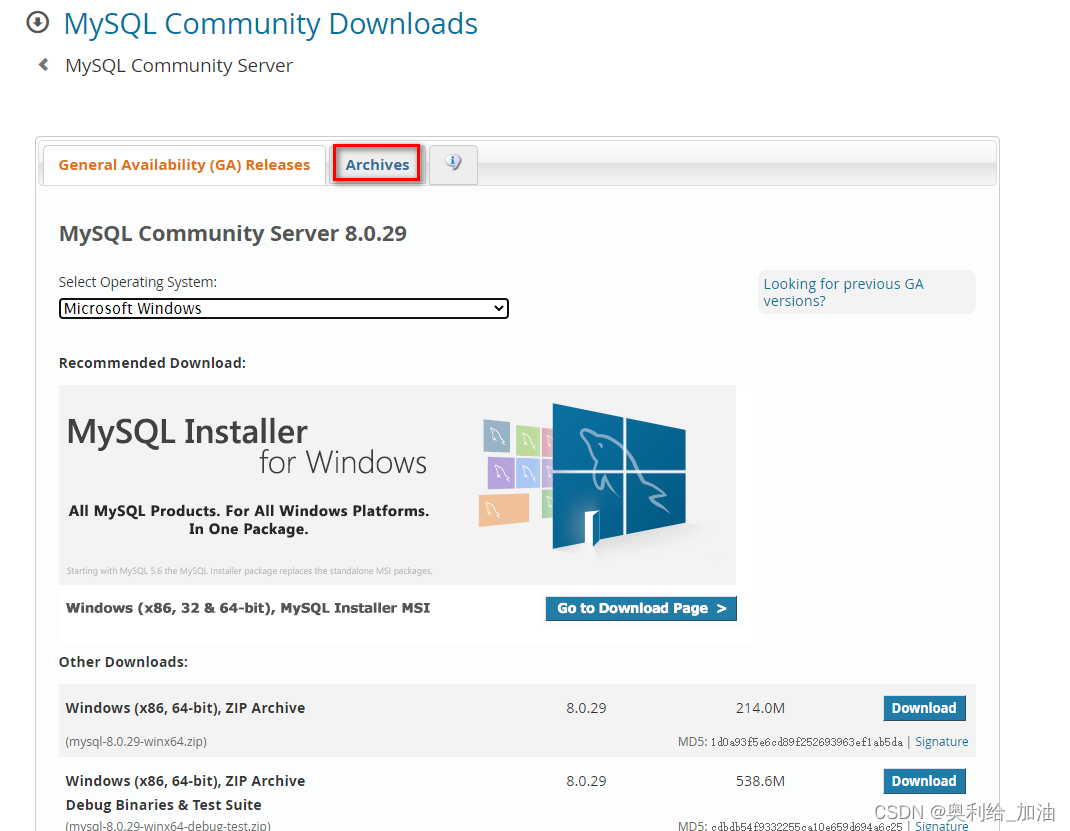

Two . Use the compressed package FinalShell Upload to centos7 Server
1. decompression
tar -zxvf mysql-5.7.30-linux-glibc2.12-x86_64.tar.gz
2. Create a new one mysql Catalog , And move the extracted directory to this directory , Change of name
mkdir /usr/mysql
mv mysql-5.7.30-linux-glibc2.12-x86_64 /usr/mysql/mysql-5.7
3、 ... and . To configure
1、 Create under the installation path data Folder ( It will be used in subsequent configurations )
cd /usr/mysql/mysql-5.7
mkdir data
2、 To configure my.cnf file
Modify the configuration file :/etc/my.cnf If the configuration is incorrect , Incomplete initialization later , You won't get the default password .
vi /etc/my.cnf
from mysql5.7 It will not be generated automatically at first my.cnf File configuration , So you need to create it manually .my.cnf File input the following
basedir: Set up mysql Installation directory
datadir: Set up mysql Database data storage directory
It should be noted that datadir Parameters , Here I designate data Catalog ,data The directory doesn't exist. We need to create it manually
[mysql]
#  Set up mysql Client default character set
default-character-set=utf8
# socket Communication configuration
socket=/usr/mysql/mysql-5.7/data/mysql.sock

[mysqld]
#  Skip permission table verification : If you are in the my.cnf Add... To "skip-grant-tables", So any account with any password ( Of course, it also includes empty ) Can log in to mysql data > library
#skip-grant-tables
#  The function is to prohibit domain name resolution : stay mysql The host name cannot be used in the authorization table of , Only use IP
skip-name-resolve
#  Set up 3306 port
port = 3306
#  Set up mysql Installation directory
basedir=/usr/mysql/mysql-5.7
#  Set up mysql Database data storage directory
datadir=/usr/mysql/mysql-5.7/data
socket=/usr/mysql/mysql-5.7/data/mysql.sock
#  Maximum connections allowed
max_connections=200
#  The character set used by the server defaults to 8 Bit coded latin1 Character set
character-set-server=utf8
#  The default storage engine that will be used when creating a new table
default-storage-engine=INNODB
lower_case_table_names=1
max_allowed_packet=16M

[client]
default-character-set=utf8
socket=/usr/mysql/mysql-5.7/data/mysql.sock
ESC:+wq Save and exit .
3、 add to mysql user 、mysql Group
by centos add to mysql User group 、mysql user
groupadd mysql

useradd -r -g mysql mysql

chown -R mysql:mysql /usr/mysql/mysql-5.7/
# View groups and users
cat /etc/group | grep mysql

cat /etc/passwd |grep mysql
3、 ... and 、 Installing the
1、 initialization mysql database ( mount this database )
Get into bin Under the path , initialization mysql database
# Get into bin Under the path
cd /usr/mysql/mysql-5.7/bin

# Execute the initialize install command
./mysqld --initialize --user=mysql --basedir=/usr/mysql/mysql-5.7 --datadir=/usr/mysql/mysql-5.7/data

Be careful :
The console will output the temporary password , Please write down : [email protected]:xxxxxx Initialize the two path configurations in the command ( Need to change to your own )
If it appears as shown in the above figure, the installation is successful ;
Here you need to remember the temporary password above , After logging into the database, you need to modify ;
2、 to /etc/init.d Folder copy mysql Service script , Set power on self start
First put the installation directory /support-files/mysql.server File copy to /etc/init.d/ Folder and rename it mysql.
cp /usr/mysql/mysql-5.7/support-files/mysql.server /etc/init.d/mysql
# Give enforceability ⾏ jurisdiction
chmod +x /etc/init.d/mysql
#  Add service
chkconfig --add mysql
#  display ⽰ List of services
chkconfig --list
#  If you see mysql Service for , also 3、4、5 All are on If you don't, you succeed . If it is off, Then hold ⾏
chkconfig --level 345 mysql on
3、 start-up MySQL
Run the start command
#  Start command
service mysql start

#  Check status command
service mysql status

#  The shutdown command
service mysql stop
4、 Add environment variables
vi /etc/profile
Add environment variables :
export PATH=$PATH:/usr/mysql/mysql-5.7/bin
Make the environment configuration work
source /etc/profile
5. Create soft link
ln -s /usr/mysql/mysql-5.7/mysql.sock /usr/mysql/mysql-5.7/data/mysql.sock

6. restart MySql service
service mysql restart
Four 、 Login to change password
1、 Sign in
The password uses the temporary password returned during installation
mysql -u user name -p
2. change root User's password , And exit
ALTER USER 'root'@'localhost' IDENTIFIED BY 'root';
exit
5、 ... and 、 Authorize the remote host to allow connections mysql database
1、 Log back in mysql, Enter the password you just changed
mysql -u root -p
2、 Query configuration data
SELECT host,user,password_expired,password_last_changed,password_lifetime FROM mysql.user;
3、 Authorization command
grant all privileges on *.* to 'root'@'%' identified by 'root';
4、 Refresh Authorization :
flush privileges;
here , Yours Mysql You can be connected remotely .
Close authorization
revoke all on *.* from [email protected];
5、 Firewall problem
If you still cannot access from external links , Please check whether your firewall configuration is open 3306 port
Or simply close the firewall , About centos Please refer to :
centos Firewall shutdown tutorial
6、 ... and .MySQL The uninstall
1. Execute the find command
find / -name mysql

2. Delete all the directories found above
rm -rf Directory name
3. uninstall my.cnf
rm -rf etc/my.cnf # Delete it manually if it exists
边栏推荐
猜你喜欢
Optimizer (SGD, momentum, adagrad, rmsprop, Adam)

只有快递单号,怎样查询物流进度查看正在派件的单号

手把手教你焊接CAD设计板底(初学者使用)图文教程

Elementary analysis of graph convolution neural network (GCN)

华为首席开源联络官任旭东:深耕基础软件开源,协同打造数字世界根技术

NLP学习路线图(思维导图),非常的全面和清晰!

IM即时通讯开发时手机信号为什么会差

ciscn_ 2019_ n_ 1 - two solutions

第6.3章:ARM架构下手动编译StarRocks(拓展篇)

Lc: sword finger offer 05. replace spaces
随机推荐
Solution of cross domain problems
LC: Sword finger offer 03. repeated numbers in the array
1.有一个分数序列:2/1,3/2,5/3,8/5,13/8,……编程求这个序列的前20项之和。
3步就能制作漫画头像的机器人,想拥有一个吗?
PWN stack overflow basic exercise - 2
Elementary analysis of graph convolution neural network (GCN)
关于博主帅soserious的一些感想.
接口文档进化图鉴, 用过第一款接口文档工具的人暴露年龄了
第一个PWN 栈溢出简单题
编码器-解码器(seq2seq)
Sentence-BERT+Milvus实现智能问答系统
NLP language model
[foundation 3] - structure and function
[第五空间2019 决赛]PWN5 ——两种解法
ciscn_2019_n_1 ——两种解法
Conditions affectant la vitesse de requête de l'interface
51单片机的入门知识(献给初学者最易懂的文章)
PWN —— ret2libc2
蓝桥杯31天冲刺之二十一day(C语言)
华为首席开源联络官任旭东:深耕基础软件开源,协同打造数字世界根技术