当前位置:网站首页>Titanic rescued - re exploration of data mining (ideas + source code + results)
Titanic rescued - re exploration of data mining (ideas + source code + results)
2022-06-11 04:48:00 【Panbohhhhh】
Write it at the front :
I wrote about... When I was just getting started kaggle Prediction of the Titanic's rescue in the competition , As a classic project for many machine learning enthusiasts , After half a year , Have some different feelings , Share with you , It is also a record of the process of stimulating learning .
Welcome to discuss .
( This article is applicable to friends who have certain foundation , I will try to reduce the language description , Write comments as much as possible )
Ps: The author's ability is limited , This article is for reference only , Welcome to exchange .
1: Ideas
If it was a vegetable chicken , Now it is a stronger vegetable chicken , For the Titanic project , We need to extract commonalities from features , Find out the general idea of data mining project .
Personal summary is as follows :
Data mining process :
- data fetch
a. Reading data , And show
b. Statistical data and various indicators
c. Clarify the data scale and tasks to be completed - Feature understanding and analysis
a. Single feature analysis , Analyze its impact on the results one by one
b. Multivariate statistical analysis , Comprehensively consider the impact of various situations
c. Draw a conclusion by statistical drawing - Data cleaning and preprocessing
a. Fill in missing values
b. Feature Standardization / normalization
c . Screen for valuable features
d. Analyze the correlation between features - Build a model
a. Characteristic data and label preparation
b. Data set segmentation
c. Comparison of various modeling algorithms
d. Integration strategy and other scheme improvements
2 Data reading and statistical analysis
import numpy as np
import pandas as pd
import matplotlib.pyplot as plt
import seaborn as sns
plt.style.use('fivethirtyeight')
import warnings
warnings.filterwarnings('ignore')
%matplotlib inline
data=pd.read_csv(r'/Titanic/train.csv')
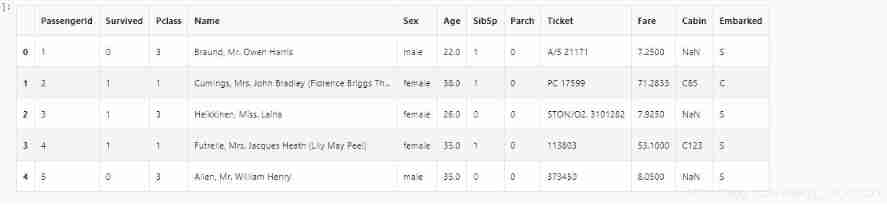
data.head()
# Check for missing values
data.isnull().sum() #checking for total null values

# Look at the data scale
data.describe()

# View the rescued proportion
f,ax=plt.subplots(1,2,figsize=(18,8))
data['Survived'].value_counts().plot.pie(explode=[0,0.1],autopct='%1.1f%%',ax=ax[0],shadow=True)
ax[0].set_title('Survived')
ax[0].set_ylabel('')
sns.countplot('Survived',data=data,ax=ax[1])
ax[1].set_title('Survived')
plt.show()

In the training set 891 Of the passengers , Only about 350 People survived , Only 38.4%
Use different characteristics of the data set to check survival . Like gender , Age , Boarding place, etc ,
First we have to understand the characteristics of the data !
The data characteristics are divided into : Continuous and discrete values
Discrete value : Gender ( male , Woman ) Place of embarkation (S,Q,C)
Continuous value : Age , Ticket price
data.groupby(['Sex','Survived'])['Survived'].count()

f,ax=plt.subplots(1,2,figsize=(18,8))
data[['Sex','Survived']].groupby(['Sex']).mean().plot.bar(ax=ax[0])
ax[0].set_title('Survived vs Sex')
sns.countplot('Sex',hue='Survived',data=data,ax=ax[1])
ax[1].set_title('Sex:Survived vs Dead')
plt.show()

The survival rate for a woman on a ship is 75% about , And men are 18-19% about .
Pclass --> The relationship between the cabin class and the rescue situation
pd.crosstab(data.Pclass,data.Survived,margins=True).style.background_gradient(cmap='summer_r')

f,ax=plt.subplots(1,2,figsize=(18,8))
data['Pclass'].value_counts().plot.bar(color=['#CD7F32','#FFDF00','#D3D3D3'],ax=ax[0])
ax[0].set_title('Number Of Passengers By Pclass')
ax[0].set_ylabel('Count')
sns.countplot('Pclass',hue='Survived',data=data,ax=ax[1])
ax[1].set_title('Pclass:Survived vs Dead')
plt.show()

pClass1 Survival is 63% about , and pclass2 It's about 48%.
Money is really great ..
Cabin class and gender
pd.crosstab([data.Sex,data.Survived],data.Pclass,margins=True).style.background_gradient(cmap='summer_r')

sns.factorplot('Pclass','Survived',hue='Sex',data=data)
plt.show()

use factorplot It looks more intuitive .
It is easy to infer , from pclass1 Female survival is 95-96%, Such as 94 There is nothing but 3 Women from pclass1 Not rescued .
The obvious thing is , Regardless of pClass, Women are preferred .
therefore Pclass It is also an important feature
Look at your age
print('Oldest Passenger was of:',data['Age'].max(),'Years')
print('Youngest Passenger was of:',data['Age'].min(),'Years')
print('Average Age on the ship:',data['Age'].mean(),'Years')

f,ax=plt.subplots(1,2,figsize=(18,8))
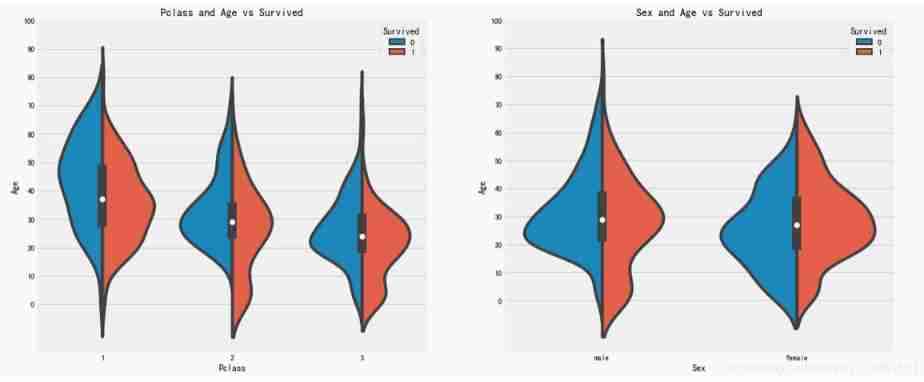
sns.violinplot("Pclass","Age", hue="Survived", data=data,split=True,ax=ax[0])
ax[0].set_title('Pclass and Age vs Survived')
ax[0].set_yticks(range(0,110,10))
sns.violinplot("Sex","Age", hue="Survived", data=data,split=True,ax=ax[1])
ax[1].set_title('Sex and Age vs Survived')
ax[1].set_yticks(range(0,110,10))
plt.show()
result :
1)10 The survival rate of children under years old varies with passenegers increase in numbers .
2) Survival is 20-50 The chance of being rescued is higher at the age of .
3) For men , With age , Reduced survival .
Missing value fill
- Average
- Empirical value
- Regression model predicts
- Remove
Age characteristics are 177 A null value . To replace these missing values , Replace with an average
But men and women are different , Divide by address . Simply speaking , Is to find out the average age of women , Find out the average age of men
data['Initial']=0
for i in data:
    data['Initial']=data.Name.str.extract('([A-Za-z]+)\.')
pd.crosstab(data.Initial,data.Sex).T.style.background_gradient(cmap='summer_r')

data['Initial'].replace(['Mlle','Mme','Ms','Dr','Major','Lady','Countess','Jonkheer','Col','Rev','Capt','Sir','Don'],['Miss','Miss','Miss','Mr','Mr','Mrs','Mrs','Other','Other','Other','Mr','Mr','Mr'],inplace=True)
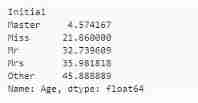
data.groupby('Initial')['Age'].mean() #lets check the average age by Initials
##  Use the mean of each group to fill
data.loc[(data.Age.isnull())&(data.Initial=='Mr'),'Age']=33
data.loc[(data.Age.isnull())&(data.Initial=='Mrs'),'Age']=36
data.loc[(data.Age.isnull())&(data.Initial=='Master'),'Age']=5
data.loc[(data.Age.isnull())&(data.Initial=='Miss'),'Age']=22
data.loc[(data.Age.isnull())&(data.Initial=='Other'),'Age']=46
data.Age.isnull().any() # Let's see how it's filled
f,ax=plt.subplots(1,2,figsize=(20,10))
data[data['Survived']==0].Age.plot.hist(ax=ax[0],bins=20,edgecolor='black',color='red')
ax[0].set_title('Survived= 0')
x1=list(range(0,85,5))
ax[0].set_xticks(x1)
data[data['Survived']==1].Age.plot.hist(ax=ax[1],color='green',bins=20,edgecolor='black')
ax[1].set_title('Survived= 1')
x2=list(range(0,85,5))
ax[1].set_xticks(x2)
plt.show()

Conclusion :
1) Age 5 Saved at the age of , Priority policies for women and children .
2) The oldest passenger was saved (80 year ).
3) The highest death toll is 30-40 Age group .
sns.factorplot('Pclass','Survived',col='Initial',data=data)
plt.show()

Embarked–> Place of embarkation
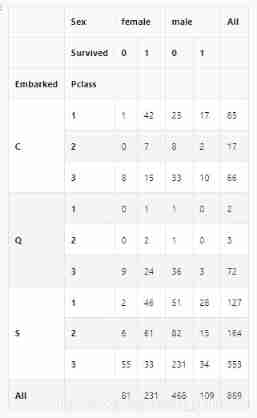
pd.crosstab([data.Embarked,data.Pclass],[data.Sex,data.Survived],margins=True).style.background_gradient(cmap='summer_r')
sns.factorplot('Embarked','Survived',data=data)
fig=plt.gcf()
fig.set_size_inches(5,3)
plt.show()

C The highest probability of survival in Hong Kong is 0.55 about , and S The survival rate is the lowest .
f,ax=plt.subplots(2,2,figsize=(20,15))
sns.countplot('Embarked',data=data,ax=ax[0,0])
ax[0,0].set_title('No. Of Passengers Boarded')
sns.countplot('Embarked',hue='Sex',data=data,ax=ax[0,1])
ax[0,1].set_title('Male-Female Split for Embarked')
sns.countplot('Embarked',hue='Survived',data=data,ax=ax[1,0])
ax[1,0].set_title('Embarked vs Survived')
sns.countplot('Embarked',hue='Pclass',data=data,ax=ax[1,1])
ax[1,1].set_title('Embarked vs Pclass')
plt.subplots_adjust(wspace=0.2,hspace=0.5)
plt.show()


Observe :
1) Most people's cabin class is 3.
2)C Our passengers look lucky , Some of them survived .
3)S There are many rich people in the port . The chances of survival are low .
4) port Q Almost 95% All the passengers are poor .
sns.factorplot('Pclass','Survived',hue='Sex',col='Embarked',data=data)
plt.show()

Conclusion :
1.Pclass1 and Pclass2 The survival rate of women in the study is almost 1
2.Pclass3 People who , Both men and women , The survival rate is impressive
3. port Q Of the people who have the most problems , Because it's all 3 First class
Conclusion : Money means you can do whatever you want .
Because the port also has missing values , Use the total here to fill in ,
data['Embarked'].fillna('S',inplace=True)
data.Embarked.isnull().any()
sibsip --> The number of brothers and sisters
This characteristic indicates whether a person is alone or with his family .
pd.crosstab([data.SibSp],data.Survived).style.background_gradient(cmap='summer_r')

f,ax=plt.subplots(1,2,figsize=(20,8))
sns.barplot('SibSp','Survived',data=data,ax=ax[0])
ax[0].set_title('SibSp vs Survived')
sns.factorplot('SibSp','Survived',data=data,ax=ax[1])
ax[1].set_title('SibSp vs Survived')
plt.close(2)
plt.show()

pd.crosstab(data.SibSp,data.Pclass).style.background_gradient(cmap='summer_r')

Conclusion : The survival rate with brothers and sisters is not high .
This is in line with our actual situation .
( There's a bigger problem , Did you see 5 and 8 The survival rate is 0.. I know )
And the next one : Study the number of parents and children
pd.crosstab(data.Parch,data.Pclass).style.background_gradient(cmap='summer_r')

f,ax=plt.subplots(1,2,figsize=(20,8))
sns.barplot('Parch','Survived',data=data,ax=ax[0])
ax[0].set_title('Parch vs Survived')
sns.factorplot('Parch','Survived',data=data,ax=ax[1])
ax[1].set_title('Parch vs Survived')
plt.close(2)
plt.show()

Passengers with parents have a greater chance of survival . however , The extended family is here Pclass3
1-3 People with the highest probability of survival .
Fare- The price of the ticket
print('Highest Fare was:',data['Fare'].max())
print('Lowest Fare was:',data['Fare'].min())
print('Average Fare was:',data['Fare'].mean())


Simply trim :
Gender : Compared with men , Women have a high chance of survival .
Pclass: Better survival in first class
Age : Less than 5-10 The survival rate of children aged 20 is high . Age 15 To 35 Many passengers died between the ages of .
port : Port and Pclass The relevance is too high
family : Family size also affects survival
sns.heatmap(data.corr(),annot=True,cmap='RdYlGn',linewidths=0.2) #data.corr()-->correlation matrix
fig=plt.gcf()
fig.set_size_inches(10,8)
plt.show()
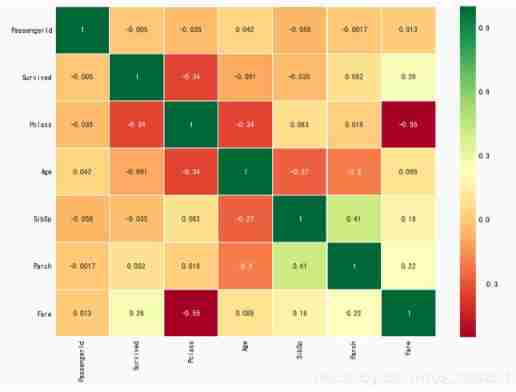
Heat map of characteristic correlation
The first thing to notice is that , Only numerical characteristics are compared
positive correlation : If features A The increase in leads to the characteristics b An increase in , Then they are positively correlated . value 1 It's a completely positive correlation .
negative correlation : If features A The increase in leads to the characteristics b The reduction of , There is a negative correlation . value -1 It means completely negative correlation .
If the two characteristics are highly correlated , Or completely relevant , That is, an increase in one will lead to another increase . Both features contain highly similar information ,
In high school mathematics , These two characteristics A and B, And there are A=aB+b, here ,A and B These two characteristics , We only need one .
This is called redundancy ,
Now? , We can see from the picture above . The features we get , No significant correlation .
Feature Engineering and data cleaning
After understanding the relationship of feature correlation , We need to observe , Experience , Or from another Extract information from features to obtain or add new features .
Age characteristics :
Age is a continuous feature .
There is a problem , such as 30 personal ,30 Age , We can't share 30 Group ,
The problem is simply : Discrete grouping of continuous values !
Take this topic for example .
The maximum age of passengers is 80 year , hold 0-80 Divide into 5 Group words ,80/5=16, That is, every 16 Divide into groups .
data['Age_band']=0
data.loc[data['Age']<=16,'Age_band']=0
data.loc[(data['Age']>16)&(data['Age']<=32),'Age_band']=1
data.loc[(data['Age']>32)&(data['Age']<=48),'Age_band']=2
data.loc[(data['Age']>48)&(data['Age']<=64),'Age_band']=3
data.loc[data['Age']>64,'Age_band']=4
data.head(2)

data['Age_band'].value_counts().to_frame().style.background_gradient(cmap='summer')
# Look at the approximate age of each group

sns.factorplot('Age_band','Survived',data=data,col='Pclass')
plt.show()

You can see from the picture , Survival decreases with age , This is in line with the actual situation ,
Family_size: Total number of families
data['Family_Size']=0
data['Family_Size']=data['Parch']+data['SibSp']#family size
data['Alone']=0
data.loc[data.Family_Size==0,'Alone']=1#Alone

f,ax=plt.subplots(1,2,figsize=(18,6))
sns.factorplot('Family_Size','Survived',data=data,ax=ax[0])
ax[0].set_title('Family_Size vs Survived')
sns.factorplot('Alone','Survived',data=data,ax=ax[1])
ax[1].set_title('Alone vs Survived')
plt.close(2)
plt.close(3)
plt.show()

family_size = 0 signify passeneger It's a person .
 A person and family 4 More people , The chances of survival are very small .
 This is an important feature of the model .
Ticket price
The price of the ticket is also a continuous characteristic , Need to be converted into discrete values
It's used here pandas.qcut
data['Fare_Range']=pd.qcut(data['Fare'],4).cat.codes

data.groupby(['Fare_Range'])['Survived'].mean().to_frame().style.background_gradient(cmap='summer_r')

As mentioned above , We can see clearly that , Ticket prices increase the chances of survival .
data['Fare_cat']=0
data.loc[data['Fare']<=7.91,'Fare_cat']=0
data.loc[(data['Fare']>7.91)&(data['Fare']<=14.454),'Fare_cat']=1
data.loc[(data['Fare']>14.454)&(data['Fare']<=31),'Fare_cat']=2
data.loc[(data['Fare']>31)&(data['Fare']<=513),'Fare_cat']=3
sns.factorplot('Fare_cat','Survived',data=data,hue='Sex')
plt.show()

Conclusion , With fare_cat increase , Increased chance of survival .
About gender , It is easy to modify .0 male 1 Woman
What this shows is ,: We convert strings into numbers .
data['Sex'].replace(['male','female'],[0,1],inplace=True)

There are also some unwanted eigenvalues
name: Unwanted , Don't explain .
Age : Already grouped .
Ticket number : Any string , Unable to categorize
The fare : Use fare_cat features
Bunker number /passengerid --> Cannot be classified
data.drop(['Name','Age','Ticket','Fare','Cabin','Fare_Range','PassengerId'],axis=1,inplace=True)
sns.heatmap(data.corr(),annot=True,cmap='RdYlGn',linewidths=0.2,annot_kws={'size':20})
fig=plt.gcf()
fig.set_size_inches(18,15)
plt.xticks(fontsize=14)
plt.yticks(fontsize=14)
plt.show()

Machine learning modeling
Classical machine learning modeling algorithms include :
1)logistic Return to
2) Support vector machine ( Linear and radial )
3) Random forests
4)k- a near neighbor
5) Naive Bayes
6) Decision tree
7) neural network
#importing all the required ML packages
from sklearn.linear_model import LogisticRegression #logistic regression
from sklearn import svm #support vector Machine
from sklearn.ensemble import RandomForestClassifier #Random Forest
from sklearn.neighbors import KNeighborsClassifier #KNN
from sklearn.naive_bayes import GaussianNB #Naive bayes
from sklearn.tree import DecisionTreeClassifier #Decision Tree
from sklearn.model_selection import train_test_split #training and testing data split
from sklearn import metrics #accuracy measure
from sklearn.metrics import confusion_matrix #for confusion matrix
data.head()

train,test=train_test_split(data,test_size=0.3,random_state=0,stratify=data['Survived'])
train_X=train[train.columns[1:]]
train_Y=train[train.columns[:1]]
test_X=test[test.columns[1:]]
test_Y=test[test.columns[:1]]
X=data[data.columns[1:]]
Y=data['Survived']
# Support vector machine --- The kernel function is rbf
model=svm.SVC(kernel='rbf',C=1,gamma=0.1)
model.fit(train_X,train_Y)
prediction1=model.predict(test_X)
print('Accuracy for rbf SVM is ',metrics.accuracy_score(prediction1,test_Y))

# Support vector machine --- The kernel function is linear
model=svm.SVC(kernel='linear',C=0.1,gamma=0.1)
model.fit(train_X,train_Y)
prediction2=model.predict(test_X)
print('Accuracy for linear SVM is',metrics.accuracy_score(prediction2,test_Y))

# Logical regression
model = LogisticRegression()
model.fit(train_X,train_Y)
prediction3=model.predict(test_X)
print('The accuracy of the Logistic Regression is',metrics.accuracy_score(prediction3,test_Y))

# Decision tree --Decision Tree
model=DecisionTreeClassifier()
model.fit(train_X,train_Y)
prediction4=model.predict(test_X)
print('The accuracy of the Decision Tree is',metrics.accuracy_score(prediction4,test_Y))

#KNN-K-Nearest Neighbors
model=KNeighborsClassifier()
model.fit(train_X,train_Y)
prediction5=model.predict(test_X)
print('The accuracy of the KNN is',metrics.accuracy_score(prediction5,test_Y))

Now the precision is KNN Changes in the model , change n_neighbours Value attribute to see the effect .
The default value is 5.
Look at the precision in n_neighbours Different results .
a_index=list(range(1,11))
a=pd.Series()
x=[0,1,2,3,4,5,6,7,8,9,10]
for i in list(range(1,11)):
    model=KNeighborsClassifier(n_neighbors=i)
    model.fit(train_X,train_Y)
    prediction=model.predict(test_X)
    a=a.append(pd.Series(metrics.accuracy_score(prediction,test_Y)))
plt.plot(a_index, a)
plt.xticks(x)
fig=plt.gcf()
fig.set_size_inches(12,6)
plt.show()
print('Accuracies for different values of n are:',a.values,'with the max value as ',a.values.max())

# gaussian
model=GaussianNB()
model.fit(train_X,train_Y)
prediction6=model.predict(test_X)
print('The accuracy of the NaiveBayes is',metrics.accuracy_score(prediction6,test_Y))

# Random forests
model=RandomForestClassifier(n_estimators=100)
model.fit(train_X,train_Y)
prediction7=model.predict(test_X)
print('The accuracy of the Random Forests is',metrics.accuracy_score(prediction7,test_Y))

What we get here is all from the training set , But in practice , Is to verify on the test set . The change in accuracy is unknown
Cross validation
Cross validation - Multiple rounds of averaging
1) Cross validation works by first dividing the data set into k-subsets.
2) Suppose we divide the data set into (k=5) part . We reserve 1 Parts to test , And 4 Training in parts .
3) We continue this process by changing the test part in each iteration and training the algorithm in other parts . Then average the measurement results , The average accuracy of the algorithm is obtained .
This is called cross validation .
from sklearn.model_selection import KFold #for K-fold cross validation
from sklearn.model_selection import cross_val_score #score evaluation
from sklearn.model_selection import cross_val_predict #prediction
kfold = KFold(n_splits=10, random_state=22) # k=10, split the data into 10 equal parts
xyz=[]
accuracy=[]
std=[]
classifiers=['Linear Svm','Radial Svm','Logistic Regression','KNN','Decision Tree','Naive Bayes','Random Forest']
models=[svm.SVC(kernel='linear'),svm.SVC(kernel='rbf'),LogisticRegression(),KNeighborsClassifier(n_neighbors=9),DecisionTreeClassifier(),GaussianNB(),RandomForestClassifier(n_estimators=100)]
for i in models:
    model = i
    cv_result = cross_val_score(model,X,Y, cv = kfold,scoring = "accuracy")
    cv_result=cv_result
    xyz.append(cv_result.mean())
    std.append(cv_result.std())
    accuracy.append(cv_result)
new_models_dataframe2=pd.DataFrame({'CV Mean':xyz,'Std':std},index=classifiers)
new_models_dataframe2

plt.subplots(figsize=(12,6))
box=pd.DataFrame(accuracy,index=[classifiers])
box.T.boxplot()

new_models_dataframe2['CV Mean'].plot.barh(width=0.8)
plt.title('Average CV Mean Accuracy')
fig=plt.gcf()
fig.set_size_inches(8,5)
plt.show()

Confusion matrix
It gives the number of correct and incorrect classifiers .
f,ax=plt.subplots(3,3,figsize=(12,10))
y_pred = cross_val_predict(svm.SVC(kernel='rbf'),X,Y,cv=10)
sns.heatmap(confusion_matrix(Y,y_pred),ax=ax[0,0],annot=True,fmt='2.0f')
ax[0,0].set_title('Matrix for rbf-SVM')
y_pred = cross_val_predict(svm.SVC(kernel='linear'),X,Y,cv=10)
sns.heatmap(confusion_matrix(Y,y_pred),ax=ax[0,1],annot=True,fmt='2.0f')
ax[0,1].set_title('Matrix for Linear-SVM')
y_pred = cross_val_predict(KNeighborsClassifier(n_neighbors=9),X,Y,cv=10)
sns.heatmap(confusion_matrix(Y,y_pred),ax=ax[0,2],annot=True,fmt='2.0f')
ax[0,2].set_title('Matrix for KNN')
y_pred = cross_val_predict(RandomForestClassifier(n_estimators=100),X,Y,cv=10)
sns.heatmap(confusion_matrix(Y,y_pred),ax=ax[1,0],annot=True,fmt='2.0f')
ax[1,0].set_title('Matrix for Random-Forests')
y_pred = cross_val_predict(LogisticRegression(),X,Y,cv=10)
sns.heatmap(confusion_matrix(Y,y_pred),ax=ax[1,1],annot=True,fmt='2.0f')
ax[1,1].set_title('Matrix for Logistic Regression')
y_pred = cross_val_predict(DecisionTreeClassifier(),X,Y,cv=10)
sns.heatmap(confusion_matrix(Y,y_pred),ax=ax[1,2],annot=True,fmt='2.0f')
ax[1,2].set_title('Matrix for Decision Tree')
y_pred = cross_val_predict(GaussianNB(),X,Y,cv=10)
sns.heatmap(confusion_matrix(Y,y_pred),ax=ax[2,0],annot=True,fmt='2.0f')
ax[2,0].set_title('Matrix for Naive Bayes')
plt.subplots_adjust(hspace=0.2,wspace=0.2)
plt.show()

Explain the confusion matrix : Look at the first picture
1) The accuracy of the prediction is 491( Death )+ 247( Survive ), Average CV Accuracy rate is (491+247)/ 891=82.8%.
2)58 and 95 It's all the wrong amount .
Are you familiar with this picture ? Remember F1 Coefficient not , Remember the precision and recall ..
边栏推荐
- An adaptive chat site - anonymous online chat room PHP source code
- Tips and websites for selecting papers
- Ican uses fast r-cnn to get an empty object detection result file
- Leetcode question brushing series - mode 2 (datastructure linked list) - 83:remove duplicates from sorted list
- 碳路先行,华为数字能源为广西绿色发展注入新动能
- 华为设备配置MCE
- 博途仿真时出现“没有针对此地址组态任何硬件,无法进行修改”解决办法
- Hiredis determines the master node
- C language test question 3 (advanced program multiple choice questions _ including detailed explanation of knowledge points)
- go单元测试实例;文件读写;序列化
猜你喜欢

PostgreSQL数据库复制——后台一等公民进程WalReceiver 收发逻辑

无刷电机调试经验与可靠性设计

exness:流动性系列-订单块、不平衡(二)

Win10+manjaro dual system installation

Acts: efficient test design (with an excellent test design tool)

Check the digital tube with a multimeter

华为设备配置BGP/MPLS IP 虚拟专用网

Acts: how to hide defects?

四大MQ的区别

Writing a good research title: Tips & Things to avoid
随机推荐
Database introduction
碳路先行,华为数字能源为广西绿色发展注入新动能
[markdown syntax advanced] make your blog more exciting (III: common icon templates)
Technical dry goods: how to select the most suitable RDMA network card
[Transformer]On the Integration of Self-Attention and Convolution
lower_bound,upper_bound,二分
New UI learning method subtraction professional version 34235 question bank learning method subtraction professional version applet source code
Cartographer learning records: 3D slam part of cartographer source code (I)
免费数据 | 新库上线 | CnOpenData全国文物商店及拍卖企业数据
新库上线 | CnOpenData不可移动文物数据
Leetcode question brushing series - mode 2 (datastructure linked list) - 21:merge two sorted lists merge two ordered linked lists
How to quickly find the official routine of STM32 Series MCU
Bas Bound, Upper Bound, deux points
华为设备配置BGP/MPLS IP 虚拟专用网地址空间重叠
[cf571e] geometric progressions -- number theory and prime factor decomposition
Chia Tai International: anyone who really invests in qihuo should know
C语言试题三(程序选择题——含知识点详解)
Emlog new navigation source code / with user center
Mindmanager22 professional mind mapping tool
Commissioning experience and reliability design of brushless motor