当前位置:网站首页>SAP Spartacus 中的 checkout(结帐) 设计
SAP Spartacus 中的 checkout(结帐) 设计
2022-06-11 13:12:00 【华为云】
https://sap.github.io/spartacus-docs/extending-checkout
The checkout feature in Spartacus is CMS-driven, which means every page in the checkout flow is based on CMS pages, slots and components.
Spartacus 中的 checkout 功能也是 CMS-driven. checkout flow 中每个页面都基于 CMS page,slots 和 Components.
Routing and Configuration
In the checkout, you often have links from one step to another, which is the reason for registering each checkout page as a semantic page in the storefront configuration.
在 checkout 流程里,我们通常从一个链接跳转到另一个链接,因此 Spartacus 采取在 Storefront 配置里,将每个 checkout page 注册成 semantic page.
默认的 checkout 配置:
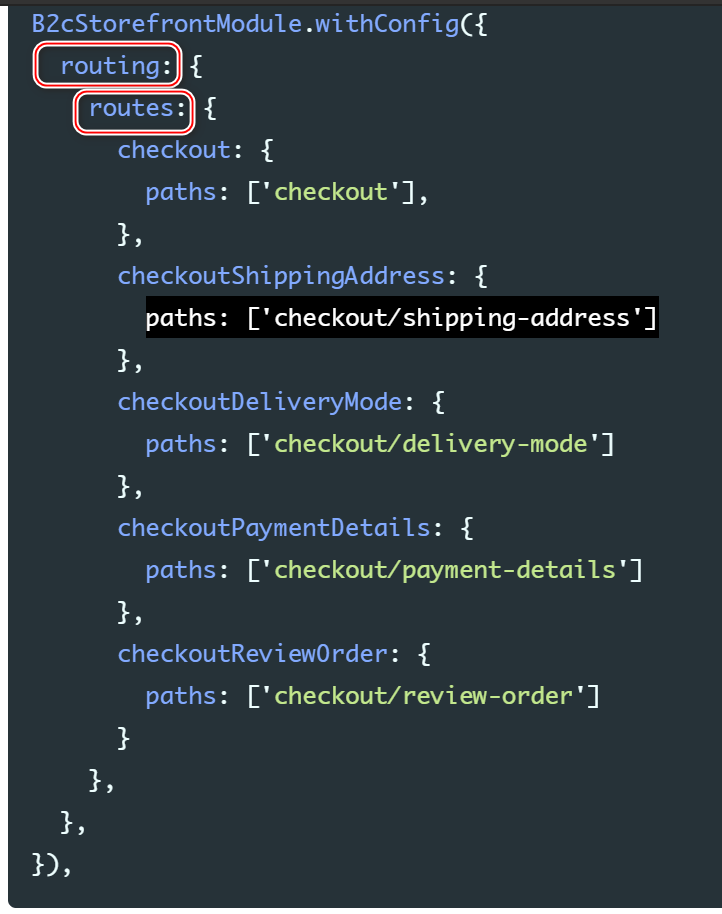
Although the default checkout has four steps, the default configuration defines five semantic pages.
This additional page has a general checkout route that is linked to from every component that should redirect to the checkout. From this general checkout page, Spartacus redirects to the correct checkout step.
虽然默认的 checkout 只有4个步骤,但是配置里包含了5个semantic 页面,具有一个通用的路由,路径为 route.

4个步骤对应的页面:

If you want to link to the checkout, always point to this general checkout page, regardless of how your checkout is set up. For example, with a multi-step checkout, you can use your CheckoutGuard to take care of redirecting to the correct checkout step.
使用自己实现的 CheckoutGuard 跳转到正确的 checkout step 上去。
With a single-step checkout, you can set all components on this checkout route and remove the CheckoutGuard from the component configuration.
如果要实现单步 checkout 步骤,从 Component configuration 中移除 CheckoutGuard.
Aside from the route configuration, you can also configure the checkout by defining the responsibility of each step, the route to the page, and the order of the steps. The following is the default configuration:
B2cStorefrontModule.withConfig({ checkout: { steps: [ { id: 'shippingAddress', name: 'checkoutProgress.shippingAddress', routeName: 'checkoutShippingAddress', type: [CheckoutStepType.SHIPPING_ADDRESS], }, { id: 'deliveryMode', name: 'checkoutProgress.deliveryMode', routeName: 'checkoutDeliveryMode', type: [CheckoutStepType.DELIVERY_MODE], }, { id: 'paymentDetails', name: 'checkoutProgress.paymentDetails', routeName: 'checkoutPaymentDetails', type: [CheckoutStepType.PAYMENT_DETAILS], }, { id: 'reviewOrder', name: 'checkoutProgress.reviewOrder', routeName: 'checkoutReviewOrder', type: [CheckoutStepType.REVIEW_ORDER], }, ], },})- id:checkout step 的唯一标识
- name:used in the CheckoutProgress component to indicate which checkout steps have been completed.
用于 CheckoutProgress 中,标识当前已经完成了哪一个 checkout 步骤。
- routeName:specifies the semantic page for each step - 每个 checkout 步骤的 semantic 页面名称
- type:用于 checkout guards
steps 数组里的步骤决定了 checkout 次序。
Every checkout component is a CMS component.
每个 checkout Component 都是 CMS Component.
Furthermore, in the default checkout, all components are CMSFlexComponents.
进一步的说,每一个 Component 都是 CMSFlexComponents.
For Angular or web components that do not need any data from CMS (for example, login), you can use the CMS component of type CMSFlexComponent as a placeholder.
对于那些不需要来自 CMS 数据的 Angular 或者 Web Component,我们可以使用 类型为 CMSFlexComponent 的 CMS Component,作为 placeholder.这种类型的 Component,具有特殊的 flexType 属性,在 Spartacus CMS mapping 中,flexType 属性被使用。
these components have more guards defined in the configuration, but are otherwise identical to regular CMS components.
CMSFlexComponent 在配置里具有更多的 guards,除此之外,同普通的 CMS Component 没有什么区别。
The checkout uses component guards instead of page guards. You protect routes by applying guards in the CMS component mapping.
- checkout 步骤使用 Component guard,而不是 page guard.
- 在 CMS Component mapping 里定义 guard.
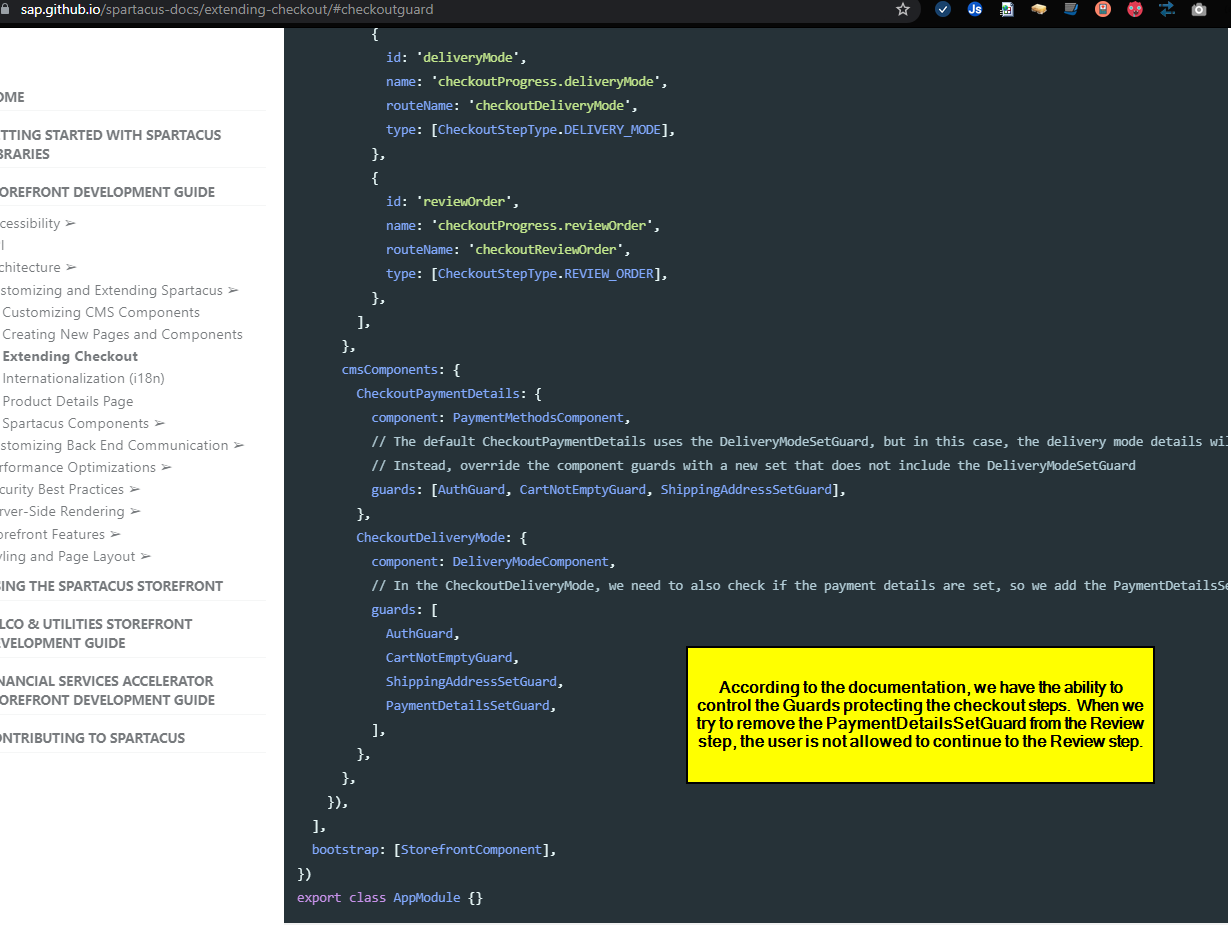
Spartacus 提供了下列的 Component guard:
(1) ShippingAddressSetGuard
(2) DeliveryModeSetGuard
(3) PaymentDetailsSetGuard
(4) CheckoutGuard
As an example, if you wanted to restrict access to the Review Order page, so that it displays only when the shipping address, delivery mode and payment details were correctly set, you would set guards for the review order component to guards: [ShippingAddressSetGuard, DeliveryModeSetGuard, PaymentDetailsSetGuard].
例如,假设需求是 Review Order Page 只有在前三个步骤都通过的时候才能打开,则给 Review order Component 设置如下的 guard:
[ShippingAddressSetGuard, DeliveryModeSetGuard, PaymentDetailsSetGuard]when you try to access the Review Order page, Spartacus first checks the guards for every component on that page, and only displays the page if every guard returns true. If one of the guard returns false, or returns a redirect URL, Spartacus redirects to the provided URL.
因此,当试图访问 Review Order 页面时,Spartacus 首先遍历这个页面所有的 Component guards,只有这些 guard 全部返回 true 之后,才能打开 Review order 页面。
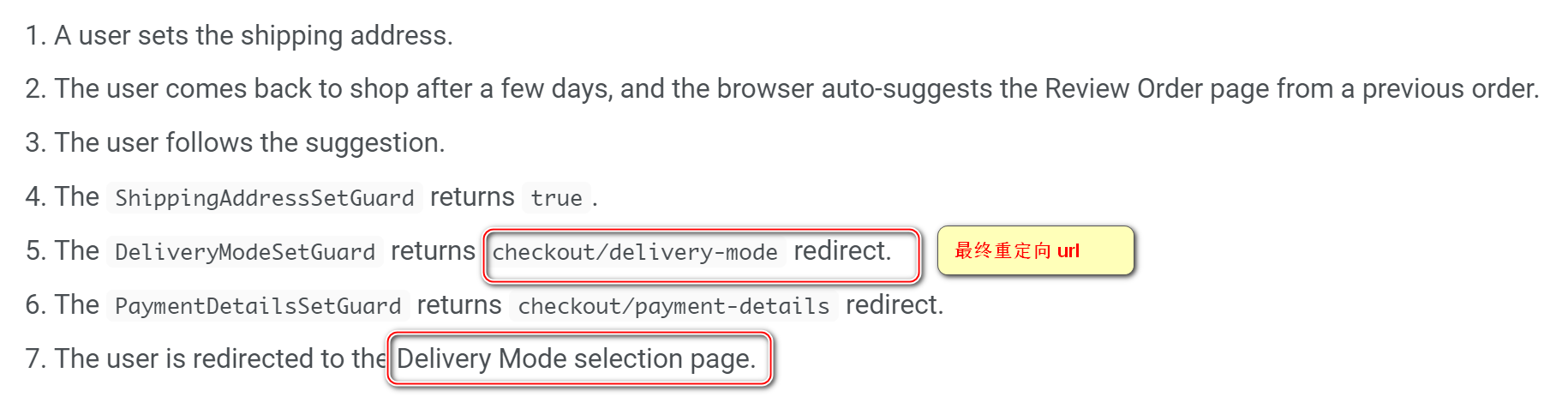
The order of the guards is important because the first redirect is used. In general, you should define guards in the same order as the checkout flow.
Component guard 最先返回哪个 redirect url,用户就被重定向到哪个 url 去。所以 Component guard 的顺序很重要。
如何定义重定向 url
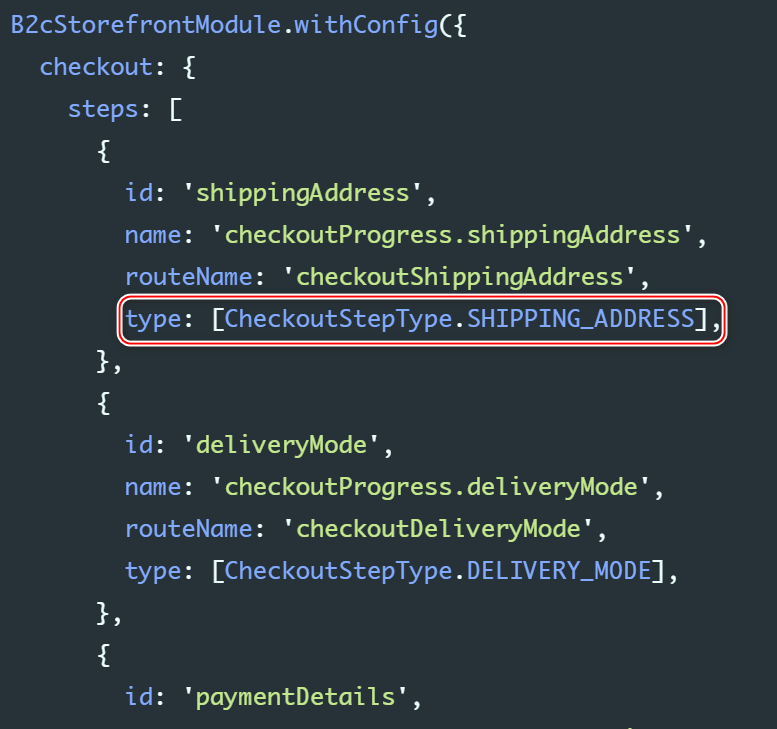
In the checkout configuration, for each step, you specify a type attribute and the type of data that should be set. A guard looks for the first step that contains the specific type and then redirects to this step.
For example, ShippingAddressSetGuard searches the checkout configuration for the first step with a type containing CheckoutStepType.shippingAddress, then reads the step route and redirects to that page.

CMS Catalog Content and Default Template
点击购物车按钮后,跳转到 checkout route:

当从 cart 跳转到 checkout 时,有一个 cancel 操作,cancel 的是 checkout default step: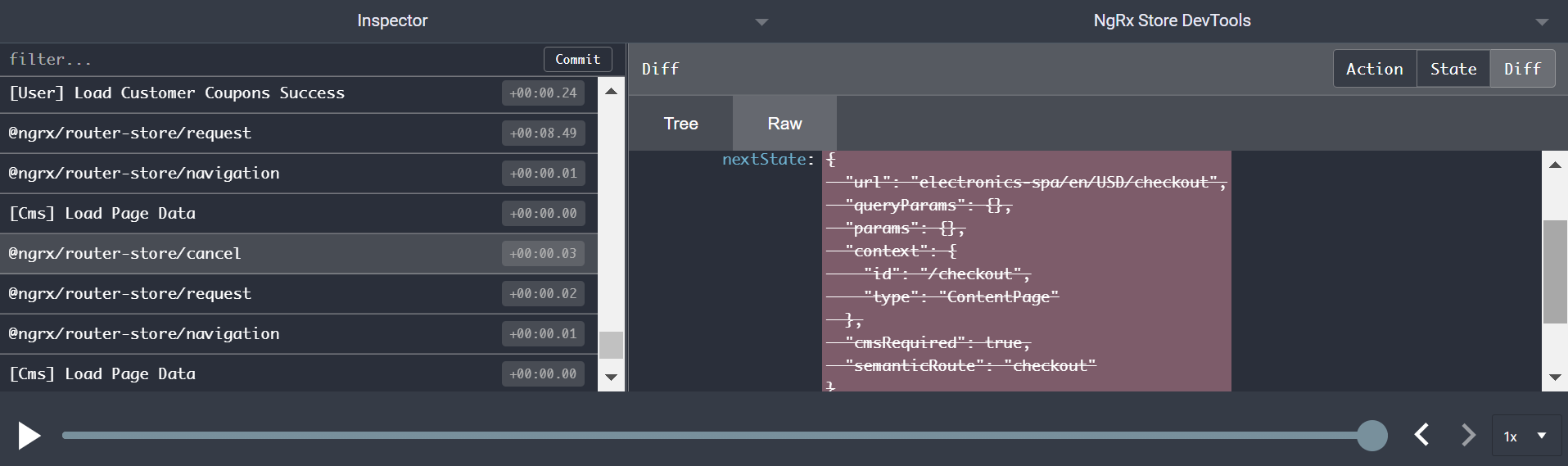
然后发起向 checkout/shipping-address 的请求:

最终跳转到 shipping address url:
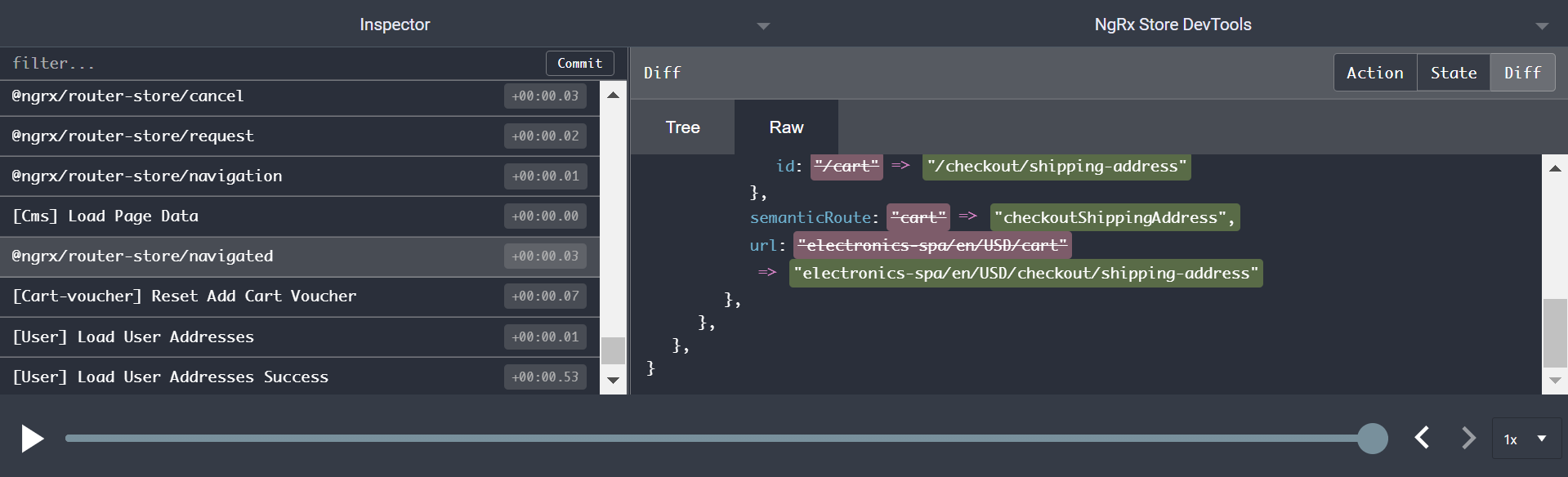
http://localhost:4200/electronics-spa/en/USD/checkout
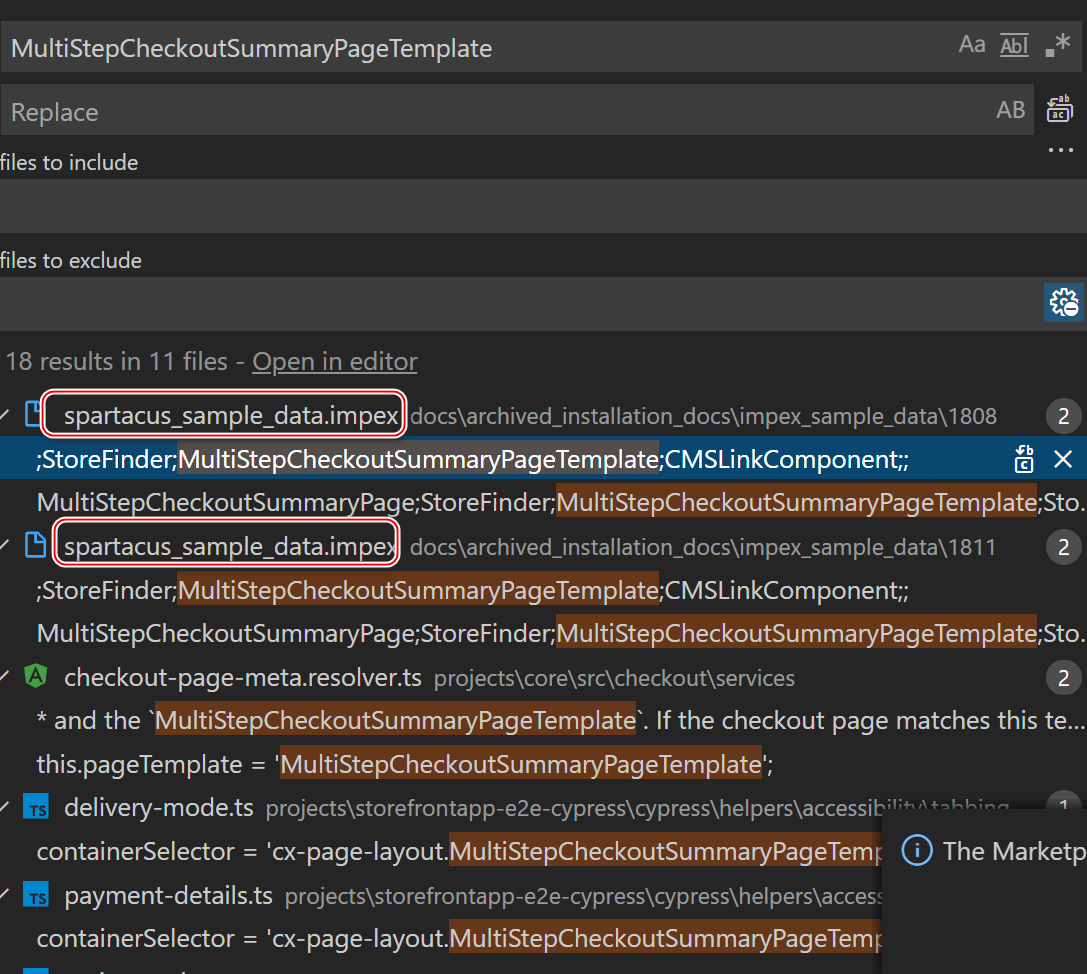
In the default checkout, Spartacus uses a modified MultiStepCheckoutOrderSummaryPageTemplate.
如下图所示:
包含 16个 content slot: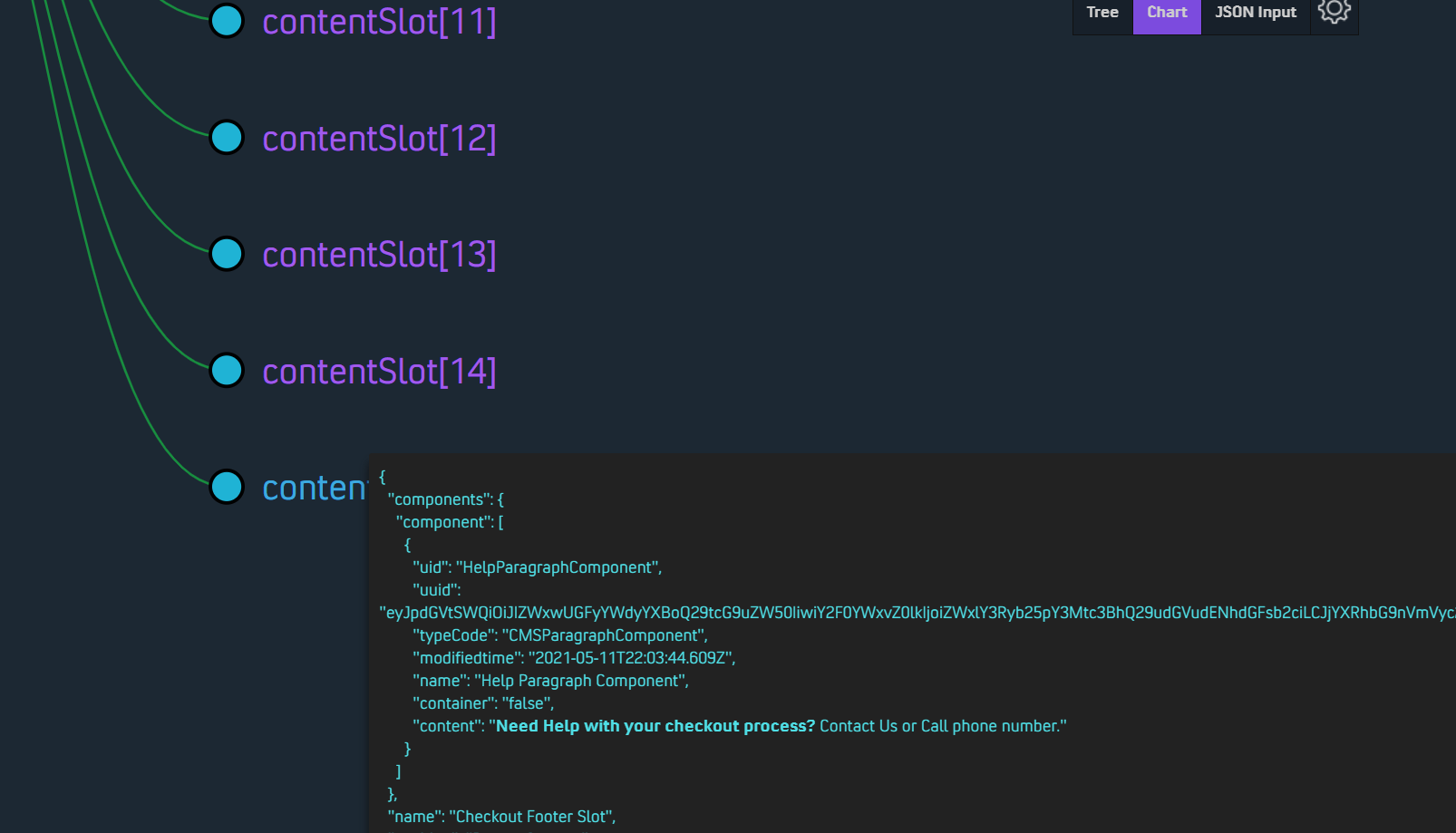
调换 checkout 步骤的顺序
一个例子:
The following scenario describes how to change the order of two steps. In the default configuration, the checkout flow starts with setting a shipping address, followed by setting the delivery mode, and finally by filling in the payment details. In this scenario, the configuration is modified so that the payment details step occurs before the delivery mode step.
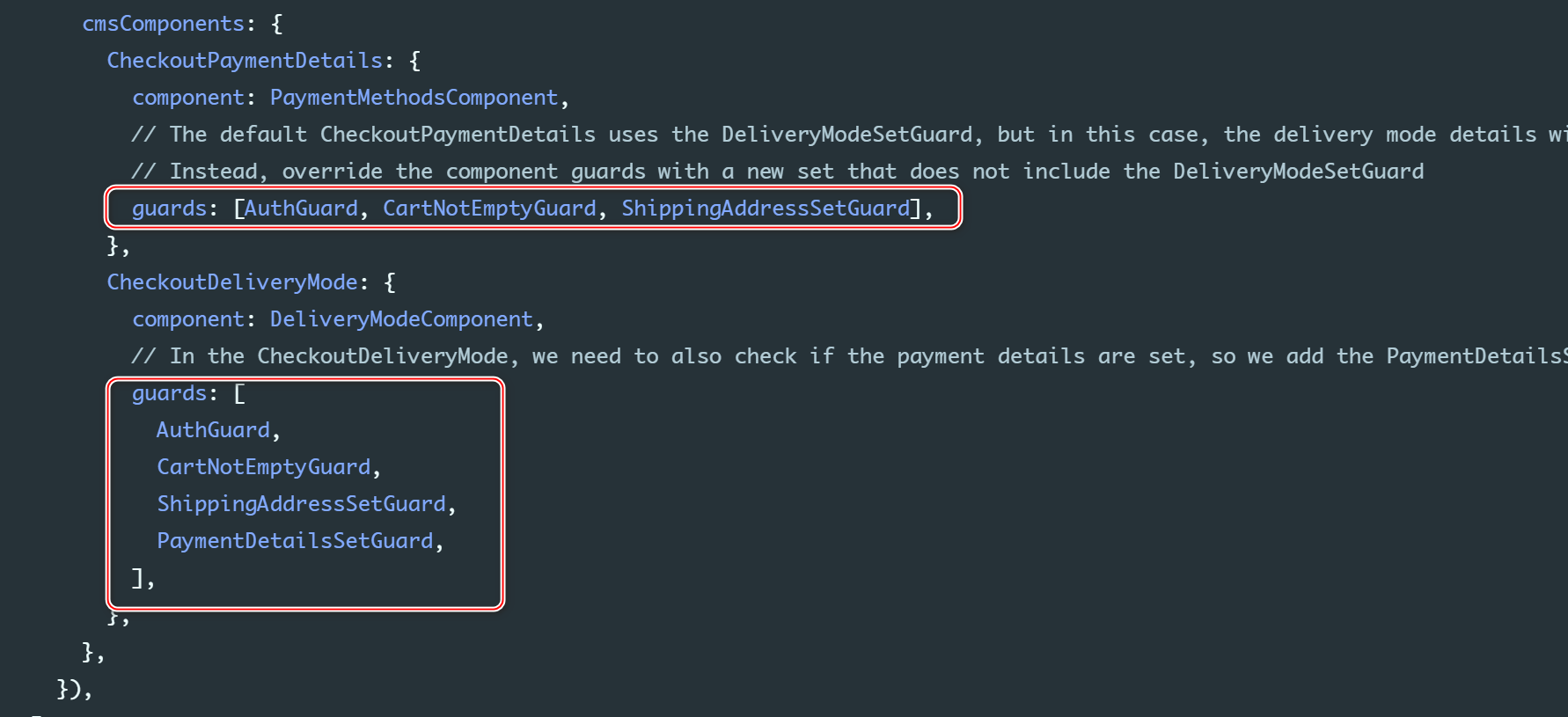
@NgModule({ imports: [ B2cStorefrontModule.withConfig({ ...restOfConfig, checkout: { // You must specify all of the steps (this configuration is not merged with the default one) steps: [ { id: 'shippingAddress', name: 'checkoutProgress.shippingAddress', routeName: 'checkoutShippingAddress', type: [CheckoutStepType.SHIPPING_ADDRESS], }, // Change the payment details step to be before the delivery mode { id: 'paymentDetails', name: 'checkoutProgress.paymentDetails', routeName: 'checkoutPaymentDetails', type: [CheckoutStepType.PAYMENT_DETAILS], }, { id: 'deliveryMode', name: 'checkoutProgress.deliveryMode', routeName: 'checkoutDeliveryMode', type: [CheckoutStepType.DELIVERY_MODE], }, { id: 'reviewOrder', name: 'checkoutProgress.reviewOrder', routeName: 'checkoutReviewOrder', type: [CheckoutStepType.REVIEW_ORDER], }, ], }, cmsComponents: { CheckoutPaymentDetails: { component: PaymentMethodsComponent, // The default CheckoutPaymentDetails uses the DeliveryModeSetGuard, but in this case, the delivery mode details will not be set yet. // Instead, override the component guards with a new set that does not include the DeliveryModeSetGuard guards: [AuthGuard, CartNotEmptyGuard, ShippingAddressSetGuard], }, CheckoutDeliveryMode: { component: DeliveryModeComponent, // In the CheckoutDeliveryMode, we need to also check if the payment details are set, so we add the PaymentDetailsSetGuard guards: [ AuthGuard, CartNotEmptyGuard, ShippingAddressSetGuard, PaymentDetailsSetGuard, ], }, }, }), ], bootstrap: [StorefrontComponent],})export class AppModule {}CheckoutPaymentDetails Component,只有在进入 payment step 时才加载: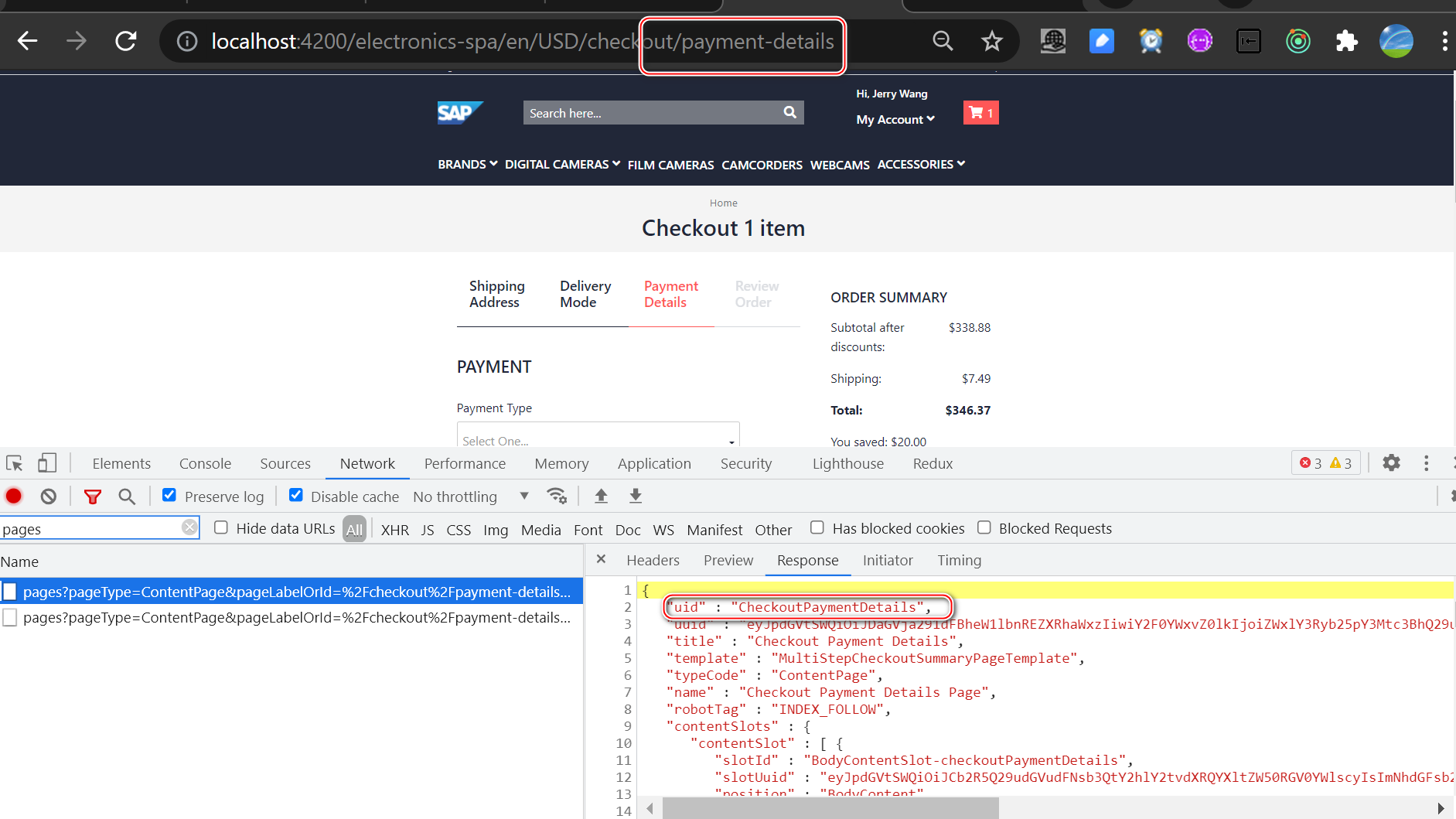
CheckoutPaymentDetails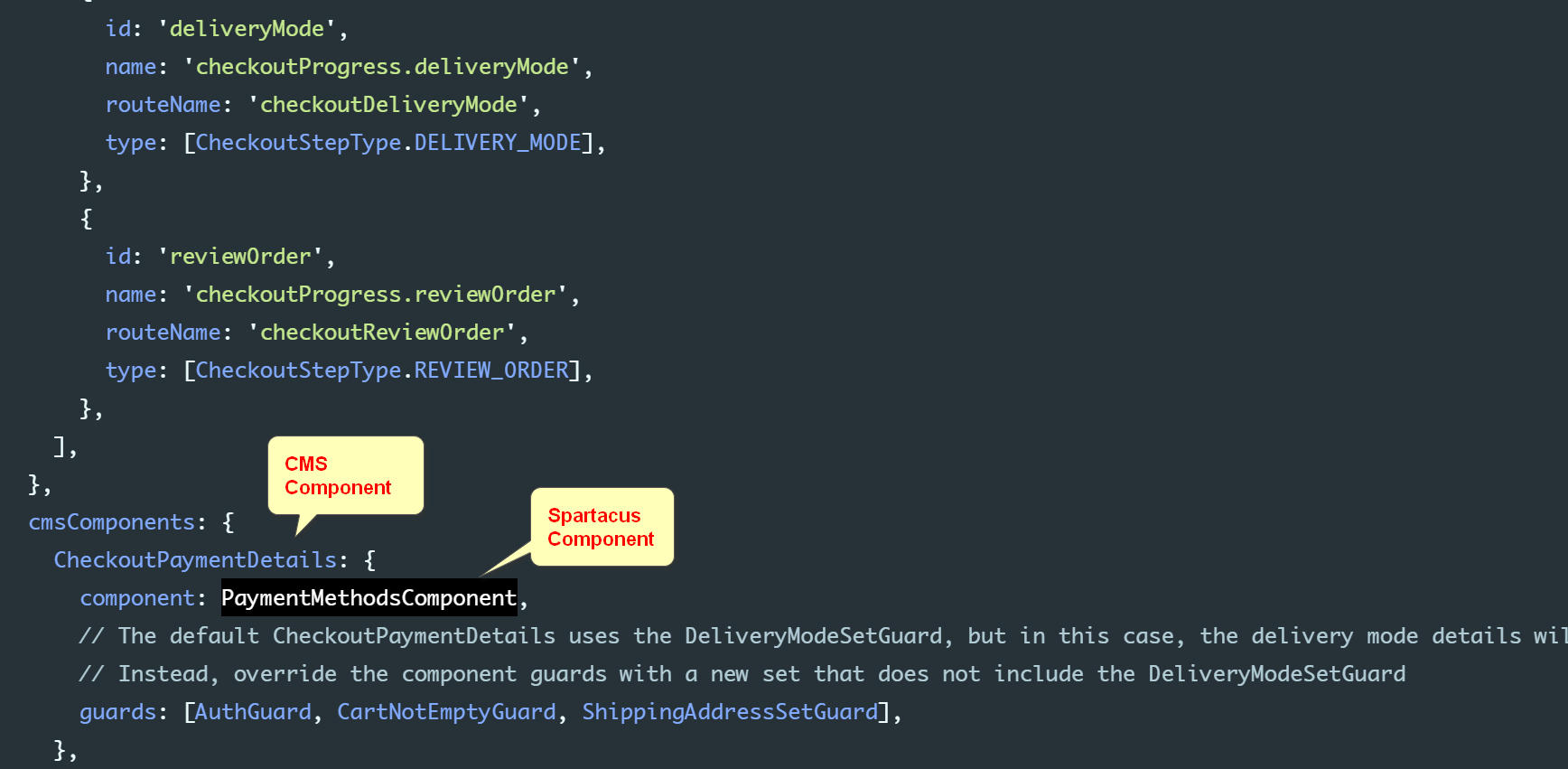

在 CMS Component mapping 里指定 Component guard:
边栏推荐
- From quic to TCP
- Dbutil auxiliary class, manual commit transaction, metadata
- 021(Keywords Search)(AC自动机)
- Audio adaptation of openharmony Standard System Porting
- How to synchronize openstack RDO source to local for offline installation
- QQ pulls up Alipay H5 payment function
- [background interaction] select to bind the data transferred in the background
- 【滤波器】基于matlab时变维纳滤波器设计【含Matlab源码 1870期】
- 如何同步openstack RDO源至本地进行离线安装
- #61. Two point answer
猜你喜欢

关于分布式锁的续命问题——基于Redis实现的分布式锁

The end of an era! After ten years, Wu Enda's classic machine learning course closed its registration this month and launched a new course

常用字体介绍
![[clearos] install the clearos system](/img/fe/8080c96ea18eb9afd4c4cff2c98b27.jpg)
[clearos] install the clearos system

Schéma de dessin utilisé par les Pads
![[untitled]](/img/f7/c8c41de567c4b137a1e72edebaf632.jpg)
[untitled]
Go语言学习之WaitGroup用法详解
![[bug resolution] the form is paged to display the total data res.data total](/img/92/1ddde16d35465f8dd53ebf90e249b8.png)
[bug resolution] the form is paged to display the total data res.data total

How about NFT market? Why is NFT so popular? How to build NFT platform

The Tree (AVL, 2-3-, 红黑,Huffman)

随机推荐
. 4 literal and variable
[bug resolution] the form is paged to display the total data res.data total
Flink 从实时计算到流式数仓,下一步去往哪里?
pip2pi和pypiserver及Apache在pip本地源配置中的应用实践
Shader shader
Research on DB2 Database Reconstruction and table data migration
tf.data(二) —— 并行化 tf.data.Dataset 生成器
On the continuing Life of Distributed Locks - - Distributed Locks Based on redis
Luo Jing: connection Efficiency Optimization Practice
2022 年,捕捉这 12 个数据和分析趋势!
Go语言学习之WaitGroup用法详解
微软再曝“丑闻”:在办公室看 VR 黄片,“HoloLens 之父”即将离职!
一个时代的终结!十年了吴恩达经典《机器学习》课程本月关闭注册,上线新课!...
Which brand of bone conduction Bluetooth headset is good? Five most popular bone conduction Bluetooth headsets
启牛商学院给的券商账户是安全的吗?开户收费吗
Chapter V data type (IV)
[arcgis] City relevance analysis
如何写出高性能代码(四)优化数据访问
求你了,不要再在对外接口中使用枚举类型了!
QQ pulls up Alipay H5 payment function