当前位置:网站首页>Kgdb debug kernel cannot execute breakpoints and kdb-22:permisson denied
Kgdb debug kernel cannot execute breakpoints and kdb-22:permisson denied
2022-07-27 10:39:00 【Kun Yu】
Before that Centos8 Operating system , adopt kgdb Debugging kernel encountered a breakpoint and kdb-22:Permisson denied The problem of . Next , This article describes the modified configuration parameters .
Chapter Preview :
1. Select kernel to configure kernel parameters
2. Configure kernel parameters
2.1 To configure kgdb Basic debugging parameters
2.2 Check or manually configure parameters
3. kgdb Relevant required configuration parameters
4. Follow up
Chapter content :
1. Select kernel to configure kernel parameters
stay linux Debugging the kernel in related systems is a simple thing , However, some minor problems may be encountered if a parameter is not configured or configured incorrectly : For example, you cannot connect to the target machine through the serial port , Unable to debug target kernel code, etc .
First , Let's start by choosing the kernel version , adopt uname -r View kernel version :

Refer to the figure 1, The kernel version is 4.18.0-240.10.1, Can download 4.18.0-240.10.1 or 4.18.xx The version uses .
2. Configure kernel parameters
First, copy the kernel package to /usr/src(ubuntu System ) or /usr/src/kernels(Centos Related systems ) Unzip and enter the directory , Then configure the kernel parameters .
Input make menuconfig( Install the required libraries one by one according to the prompts ):
2.1 To configure kgdb Basic debugging parameters
First , Press / The search window appears :
Refer to the figure 3, Enter... In the search window CONFIG_KGDB:

Refer to the figure 4, Enter enter :

Refer to the figure 5, We can see (1)、(2)… Next is CONFIG_KGDB Corresponding to all settable parameter options , We press the numbers 1 Get into :

Refer to the figure 6, Press enter to continue :
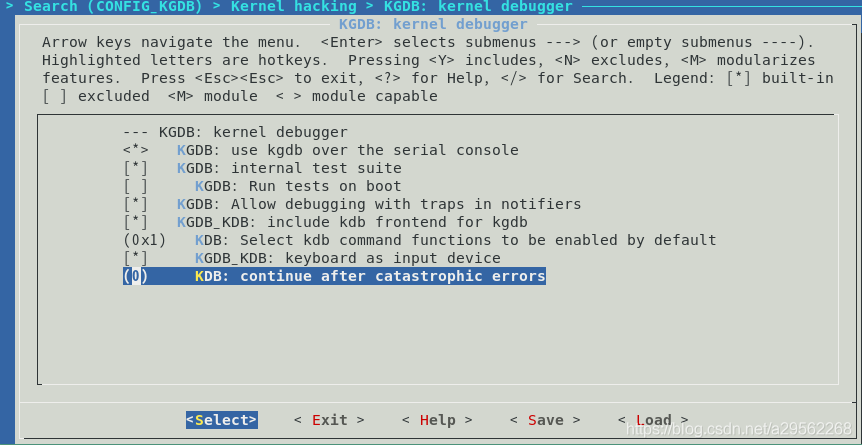
Refer to the figure 7,CONFIG_KGDB This is the setting , Then press the shift right key to Save Options , Press enter again :

Refer to the figure 8, choice ok Save configuration , And then all the time Esc Key to exit the kernel parameter configuration interface .
2.2 Check or manually configure parameters
Use vi .config or vim .config Open profile ( root directory ):

Refer to the figure 9, When we are not sure whether the file has been configured correctly , Parameters can be checked or manually set .
3. kgdb Relevant required configuration parameters
Now we know how to configure and check parameters , Next, learn what configuration parameters are required :
CONFIG_KGDB=y
CONFIG_KGDB_SERIAL_CONSOLE=y
CONFIG_KGDB_KDB=y
CONFIG_KDB_KEYBOARD=y
CONFIG_DEBUG_INFO=y
Easy to ignore configuration ( You can configure ):
CONFIG_KDB_DEFAULT_ENABLE=0x1 # kdb -22:Permisson denied
CONFIG_RANDOMIZE_BASE=y # Unable to debug breakpoints
4. Follow up
After the above steps , The rest is a brief introduction :
① Compiling and installing the kernel is relatively simple , Refer to previous articles ,ubuntu Compile kernel mode ;
② ubuntu The system is in /boot/grub/grub.cfg Internal increase kgdboc=ttyS1,102400 kgdbwait ,Centos8 stay /boot/loader/entries/xxxx- Kernel version .conf Internal increase kgdboc=ttyS1,102400 kgdbwait ;
③ The kernel source code in the remote debugging machine should be placed in the position corresponding to the target machine , And put... In the source code of the target machine vmlinux Copy to the corresponding location in the kernel source code in the remote debugging machine ;
④ stay vmware Start the target machine (kgdb Debugged machine ) when , You can communicate with the remote debugging machine by adding a serial port .
边栏推荐
- 让人深思:句法真的重要吗?邱锡鹏组提出一种基于Aspect的情感分析的强大基线...
- Ubuntu及Mysql快速入门教程
- Program translation and execution, from editing, preprocessing, compilation, assembly, linking to execution
- [Flink] Flink builds clusters in standalone mode
- Loop traversal of foreach and some of ES6
- es6 class 继承的重点
- Redis data structure analysis (II)
- Mysql死锁、悲观锁、乐观锁
- samba服务器
- Data types and variables
猜你喜欢

ctf (hardrce)

简单几步教您实现为工业树莓派共享网络

服务器访问速度
kgdb调试内核无法执行断点及kdb-22:Permisson denied
![[Linux] mariadb/mysql scheduled full backup script and data recovery](/img/02/8ee01336a46e4956738f3cc8e30683.png)
[Linux] mariadb/mysql scheduled full backup script and data recovery

Alibaba mailbox web login turn processing

Shardingsphere kernel principle

厉害了!VMware ESXi安装记录,附下载

flask_ Output fields in restful (resources, fields, marshal, marshal_with)
Analysis of heterogeneous computing technology
随机推荐
[Flink] Flink builds clusters in standalone mode
【Liunx】安装Redis
【英雄哥六月集训】第 28天: 动态规划
关于ETL的两种架构(ETL架构和ELT架构)
Beijing publicized the spot check of 8 batches of children's shoes, and qierte was listed as unqualified
JSP自定义标签之自定义分页01
Have you ever seen this kind of dynamic programming -- the stock problem of state machine dynamic programming (Part 1)
文档智能多模态预训练模型LayoutLMv3:兼具通用性与优越性
【英雄哥六月集训】第 26天: 并查集
Ubuntu and MySQL quick start tutorial
warning: remote HEAD refers to nonexistent ref, unable to checkout报错信息
厉害了!VMware ESXi安装记录,附下载
mount.nfs: access denied by server while mounting解决
Error in nodejs: getaddrinfo enotfound localhost
【Liunx】MariaDB/MySQL定时全量备份脚本及数据恢复
FSM onehot answer record
JVM -- Analysis of bytecode
The core concept and fast practice of shardingsphere
Warning: remote head references to nonexistent ref, unable to checkout error messages
[brother hero June training] day 25: tree array