当前位置:网站首页>[Flink] Flink builds clusters in standalone mode
[Flink] Flink builds clusters in standalone mode
2022-07-27 10:24:00 【No bug is the biggest bug】
What I use here is Flink1.13.0 Version of ,JDK1.8
Here are two servers , One is used to manage tasks (JobManager), One is used to perform tasks (TaskManager ),
One server for task management , The server that executes the task can expand the node unlimited according to the actual demand !!!
First go Flink Download the package on the official website https://archive.apache.org/dist/flink/flink-1.13.0/flink-1.13.0-src.tgz
Then upload the file to liunx System and unzip

Input instruction cd flink-1.13.0/conf/ Get into conf Catalog

Input instruction vim flink-conf.yaml edit conf file , This file is the core configuration file
Change the address here to Manage the task server by yourself IP Save the address and exit

Input vim masters Edit the file , This file is used to specify Flink The console address of , Default localhost
Write to the management task server IP address

Input vim workers Edit the file , This file is used to configure flink Cluster sub nodes , Default localhost
Write to the execution task server IP Address , Multiple nodes wrap and write multiple
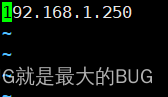
And then through scp Distribute the unzipped package to the sub server !
Enter the management task server bin Catalog

Input ./start-cluster.sh Open clusters

Enter the service password of the child node to start synchronously

Input ./stop-cluster.sh Shut down the cluster
Enter the console to view the cluster status
xxx.xxx.xxx.xxx:8080

attach :
Flink The card slot of each server in can be in conf Configuration in file , The default is 1

If the console cannot be opened, the port may be occupied :
modify conf Change the file to an unused port

At the same time to modify masters file

Just visit the console again !!!
边栏推荐
猜你喜欢

Shell read read console input, use of read

Data visualization

hdu5288(OO’s Sequence)
Anaconda安装(非常详细)

Understanding of batchnorm2d() function in pytorch

vs2019社区版下载教程(详细)

Robotframework+eclispe environment installation

Wind10 configure ADB command

Mysql database experiment training 5, data query YGGL database query (detailed)

数据库操作基础语句
随机推荐
Cannot start after installing MySQL 5.7.27 in CentOS 7? (Language bash)
Matlab/Simulink求解微分方程样例分享
Robotframework+eclispe environment installation
【Flink】Flink进行Standalone模式的集群搭建
卸载CUDA11.1
Ant高级-path和fileset
程序的翻译和执行,从编辑、预处理、编译、汇编、链接到执行
Understanding and code implementation of Se (sequence and exception) module
线代003
Anchor free detector: centernet
Snowflake vs. databricks who is better? The latest war report in 2022
Matlab-绘制叠加阶梯图和线图
Failure of CUDA installation nsight visual studio edition failed
数据库操作基础语句
关于ETL的两种架构(ETL架构和ELT架构)
Matlab low-level source code realizes the median filtering of the image (used to eliminate some miscellaneous points on the image)
Voice data acquisition - real time voice data visualization
Basic statement of database operation
Solve oracle-ora-01122 01110 01210
Sorting out some open source projects of speech recognition