当前位置:网站首页>1W words | 40 pictures | hard core es actual combat
1W words | 40 pictures | hard core es actual combat
2022-06-25 07:10:00 【Wukong chat architecture】
reply PDF Collect information

This is Wukong's first 92 Original articles
author | Wukong chat structure
source | Wukong chat structure (ID:PassJava666)
Please contact authorization for reprint ( WeChat ID:PassJava)
Preface
Last time we talked about Elasticsearch The principle of full text retrieval 《 Don't just search the logs , Please understand some principles 》, By building a local ES service , This paper analyzes with several cases ES The principle and basic use of . This time, let's talk about Spring Boot How to integrate ES, And how to Spring Cloud Micro service project ES To achieve Full text search , In order to achieve Search question bank The function of .
And the amount of data in the question bank is very large , The answer to the question is also very long , adopt ES It just can solve mysql The inefficiency of fuzzy search .
Through the actual combat, you can learn the following knowledge :
Spring Boot How to integrate ES.
In microservice ES Of API Use .
How to use in a project ES To achieve full text retrieval .
The main content of this article is as follows :

primary coverage
The cases in this paper are all based on PassJava Actual combat projects to demonstrate .
Github Address :https://github.com/Jackson0714/PassJava-Platform
In order to make you understand more clearly PassJava In the project ES How it is used , I drew three flow charts :
First step : establish question Indexes .
First define question Indexes , And then in ES Create index in .

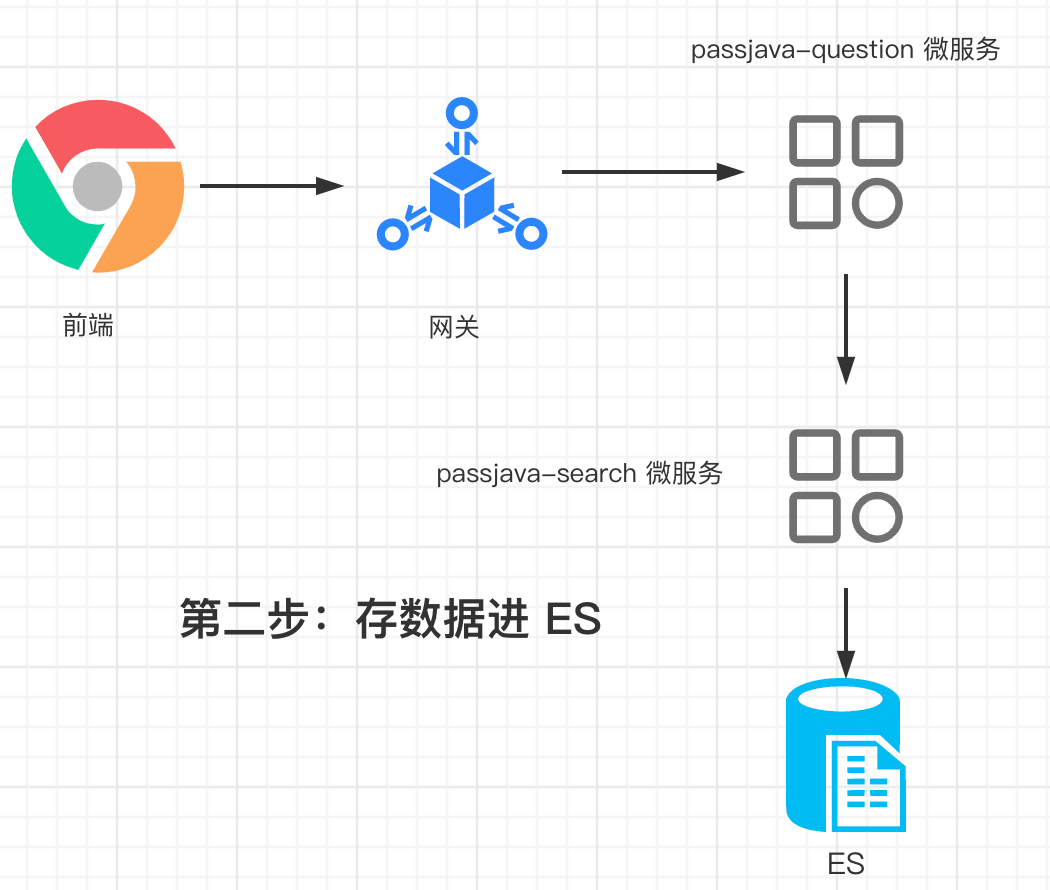
The second step : save question Data into ES .
When the front end saves data , The saved API The request goes through the gateway first , Then forward it to passjava-question Microservices , And then remotely call passjava-search Microservices , Save the data into ES in .
The third step : from ES Middle search data .
When the front end queries the data , First through the gateway , Then forward the request to passjava-search Microservices , And then from ES Query data in .

One 、Elasticsearch Introduction to component library
Before the explanation , I'd like to mention again what full text retrieval is :
Full text search : It refers to an information retrieval technology that takes all text information as the retrieval object . And the database we use , Such as Mysql,MongoDB The ability of text information retrieval, especially Chinese retrieval, has not been improved ES Powerful . So let's take a look at ES How to replace SQL Come to work .
I use Elasticsearch Service is 7.4.2 Version of , And then use the official Elastiscsearch-Rest-Client Library to operate ES, And the official library of API Easy to get started .
The official document address of the component library :
https://www.elastic.co/guide/en/elasticsearch/client/java-rest/current/java-rest-high.htmlIn addition, this component library supports multiple languages :
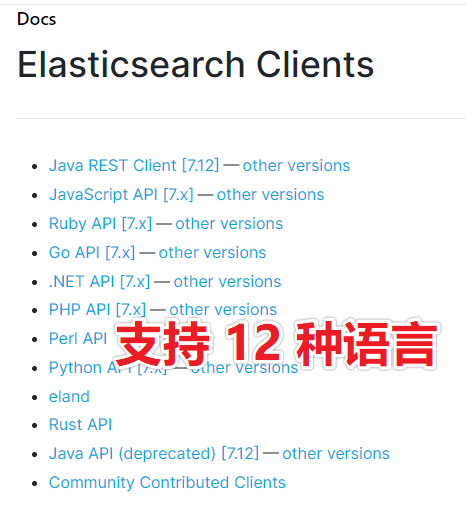
Support for multiple languages
Be careful :Elasticsearch Clients It means how to use API operation ES Component library for services .
Some students may ask questions ,Elasticsearch It says in the component library of JavaScript API, Can I access it directly from the front end ES service ? Yes, yes , But it will expose ES The port and IP Address , It would be very unsafe . So we still use back-end services to access ES service .
Our project is Java project , Nature is using the two above :Java Rest Client perhaps Java API. Let's take a look first Java API, But you'll find it's abandoned . As shown in the figure below :

Java API It's abandoned
So we can only use Java REST Client 了 . And it's divided into two kinds : High and low . Advanced contains more features , If you compare high-level to MyBatis Words , So low level is equivalent to JDBC. So we use advanced Client.

High and low Client
Two 、 Integrated search services
We take the search service as a single service . Is referred to as passjava-search Module bar .
1.1 Add search service module
establish passjava-search modular .
First of all we have PassJava-Platform Module to create a Search service module passjava-search. Then check it out. spring web service . As shown in the figure below .
First step : choice Spring Initializr, And then click Next.

choice Spring Initializr
The second step : Fill in the module information , And then click Next.
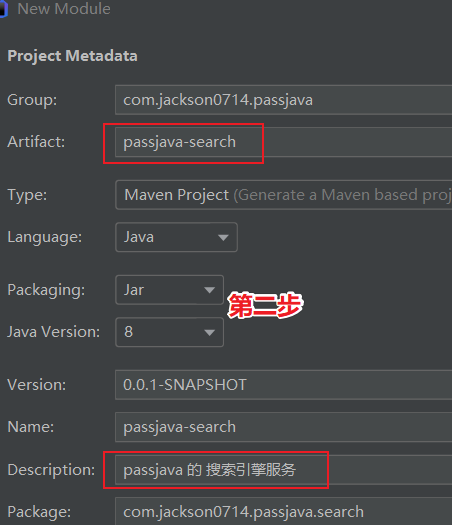
passjava-search Service module
The third step : choice Web->Spring Web rely on , And then click Next.
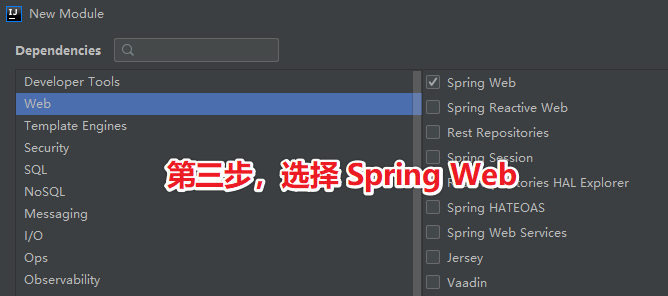
1.2 To configure Maven rely on
reference ES Official website configuration .
Enter into ES Official website , You can see that there are low-level and high-level Rest Client, We're going to choose the high-level (High Level Rest Client). And then go to the higher level Rest Client Of Maven Warehouse . The official website address is as follows :
https://www.elastic.co/guide/en/elasticsearch/client/java-rest/7.9/index.html
Rest Client Official documents
add Maven rely on .
Corresponding file path :\passjava-search\pom.xml
<dependency> <groupId>org.elasticsearch.client</groupId> <artifactId>elasticsearch-rest-high-level-client</artifactId> <version>7.4.2</version></dependency>To configure elasticsearch The version is 7.4.2
Because with Maven After dependence ,elasticsearch Version is 7.6.2, So when you encounter this kind of version inconsistency , It needs to be changed manually .
Corresponding file path :\passjava-search\pom.xml
<properties> <elasticsearch.version>7.4.2</elasticsearch.version></properties>Refresh Maven Project after , You can see the introduction of elasticsearch All are 7.4.2 Version of the , As shown in the figure below :

Set the version to 7.4.2
introduce PassJava Of Common Module dependency .
Common The module is PassJava Project independent public module , Introduced a lot of common component dependencies , Other modules introduce Common After module dependency , There is no need to introduce these common components separately , Very convenient .
Corresponding file path :\passjava-search\pom.xml
<dependency> <groupId>com.jackson0714.passjava</groupId> <artifactId>passjava-common</artifactId> <version>0.0.1-SNAPSHOT</version></dependency> After adding dependencies , We can register the search service to Nacos Registration Center .Nacos The usage of the registry has also been explained in detail in the previous articles , Here we need to pay attention to start first Nacos Registry Center , To register normally passjava-search service .
1.3 Register the search service to the registry
Modify the configuration file :src/main/resources/application.properties. Configure the application name 、 Address of Registration Center 、 The name of the registry is in the middle .
spring.application.name=passjava-searchspring.cloud.nacos.config.server-addr=127.0.0.1:8848spring.cloud.nacos.config.namespace=passjava-search to Start class Add service discovery annotation :@EnableDiscoveryClient. such passjava-search The service can be discovered by the registry .
because Common Modules depend on data sources , but search The module does not depend on the data source , therefore search The module needs to remove the data source dependency :
exclude = DataSourceAutoConfiguration.classThe two comments above are as follows :
@EnableDiscoveryClient@SpringBootApplication(exclude = DataSourceAutoConfiguration.class)public class PassjavaSearchApplication { public static void main(String[] args) { SpringApplication.run(PassjavaSearchApplication.class, args); }}Next, let's add a ES Service specific configuration class , The main purpose is to automatically load a ES Client For follow-up ES API Use , Not every time new One ES Client.
1.4 add to ES Configuration class
Configuration class :PassJavaElasticsearchConfig.java
The core approach is RestClient.builder Method , Set it up ES Service IP Address 、 Port number 、 Transport protocol is OK . Finally, it automatically loads RestHighLevelClient.
package com.jackson0714.passjava.search.config;import org.apache.http.HttpHost;import org.elasticsearch.client.RestClient;import org.elasticsearch.client.RestHighLevelClient;import org.springframework.context.annotation.Bean;import org.springframework.context.annotation.Configuration;/** * @Author: official account | Wukong chat structure * @Date: 2020/10/8 17:02 * @Site: www.passjava.cn * @Github: https://github.com/Jackson0714/PassJava-Platform */@Configurationpublic class PassJavaElasticsearchConfig { @Bean // Register a... For the container RestHighLevelClient, Used for operation ES // Refer to official documentation :https://www.elastic.co/guide/en/elasticsearch/client/java-rest/7.9/java-rest-high-getting-started-initialization.html public RestHighLevelClient restHighLevelClient() { return new RestHighLevelClient( RestClient.builder( new HttpHost("192.168.56.10", 9200, "http"))); }}Now let's test ES Client Whether the automatic loading is successful .
1.5 test ES Client Automatic loading
Testing class PassjavaSearchApplicationTests Write test methods in , Print out the automatically loaded ES Client. The expected result is a RestHighLevelClient object .
package com.jackson0714.passjava.search;import org.elasticsearch.client.RestHighLevelClient;import org.junit.jupiter.api.Test;import org.springframework.beans.factory.annotation.Autowired;import org.springframework.beans.factory.annotation.Qualifier;import org.springframework.boot.test.context.SpringBootTest;@SpringBootTestclass PassjavaSearchApplicationTests { @Qualifier("restHighLevelClient") @Autowired private RestHighLevelClient client; @Test public void contextLoads() { System.out.println(client); }}The running results are as follows , Printed out RestHighLevelClient. Explain custom ES Client Auto loading succeeded .

ES test result
1.6 test ES Simply insert data
The test method testIndexData, Omit User class .users The index is in my ES There's no record of it , So the expected result is ES There's a new one in users data .
/** * Test storing data to ES. * */@Testpublic void testIndexData() throws IOException { IndexRequest request = new IndexRequest("users"); request.id("1"); // Document id // structure User object User user = new User(); user.setUserName("PassJava"); user.setAge("18"); user.setGender("Man"); //User Object to JSON data String jsonString = JSON.toJSONString(user); // JSON Put data in request in request.source(jsonString, XContentType.JSON); // Perform the insert operation IndexResponse response = client.index(request, RequestOptions.DEFAULT); System.out.println(response);}perform test Method , We can see the console output the following result , Description data is inserted into ES success . Another thing to note is that in the results result Field is updated, It's because I'm here for screenshots , A few more insertions , But because id = 1, So it's all about updated operation , instead of created operation .

Console output
Let's go back to ES Middle view users The data in the index . Inquire about users Indexes :
GET users/_searchThe results are shown below :

Inquire about users Index results
You can see from the figure that a record has been found , The query data is _id = 1, And inserted documents id Agreement . The values of the other fields are the same . Explain that there is no problem with the inserted data .
"age" : "18","gender" : "Man","userName" : "PassJava"1.7 test ES Query complex statements
Example : Search for bank Indexes ,address The field contains big The age distribution of all people ( front 10 strip ) And the average age , And average pay .
1.7.1 Construct search conditions
We can refer to the example given in the official document to create a SearchRequest object , Specify the index to query as bank, And then create a SearchSourceBuilder To assemble query conditions . There are three conditions to assemble :
address Contained in the road All of us .
Aggregate by age distribution .
Calculate the average salary .
The code is as follows , Please go to my Github/PassJava Upload and download .

Examples of query complex statements
Copy the printed retrieval parameters , Then put JSON Format it in the format tool , Paste to ES Console execution , It is found that the execution result is correct .

Print out the search parameters
Format with online tools JSON character string , The results are shown below :

Then we remove some of the default parameters , Finally, the simplified retrieval parameters are put into Kibana In the implementation of .
Kibana Dev Tools Execute the search statement in the console as shown in the figure below , The search results are shown in the figure below :
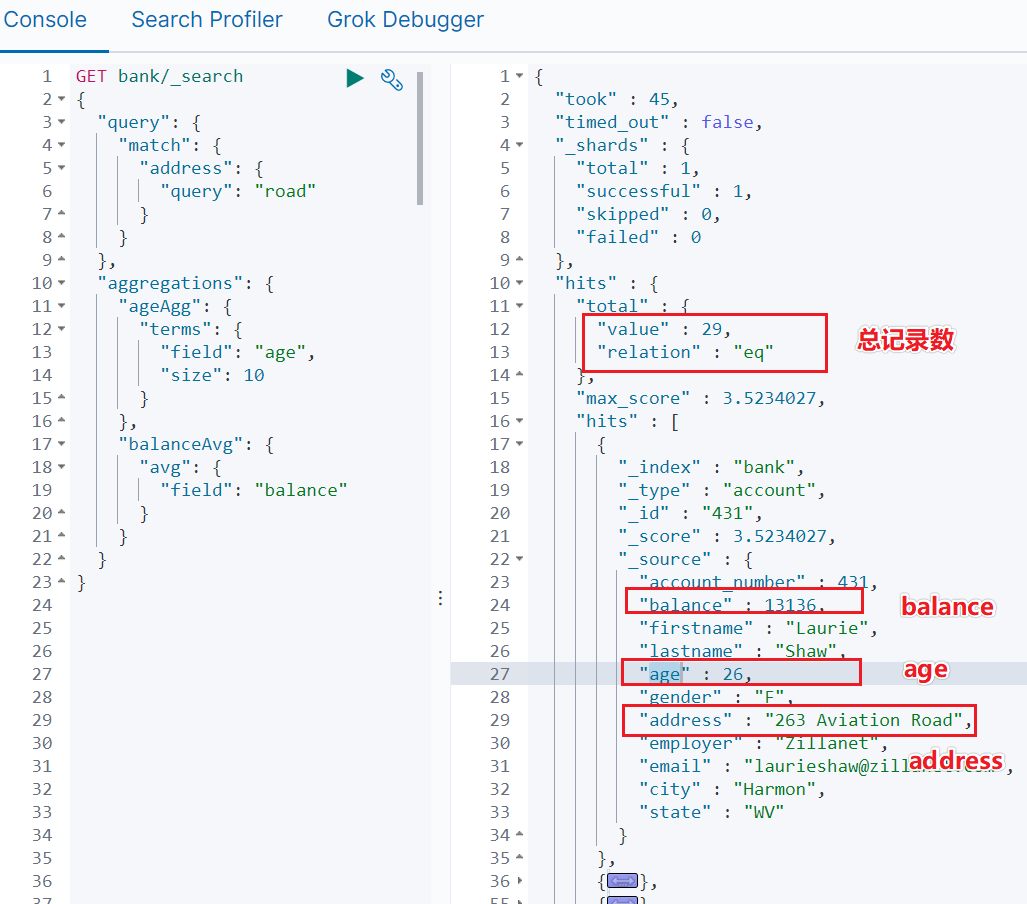
The search statement is executed in the console
Total records found :29 strip .
The details of the first hit record are as follows :
Average balance:13136.
Average age :26.
The address contains Road Of :263 Aviation Road.
and IDEA The results of the tests performed in are consistent , It shows that the function of complex retrieval has been successfully realized .
17.2 Get the hit record details
And get the hit record details , You need to go through it twice getHists() How to get , As shown below :
// 3.1) Get the data .SearchHits hits = response.getHits();// 3.2) Get the real hit result SearchHit[] searchHits = hits.getHits();We can do this by traversing searchHits Print out the details of all hit results .
// 3.3)、 Traversing hits for (SearchHit hit: searchHits) { String hitStr = hit.getSourceAsString(); BankMember bankMember = JSON.parseObject(hitStr, BankMember.class);}Get every record hitStr It's a JSON data , As shown below :
{ "account_number": 431, "balance": 13136, "firstname": "Laurie", "lastname": "Shaw", "age": 26, "gender": "F", "address": "263 Aviation Road", "employer": "Zillanet", "email": "[email protected]", "city": "Harmon", "state": "WV"}and BankMember Is defined according to the details of the returned results JavaBean. It can be generated automatically by tools . Online generation JavaBean Our website is as follows :
https://www.bejson.com/json2javapojo/new/Put this JavaBean Add to PassjavaSearchApplicationTests Class :
@ToString@Datastatic class BankMember { private int account_number; private int balance; private String firstname; private String lastname; private int age; private String gender; private String address; private String employer; private String email; private String city; private String state;}And then bankMember Print out :
System.out.println(bankMember);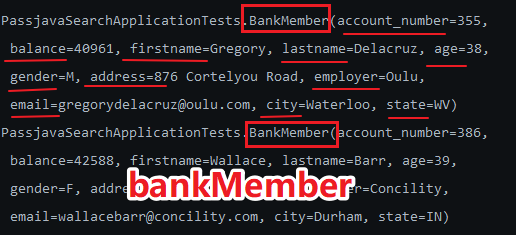
bankMember
The result is really what we encapsulate BankMember object , And all the attribute values in it have been obtained .
1.7.3 Get age distribution aggregation information
ES Back to response in , The age distribution is based on ES In the format of , If you want to return in our own format , You need to response To deal with .
As shown in the figure below , This is the result of the age distribution , We need to take out some of these fields , such as buckets, It represents the distribution of 21 One year old has 4 individual .

ES Age distribution information returned
The following is the code implementation :
Aggregations aggregations = response.getAggregations();Terms ageAgg1 = aggregations.get("ageAgg");for (Terms.Bucket bucket : ageAgg1.getBuckets()) { String keyAsString = bucket.getKeyAsString(); System.out.println(" User age : " + keyAsString + " The number of :" + bucket.getDocCount());}The final printed result is as follows ,21 One year old has 4 people ,26 One year old has 4 people , wait .

Print the results : User age distribution
1.7.4 Get aggregate information on average salary
Now let's see how the average salary returns in the desired format ,ES The returned result is shown in the figure below , We need to get balanceAvg Field value value .
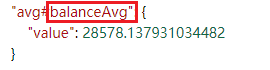
ES Return the average salary information
Code implementation :
Avg balanceAvg1 = aggregations.get("balanceAvg");System.out.println(" Average salary :" + balanceAvg1.getValue());The results are as follows , Average salary 28578 element .

Print the results : Average salary
3、 ... and 、 actual combat : Sync ES data
3.1 Define the retrieval model
PassJava This item can be used to configure the question bank , If we want to search the question bank by keywords , How do you do that ?
Similar to Baidu search , Enter a few keywords to search for the associated results , Our function is similar , adopt Elasticsearch Do search engine , Small program management and background interface , Just type in the keyword on the applet , You can retrieve the relevant questions and answers .
First, we need to save the questions and answers to ES in , Before saving , The first step is to define the model of the index , As shown below , In the model title and answer Field , A question and an answer .
"id": { "type": "long"},"title": { "type": "text", "analyzer": "ik_smart"},"answer": { "type": "text", "analyzer": "ik_smart"},"typeName": { "type": "keyword"}3.2 stay ES Create index in
We have defined the index structure above , And then there was ES Create index in .
stay Kibana Execute the following statement in the console :
PUT question{ "mappings" : { "properties": { "id": { "type": "long" }, "title": { "type": "text", "analyzer": "ik_smart" }, "answer": { "type": "text", "analyzer": "ik_smart" }, "typeName": { "type": "keyword" } } }}The results are shown below :
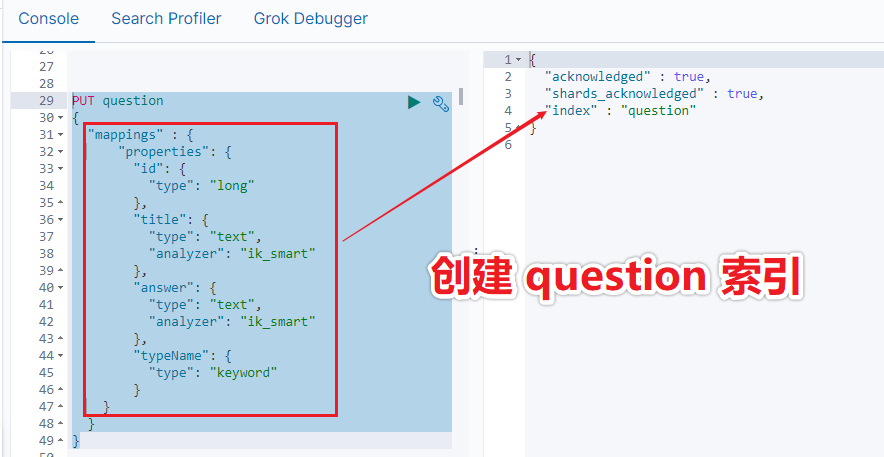
establish question Indexes
We can check... With the following command question Whether the index is in ES in :
GET _cat/indicesThe execution result is shown in the figure below :

see ES All the indexes in
3.3 Definition ES model
Above we define ES The index of , The next step is to define the model corresponding to the index , Put the data in this model , And then save it to ES in .
ES Model as follows , There are four fields in total :id、title、answer、typeName. and ES The indexes correspond to each other .
@Datapublic class QuestionEsModel { private Long id; private String title; private String answer; private String typeName;}3.4 Time to trigger save
When we create or save a topic in the background , First save the data to mysql database , And then save it to ES in .
As shown in the figure below , When creating a topic in the management background , Trigger to save data to ES .
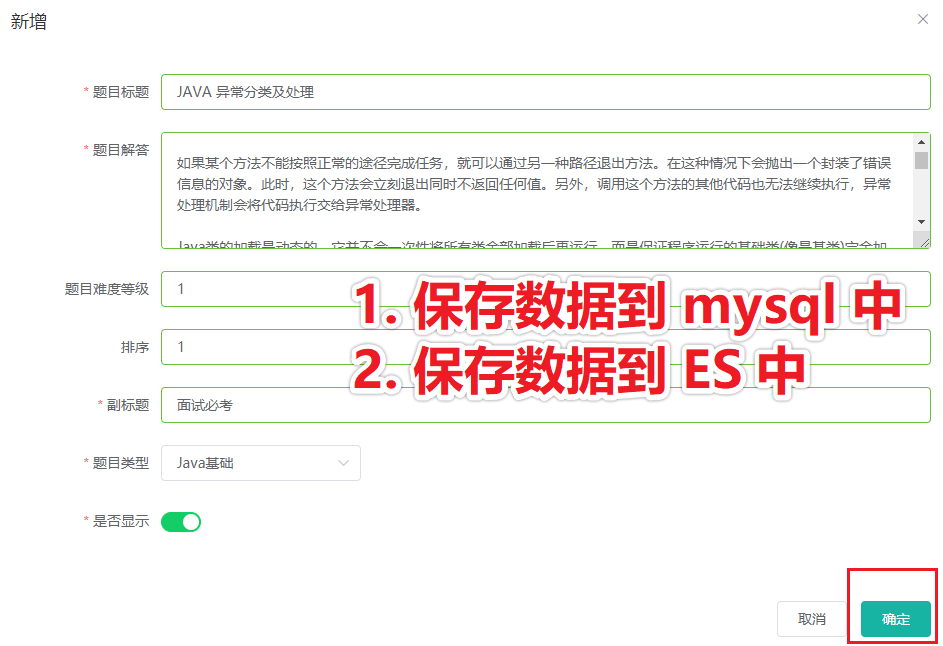
First step , Save data to mysql in , This feature is already included in the project , I won't go into that , Go straight to the second step : Save data to ES in .
And save the data to ES in , You need to assemble the data into ES Index the corresponding data , So I used a ES model, First save the data to ES model in .
3.5 use model To assemble data
The key code here is copyProperties, Can be question Object , And then assign it to ES model in . however ES model There are also fields in question Not found in , So it needs to be carried out alone , such as typeName Field ,question Object doesn't have this field , Its corresponding field is question.type, So we put type Take it out and assign it to ES model Of typeName Field . As shown in the figure below :

use model To assemble data
3.6 Save data to ES
I am here passjava-search Microservice has written a topic to save api Used to save data to ES in .

Save data to ES
And then in passjava-question Call in micro service search The preservation of microservices ES That's it .
// call passjava-search service , Send data to ES Kept in .searchFeignService.saveQuestion(esModel);3.7 test ES Whether or not the
We can go through kibana To see question Documents in the index . Check it out with the following command :
GET question/_searchThe execution result is shown in the figure below , There's a record :

In addition, do you have any questions : Can I update the title again and again ?
The answer is yes , Save to ES The data of is idempotent , Because when you save it, you bring a database primary key id.
Four 、 actual combat : Inquire about ES data
We've synchronized the data to ES in , Now is how the front end queries ES In the data , We're still going to use it here Postman To simulate the front-end query request .
4.1 Define request parameters
I define three request parameters :
keyword: Used to match questions or answers .
id: Used to match topics id.
pageNum: Used to query data in pages .
Here I define these three parameters as a class :
@Datapublic class SearchParam { private String keyword; // Full text matching keywords private String id; // subject id private Integer pageNum; // What page of data to query }4.2 Define return parameters
Back to response I also defined four fields :
questionList: The list of questions found .
pageNum: Page data .
total: Total number of queries .
totalPages: Total number of pages .
The classes defined are as follows :
@Datapublic class SearchQuestionResponse { private List<QuestionEsModel> questionList; // List of topics private Integer pageNum; // What page of data to query private Long total; // Total number of articles private Integer totalPages; // Total number of pages }4.3 assemble ES Query parameters
call ES Query for API when , You need to build query parameters .
The core code for assembling query parameters is as follows :

Assemble query parameters
First step : Create a search request .
The second step : Set which fields need fuzzy matching . There are three fields :title,answer,typeName.
The third step : Set how to paginate . The paging size here is 5 individual .
Step four : Call query api.
4.4 format ES Return results
ES The data returned is ES Defined format , The real data is nested in ES Of response in , So you need to format the returned data .
The core code is shown in the figure below :
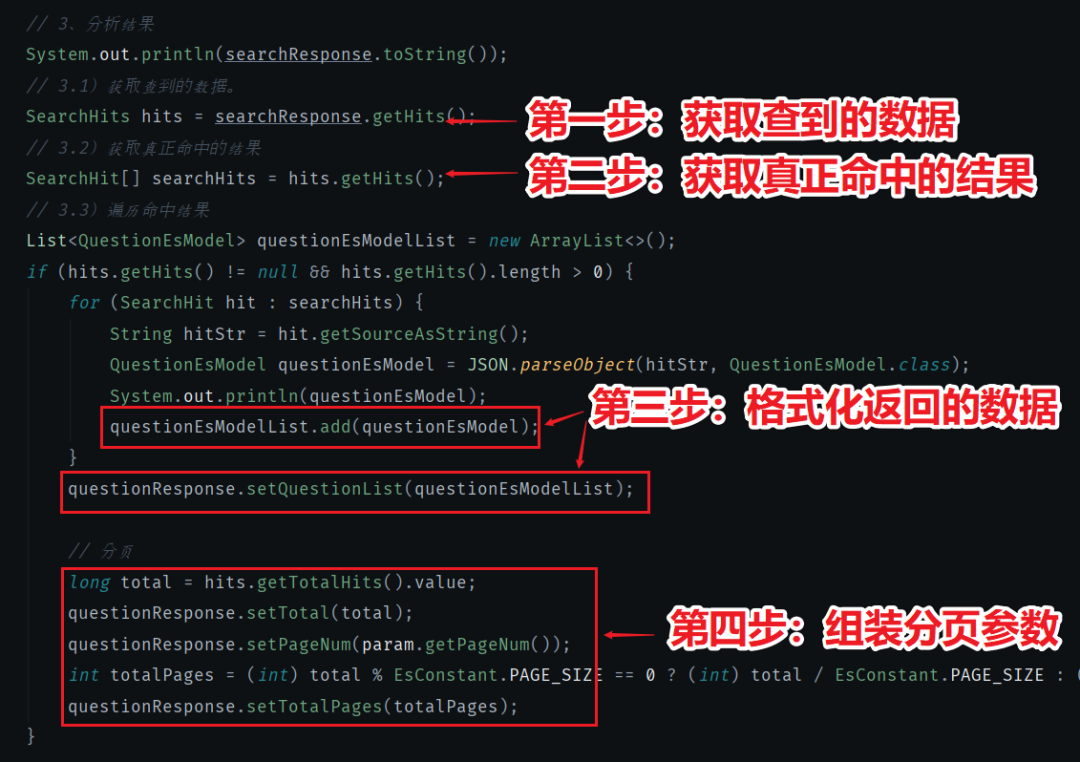
format ES Return results
First step : Get the data .
The second step : Get the real hit result .
The third step : Format the returned data .
Step four : Assemble paging parameters .
4.5 test ES Inquire about
4.5.1 Experiment 1 : test title matching
We now want to verify title Whether the field matches , The request parameters of the transmission keyword = 111, It's a match title = 111 The data of , And there's only one . Page number pageNum I passed it on 1, Indicates that the first page of data is returned . As shown in the figure below :

Test matching title
4.5.2 Experiment two : test answer matching
We now want to verify answer Whether the field matches , The request parameters of the transmission keyword = Test the answer , It's a match title = Data for testing answers , And there's only one , The query is successful . As shown in the figure below :

Test matching answer
4.5.2 Experiment three : test id matching
We want to match the topic now id Words , Request parameters need to be sent id, and id It's an exact match . in addition id and keyword It's Union , So you can't pass it on keyword Field .
Request parameters id = 5, The return result is also id =5 The data of , The query is successful . As shown in the figure below :

test id matching
5、 ... and 、 summary
Through my open source project passjava To explain ES Integration of ,ES Of API Use and test . Explained in great detail how to do each step , I believe that after reading this article , Plus my own practice , I'm sure I can master how to use the front end and back end ES To achieve the purpose of efficient search .
Of course ,ES API There are still many functions that are not practiced in this article , Interested students can go to ES Check and learn from the official website .
Again : The code of this article is hard to debug , Please don't forget to praise and forward ~

- END -
I wrote two PDF, reply Distributed or PDF Next load .
my JVM The column is on the shelves , reply JVM receive


I'm Wukong , Try to be strong , Become a super Saiya !
This article is from WeChat official account. - Wukong chat structure (PassJava666).
If there is any infringement , Please contact the [email protected] Delete .
Participation of this paper “OSC Source creation plan ”, You are welcome to join us , share .
边栏推荐
- 太美的承诺因为太年轻
- keil debug查看变量提示not in scope
- Hongmeng learning notes: creating layouts using XML
- [learn shell programming easily]-5. Plan tasks
- Single lithium battery 3.7V power supply 2x12w stereo boost audio power amplifier IC combination solution
- In depth analysis of Apache bookkeeper series: Part 3 - reading principle
- Pratique de gestion hiérarchique basée sur kubesphere
- CTFHub-Web-信息泄露-目录遍历
- Astronomers may use pulsars to detect merged supermassive black holes
- Uncaught TypeError: Cannot read properties of undefined (reading ‘prototype‘)
猜你喜欢

Want to self-study SCM, do you have any books and boards worth recommending?

活动报名|Apache Pulsar x KubeSphere 在线 Meetup 火热来袭

Cloning and importing DOM nodes
![[2022 dark horse programmer] SQL optimization](/img/68/92ee1ff47428e17aca0feb0e33382e.png)
[2022 dark horse programmer] SQL optimization

Kubernetes core components etcd details

有了 MySQL 为什么要用 NoSQL?

Keil debug view variable prompt not in scope
![Analysis of China's food cold chain logistics, output of quick-frozen noodles and rice products and operation of major enterprises in 2021 [figure]](/img/66/f723dc48a1009a503f521c4d81c306.jpg)
Analysis of China's food cold chain logistics, output of quick-frozen noodles and rice products and operation of major enterprises in 2021 [figure]

Qcom--lk phase I2C interface configuration scheme -i2c6
Navicat防止新建查询误删
随机推荐
mysql 表查询json数据
TorchServe避坑指南
ASP. Net core - Safety of asynclocal in asp NET Core
Analysis on the scale of China's smart airport industry in 2020: there is still a large space for competition in the market [figure]
基於 KubeSphere 的分級管理實踐
Blue Bridge Cup SCM module code (timer) (code + comments)
Coffee script unmatched outent error
集群常用群起脚本
Three laws of go reflection
分布式锁中的王者方案 - Redisson
[ACNOI2022]王校长的构造
アルマ / alchemy girl
Derivation of sin (a+b) =sina*cosb+sinb*cosa
The process of making wooden barrels with 3DMAX software: a three-step process
The significance and proof of weak large number theorem
Baidu map - introductory tutorial
聚类和分类的最基本区别。
Blue Bridge Cup SCM module code (external interrupt) (code + comment)
Cloning and importing DOM nodes
Design of PWM breathing lamp based on FPGA