当前位置:网站首页>Use fill and fill in Matplotlib_ Between fill the blank area between functions
Use fill and fill in Matplotlib_ Between fill the blank area between functions
2022-06-26 04:45:00 【I am a little monster】
Catalog
fill: Used to fill the area between the coordinate axis and the function
fill_between: Used to fill the area between functions
The following is with explicit parameters fill_between An example of :
fill: Used to fill the area between the coordinate axis and the function
import matplotlib.pyplot as plt
import numpy as np
import pandas as pd

x=np.linspace(0,2*np.pi,num=500)
y=np.sin(x)

plt.fill(x,y,color='cornflowerblue',alpha=0.4)
plt.plot(x,y,color='red',alpha=0.8)
plt.plot([x[0],x[-1]],[y[0],y[-1]],color='red',alpha=0.8)

plt.xlim(0,2*np.pi)
plt.ylim(-1.1,1.1)

plt.show()
fill_between: Used to fill the area between functions
import matplotlib.pyplot as plt
import numpy as np
import pandas as pd

x=np.linspace(0,2,500)# Use numpy In the library linspace stay 0 To 2 Take the average of 500 A little bit
y1=np.sin(2*np.pi*x)
y2=1.4*np.sin(3*np.pi*x)# Draw... Separately y1 and y2 Images

fig,ax=plt.subplots(3,1,sharex='all')# This is a 3 That's ok 1 Sharing of columns x Grid layout subarea of the axis
plt.xlim(0,2)# Set up x Axis range

ax[0].fill_between(x,0,y1,color='red',alpha=0.5)# The first subgraph curve y1 and y=0 The area between is filled with red
ax[0].set_ylim(-1.2,1.2)# Set up y Axis range

ax[1].fill_between(x,y2,1.1,color='blue',alpha=0.5)#y2 and y=1.1 The area between them is filled with blue , Transparency is 0.5
ax[1].set_ylim(-1.5,1.5)

ax[2].fill_between(x,y1,y2,color='blue',alpha=0.3) #y1 and y2 The area between them is filled with blue , Transparency is 0.3
ax[2].set_ylim(-1.5,1.5)

plt.show()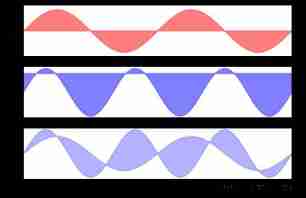
The following is with explicit parameters fill_between An example of :
import matplotlib.pyplot as plt
import numpy as np
import pandas as pd

x=np.linspace(0,2,500)
y1=np.sin(2*np.pi*x)
y2=1.4*np.sin(3*np.pi*x)

fig=plt.figure(figsize=(12,6))# Specifies that the size of the drawing board is 12:6
ax=fig.add_subplot(111)# Add canvas

ax.plot(x,y1,color='black')# Draw images separately
ax.plot(x,y2,color='red')
ax.set_xlim(0,2) Set up x The scope of the shaft

#where Specified scope ,interpolate Set to True, You can assign a color to the area near the intersection of the curve , There is no change after I adjust this parameter
ax.fill_between(x,y1,y2,where=y1<=y2,interpolate=True,facecolor='cornflowerblue',alpha=0.7)
ax.fill_between(x,y2,y1,where=y1>=y2,interpolate=True,facecolor='darkred',alpha=0.7)

plt.show()
import matplotlib.pyplot as plt
import numpy as np
import pandas as pd

fig=plt.figure()
ax=fig.add_subplot(111)

y=np.linspace(0,2,500)
x1=np.sin(2*np.pi*y)
x2=1.4*np.sin(3*np.pi*y)

ax.plot(x1,y,color='k',ls=':',lw=2)# Set the line style to dashed line , Width is 2
ax.plot(x2,y,color='k')

ax.fill_betweenx(y,x2,x1,where=x1<=x2,interpolate=True,facecolor='cornflowerblue',alpha=0.7)
ax.fill_betweenx(y,x2,x1,where=x1>=x2,interpolate=True,facecolor='darkred',alpha=0.7)
ax.set_xlim(-1.5,1.5)
ax.set_ylim(0,2)
ax.grid(ls=':',lw=1,color='gray',alpha=0.5)
plt.show()
边栏推荐
- SSH password free login, my server password free login to the other server, the other server password free login to your server
- How to use the configured slave data source for the scheduled task configuration class scheduleconfig
- Multipass中文文档-与实例共享数据
- Solution to composer error could not find package
- 排序查询
- Guide de la pompe de données Oracle
- Rsync common error messages (common errors on the window)
- 条件查询
- How to carry out word-of-mouth marketing for enterprises' products and services? Can word of mouth marketing be done on behalf of others?
- Comment enregistrer une image dans une applet Wechat
猜你喜欢

Realize video call and interactive live broadcast in the applet

2021-02-07
![[H5 development] 03- take you hand in hand to improve H5 development - single submission vs batch submission with a common interface](/img/37/84b7d59818e854dac71d6f06700cde.jpg)
[H5 development] 03- take you hand in hand to improve H5 development - single submission vs batch submission with a common interface
![Fastadmin always prompts sqlstate[23000]: integrity constraint violation: 1052 column 'ID' in order clause is am](/img/71/ed3b2ca9e6d4afd2dae3c601b3a75b.jpg)
Fastadmin always prompts sqlstate[23000]: integrity constraint violation: 1052 column 'ID' in order clause is am
#微信小程序# 在小程序里面退出退出小程序(navigator以及API--wx.exitMiniProgram)

修改Oracle连接数
1.20 learning summary

1.24 learning summary

Essential foundation of programming - Summary of written interview examination sites - computer network (1) overview
Rsync common error messages (common errors on the window)
随机推荐
基础查询
Text horizontal alignment attribute text align and element vertical alignment attribute vertical align
#微信小程序# 在小程序里面退出退出小程序(navigator以及API--wx.exitMiniProgram)
PHP has the problem of using strtotime to obtain time in months and months [original]
BACK-OFF RESTARTING FAILED CONTAINER 的解决方法
Numpy index and slice
PSIM software learning ---08 call of C program block
Notes on enterprise wechat development [original]
2021/11/6-burpsuit packet capturing and web page source code modification
TP5 distinct method paging problem
PIP batch complete uninstall package
PHP syntax summary
Multipass中文文档-使用实例命令别名
Stm8 MCU ADC sampling function is triggered by timer
Multipass中文文档-使用Packer打包Multipass镜像
LISP programming language
Multipass Chinese document - share data with instances
Zhimeng CMS will file a lawsuit against infringing websites
Modify the number of Oracle connections
微信小程序保存圖片的方法