当前位置:网站首页>PSIM software learning ---08 call of C program block
PSIM software learning ---08 call of C program block
2022-06-26 04:39:00 【Embedded @hxydj】
stay PSIM Circuit simulation , If a function cannot be built using the circuit component model in the component library , have access to C Program element , To write C Program code implementation . among C Language modules include simplification C Modules and common C modular .C The application method of program module is as follows .
simplify C modular
Call simplification C The steps of the module are . Open the menu bar Elements — Other — Function Blocks — Simplified C block.


Now open a C modular , take C The module is placed in the circuit diagram .
Double click this C The module opens it .
At this point, you can write in this blank area C Code. , Writing C Before code , First, briefly introduce the meaning of each attribute in this interface .
Name : Used to set C Module name .
Input: Used to set the number of input pins , Input pin is used for x Named after the , such as x1、x2、x3 … xn.
Output: Used to set the number of output pins , For output pins y Named after the , such as y1、y2、y3 … yn.
Writing C Code time , There are also two default variables that can be used t and delt,t Refers to the total time the system is running ,delt It refers to the time step , That is, how often the system calls C Module once . For example, the running time of the system is 1s, The time step is 0.0001s, that 1s The clock system will call c modular 1000 Time . This t and delt The value of is oneself in Simulation Control Set in the .
Next write C Code .
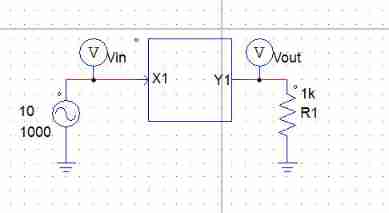
Here, the input port and output port are respectively set to one , C The code is also very simple , Set the output signal to twice the input signal . Next, build a simple test circuit .
Enter an amplitude of 10 v , The frequency is 1000 The sine wave signal of , Then measure the output signal . The output waveform is as follows :
It can also be seen from the waveform that the output waveform is the input waveform 2 times .
For time C Modules look more intuitive , You can edit the shape drawing of components . Double-click to open C modular , And then choose Edit Image.
A graphic editing window will open , In this window, you can edit the component shape by yourself .
After editing, see the following :
Close the graphic editing window after editing , At this point, you can see in the simulation circuit diagram C The input / output port of the module will have a text prompt .
Universal C modular
Call general C The steps of the module are . Open the menu bar Elements — Other — Function Blocks — C block.
Universal C Modules and simplicity C The use of modules is basically the same , General C The module is placed in the circuit , Then double click to open .
And simple C Module comparison , Universal C A function type option is added to the module . The functions of these function types are concluded below .
Variable / Function definitions : Define the header file or variable required in the code .
OpenSimUser Fcn: Call the code here once to set the system initialization at the beginning of simulation .
**RunSimUser Fcn:** Here are the specific execution functions C Code . In the simulation process , Each time step calls the code in the secondary module .
CloseSimUser Fcn: Call the code here once when the simulation exits .
And simple C Module comparison , Universal C The module adds the code before the function is run and after the function is executed . It is equivalent to adding an initialization and collection function to the function .
Do the same for C Module code . Here, the input and output ports are set to one , The function of the code is that the output signal is twice the input signal . The code is written in RunSimUser Fcn Inside the module . The other three modules don't matter , Just use the default code .
The I / O port here is not x and y 了 , It is in and out Of Array .
The current module is a function , All parameters are passed in from the function entry . About the detailed usage of this module , Can point Help Button to view the help document of the system .
After writing the code , You can choose Edit Image Button , Yes C Edit the graphic symbols of the module .
Finally, build a simple circuit to test .
The simulation waveform is as follows :
It can be seen from the waveform that , The output signal is the same as the input signal 2 times .
From the above two tests, we can see , simplify C Modules and common C The use of modules is basically the same . But here we should pay attention to one thing , Every C Variables in a block are not valid for other C It is invisible to the program block . take C The value in the block is passed to another C The only way to program a block or other circuit , It is through C The input and output ports of the program block . When C The output of a block is directly connected to another C When inputting a program block , Simulation software runtime , First run the 1 individual C Block , Then run the second C Block .
Finally, a slightly more complex example is used to demonstrate C Usage of modules .


A sine wave generator is used to generate a frequency of 60Hz, The range is 1V The sine wave of . Then use the system's own effective value calculation tool to calculate the effective value of the current sine wave . Send this sine wave to a C Module , adopt C Code to calculate the effective value of the current sine wave . Finally, compare whether the effective values calculated respectively are the same .
Compiling C The code is as follows :
C The code implementation idea is : When the system uses this module at each time step , The sum of the squares of the current input voltage is accumulated , When a period of sampling is completed , Average the cumulative sum , And then we'll make a prescription .
The simulation waveform is as follows :
It can be seen from the simulation waveform that , System native RMS The results calculated by the value calculation tool and C The result calculated by the module is the same .
边栏推荐
猜你喜欢

1.11 learning summary

pip 批量完全卸载包

TP5 distinct method paging problem

小程序中实现视频通话及互动直播功能
![[Qunhui] Internet access + custom port](/img/7d/c00caeade209a48c8f44a4fecb59d5.jpg)
[Qunhui] Internet access + custom port

Rdkit chemical formula molecular formula search

企业的产品服务怎么进行口碑营销?口碑营销可以找人代做吗?

Yapi cross domain request plug-in installation

Text horizontal alignment attribute text align and element vertical alignment attribute vertical align
How to carry out word-of-mouth marketing for enterprises' products and services? Can word of mouth marketing be done on behalf of others?
随机推荐
Essential foundation of programming - Summary of written interview examination sites - computer network (1) overview
Nabicat连接:本地Mysql&&云服务Mysql以及报错
Notes on enterprise wechat development [original]
Numpy index and slice
An unexpected attempt (Imperial CMS list template filters spaces and newlines in smalltext introduction)
Install Damon database
Install dbeaver and connect Clickhouse
Simple use of redis in laravel
Motivational skills for achieving goals
digital image processing
numpy 通用函数
"Eight hundred"
Text horizontal alignment attribute text align and element vertical alignment attribute vertical align
防撤回测试记录
What is the best way to store chat messages in a database? [Close] - best way to store chat messages in a database? [closed]
35 year old programmer fired Luna millions of assets and returned to zero in three days. Netizen: it's the same as gambling
Multipass中文文档-设置驱动
SixTool-多功能多合一代挂助手源码
Modify the number of Oracle connections
Database design (I)