当前位置:网站首页>Kotlin collaboration - flow+room database
Kotlin collaboration - flow+room database
2022-06-13 06:26:00 【m0_ forty-seven million nine hundred and fourteen thousand one 】
Import dependence :
implementation "androidx.lifecycle:lifecycle-livedata-ktx:2.2.0"
def room_version = "2.3.0"
implementation "androidx.room:room-runtime:$room_version"
implementation "androidx.room:room-ktx:$room_version"
kapt "androidx.room:room-compiler:$room_version"
implementation 'androidx.recyclerview:recyclerview:1.2.1'
/**
* entities A table stored in a database , But many
* version Version number of the database
* exportSchema Whether to generate json file , Used to view the structure of the database
*/
@Database(entities = [User::class],version = 1,exportSchema = false)
abstract class AppDataBase : RoomDatabase() {
abstract fun UserDao():UserDao //Dao object
companion object{
private var instance:AppDataBase?=null
fun getInstance(context:Context):AppDataBase{
// Object lock
return instance?: synchronized(this) {
// Context Database name
Room.databaseBuilder(context,AppDataBase::class.java,"user_db")
.build().also { instance=it }
}
}
}
}database dataBase file
@Dao //Dao  Class declaration
interface UserDao  {
    // Here is a conflict ,  If two records are the same, they will be replaced
    @Insert(onConflict = OnConflictStrategy.REPLACE)
    suspend fun insert(user: User)

    // There is no need to suspend ( return flow or livedata No need )
    @Query("SELECT * FROM user")
    fun getAll(): Flow<List<User>>
}
database Dao class
//Room Entity class declaration
@Entity
data class User(
        // Primary key
        @PrimaryKey val uid:Int,
        // Field names stored in the database
        @ColumnInfo(name = "first_name")val  firstName:String,
        // Field names stored in the database
        @ColumnInfo(name = "last_name") val lastName :String
)
Database entity class
class UserViewModel(app: Application) :AndroidViewModel(app) {

    fun insert(uid:String,firstName:String,lastName:String){
            // coroutines
            viewModelScope.launch {
                AppDataBase.getInstance(getApplication()).UserDao()
                        // insert data
                    .insert(User(uid.toInt(),firstName,lastName))
                Log.d("ning","insert user:$uid")
            }
    }

    fun getAll(): Flow<List<User>>{
        return AppDataBase.getInstance(getApplication())
            .UserDao().getAll().catch {
                e-> // There is an abnormality in the upstream , Under the guarantee of not breaking flow Where principles are involved, it is recommended to use catch function
                e.printStackTrace()
            }.flowOn(Dispatchers.IO)// Switching thread
    }
}
class BindingViewHolder (val binding:ViewBinding):RecyclerView.ViewHolder(binding.root){
}Packaged ViewHolder
class UserAdapter(private val context: Context) : RecyclerView.Adapter<BindingViewHolder>() {
    private val data=ArrayList<User>()

    fun setData(data:List<User>){
        this.data.clear();
        this.data.addAll(data)
        notifyDataSetChanged()
    }

    override fun onCreateViewHolder(parent: ViewGroup, viewType: Int): BindingViewHolder {
        val inflate = ItemUserBinding.inflate(LayoutInflater.from(context), parent, false)
        return BindingViewHolder(inflate)
    }

    override fun onBindViewHolder(holder: BindingViewHolder, position: Int) {
       val item=data[position]
        val itemUserBinding = holder.binding as ItemUserBinding
        itemUserBinding.text.text="${item.uid},${item.firstName},${item.lastName}"
    }

    override fun getItemCount(): Int {
       return data?.size
    }
}
class UserFragment :Fragment() {
// Here you create an object directly
private val viewModel by viewModels<UserViewModel> ()
private val mBinding: FragmentUserBinding by lazy {
FragmentUserBinding.inflate(layoutInflater)
}
override fun onCreateView(
inflater: LayoutInflater,
container: ViewGroup?,
savedInstanceState: Bundle?
): View? {
return mBinding.root
}
override fun onActivityCreated(savedInstanceState: Bundle?) {
super.onActivityCreated(savedInstanceState)
mBinding.apply {
btnAddUser.setOnClickListener {
viewModel.insert(
etUserId.text.toString(),
etFirstName.text.toString(),
etLastName.text.toString()
)
}
}
context?.also {
val adapter=UserAdapter(it)
mBinding.recyclerView.adapter=adapter
// coroutines
lifecycleScope.launchWhenCreated {
//flow Take out
viewModel.getAll().collect {
value ->
adapter.setData(value)
}
}
}
}
}<layout xmlns:android="http://schemas.android.com/apk/res/android"
xmlns:app="http://schemas.android.com/apk/res-auto"
xmlns:tools="http://schemas.android.com/tools">
<data>
</data>
<LinearLayout
android:layout_width="match_parent"
android:layout_height="match_parent"
android:orientation="vertical"
tools:context=".fragment.UserFragment"
>
<LinearLayout
android:layout_width="match_parent"
android:layout_height="wrap_content"
android:orientation="vertical"
android:padding="5dip">
<LinearLayout
android:layout_width="match_parent"
android:layout_height="wrap_content"
android:orientation="horizontal">
<EditText
android:id="@+id/et_user_id"
android:layout_width="0dip"
android:layout_height="wrap_content"
android:layout_weight="1"
android:hint="USER ID" />
<EditText
android:id="@+id/et_first_name"
android:layout_width="0dip"
android:layout_height="wrap_content"
android:layout_weight="1"
android:hint="FIRST NAME" />
<EditText
android:id="@+id/et_last_name"
android:layout_width="0dip"
android:layout_height="wrap_content"
android:layout_weight="1"
android:hint="LAST NAME" />
</LinearLayout>
<Button
android:id="@+id/btn_add_user"
android:layout_width="match_parent"
android:layout_height="wrap_content"
android:text="ADD USER" />
</LinearLayout>
<androidx.recyclerview.widget.RecyclerView
android:id="@+id/recyclerView"
android:layout_width="match_parent"
android:layout_height="match_parent"
android:orientation="vertical"
app:layoutManager="androidx.recyclerview.widget.LinearLayoutManager" />
</LinearLayout>
</layout>This is the Lord XML file
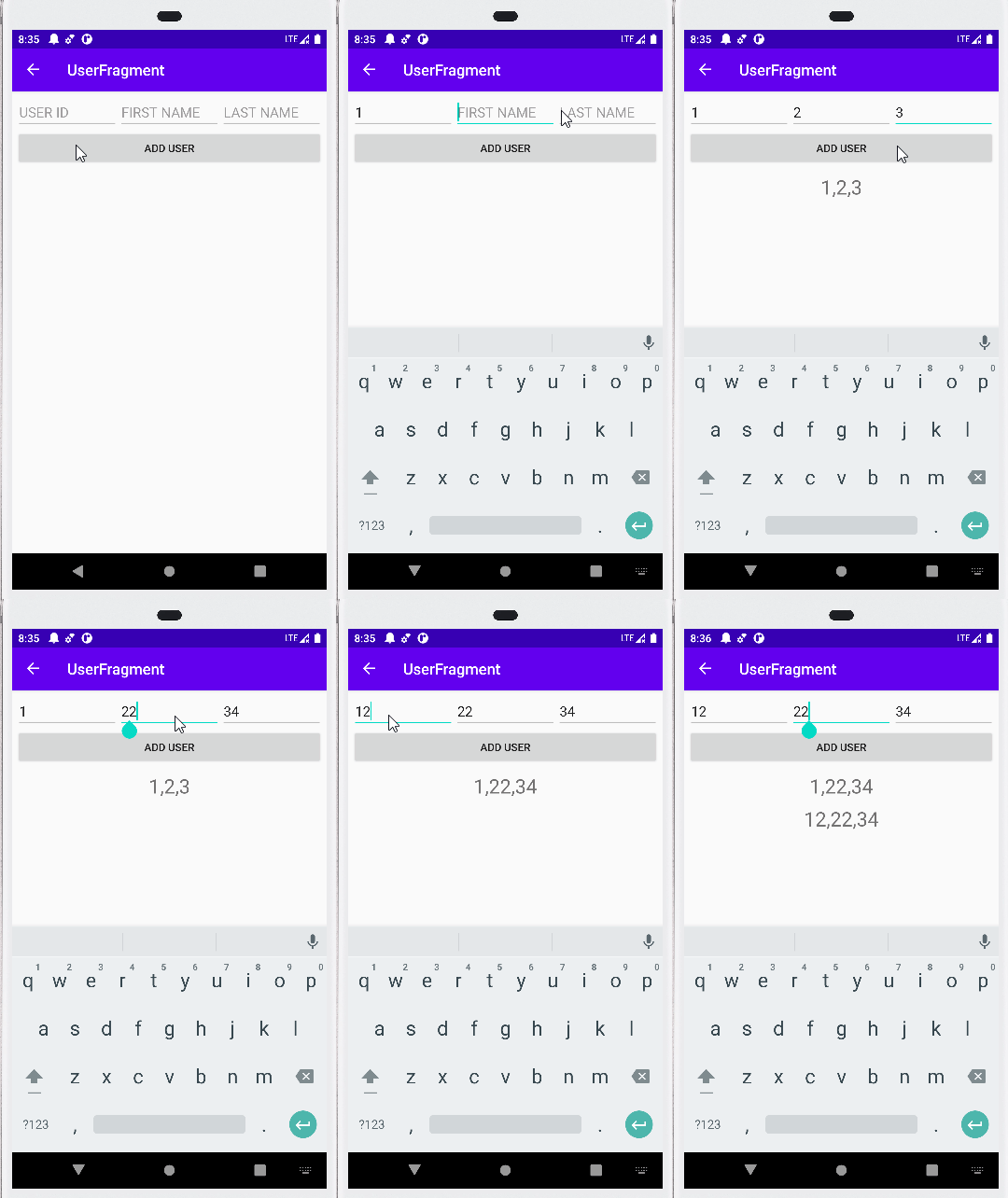
Effect display :
边栏推荐
- Fragment lifecycle
- 自定义View —— 可伸展的CollapsExpendView
- Wechat applet jumps to H5 page with parameters
- Uniapp hides the scroll bar of scroll view
- Echart line chart: different colors are displayed when the names of multiple line charts are the same
- 端午安康,使用祝福话语生成词云吧
- Applet disable native top
- [written examination questions of meituan]
- JS convert text to language for playback
- JS to realize bidirectional data binding
猜你喜欢

Failed to extract manifest from apk: processexception:%1 is not a valid Win32 Application.

RN Metro packaging process and sentry code monitoring

Solutions to common problems in small program development

Explication détaillée du triangle Yang hui

欧姆龙平替国产大货—JY-V640半导体晶元盒读写器
Not in the following list of legal domain names, wechat applet solution

Solution: vscode open file will always overwrite the last opened label

JetPack - - - LifeCycle、ViewModel、LiveData

Dart class inherits and implements mixed operators
Detailed explanation of Yanghui triangle

随机推荐
[solution] camunda deployment process should point to a running platform rest API
Thread pool learning
Failed to extract manifest from apk: processexception:%1 is not a valid Win32 Application.
Applet pull-up loading data
MFS详解(七)——MFS客户端与web监控安装配置
Echart line chart: different colors are displayed when the names of multiple line charts are the same
Alibaba cloud OSS file download cannot be resumed at a breakpoint
JetPack - - - LifeCycle、ViewModel、LiveData
PHP redis makes high burst spike
SSM框架整合--->简单后台管理
Echart histogram: stacked histogram displays value
Echart折线图:当多条折线图的name一样时也显示不同的颜色
Wechat applet (function transfer parameters, transfer multiple parameters, page Jump)
【新手上路常见问答】一步一步理解程序设计
Wechat applet development (requesting background data and encapsulating request function)
Kotlin basic definition class, initialization and inheritance
免费录屏软件Captura下载安装
杨辉三角形详解
El form form verification
RFID process management solution for electroplating fixture