当前位置:网站首页>Geth installation
Geth installation
2022-07-29 00:16:00 【LEVI_ one hundred and four】
Combined with various online articles , After more than ten hours of failure , During this period, the virtual machine can't be turned on , But finally successfully installed geth. Next I will show the problems and solutions I have encountered
Catalog
2. Installation of basic tools
5. Firewall and network time synchronization
7. All environment configurations
1. System environment
Windows10,Linux,Centos7.6
2. Installation of basic tools
Download and install git、vim、gcc-c++、ntp Components 、nodejs As well as add epel Third party installation source . These tools are described below :
The following are the things that need to be prepared for various methods on the network
yum install yum*: Install the tool kit
Cloning tool :yum install git
- git: Install the relevant components , Download and install all kinds of open source code and tools ;
- vim: Text editing tools , replace vi;
- gcc-c++:c/c++ Compiler tools , be used for golang Lower part c Library compilation and truffle Component compilation
- ntp: Network clock synchronization component ;Ethereum Of rpc The network needs time synchronization ;
- nodejs:ethereum The front-end development JavaScript Package management software
- epel: Third party Internet linux Install package source
Execute the following installation command to download and install the above 6 Something :
yum update -y && yum install git bzip2 gcc-c++ ntp epel-release nodejs -ysummary : It may take a little longer to download , But it's OK after downloading , There is no need to operate other things
3. install cmake
Smart contract compilation requires cmake
- wget https://cmake.org/files/v3.15/cmake-3.15.2.tar.gz
- tar -zxvf cmake-3.15.2.tar.gz
- mv cmake-3.15.2 /usr/local/
- cd /usr/local/cmake-3.15.2
- ./bootstrap
- gmake
- gmake install
Configure environment variables
- echo "export PATH=/usr/local/cmake-3.15.2/bin:$PATH" >> /etc/profile
- source /etc/profile
- cmake -version

summary : I install cmake It was still very smooth
4. install Golang
- wget https://storage.googleapis.com/golang/go1.10.2.linux-amd64.tar.gz
- tar -C /usr/local -zxzf go1.10.2.linux-amd64.tar.gz
- I can't install through the first two points go, And the lower version go It may not be compatible
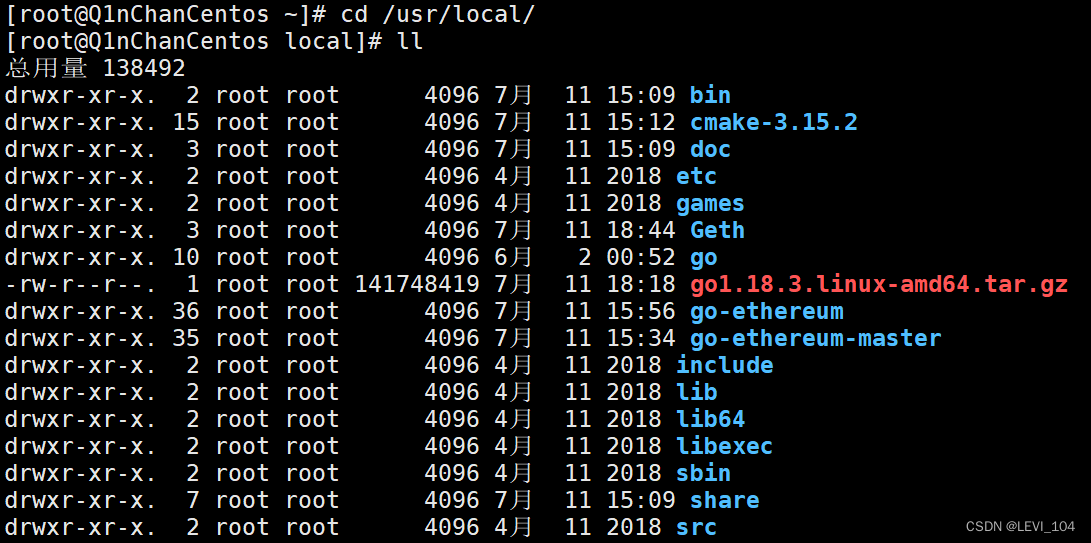
- So I found the latest version on the Internet go:go1.18.3.linux-amd64.tar.gz
- Then install it in /usr/local
- echo "export GOROOT=/usr/local/go" >> /etc/profile
- echo "export PATH=/usr/local/go/bin:$PATH" >> /etc/profile
- source /etc/profile
Clone and compile go-ethereum
- cd /usr/local
- git clone https://github.com/ethereum/go-ethereum.git
- I have tried this many times , No way git clone cloned ( Only once , Network problems ?)

- therefore , I am here github Download directly from the warehouse , adopt Xftp7 to centos7.6
- GitHub - ethereum/go-ethereum: Official Go implementation of the Ethereum protocol

- Put this ZIP Download and unzip the file , Put it in /usr/local/, It's documents go-ethereum-master
- go-ethereum The file is so many attempts git clone Success comes at once ,go-ethereum-master and go-ethereum The documents inside are exactly the same
- cd go-ethereum/
- make all
- I can't succeed at this step , Many times , It takes the longest time , Encountered various problems , One is as follows :

- The reason for the failure :GitHub Warehouse ,go-ethereum-build in , No, env.sh The file ! If any , Change to , hold dos The order was changed to unix after , And it's going to work . because .sh It's a script , It will help us install , And this script is missing . Then the default is dos The order can't be in Linux perform , So it's going to be unix Talent
- therefore , I can download it directly on the Internet geth The latest version . Address :Downloads | Go Ethereum
- And then again /usr/local/Geth place , Unzip and run ok

- echo "export PATH=$PATH:/usr/local/go-ethereum/build/bin" >> /etc/profile
- source /etc/profile
- geth version verification


5. Firewall and network time synchronization
Turn on network time synchronization
- systemctl enable ntpd
- systemctl start ntpd
Turn on the firewall : Turn on the firewall , open Geth The use of 8087 and 30303 port
- systemctl start firewalld
- firewall-cmd --zone=public --add-port=8087/tcp --permanent
- firewall-cmd --zone=public --add-port=30303/tcp --permanent
6. Get into geth

Get into geth The file of is shown in the figure , At first, executing permissions is not 777, Need modification :chmod 777 geth. perform : Direct input geth. It's fine too :geth --datadir ./data. Will create a data Folder , Used to store our data . The execution is as follows :

7. All environment configurations

边栏推荐
- Data warehouse: Doris' application practice in meituan
- Detailed explanation of the usage of exists in MySQL
- NPM replace the latest Taobao image
- 熊市下PLATO如何通过Elephant Swap,获得溢价收益?
- Application of Devops in Internet of things solutions
- The failure rate is as high as 80%. How to correctly complete the strategic planning of digital transformation?
- Concurrency in go
- 实时数仓:美团基于Flink的实时数仓建设实施
- Intelligent trash can (VII) -- Introduction and use of sg90 steering gear (Pico implementation of raspberry pie)
- [CNN] Why is the convolution kernel size of CNN usually odd
猜你喜欢

How NAT configures address translation
MySQL安装配置教程(超级详细、保姆级)

Doip test development practice
feign调用不通问题,JSON parse error Illegal character ((CTRL-CHAR, code 31)) only regular white space (r

Intelligent trash can (VII) -- Introduction and use of sg90 steering gear (Pico implementation of raspberry pie)

JS高级 之 ES6~ES13 新特性

基于 FPGA 实现数字时钟详细原理讲解及验证结果

Sword finger offer 55 - I. depth of binary tree
【微服务】Nacos集群搭建以及加载文件配置

Leetcode64. Minimum path sum
随机推荐
Connection pool - return connection details (Part 2)
Oracle超全SQL,细节狂魔
@Transactional 注解使用详解
Leetcode61. rotating linked list
软件设计师的错题汇总
curl (7) Failed connect to localhost8080; Connection refused
研发效能的道法术器
Android studio连接MySQL并完成简单的登录注册功能
1-8 basic use of props
Develop effective Tao spell
Real time data warehouse: meituan's implementation of real-time data warehouse construction based on Flink
Detailed explanation of 9 common reasons for MySQL index failure
DoIP测试开发实践
ZABBIX 5.0 uses its own redis template for monitoring
1-7 solve the problem of this pointing of methods in classes
IDEA2021.2安装与配置(持续更新)
Opencv macro definition
Have passed hcip and joined the company of your choice, and share the learning experience and experience of Huawei certification
Okaleido ecological core equity Oka, all in fusion mining mode
【C】逆序字符串(俩种递归思路)