当前位置:网站首页>Apache Doris real-time data analysis nanny level tutorial
Apache Doris real-time data analysis nanny level tutorial
2022-06-22 01:39:00 【Import\u bigdata】
Click on the above In blue , choice “ Set to star ”
reply " interview " Get more surprises

《 Big data interview improves the private education training camp 6 Low key enrollment open ~》
Doris install
Cluster deployment
Official website download address :
https://doris.apache.org/zh-CN/downloads/downloads.html

Select binary Download , Download the source code and compile it yourself . decompression doris file :
tar -zxvf apache-doris-1.0.0-incubating-bin.tar.gz -C /opt/module/
Cluster planning

FE Deploy
Modify the configuration file vim conf/fe.conf
meta_dir = /opt/module/doris-meta

Distribute storage paths and data in the cluster FE The configuration file , start-up FE.
#  establish meta Folder storage path
mkdir /opt/module/doris-meta
#  All three machines have to perform
sh bin/start_fe.sh --daemon
BE Deploy
Modify the configuration file vim conf/be.conf
# storage_root_path Configure storage directory , It can be used ; To specify multiple directories , Each directory can be followed by a comma , Specify the default size GB
storage_root_path = /opt/module/doris_storage1,10;/opt/module/doris_storage2
Distribute storage paths and data in the cluster BE The configuration file , start-up BE
#  establish storage_root_path Storage path
mkdir /opt/module/doris_storage1
mkdir /opt/module/doris_storage2
#  All three machines have to perform
sh bin/start_be.sh --daemon
visit Doris PE node
doris have access to mysql Client access , If not installed , You need to install mysql-client.
#  The first access does not require a password , You can set your own password
mysql -hdoris1 -P 9030 -uroot
#  Change Password
set password for 'root' = password('root');
add to BE node
adopt mysql After the client logs in , add to be node ,port by be Upper heartbeat_service_port port , Default 9050
mysql> ALTER SYSTEM ADD BACKEND "hadoop102:9050";
mysql> ALTER SYSTEM ADD BACKEND "hadoop103:9050";
mysql> ALTER SYSTEM ADD BACKEND "hadoop104:9050";
adopt mysql client , testing be Node status ,alive It has to be for true
mysql> SHOW PROC '/backends';
BROKER Deploy
Optional , Non mandatory deployment , start-up BROKER
#  All three clusters should be started
sh bin/start_broker.sh --daemon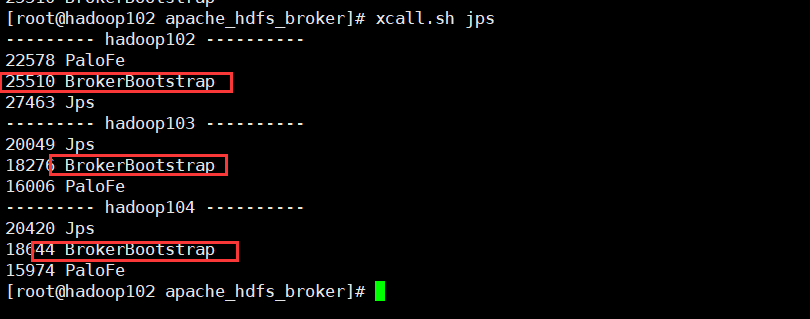
Use mysql Client access pe, add to broker node
mysql> ALTER SYSTEM ADD BROKER broker_name "hadoop102:8000","hadoop103:8000","hadoop104:8000"; see broker state
mysql> SHOW PROC "/brokers";Expansion shrinkage capacity
Doris It is very convenient to expand and shrink FE、BE、Broker example . Monitoring through page access , visit 8030, Account is root, The password is blank by default, and there is no need to fill in , Unless the password is set above, use the password to log in http://hadoop102:8030

FE Expand and shrink
FE The expansion and contraction process of nodes , Does not affect the current system operation .
Use mysql After logging in to the client , have access to sql Command view FE state , At present, there is only one FE.
mysql> SHOW PROC '/frontends';
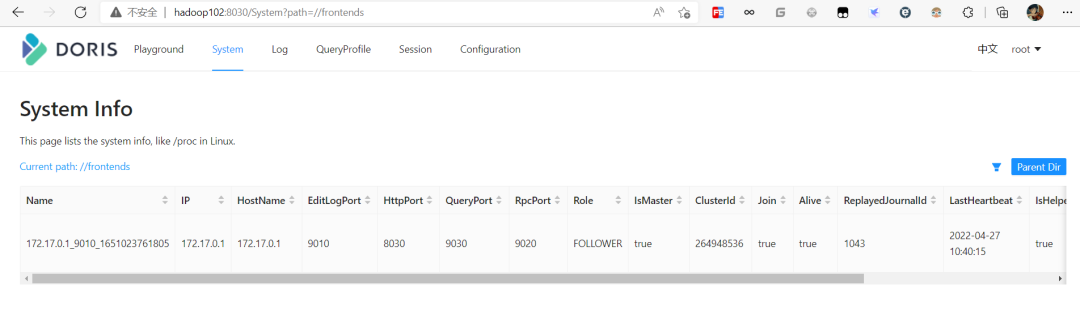
increase FE node ,FE It is divided into Leader,Follower and Observer Three roles . By default, a cluster can only have one Leader, There can be multiple Follower and Observer. among Leader and Follower Form a Paxos Select group , If Leader Downtime , Then the rest Follower It's going to be Leader, Guarantee HA.Observer Is responsible for synchronization Leader Data does not participate in the election . If only one is deployed FE, be FE The default is Leader
The first one to start FE Automatically become Leader. On this basis , You can add several Follower and Observer. add to Follower or Observer. Use mysql-client Connect to a started FE, And implement : stay doris2 Deploy Follower,doris3 Upper Department Observer
#  Just execute one of them , The comments are as follows
# follower/observer_host IP Node location
# edit_log_port fe.conf You can find... In the configuration file

# ALTER SYSTEM ADD FOLLOWER "follower_host:edit_log_port";
ALTER SYSTEM ADD FOLLOWER "hadoop103:9010";
# ALTER SYSTEM ADD OBSERVER "observer_host:edit_log_port";
ALTER SYSTEM ADD OBSERVER "hadoop104:9010";
You need to restart the configuration node FE, And add the following parameters to start
# --helper Parameter assignment leader Address and port number
sh bin/start_fe.sh --helper hadoop102:9010 --daemon
sh bin/start_fe.sh --helper hadoop102:9010 --daemon
After all starts , Re pass mysql client , see FE condition
mysql> SHOW PROC '/frontends';
Use the following command to delete the corresponding FE node ALTER SYSTEM DROP FOLLOWER[OBSERVER] "fe_host:edit_log_port"; Delete Follower FE when , Ensure that the final remaining Follower( Include Leader) Nodes are odd
ALTER SYSTEM DROP FOLLOWER "hadoop103:9010";
ALTER SYSTEM DROP OBSERVER "hadoop104:9010";
BE Expand and shrink
increase BE node , Just like the installation above mysql client , Use ALTER SYSTEM ADD BACKEND
Delete BE node , Use ALTER SYSTEM DROP BACKEND "be_host:be_heartbeat_service_port";
Please check the official website for specific documents .
Doris Operation manual
Create user
#  Connect doris
mysql -hhadoop102 -P 9030 -uroot
#  Create user
mysql> create user 'test' identified by 'test';
#  Quit using test To log in
mysql> exit;
mysql -hhadoop102 -P 9030 -utest -ptest
Table operations
#  Create database
mysql> create database test_db;
#  give test user test Library permissions
mysql> grant all  on test_dn to test;
#  Using a database
mysql> use test_db;
Partition table
Partition tables are divided into single partition and composite partition
Single partition table , Create a sheet student surface . The barrels are listed as id, The number of barrels is 10, Replications for 1
CREATE TABLE student
(
id INT,
name VARCHAR(50),
age INT,
count  BIGINT SUM DEFAULT '0'
)
AGGREGATE KEY (id,name,age)
DISTRIBUTED BY HASH(id) buckets 10
PROPERTIES("replication_num" = "1");
Composite partition table , The first level is called Partition, Zoning . The user specifies a dimension column as the partition column ( Currently, only integer and time type columns are supported ), And specify the value range of each partition . The second level is called Distribution, It's divided into barrels . The user can specify one or more dimension columns and bucket number for HASH Distribution
# establish student2 surface , Use dt Fields as partition Columns , And create 3 Partition (s) , Namely :
#P202007  The range value is less than 2020-08-01 The data of
#P202008  The range value is 2020-08-01 To 2020-08-31 The data of
#P202009  The range value is 2020-09-01 To 2020-09-30 The data of
CREATE TABLE student2
(
dt DATE,
id INT,
name VARCHAR(50),
age INT,
count  BIGINT SUM DEFAULT '0'
)
AGGREGATE KEY (dt,id,name,age)
PARTITION BY RANGE(dt)
(
  PARTITION p202007 VALUES LESS THAN ('2020-08-01'),
  PARTITION p202008 VALUES LESS THAN ('2020-09-01'),
  PARTITION p202009 VALUES LESS THAN ('2020-10-01')
)
DISTRIBUTED BY HASH(id) buckets 10
PROPERTIES("replication_num" = "1");
Composite partition table , The first level is called Partition, Zoning . The user specifies a dimension column as the partition column ( Currently, only integer and time type columns are supported ), And specify the value range of each partition . The second level is called Distribution, It's divided into barrels . The user can specify one or more dimension columns and bucket number for HASH Distribution .
# establish student2 surface , Use dt Fields as partition Columns , And create 3 Partition (s) , Namely :
#P202007  The range value is less than 2020-08-01 The data of
#P202008  The range value is 2020-08-01 To 2020-08-31 The data of
#P202009  The range value is 2020-09-01 To 2020-09-30 The data of
CREATE TABLE student2
(
dt DATE,
id INT,
name VARCHAR(50),
age INT,
count  BIGINT SUM DEFAULT '0'
)
AGGREGATE KEY (dt,id,name,age)
PARTITION BY RANGE(dt)
(
  PARTITION p202007 VALUES LESS THAN ('2020-08-01'),
  PARTITION p202008 VALUES LESS THAN ('2020-09-01'),
  PARTITION p202009 VALUES LESS THAN ('2020-10-01')
)
DISTRIBUTED BY HASH(id) buckets 10
PROPERTIES("replication_num" = "1");
Data model
AGGREGATE KEY
AGGREGATE KEY Phase at the same time , The old and new records will be aggregated
AGGREGATE KEY Models can aggregate data in advance , It is suitable for reporting and multidimensional business
UNIQUE KEY
UNIQUE KEY Phase at the same time , New records overwrite old records . at present UNIQUE KEY and AGGREGATE KEY Of REPLACE The aggregation method is consistent . It is applicable to businesses with update requirements .
DUPLICATE KEY
Specify only the rank , The same rows are not merged . It is applicable to the analysis business where data does not need to be aggregated in advance
Data import
To adapt to different data import requirements ,Doris The system provides 5 There are two different import methods . Each import method supports different data sources , There are different ways ( asynchronous 、 Sync )
Broker load
Broker load Is an asynchronous way of importing , The data sources supported depend on Broker Data sources supported by the process
The basic principle : After the user submits the import task ,FE(Doris Metadata and scheduling node of the system ) Will generate the corresponding PLAN( Import execution plan ,BE The import plan will be executed to import the input Doris in ) And according to BE(Doris Computing and storage nodes of the system ) The number of and the size of the file , take Plan Give it to more than one BE perform , Every BE Import part of the data .BE In the process of execution, it will start from Broker Pull data , Import the data into the system after conversion . all BE All finished importing , from FE The final decision is whether the import is successful .
Test import HDFS Data to Doris
Write test files , Upload to HDFS.

establish doris surface , Test import
CREATE TABLE student
(
id INT,
name VARCHAR(50),
age INT,
count  BIGINT SUM DEFAULT '0'
)
AGGREGATE KEY (id,name,age)
DISTRIBUTED BY HASH(id) buckets 10
PROPERTIES("replication_num" = "1");
To write diros Import sql, See the official website for more parameters
LOAD LABEL test_db.label1
(
    DATA INFILE("hdfs://bigdata:8020/student")
    INTO TABLE student
    COLUMNS TERMINATED BY ","
    (id,name,age,count)
    SET
    (
        id=id,
        name=name,
        age=age,
        count=count
    )
)
WITH BROKER broker_name
(
    "username"="root"
)
PROPERTIES
(
    "timeout" = "3600"
);
see doris Import status
use test_db;
show load;
Check whether the data import is successful

Routine Load
Routine import (Routine Load) The function provides users with a function of automatically importing data from specified data sources
from Kafka Import data to Doris
establish kafka The theme
kafka-topics.sh --zookeeper bigdata:2181 --create --replication-factor 1 --partitions 1 --topic teststart-up kafka Producer production data
kafka-console-producer.sh --broker-list bigdata:9092 --topic test

#  data format
{"id":"4","name":"czsqhh","age":"18","count":"50"}
stay doris Create corresponding table in
CREATE TABLE kafka_student
(
id INT,
name VARCHAR(50),
age INT,
count  BIGINT SUM DEFAULT '0'
)
AGGREGATE KEY (id,name,age)
DISTRIBUTED BY HASH(id) buckets 10
PROPERTIES("replication_num" = "1");
Create import job ,desired_concurrent_number Specify the degree of parallelism
CREATE ROUTINE LOAD test_db.job1 on kafka_student
PROPERTIES
(
    "desired_concurrent_number"="1",
    "strict_mode"="false",
    "format"="json"
)
FROM KAFKA
(
    "kafka_broker_list"= "bigdata:9092",
    "kafka_topic" = "test",
    "property.group.id" = "test"
);
View job status
SHOW ROUTINE LOAD;
Control operations
STOP ROUTINE LOAD For jobxxx : Stop job
PAUSE ROUTINE LOAD For jobxxx: Stop work
RESUME ROUTINE LOAD For jobxxx: Restart job
Export data
Drois Export data to HDFS
See the official website for other parameters
EXPORT TABLE test_db.student
PARTITION (student)
TO "hdfs://bigdata:8020/doris/student/"
WITH BROKER broker_name
(
    "username" = "root"
);
Doris Code operation
Spark
Introduce dependencies
<dependencies>
    <dependency>
        <groupId>org.apache.spark</groupId>
        <artifactId>spark-core_2.12</artifactId>
        <version>3.0.0</version>
    </dependency>
    <dependency>
        <groupId>org.apache.spark</groupId>
        <artifactId>spark-yarn_2.12</artifactId>
        <version>3.0.0</version>
    </dependency>
    <dependency>
        <groupId>org.apache.spark</groupId>
        <artifactId>spark-sql_2.12</artifactId>
        <version>3.0.0</version>
    </dependency>

    <dependency>
        <groupId>mysql</groupId>
        <artifactId>mysql-connector-java</artifactId>
        <version>5.1.27</version>
    </dependency>
    <dependency>
        <groupId>org.apache.spark</groupId>
        <artifactId>spark-hive_2.12</artifactId>
        <version>3.0.0</version>
    </dependency>

    <dependency>
        <groupId>org.apache.hive</groupId>
        <artifactId>hive-exec</artifactId>
        <version>1.2.1</version>
    </dependency>
    <dependency>
        <groupId>org.apache.spark</groupId>
        <artifactId>spark-streaming_2.12</artifactId>
        <version>3.0.0</version>
    </dependency>
    <dependency>
        <groupId>org.apache.spark</groupId>
        <artifactId>spark-streaming-kafka-0-10_2.12</artifactId>
        <version>3.0.0</version>
    </dependency>
    <dependency>
        <groupId>com.fasterxml.jackson.core</groupId>
        <artifactId>jackson-core</artifactId>
        <version>2.10.1</version>
    </dependency>
    <!-- https://mvnrepository.com/artifact/com.alibaba/druid -->
    <dependency>
        <groupId>com.alibaba</groupId>
        <artifactId>druid</artifactId>
        <version>1.1.10</version>
    </dependency>
</dependencies>
Read doris data
object ReadDoris {
  def main(args: Array[String]): Unit = {
    val sparkConf = new SparkConf().setAppName("testReadDoris").setMaster("local[*]")
    val sparkSession = SparkSession.builder().config(sparkConf).getOrCreate()

    val df = sparkSession.read.format("jdbc")
      .option("url", "jdbc:mysql://bigdata:9030/test_db")
      .option("user", "root")
      .option("password", "root")
      .option("dbtable", "student")
      .load()

    df.show()

    sparkSession.close();
  }

}
Flink
Introduce dependencies
<dependencies>
    <dependency>
        <groupId>org.apache.flink</groupId>
        <artifactId>flink-java</artifactId>
        <version>1.14.3</version>
    </dependency>

    <dependency>
        <groupId>org.apache.flink</groupId>
        <artifactId>flink-streaming-java_2.12</artifactId>
        <version>1.14.3</version>
    </dependency>

    <dependency>
        <groupId>org.apache.flink</groupId>
        <artifactId>flink-clients_2.12</artifactId>
        <version>1.14.3</version>
    </dependency>

    <dependency>
        <groupId>org.projectlombok</groupId>
        <artifactId>lombok</artifactId>
        <version>1.18.16</version>
    </dependency>

    <dependency>
        <groupId>org.apache.flink</groupId>
        <artifactId>flink-connector-kafka_2.12</artifactId>
        <version>1.14.3</version>
    </dependency>

    <dependency>
        <groupId>org.apache.flink</groupId>
        <artifactId>flink-connector-elasticsearch7_2.12</artifactId>
        <version>1.14.3</version>
    </dependency>

    <dependency>
        <groupId>org.apache.bahir</groupId>
        <artifactId>flink-connector-redis_2.12</artifactId>
        <version>1.1-SNAPSHOT</version>
    </dependency>

    <dependency>
        <groupId>org.apache.flink</groupId>
        <artifactId>flink-table-api-java-bridge_2.12</artifactId>
        <version>1.14.3</version>
    </dependency>

    <dependency>
        <groupId>org.apache.flink</groupId>
        <artifactId>flink-table-planner_2.12</artifactId>
        <version>1.14.3</version>
    </dependency>

    <dependency>
        <groupId>org.apache.flink</groupId>
        <artifactId>flink-table-common</artifactId>
        <version>1.14.3</version>
    </dependency>

    <dependency>
        <groupId>org.apache.flink</groupId>
        <artifactId>flink-csv</artifactId>
        <version>1.14.3</version>
    </dependency>

    <dependency>
        <groupId>org.apache.flink</groupId>
        <artifactId>flink-connector-jdbc_2.12</artifactId>
        <version>1.14.3</version>
    </dependency>
    <dependency>
        <groupId>mysql</groupId>
        <artifactId>mysql-connector-java</artifactId>
        <version>8.0.23</version>
    </dependency>

    <dependency>
        <groupId>org.apache.flink</groupId>
        <artifactId>flink-connector-kafka_2.12</artifactId>
        <version>1.14.3</version>
    </dependency>

</dependencies>
Reading data
public static void main(String[] args) {
    EnvironmentSettings settings = EnvironmentSettings.newInstance().inBatchMode().build();
    TableEnvironment tEnv = TableEnvironment.create(settings);

    String sourceSql = "CREATE TABLE student (\n" +
            "`id` Integer,\n" +
            "`name` STRING,\n" +
            "`age` Integer\n" +
            ")WITH (\n" +
            "'connector'='jdbc',\n" +
            "'url' = 'jdbc:mysql://bigdata:9030/test_db',\n" +
            "'username'='root',\n" +
            "'password'='root',\n" +
            "'table-name'='student'\n" +
            ")";
    tEnv.executeSql(sourceSql);

    Table table = tEnv.sqlQuery("select * from student");
    table.execute().print();
}
If this article is helpful to you , Don't forget it 「 Looking at 」 「 give the thumbs-up 」 「 Collection 」 Third company, hello !


The worst age of the Internet may really come
I am here B Standing University , Big data
We are learning Flink When , What are you learning ?
193 This article beat up Flink, You need to pay attention to this collection
Flink Production environment TOP Problems and optimization , Alibaba Sutra Pavilion YYDS
Flink CDC I can't keep Jesus after I eat !| Flink CDC Online problem small disk point
We are learning Spark When , What are you learning ?
In all Spark Module , I would like to say SparkSQL For the strongest !
Rigid Hive | 4 A summary of the interview on the basis of ten thousand words
Encyclopedia of data governance methodology and practice
Label system under the user portrait construction guide
4 Ten thousand words long text | ClickHouse Basics & practice & Analysis from a full perspective
Another decade of big data starts |《 Hard and rigid series 》 The first edition is over
I wrote about growing up / interview / Articles on career advancement
When we are learning Hive What were you learning when you were ?「 Rigid Hive Sequel 」
边栏推荐
- Counter完之后,想统计字符串长度大于2的结果
- 【第 26 章 基于最小误差法和区域生长的医学影响分割系统--matlab深度学习实战GUI项目】
- Yang Bing: oceanbase helps digital transformation, and native distributed database becomes the first choice for core system
- 修改字典的方法
- 亚马逊测评浏览器,亚马逊测评风控核心知识点
- 杨冰:OceanBase助力数字化转型,原生分布式数据库成核心系统首选
- [cyw20189] VII. Detailed explanation of HCI command format
- Find find files with different extensions
- Panic: permission denied problems encountered when using gomonkey mock functions and methods and Solutions
- php-admin部署-解决全部错误
猜你喜欢

Creating a successful paradigm for cross-border e-commerce: Amazon cloud technology helps sellers lay out the next growth point

Navicat连接不到MySQL

Show you how to distinguish several kinds of parallelism

动态规划-01背包,分割等和子集,最后一块石头的重量

SQL operation: with expression and its application

Idea prompt duplicated code fragment (15 lines long)

出现IOError: No translation files found for default language zh-cn.的解决方法
![[solution] Ming Chu Liang Zao video edge computing gateway solution](/img/67/20a9ece2dc7d3a842aff1fc651e4fc.png)
[solution] Ming Chu Liang Zao video edge computing gateway solution

SAP MM 进口采购业务中供应商多送或者少送场景的处理

对标Copilot,国内首个:自然语言一键生成方法级代码aiXcoder XL来了
随机推荐
Sending webhook of message queue to realize cross application asynchronous callback
Cache consistency of arm
【数论】leetcode1010. Pairs of Songs With Total Durations Divisible by 60
. Several methods of obtaining hinstance in. Net
第 24 章 基于 Simulink 进行图像和视频处理--matlab深度学习实战整理
What does container cloud mean? What is the difference with fortress machine?
杨冰:OceanBase助力数字化转型,原生分布式数据库成核心系统首选
颜值、空间、安全、动力齐升级,新捷途X70S 8.79万元起售上市
LeetCode 5218. Sum of integers with K digits (enumeration)
Creating a successful paradigm for cross-border e-commerce: Amazon cloud technology helps sellers lay out the next growth point
产业互联网时代,并不存在真正意义上的中心
一条短视频成本几十万元,虚拟数字人凭“实力”出圈
動態規劃-01背包,分割等和子集,最後一塊石頭的重量
High score schemes have been opened to the public, and the second round of the China "software Cup" remote sensing competition is coming!
点云配准--4PCS原理与应用
内网学习笔记(9)
Yang Bing: oceanbase helps digital transformation, and native distributed database becomes the first choice for core system
LeetCode 5242. Best English letters with both upper and lower case
云堡垒机分布式集群部署优缺点简单说明
How to make your website quickly found by search engines