当前位置:网站首页>Getting started with scottplot tutorial: getting and displaying values at the mouse
Getting started with scottplot tutorial: getting and displaying values at the mouse
2022-07-28 14:36:00 【Xintang laoben】
1 Effect display
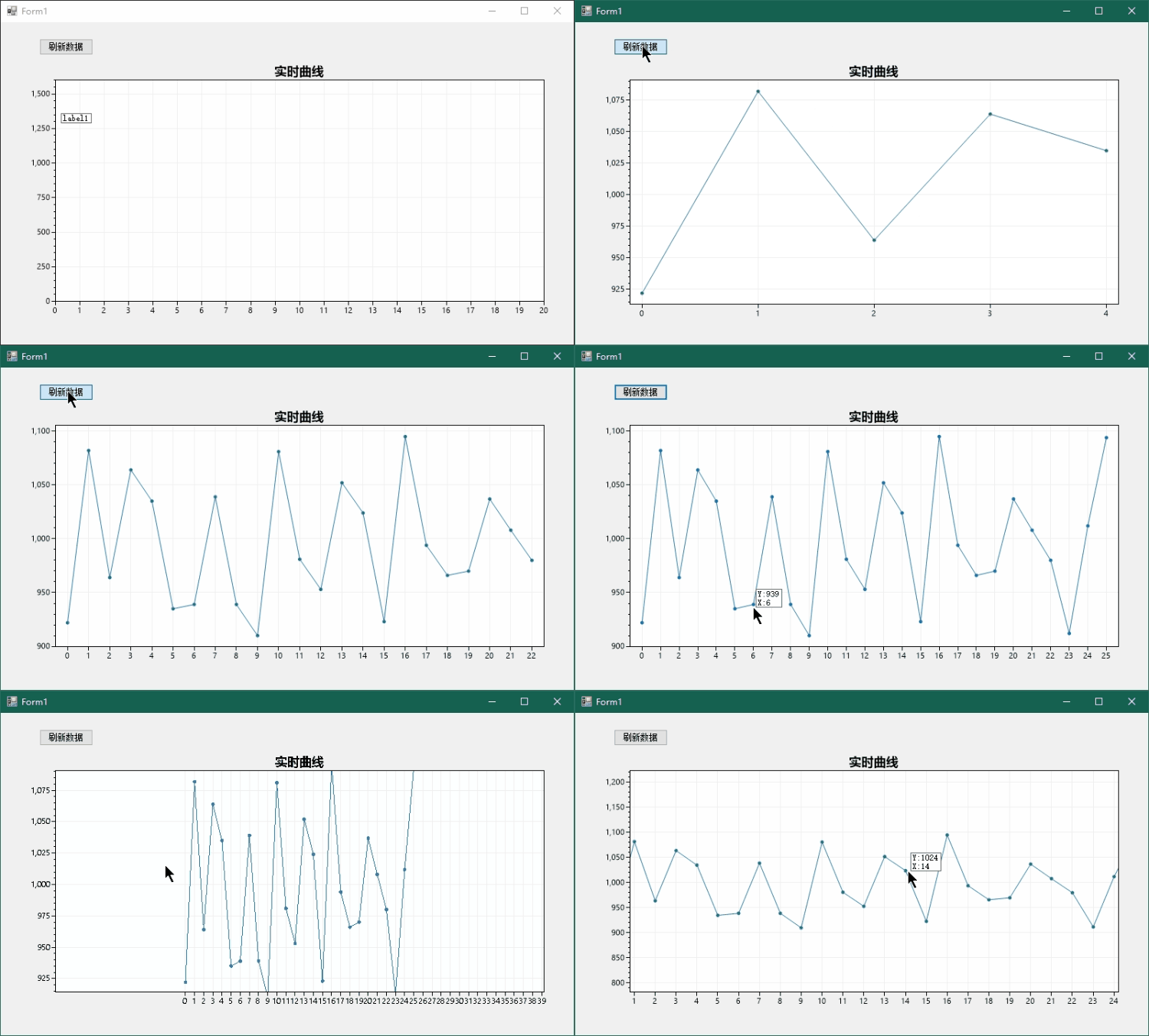
ScottPlot It is a very good open source chart Library , Official routines are also relatively rich , This article gives a simple example of how to get the value at the mouse .
2 establish Demo engineering
Create a blank Winform Desktop applications

introduce ScottPlot library

Right click solution , Click on Nuget Package management , Search full name ScottPlot:

After the import is completed, the toolbox of the design window will appear FromsPlot Control , Drag and drop it into the design interface , Here are two more controls :
Button Used to generate random data by clicking ,Label Used to display the value of the mouse position , The initial position is arbitrary , In the program, we let it follow the mouse to display in the appropriate position .

Changed in the figure Label Background color and border style , It looks better like this .
3 Code editing
Double click the added refresh Button You can quickly add monitoring and enter code editing mode .
using System;
using System.Collections.Generic;
using System.ComponentModel;
using System.Data;
using System.Drawing;
using System.Linq;
using System.Text;
using System.Threading.Tasks;
using System.Windows.Forms;

namespace ScottPlotTest
{
    public partial class Form1 : Form
    {
        public const int MAX_LOG_LENGHT = 1000;

        private double[] values = new double[MAX_LOG_LENGHT];
        private int dataCnt = 0;
        private ScottPlot.Plottable.SignalPlot signalPlot;
        public Form1()
        {
            InitializeComponent();

            /*
             * 1. Set data source , Customize X Axis labels
             */
            var plt = formsPlot1.Plot;
            plt.Title(" Real time curve ");
            plt.SetAxisLimitsY(0, 1600);
            plt.SetAxisLimitsX(0, 20);
            signalPlot = plt.AddSignal(values);
            signalPlot.MaxRenderIndex = dataCnt;
            // Generate X Axis labels
            double[] labelPositions = new double[MAX_LOG_LENGHT];
            string[] labelsXAxis = new string[MAX_LOG_LENGHT];
            for (int i = 0; i < MAX_LOG_LENGHT; i++)
            {
                labelsXAxis[i] = i.ToString();
                labelPositions[i] = i;
            }
            plt.XTicks(labelPositions, labelsXAxis);
            formsPlot1.Refresh();

            // Mouse movement monitoring
            formsPlot1.MouseMove += FormsPlot1_MouseMove;
        }

        protected override void OnSizeChanged(EventArgs e)
        {
            base.OnSizeChanged(e);
            /*
             * 2. Auto fit window size
             */
            formsPlot1.Location = new Point(12, 51);
            formsPlot1.Width = Size.Width - 48;
            formsPlot1.Height = Size.Height - 108;
        }

        private void FormsPlot1_MouseMove(object sender, MouseEventArgs e)
        {
            /*
             * 3. Calculate the value at the mouse and pass Label Show
             */
            label1.Visible = false;
            Point mouseLocation = e.Location;
            double xCoordinate = formsPlot1.Plot.GetCoordinateX(mouseLocation.X);
            int xAxis = Math.Abs((int)Math.Round(xCoordinate));
            if (xAxis < dataCnt)
            {
                int y = (int)formsPlot1.Plot.GetPixelY(values[xAxis]);
                if (Math.Abs(mouseLocation.Y - y) < 16)
                {
                    label1.Text = "Y:" + y.ToString()
                        + "\nX:" + xAxis.ToString();
                    // adjustment label To the right place
                    mouseLocation.Y += label1.Height;
                    mouseLocation.X += 16;
                    label1.Location = mouseLocation;
                    label1.Visible = true;
                }
            }
        }

        private void Button1_Click(object sender, EventArgs e)
        {
            /*
             * 4. Generate random data
             */
            GetData();
            formsPlot1.Plot.AxisAuto();
            formsPlot1.Refresh();
        }

        private void GetData()
        {
            Random rand = new Random();
            values[dataCnt] = 1000 + rand.Next(-100, 100);
            signalPlot.MaxRenderIndex = dataCnt;
            dataCnt++;
            if(MAX_LOG_LENGHT == dataCnt)
            {
                dataCnt = 0;
            }
        }
    }
}
The code did 4 thing :
1. Set data source ; Customize X Axis labels , Show only integers .
2. Auto fit window size .
3. Calculate the value at the mouse and pass Label Show .
4. Generate random data .
We focus on how to get the value at the mouse , adopt GetCoordinateX() obtain X The value of the icon curve coordinate corresponding to the axis mouse pixel , Then take the nearest integer , This number is the index of the data , Here you get X-Y Value of pair . But we need the mouse to point to the data point before it displays , So the next step is through GetPixelY() obtain Y The pixel value corresponding to the axis coordinate value , In the distance 16 Display within pixels Label, Otherwise, it will not show .

4END
边栏推荐
- 这3款在线PS工具,得试试
- 九、uni-popup用法 下拉框底部弹窗效果
- Thoughts on the construction of some enterprise data platforms
- How does vos3000 send incoming calls to okcc
- 35道MySQL面试必问题图解,这样也太好理解了吧
- &0xffffffff(0x08)
- Using reflection to build a menu spanning tree
- Hcip day 11
- [线程安全问题] 多线程到底可能会带来哪些风险?
- Recommended super easy-to-use mobile screen recording software
猜你喜欢

35道MySQL面试必问题图解,这样也太好理解了吧

2022 melting welding and thermal cutting examination questions and online simulation examination

Revised version | target detection: speed and accuracy comparison (faster r-cnn, r-fcn, SSD, FPN, retinanet and yolov3)

HCIP第十天

Hcip day 11
C# 读取ini文件、键值对操作

Thoughts on the construction of some enterprise data platforms

如何只降3D相机不降UI相机的分辨率
HCIP第十一天

软件测试工程师的职业规划

随机推荐
ZABBIX distributed
[ecmascript6] iterator and generator
Summarize the knowledge points of the ten JVM modules. If you don't believe it, you still don't understand it
Career planning of Software Test Engineer
Mobile phone scrolling screenshot software recommendation
Nport serial server configuration website (whether the serial server is from network port to serial port)
SwiftUI 布局 —— 尺寸( 上 )
如何有效进行回顾会议(上)?
Super resolution reconstruction based on deep learning
在 SwiftUI 视图中打开 URL 的若干方法
SwiftUI 布局 —— 对齐
2022年熔化焊接与热切割考题及在线模拟考试
2022 melting welding and thermal cutting examination questions and online simulation examination
Introduction to database system (5th Edition) supplementary exercises - Chapter 1 Introduction
[leetcode] 1331. Array sequence number conversion
OKR与GRAD
Floating point data type in C language (did you learn to waste it)
468 product planning and promotion plan (150 copies)
一些企业数据平台建设的思考
These three online PS tools should be tried