当前位置:网站首页>【yolov4】基于yolov4深度学习网络目标检测MATLAB仿真
【yolov4】基于yolov4深度学习网络目标检测MATLAB仿真
2022-06-26 06:41:00 【fpga和matlab】
YOLO发展至YOLOv3时,基本上这个系列都达到了一个高潮阶段,很多实际任务中,都会见到YOLOv3的身上,而对于较为简单和场景,比如没有太密集的目标和极端小的目标,多数时候仅用YOLOv2即可。除了YOLO系列,也还有其他很多优秀的工作,比如结构同样简洁的RetinaNet和SSD。后者SSD其实也会常在实际任务中见到,只不过就性能而言,要略差于YOLOv3,当然,这也是因为SSD并没有去做后续的升级,反倒很多新工作如RFB-Net、DSSD等工作都将其作为baseline。论性能,RetinaNet当然是不输于YOLOv3的,只是,相较于YOLOv3,RetinaNet的一个较为致命的问题就是:速度太慢。而这一个问题的主要原因就是RetinaNet使用较大的输出图像尺寸和较重的检测头。
yolov4的创新点
1.输入端的创新点:训练时对输入端的改进,主要包括Mosaic数据增强、cmBN、SAT自对抗训练
2.BackBone主干网络:各种方法技巧结合起来,包括:CSPDarknet53、Mish激活函数、Dropblock
3.Neck:目标检测网络在BackBone和最后的输出层之间往往会插入一些层,比如Yolov4中的SPP模块、FPN+PAN结构
4.Head:输出层的锚框机制和Yolov3相同,主要改进的是训练时的回归框位置损失函数CIOU_Loss,以及预测框筛选的nms变为DIOU_nms
通俗的讲,就是说这个YOLO-v4算法是在原有YOLO目标检测架构的基础上,采用了近些年CNN领域中最优秀的优化策略,从数据处理、主干网络、网络训练、激活函数、损失函数等各个方面都有着不同程度的优化,虽没有理论上的创新,但是会受到许许多多的工程师的欢迎,各种优化算法的尝试。文章如同于目标检测的trick综述,效果达到了实现FPS与Precision平衡的目标检测 new baseline。
yolov4 网络结构的采用的算法,其中保留了yolov3的head部分,修改了主干网络为CSPDarknet53,同时采用了SPP(空间金字塔池化)的思想来扩大感受野,PANet作为neck部分。

yolov4在技术处理的思维导图:

1.MATLAB源码
clc;
clear;
close all;
warning off;
addpath(genpath(pwd));

%****************************************************************************
%更多关于matlab和fpga的搜索“fpga和matlab”的CSDN博客:
%matlab/FPGA项目开发合作
%https://blog.csdn.net/ccsss22?type=blog
%****************************************************************************
%% Download Pretrained Network
% Set the modelName from the above ones to download that pretrained model.
modelName = 'YOLOv4-coco';
model = helper.downloadPretrainedYOLOv4(modelName);
net = model.net;

%% Load Data
% Unzip the vehicle images and load the vehicle ground truth data.
unzip vehicleDatasetImages.zip
data = load('vehicleDatasetGroundTruth.mat');
vehicleDataset = data.vehicleDataset;

% Add the full path to the local vehicle data folder.
vehicleDataset.imageFilename = fullfile(pwd, vehicleDataset.imageFilename);


rng('default')
shuffledIndices = randperm(height(vehicleDataset));
idx = floor(0.6 * length(shuffledIndices));
trainingDataTbl = vehicleDataset(shuffledIndices(1:idx), :);
testDataTbl = vehicleDataset(shuffledIndices(idx+1:end), :);

% Create an image datastore for loading the images.
imdsTrain = imageDatastore(trainingDataTbl.imageFilename);
imdsTest = imageDatastore(testDataTbl.imageFilename);

% Create a datastore for the ground truth bounding boxes.
bldsTrain = boxLabelDatastore(trainingDataTbl(:, 2:end));
bldsTest = boxLabelDatastore(testDataTbl(:, 2:end));

% Combine the image and box label datastores.
trainingData = combine(imdsTrain, bldsTrain);
testData = combine(imdsTest, bldsTest);

helper.validateInputData(trainingData);
helper.validateInputData(testData);

%% Data Augmentation
augmentedTrainingData = transform(trainingData, @helper.augmentData);


augmentedData = cell(4,1);
for k = 1:4
    data = read(augmentedTrainingData);
    augmentedData{k} = insertShape(data{1,1}, 'Rectangle', data{1,2});
    reset(augmentedTrainingData);
end
figure
montage(augmentedData, 'BorderSize', 10)

%% Preprocess Training Data
% Specify the network input size.
networkInputSize = net.Layers(1).InputSize;


preprocessedTrainingData = transform(augmentedTrainingData, @(data)helper.preprocessData(data, networkInputSize));

% Read the preprocessed training data.
data = read(preprocessedTrainingData);

% Display the image with the bounding boxes.
I = data{1,1};
bbox = data{1,2};
annotatedImage = insertShape(I, 'Rectangle', bbox);
annotatedImage = imresize(annotatedImage,2);
figure
imshow(annotatedImage)

% Reset the datastore.
reset(preprocessedTrainingData);

%% Modify Pretrained YOLO v4 Network

rng(0)
trainingDataForEstimation = transform(trainingData, @(data)helper.preprocessData(data, networkInputSize));
numAnchors = 9;
[anchorBoxes, meanIoU] = estimateAnchorBoxes(trainingDataForEstimation, numAnchors);

% Specify the classNames to be used in the training.
classNames = {'vehicle'};


[lgraph, networkOutputs, anchorBoxes, anchorBoxMasks] = configureYOLOv4(net, classNames, anchorBoxes, modelName);

%% Specify Training Options
numEpochs = 90;
miniBatchSize = 4;
learningRate = 0.001;
warmupPeriod = 1000;
l2Regularization = 0.001;
penaltyThreshold = 0.5;
velocity = [];

%% Train Model
if canUseParallelPool
   dispatchInBackground = true;
else
   dispatchInBackground = false;
end

mbqTrain = minibatchqueue(preprocessedTrainingData, 2,...
        "MiniBatchSize", miniBatchSize,...
        "MiniBatchFcn", @(images, boxes, labels) helper.createBatchData(images, boxes, labels, classNames), ...
        "MiniBatchFormat", ["SSCB", ""],...
        "DispatchInBackground", dispatchInBackground,...
        "OutputCast", ["", "double"]);


% Convert layer graph to dlnetwork.
net = dlnetwork(lgraph);

% Create subplots for the learning rate and mini-batch loss.
fig = figure;
[lossPlotter, learningRatePlotter] = helper.configureTrainingProgressPlotter(fig);

iteration = 0;
% Custom training loop.
for epoch = 1:numEpochs

    reset(mbqTrain);
    shuffle(mbqTrain);

    while(hasdata(mbqTrain))
        iteration = iteration + 1;

        [XTrain, YTrain] = next(mbqTrain);

        % Evaluate the model gradients and loss using dlfeval and the
        % modelGradients function.
        [gradients, state, lossInfo] = dlfeval(@modelGradients, net, XTrain, YTrain, anchorBoxes, anchorBoxMasks, penaltyThreshold, networkOutputs);

        % Apply L2 regularization.
        gradients = dlupdate(@(g,w) g + l2Regularization*w, gradients, net.Learnables);

        % Determine the current learning rate value.
        currentLR = helper.piecewiseLearningRateWithWarmup(iteration, epoch, learningRate, warmupPeriod, numEpochs);

        % Update the network learnable parameters using the SGDM optimizer.
        [net, velocity] = sgdmupdate(net, gradients, velocity, currentLR);

        % Update the state parameters of dlnetwork.
        net.State = state;

        % Display progress.
        if mod(iteration,10)==1
            helper.displayLossInfo(epoch, iteration, currentLR, lossInfo);
        end

        % Update training plot with new points.
        helper.updatePlots(lossPlotter, learningRatePlotter, iteration, currentLR, lossInfo.totalLoss);
    end
end

% Save the trained model with the anchors.
anchors.anchorBoxes = anchorBoxes;
anchors.anchorBoxMasks = anchorBoxMasks;

save('yolov4_trained', 'net', 'anchors');

%% Evaluate Model
confidenceThreshold = 0.5;
overlapThreshold = 0.5;

% Create a table to hold the bounding boxes, scores, and labels returned by
% the detector.
numImages = size(testDataTbl, 1);
results = table('Size', [0 3], ...
    'VariableTypes', {'cell','cell','cell'}, ...
    'VariableNames', {'Boxes','Scores','Labels'});

% Run detector on images in the test set and collect results.
reset(testData)
while hasdata(testData)
    % Read the datastore and get the image.
    data = read(testData);
    image = data{1};

    % Run the detector.
    executionEnvironment = 'auto';
    [bboxes, scores, labels] = detectYOLOv4(net, image, anchors, classNames, executionEnvironment);

    % Collect the results.
    tbl = table({bboxes}, {scores}, {labels}, 'VariableNames', {'Boxes','Scores','Labels'});
    results = [results; tbl];
end

% Evaluate the object detector using Average Precision metric.
[ap, recall, precision] = evaluateDetectionPrecision(results, testData);

% The precision-recall (PR) curve shows how precise a detector is at varying
% levels of recall. Ideally, the precision is 1 at all recall levels.

% Plot precision-recall curve.
figure
plot(recall, precision)
xlabel('Recall')
ylabel('Precision')
grid on
title(sprintf('Average Precision = %.2f', ap))

%% Detect Objects Using Trained YOLO v4
reset(testData)
data = read(testData);

% Get the image.
I = data{1};

% Run the detector.
executionEnvironment = 'auto';
[bboxes, scores, labels] = detectYOLOv4(net, I, anchors, classNames, executionEnvironment);

% Display the detections on image.
if ~isempty(scores)
    I = insertObjectAnnotation(I, 'rectangle', bboxes, scores);
end
figure
imshow(I)
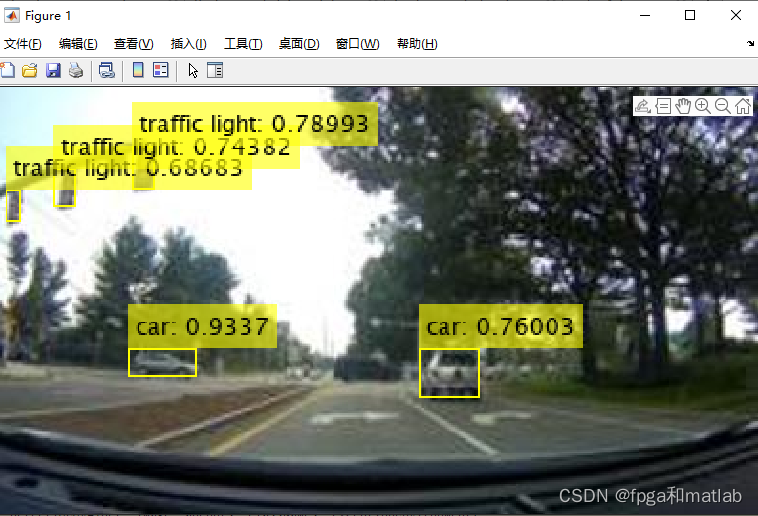
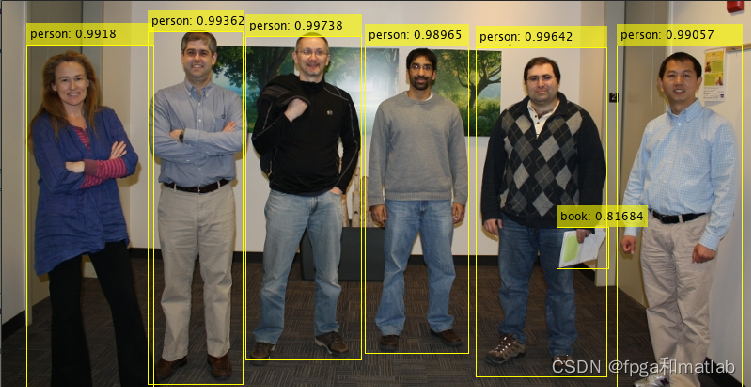
2.yolov4仿真效果


资源
边栏推荐
- Go learning notes 1.3- data types of variables
- C# Nuget离线缓存包安装
- DS18B20详解
- Go语言学习笔记 1.2-变量篇
- Get the first and last days of the current month, and the first and last days of the previous month
- Simple use of typescript's class interface
- Differences, advantages and disadvantages between synchronous communication and asynchronous communication
- LabVIEW Arduino TCP/IP遠程智能家居系統(項目篇—5)
- Introduction to the use of TS generics in functions, interfaces and classes
- Bugku练习题---MISC---富强民主
猜你喜欢





随机推荐
连接数服务器数据库报:错误号码2003Can‘t connect to MySQL server on ‘服务器地址‘(10061)
Unsatisfied dependency expressed through field ‘baseMapper‘; nested exceptio
TS泛型在函数、接口、类中使用介绍
宝塔服务器搭建及数据库远程连接
GoF23—工厂模式
China micro cultivator market trend report, technical dynamic innovation and market forecast
[alluxio & Dachang] the original boss direct employment was applied in this way
Dpdk - tcp/udp protocol stack server implementation (II)
Jasminum plug-in of Zotero document management tool
在公司逮到一个阿里10年的测试开发,聊过之后大彻大悟...
Web technology sharing | webrtc recording video stream
Past events of Xinhua III
Get the first and last days of the current month, and the first and last days of the previous month
获取当前月份的第一天和最后一天,上个月的第一天和最后一天
Ppt template crawler case
typescript的type
Installing rainbow in various kubernetes with Helm
SQL中空值的判断
New generation engineers teach you how to play with alluxio + ml (Part 1)
Library management system