当前位置:网站首页>NFS service and Samba service deployment
NFS service and Samba service deployment
2022-07-26 07:38:00 【Xiaolesheng】
NFS The concept of
NFS( Network file system ) Provide one in UNIX The method of sharing files on the system . at present ,NFS There are three versions :NFSv2、NFSv3、NFSv4,Centos7 By default NFSv4 Provide services .
Its advantage is to provide stateful connection , Easier to track connection status , Enhance security .
NFS Monitor in 2049 On port , Users can mount the shared data to the local directory by mounting .
NFS Related documents of
Primary profile :/etc/exports
This is a NFS The main configuration file of . The file is blank , Some systems may not have this file , It is mainly established manually .NFS The configuration of is generally only configured in this file .
NFS File system maintenance instructions :/usr/sbin/exportfs
This is maintenance NFS Instructions for sharing resources , You can use this command to re share /etc/exports Changed directory resources 、 take NFS Server Remove or re share the shared directory .
Login file for sharing resources :/var/lib/nfs/*tab
stay NFS The login files of the server are placed in /var/lib/nfs/ Inside the directory , There are two important login files in this directory , One is etab , It mainly records NFS The full permission setting value of the shared directory ; the other one xtab Then the record has been linked to this NFS Server related client data .
The client queries the server for instructions to share resources :/usr/sbin/showmount
This is another important NFS Instructions .exportfs It's for NFS Server End , and showmount It is mainly used in Client End .showmount It can be used to see NFS Shared directory resources .
NFS actual combat
- Environmental preparation
| ip | Host name | node |
|---|---|---|
| 192.168.0.20 | nfs-server | NFS Service node |
| 192.168.0.21 | nfs-client | NFS Customer node |
- NFS install
[[email protected] ~]# hostnamectl set-hostname nfs-server
[[email protected] ~]# bash
[[email protected] ~]# yum install -y nfs-utils rpcbind

[[email protected] ~]# hostnamectl set-hostname nfs-client
[[email protected] ~]# bash
[[email protected] ~]# yum install -y nfs-utils rpcbind
- stay NFS Set up on the server for NFS Directory for file sharing , And set up enough permissions to make sure that other people have write permissions
[[email protected] ~]# mkdir /nfsfile
[[email protected] ~]# chmod -R 777 /nfsfile
[[email protected] ~]# echo 1232424 > /nfsfile/test
- To configure NFS Parameters of the service program configuration file

[[email protected] ~]# vim /etc/exports
[[email protected] ~]# cat /etc/exports
/nfsfile 192.168.0.0/24(rw,sync,root_squash)
- NFS Client-side configuration
Use showmount Command query NFS Remote sharing information of server
[[email protected] ~]# showmount -e 192.168.0.20
Export list for 192.168.0.20:
/nfsfile 192.168.0.0/24
- Client mount use
[[email protected] ~]# mkdir /nfsfile
[[email protected] ~]# mount -t nfs 192.168.0.20:/nfsfile /nfsfile
[[email protected] ~]# df -Th
Filesystem              Type      Size  Used Avail Use% Mounted on
/dev/mapper/centos-root xfs        18G  1.1G   17G   7% /
devtmpfs                devtmpfs  1.9G     0  1.9G   0% /dev
tmpfs                   tmpfs     1.9G     0  1.9G   0% /dev/shm
tmpfs                   tmpfs     1.9G  8.6M  1.9G   1% /run
tmpfs                   tmpfs     1.9G     0  1.9G   0% /sys/fs/cgroup
/dev/sda1               xfs       497M  124M  373M  25% /boot
tmpfs                   tmpfs     378M     0  378M   0% /run/user/0
/dev/sr0                iso9660   4.2G  4.2G     0 100% /cdrom
192.168.0.20:/nfsfile   nfs4       18G  1.1G   17G   7% /nfsfile
[[email protected] ~]# cat /nfsfile/test
1232424
CIFS service
CIFS The concept of
cifs The service implements a file system that shares services for you Ji'an , The main implementation window File sharing in the system , stay linux Less is used in the system , commonly linux Use in cifs When realizing file sharing samba service ,smaba Is to make linux Support SMB/CIFS The group software package of the Protocol .samba The service is linux and window Build a bridge between the two systems .
Samba The function of
Samba The software included in the service includes Samba,samba-client,samba-common. The software package consists of smbd and nmbd Two daemons .samba Provide 4 A service : Document printing service , Authorized and authorized , Name resolution , Browsing Services . The first two are smbd The daemons provide , Later by nmbd The daemons provide .
smbd Process listening port :TCP 139 (NeBIOS over TCP/IP) and TCP 445 (SMBoverTCP/CIFS) port
nmbd Process listening port :UDP 137 (NeBIOS-ns) and UDP 138 (NetBIOS-dgm) port
The main functions are :
1、 Share file and printer Services
2、 It can provide user login samba Host authentication , To provide individual data of users with different identities
3、 Can be done windows Host name resolution on the network
4、 You can share devices
samba actual combat
- install samba service
- Modify hostname
[[email protected] ~]# hostnamectl set-hostname samba
[[email protected] ~]# bash
[[email protected] ~]#
- install samba service
[[email protected] ~]# yum install samba -y
- To configure samba service
- Samba Parameters and functions in the service program
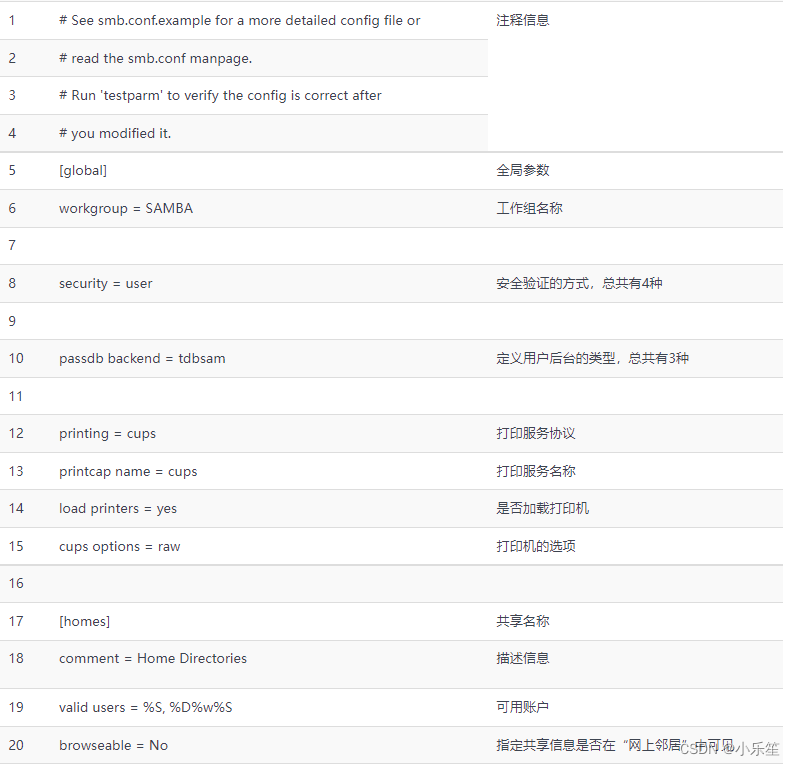

- To configure samba Configuration file for /etc/samba/smb.conf, Delete unnecessary parameters

- Add the information of the shared file at the end of the configuration file
- Parameter description
【share】: Share name
path: Path to shared directory
browseable : Operating authority
public: Access right
writable: Permission to operate the file
commment: Tips for this share
- Samba Parameters and functions in the service program
[[email protected] ~]# cat /etc/samba/smb.conf
# See smb.conf.example for a more detailed config file or
# read the smb.conf manpage.
# Run 'testparm' to verify the config is correct after
# you modified it.

[global]
        workgroup = SAMBA
        security = user

        passdb backend = tdbsam
[share]
        path = /opt/share
        browseable = yes
        public = yes
        writable = yes
- Create directories and give permissions , Restart the service
[[email protected] ~]# mkdir /opt/share
[[email protected] ~]# chmod 777 /opt/share
[[email protected] ~]# systemctl restart smb
[[email protected] ~]# systemctl restart nmb
- Check the port status
[[email protected] ~]# netstat -ntpl
Active Internet connections (only servers)
Proto Recv-Q Send-Q Local Address           Foreign Address         State       PID/Program name
tcp        0      0 0.0.0.0:139             0.0.0.0:*               LISTEN      22365/smbd
tcp        0      0 0.0.0.0:22              0.0.0.0:*               LISTEN      1187/sshd
tcp        0      0 127.0.0.1:25            0.0.0.0:*               LISTEN      2302/master
tcp        0      0 0.0.0.0:445             0.0.0.0:*               LISTEN      22365/smbd
tcp6       0      0 :::139                  :::*                    LISTEN      22365/smbd
tcp6       0      0 :::22                   :::*                    LISTEN      1187/sshd
tcp6       0      0 ::1:25                  :::*                    LISTEN      2302/master
tcp6       0      0 :::445                  :::*                    LISTEN      22365/smbd
- establish samba user
- pdbedit Command for management Samba Account information database of service program , The format is “pdbedit [ Options ] Account ”. When writing account information to the database for the first time, you need to use -a Parameters , Change password later 、 This parameter is no longer needed for operations such as deleting accounts . in addition ,Samba The database of the service program requires that the account must already exist in the current system , Otherwise, creating a file in the future will lead to confusion of permission properties of the file , This leads to mistakes .

- pdbedit Command for management Samba Account information database of service program , The format is “pdbedit [ Options ] Account ”. When writing account information to the database for the first time, you need to use -a Parameters , Change password later 、 This parameter is no longer needed for operations such as deleting accounts . in addition ,Samba The database of the service program requires that the account must already exist in the current system , Otherwise, creating a file in the future will lead to confusion of permission properties of the file , This leads to mistakes .
[[email protected] ~]# useradd user1
[[email protected] ~]# echo 123456 | passwd --stdin user1
Changing password for user user1.
passwd: all authentication tokens updated successfully.
[[email protected] ~]# id user1
uid=1000(user1) gid=1000(user1) groups=1000(user1)
[[email protected] ~]# pdbedit -a -u user1
new password:
retype new password:
Unix username:        user1
NT username:
Account Flags:        [U          ]
User SID:             S-1-5-21-982865867-531351322-2816181876-1000
Primary Group SID:    S-1-5-21-982865867-531351322-2816181876-513
Full Name:
Home Directory:       \\samba\user1
HomeDir Drive:
Logon Script:
Profile Path:         \\samba\user1\profile
Domain:               SAMBA
Account desc:
Workstations:
Munged dial:
Logon time:           0
Logoff time:          Wed, 06 Feb 2036 10:06:39 EST
Kickoff time:         Wed, 06 Feb 2036 10:06:39 EST
Password last set:    Tue, 12 Jul 2022 05:30:47 EDT
Password can change:  Tue, 12 Jul 2022 05:30:47 EDT
Password must change: never
Last bad password   : 0
Bad password count  : 0
Logon hours         : FFFFFFFFFFFFFFFFFFFFFFFFFFFFFFFFFFFFFFFFFF
[[email protected] ~]# pdbedit -L
user1:1000:
- smbpasswd Command addition samba user
[[email protected] ~]# smbpasswd  -a root
New SMB password:
Retype new SMB password:
Added user root.
[[email protected] ~]# pdbedit -L
user1:1000:
root:0:root
- Restart the service
[[email protected] ~]# systemctl restart smb
[[email protected] ~]# systemctl restart nmb
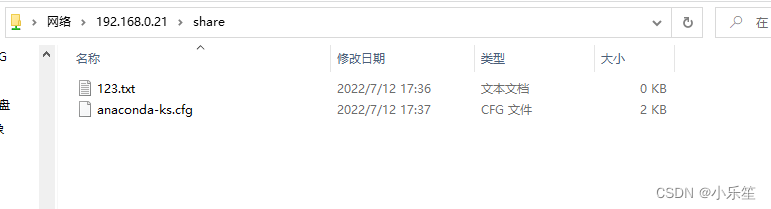
- Use samba service


[[email protected] ~]# cp anaconda-ks.cfg /opt/share/
边栏推荐
猜你喜欢

Speech at 2021 global machine learning conference

C # use log4net to record logs (basic chapter)
Deep learning model deployment
WCF deployed on IIS

PostgreSQL sequence create alter nextval Curval numerical interval gap

VScode无法启动问题解决思路
![[daily question 1] 919. Complete binary tree inserter](/img/a2/2ff77ccdfb78bb1812b989342c2331.png)
[daily question 1] 919. Complete binary tree inserter
Vscode cannot start the problem solving idea
:app:checkDebugAarMetadata 2 issues were found when checking AAR metadata: 2 issues were found when

Redis系列之什么是布隆过滤器?
随机推荐
Selenium: detailed explanation of browser crawler use (I)
NFT digital collection system development: digital collections give new vitality to brands
C # use log4net to record logs (basic chapter)
HOT100 hash
2021全球机器学习大会演讲稿
“尝鲜”元宇宙,周杰伦最佳拍档方文山将于7月25日官宣《华流元宇宙》
Vscode cannot start the problem solving idea
China Unicom transformed the Apache dolphin scheduler resource center to realize the one-stop access of cross cluster call and data script of billing environment
In July, glassnode data showed that the open position of eth perpetual futures contract on deribit had just reached a one month high of $237959827.
NFT digital collection system development: the collision of literature + Digital Collections
Ethernet switching security
Download and install the free version of typora
2022.7.22DAY612
With someone else's engine, can it be imitated?
Come across the sea to see you
Program environment and pretreatment
Pycharm common shortcut keys
Web page basic label
Summarize the common high-frequency interview questions of the software testing post
2022.7.22DAY612