当前位置:网站首页>GeoServer + openlayers
GeoServer + openlayers
2022-07-30 15:32:00 【Study hard and love you hard!】
GeoServer 安装
前提有java环境
安装地址
https://geoserver.org/release/stable/
Here is an example of binary download
下载后解压
D:\Program Files (x86)\geoserver-2.21.0-bin\bin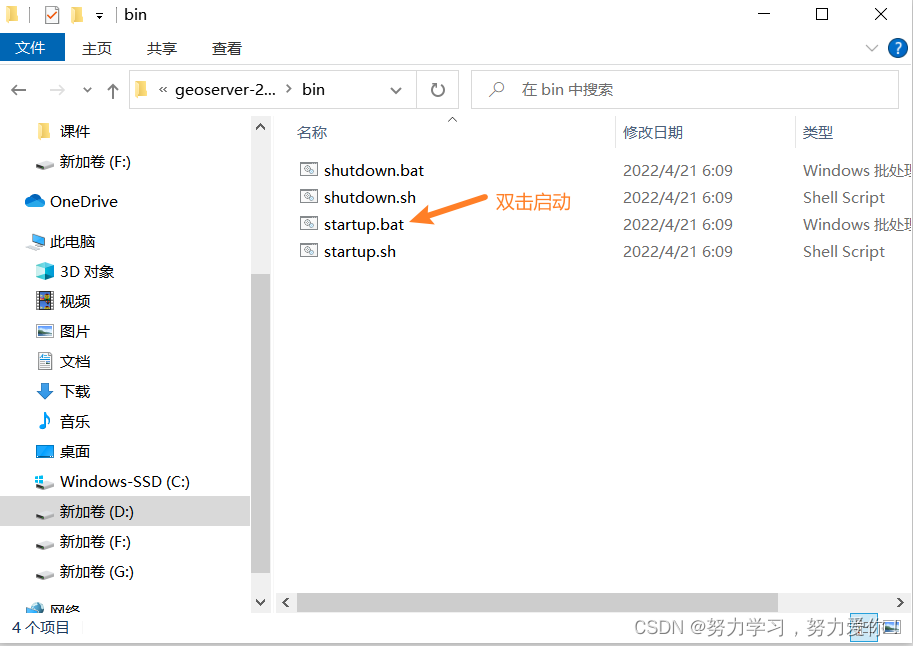
http://localhost:8080/geoserver 进入服务
使用默认用户名admin和密码geoserver登陆
Source preparation
百度网盘下载 Map software all-around map
链接:https://pan.baidu.com/s/1UZGx86R1b4VBDO9HOD-gFw
提取码:0125
下载后解压
Except for choosing the installation location 一路next
Almighty map downloader to use
打开后 先试用一个月
A map source can be selected I chose the map -》谷歌地图-》混合
地图级别 我选择的是12 可以自行选择
Download First select an area with the rectangle tool or other tools
Click on the task list to customize the name
地图下载 设置 定义格式 Click on the map to download 开始 开始下载
The format, etc. can be defaulted
选择是 拼接
Select these three and click Splicing
Put the image source in geoServer服务器上

Creative workspace
Select a repository 点击geoTIFF 栅格数据上传
The workspace selection has just been created
数据源名称 自己填写
下面地址 To select the image source address just now tif文件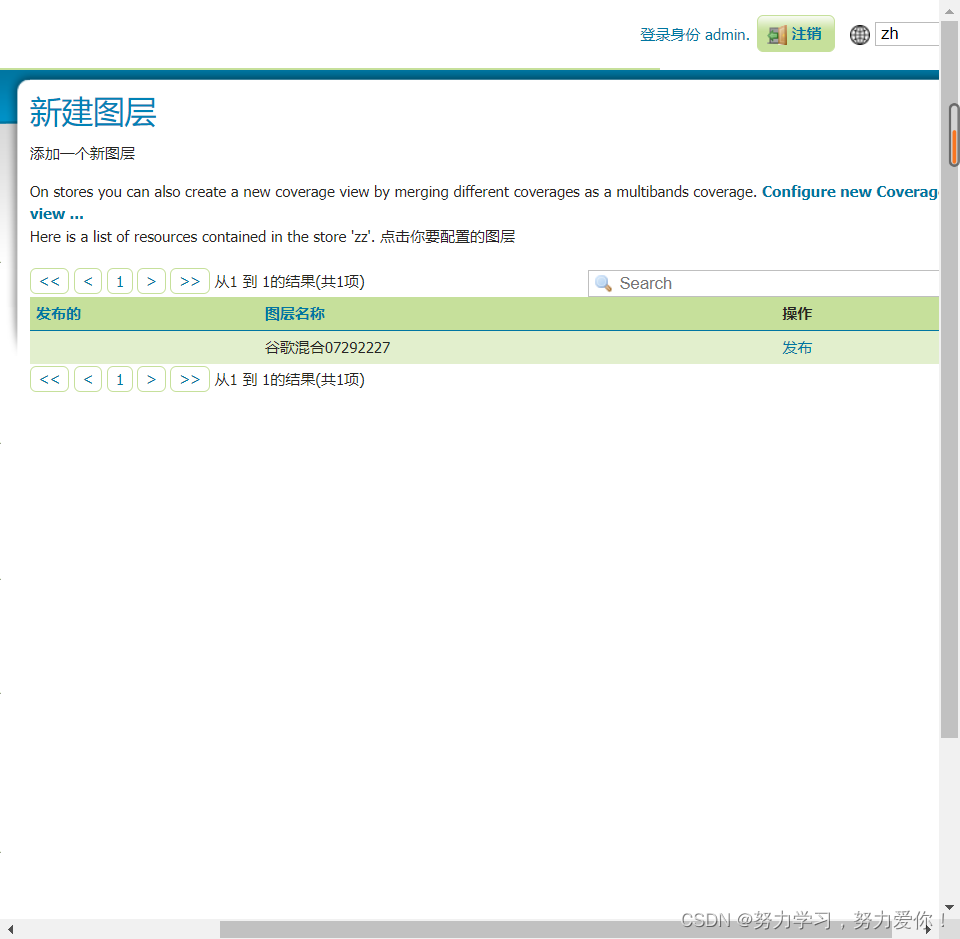
点击发布
然后保存即可
图层预览-》Select the layer you just created 点击openlayers进行预览
部署成功 ,The latitude and longitude are displayed in the lower right corner
openlayers 使用
Since our deployment is using wmsway so choosewmsSample loading image source
我选择的是https://openlayers.org/en/latest/examples/epsg-4326.html
vueThe project needs to run npm install ol 导入openlayers
in the sample main.js放到mounted函数中
Extract the page and place it on top
The writing of this example is extracted as follows
<template>
  <div id="map" class="map"></div>
</template>

<script> import Map from "ol/Map"; import TileLayer from "ol/layer/Tile"; import TileWMS from "ol/source/TileWMS"; import View from "ol/View"; import {
       ScaleLine, defaults as defaultControls } from "ol/control"; export default {
       mounted() {
       const layers = [ new TileLayer({
       source: new TileWMS({
       url: "http://localhost:8080/geoserver/ouc/wms", //To change the address to your own, see below params: {
       LAYERS: "ouc:google mix07292025", //Layers too See below TILED: true, }, }), }), ]; new Map({
       controls: defaultControls().extend([ new ScaleLine({
       units: "degrees", }), ]), layers: layers, target: "map", view: new View({
       projection: "EPSG:4326", center: [120.44, 36.13], zoom: 12, }), }); }, }; </script>
<style> .map {
       height: 400px; width: 100%; } </style>
in the layer preview F12 network ctrl+RCall out the request

url Prefix to the requestwms

图层为
启动服务 运行成功
作者声明
如有问题,欢迎指正!
边栏推荐
猜你喜欢

定时任务 corn

双碳目标下:农田温室气体排放模拟

GeoServer

In-depth analysis of Kubernetes application management

CS内网横向移动 模拟渗透实操 超详细
How to use Databricks for data analysis on TiDB Cloud | TiDB Cloud User Guide

嵌入式开发:嵌入式基础知识——正确启动固件项目的 10 条建议

【元胞自动机】基于元胞自动机模拟生命演化、病毒感染等实例附matlab代码

71页全域旅游综合整体解决方案2021 ppt

952. 按公因数计算最大组件大小 : 枚举质因数 + 并查集运用题
随机推荐
InputStream和OutputStream流的使用
算力顶天地,存力纳乾坤:国家超级计算济南中心的一体两面
Sentinel
Understand the Chisel language. 29. Chisel advanced communication state machine (1) - communication state machine: take the flash as an example
Office Automation | Office Software and Edraw MindMaster Shortcuts
学习 MySQL 需要知道的 28 个小技巧
Flink本地UI运行
Flink实时仓库-DWS层(关键词搜索分析-自定义函数,窗口操作,FlinkSql设置水位线,保存数据到Clickhouse)模板代码
国内数字藏品的乱象与未来
Normal and escaped strings for postgresql
Mac 中 MySQL 的安装与卸载
【回归预测-lssvm分类】基于最小二乘支持向量机lssvm实现数据分类代码
ISELED---氛围灯方案的新选择
CVE-2022-33891 Apache Spark 命令注入复现
MySQL客户端工具的使用与MySQL SQL语句
Could not acquire management access for administration
1222. 可以攻击国王的皇后-力扣双百代码
有关收集箱的改进建议
LeetCode_数位枚举_困难_233.数字 1 的个数
微服务该如何拆分?