当前位置:网站首页>[FPGA mathematical formula] use FPGA to realize common mathematical formulas
[FPGA mathematical formula] use FPGA to realize common mathematical formulas
2022-06-29 03:52:00 【FPGA and MATLAB】
The formula 1:
C=Z1/30
Because in FPGA The data input in is a serial input , We need to do this , Store the input data into memory , Then every time you enter a data , Press OK , Description data has been entered , Then the data is stored in memory , Finally, the input thirty pieces of data are read from the memory , And then find the average .
Because divided by 30 No 2 Power square , So divide by 30 The following operations are required . That is, the value is changed from... Through the search method ROM Read from , Then divide by 30 The operation of . Or use division IP nucleus , The method we use in this system is division IP The kernel method is used to divide by 30 The algorithm of .
always @(posedge i_clk or posedge i_rst)
begin
     if(i_rst)
	  begin
	  sums       <= 20'd0;

     sums1      <= 20'd0;
     sums2      <= 20'd0;
     sums3      <= 20'd0;
     sums4      <= 20'd0;
     sums5      <= 20'd0;
     sums6      <= 20'd0;
     sums7      <= 20'd0;
     sums8      <= 20'd0;
     sums9      <= 20'd0;
     sums10     <= 20'd0;
     sums11     <= 20'd0;
     sums12     <= 20'd0;
     sums13     <= 20'd0;
     sums14     <= 20'd0;
     sums15     <= 20'd0;
     sums16     <= 20'd0;

     sumst1     <= 20'd0;
     sumst2     <= 20'd0;
     sumst3     <= 20'd0;
     sumst4     <= 20'd0;
     sumst5     <= 20'd0;
     sumst6     <= 20'd0;
     sumst7     <= 20'd0;
     sumst8     <= 20'd0;

     sumstt1    <= 20'd0;
     sumstt2    <= 20'd0;
     sumstt3    <= 20'd0;
     sumstt4    <= 20'd0;

     sumsttt1   <= 20'd0;
     sumsttt2   <= 20'd0;
	  end
else begin
     sums1      <= i_data1  + i_data2;
     sums2      <= i_data3  + i_data4;
     sums3      <= i_data5  + i_data6;
     sums4      <= i_data7  + i_data8;
     sums5      <= i_data9  + i_data10;
     sums6      <= i_data11 + i_data12;
     sums7      <= i_data13 + i_data14;
     sums8      <= i_data15 + i_data16;
     sums9      <= i_data17 + i_data18;
     sums10     <= i_data19 + i_data20;
     sums11     <= i_data21 + i_data22;
     sums12     <= i_data23 + i_data24;
     sums13     <= i_data25 + i_data26;
     sums14     <= i_data27 + i_data28;
     sums15     <= i_data29;
     sums16     <= i_data30;

     sumst1     <= sums1    + sums2;
     sumst2     <= sums3    + sums4;
     sumst3     <= sums5    + sums6;
     sumst4     <= sums7    + sums8;
     sumst5     <= sums9    + sums10;
     sumst6     <= sums11   + sums12;
     sumst7     <= sums13   + sums14;
     sumst8     <= sums15   + sums16;

     sumstt1    <= sumst1   + sumst2;
     sumstt2    <= sumst3   + sumst4;
     sumstt3    <= sumst5   + sumst6;
     sumstt4    <= sumst7   + sumst8;

     sumsttt1   <= sumstt1  + sumstt2;
     sumsttt2   <= sumstt3  + sumstt4;
	  sums       <= sumsttt1 + sumsttt2;
     end
end


divider divider_u(
						.clk        (i_clk),
						.dividend   (sums),
						.divisor    (16'd30),
						.quotient   (o_average),
						.remainder  (),
						.rfd        ()
						);
Division adoption IP Kernel Implementation ; The simulation is as follows :

The standard operation value is :
368.886; It is close to our simulation value ;
The formula 2:
C=[Σ(A1×B1)/(4×D1)] ×100%
As long as the input data is A1,B1,D1, And then multiply IP Kernel and division IP The kernel implements the operation result of the formula ;
The implementation steps are :
The formula 1:A1×B1
The formula 2:4×D1
The formula 3:[Σ(A1×B1)/(4×D1)]
The formula 4:1000*C. The result is zero %0.
always @(posedge i_clk or posedge i_rst)
begin
     if(i_rst)
	  begin
     r1 <= 22'd0;
     r2 <= 32'd0;

     r3 <= 32'd0;
     r4 <= 32'd0;
	  end
else begin
     r1 <= i_A1   * i_B1;
     r2 <= 10'd1000 * r1;

     r3 <= 16'd4  * i_D1;
     r4 <= r3;
     end
end


divider2 divider2_u(
						 .clk        (i_clk),
						 .dividend   (r2),
						 .divisor    (r4),
						 .quotient   (o_C),
						 .remainder  (),
						 .rfd        ()
						 );
The simulation results are as follows :

Here for the accuracy of the calculation , We chose one thousandth of a unit , So the end result C Per thousand XX. Conversion for % Just divide the result by 10 that will do .
The formula 3:
C4=(Z2-Z3)/Z2×100%
First calculate Z2-Z3;
And then calculate (Z2-Z3)/Z2;
Then use division IP The result of nuclear calculation , Then you can get the division result as follows :
Because the weight we weigh here is 30 They are called together , So just record 30 The total number of , Then record three times , Then calculate the average value , It can be used as the total value before storage and the weight value after storage .
So in FPGA When entering in , The value we need to calculate needs to be input 3 Time , And then in FPGA Calculate the average of the three values entered in . Then get the desired result .
always @(posedge i_clk or posedge i_rst)
begin
     if(i_rst)
	  begin
	  sum1 <= 16'd0;
	  sum2 <= 16'd0;
	  end
else begin
	  sum1 <= i_Z2_1 +i_Z2_2 + i_Z2_3;
	  sum2 <= i_Z3_1 +i_Z3_2 + i_Z3_3;
     end
end

divider3_1 divider3_1_u1(
								.clk        (i_clk),
								.dividend   (sum1),
								.divisor    (16'd3),
								.quotient   (o_Z2_average),
								.remainder  (),
								.rfd        ()
							   );

divider3_1 divider3_1_u2(
								.clk        (i_clk),
								.dividend   (sum2),
								.divisor    (16'd3),
								.quotient   (o_Z3_average),
								.remainder  (),
								.rfd        ()
							   );

reg[31:0]r_Z2_average1;
reg[31:0]r_Z2_average2;

reg[15:0]r_Z2_averaget1;
reg[15:0]r_Z2_averaget2;

always @(posedge i_clk or posedge i_rst)
begin
     if(i_rst)
	  begin
     r_Z2_average1  <= 32'd0;
     r_Z2_average2  <= 32'd0;
     r_Z2_averaget1 <= 16'd0;
     r_Z2_averaget2 <= 16'd0;
	  end
else begin
     r_Z2_averaget1 <= o_Z2_average - o_Z3_average;
     r_Z2_averaget2 <= o_Z2_average;

     r_Z2_average1  <= 16'd1000 * r_Z2_averaget1;
     r_Z2_average2  <= {16'b0000_0000_0000_0000,r_Z2_averaget2};
     end
end

divider3_2 divider3_2_u(
							  .clk        (i_clk),
							  .dividend   (r_Z2_average1),
							  .divisor    (r_Z2_average2),
							  .quotient   (w_C4),
							  .remainder  (),
							  .rfd        ()
							  );

assign o_C4 = w_C4[15:0];
Simulation

The formula 4:
C=ρV×100/m
· Design thinking :
First calculate ρ×V
And then calculate 100×ρ×V
The final calculation 100×ρ×V/m;
always @(posedge i_clk or posedge i_rst)
begin
     if(i_rst)
	  begin
     pv    <=22'd0;
     pv100 <=32'd0;
     m1    <=32'd0;
     m2    <=32'd0;
	  end
else begin
     pv    <=  i_P    * i_V;
     pv100 <=  10'd1000 * pv;
     m1    <= {16'b0000_0000_0000_0000,i_m};
     m2    <=  m1;
     end
end

divider5 divider5_u(
						 .clk        (i_clk),
						 .dividend   (pv100),
						 .divisor    (m2),
						 .quotient   (w_C),
						 .remainder  (),
						 .rfd        ()
						 );

assign o_C = w_C[15:0];
· Design code and simulation

The formula 5:
C=44×(V1-V2) ×M / (W×h)
· Design thinking :
Need to compute V1-V2;
And then calculate 44*(V1-V2)
And then calculate 44*(V1-V2)*M
And then calculate W*h
The final calculation 44*(V1-V2)*M/(W*h)
always @(posedge i_clk or posedge i_rst)
begin
     if(i_rst)
	  begin
     r_V <= 16'd0;
     r_V1<= 26'd0;
     r_V2<= 32'd0;
     wh1 <= 32'd0;
     wh2 <= 32'd0;
     wh3 <= 32'd0;
	  end
else begin
     r_V <= i_V1 - i_V2;
     r_V1<= r_V  * i_M;
     r_V2<= 6'd44* r_V1;

     wh1 <= i_W  * i_h;
     wh2 <= wh1;
	  wh3 <= wh2;
     end
end

divider5 divider5_u(
						 .clk        (i_clk),
						 .dividend   (r_V2),
						 .divisor    (wh3),
						 .quotient   (w_C),
						 .remainder  (),
						 .rfd        ()
						 );

assign o_C = w_C[15:0];
· Design code and simulation
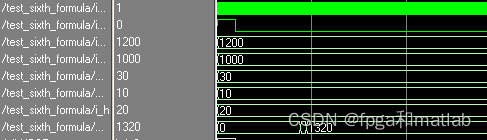
The formula 6:
C=0.88 / (V1-V2)
· Design thinking :
First calculate V1-V0
And then calculate 88*(V1-V0)
The final calculation 88*(V1-V0)/100
always @(posedge i_clk or posedge i_rst)
begin
     if(i_rst)
	  begin
     r_V <= 16'd0;
     r_V1<= 32'd0;
	  end
else begin
     r_V <= i_V1   - i_V0;
     r_V1<= 16'd88 * r_V;
     end
end
wire[31:0]w_C;
divider5 divider5_u(
						 .clk        (i_clk),
						 .dividend   (r_V1),
						 .divisor    (32'd100),
						 .quotient   (w_C),
						 .remainder  (),
						 .rfd        ()
						 );

assign o_C = w_C[15:0];
· Design code and simulation

The formula 7:
C=(c×V1×V2×100)/(V0×m)
· Design thinking :
First calculate c*V1
And then calculate c*V1*V2
And then calculate 100* c*V1*V2
And then calculate V0×m
The final calculation (100* c*V1*V2)/(V0×m);
always @(posedge i_clk or posedge i_rst)
begin
     if(i_rst)
	  begin
     r1 <= 16'd0;
     r2 <= 16'd0;
     r3 <= 32'd0;

     r4 <= 32'd0;
     r5 <= 32'd0;
     r6 <= 32'd0;
	  end
else begin
     r1 <= 8'd100 * i_V1;
     r2 <= i_V2   * i_c;
     r3 <= r1     * r2;

     r4 <= i_V0 * i_m;
     r5 <= r4;
	  r6 <= r5;
     end
end

wire[31:0]w_C;
divider5 divider5_u(
						 .clk        (i_clk),
						 .dividend   (r3),
						 .divisor    (r6),
						 .quotient   (w_C),
						 .remainder  (),
						 .rfd        ()
						 );

assign o_C = w_C[15:0];
· Design code and simulation

A16-34
边栏推荐
- Vg4131sxxxn0s1 wireless module hardware specification
- leetcode:560. Subarray with and K
- Data collection and management [11]
- SSH login without password
- [World Ocean Day] tcapulusdb calls on you to protect marine biodiversity together
- [tcapulusdb knowledge base] batch copy the game area
- Implementing mqtt communication with PHP
- 图论的基本概念
- 【若依(ruoyi)】ztree初始化
- 数据库和缓存如何保持一致性
猜你喜欢








随机推荐
Set hardware breakpoint instruction for ejtag under the PMON of the Godson development board
MobileOne: 移动端仅需1ms的高性能骨干
欧拉开源社区第二届理事会第二次会议召开,新华三、超聚变和龙芯中科成为理事会成员单位
[tcapulusdb knowledge base] tcapulusdb technical support introduction
VG4131SxxxN0S1无线模块硬件规格书
【TcaplusDB知识库】TcaplusDB-tcapsvrmgr工具介绍(一)
【若依(ruoyi)】ztree初始化
Kingbase export table structure
88. (cesium chapter) cesium aggregation diagram
Open source demo| you draw and I guess -- make your life more interesting
【Ubuntu】【Mysql】ubuntu安装了mysql 但是编译报错 mysql.h: No such file or directory
科技云报道:混合办公的B面:安全与效率如何兼得?
SSH无密码登陆
Data collection and management [15]
[tcapulusdb knowledge base] Introduction to tcapulusdb data import
Data collection and management [1]
【TcaplusDB知识库】TcaplusDB数据导入介绍
88.(cesium篇)cesium聚合图
Access 500 error after modstart migrates the environment
Data collection and management [9]