当前位置:网站首页>Use of locust
Use of locust
2022-07-01 22:56:00 【victorwjw】
install locust
pip install locust
- Check whether the installation is successful , View version number locust -V
- Update the latest version number pip install -U --pre locust
demo:
from locust import FastHttpUser, TaskSet, between, task, events, LoadTestShape
import os
from queue import Queue
from gevent._semaphore import Semaphore

all_locusts_spawned = Semaphore()
all_locusts_spawned.acquire()
n = 0

def on_hatch_complete(**kwargs):
    """Select_task Class hook method """
    all_locusts_spawned.release()


events.spawning_complete.add_listener(on_hatch_complete)


class UserBehavior1(TaskSet):
    def login(self):
        global n
        n += 1
        # print("%s Virtual users started , And login "%n)

    def logout(self):
        print(" Log out ")

    def on_start(self):
        self.login()
        self.id = self.parent.q.get()
        self.token = self.parent.test_data[self.id%4]
        # all_locusts_spawned.wait()   #  Marshal Point
        print(f"{self.id} Mission entry on_start")

    def on_stop(self):
        print(f"{self.id} Mission exit on_stop")
        self.parent.q.put(self.id)

    @task
    def test_baidu_localnews(self):
        url = '/widget?id=LocalNews&ajax=json&t=1632650885696'
        param = {"limit": 2,"offset": 0,}
        # print(f"--------{self.token}------")
        with self.client.get(url,params=param,headers={},catch_response = True) as response:
            if response.json().get('errno') == 0:
                response.success()
            else:
                response.failure(f'{self.id}------Failed!')


class UserBehavior2(TaskSet):

    @task(5)
    def test_baidu_error(self):
        url = '/widget?id=China&ajax=json&t=1632650885696'
        param = {"limit": 2,"offset": 0,}
        with self.client.get(url, params=param, headers={}, catch_response=True) as response:
            if response.json().get('errno') == 0:
                response.success()
            else:
                response.failure(f'Failed!')

    @task(5)
    def test_baidu_ad(self):
        url = '/widget?id=ad&ajax=json'
        param = {"limit": 2, "offset": 0, }
        with self.client.get(url, params=param, headers={}, catch_response=True) as response:
            if response.json().get('errno') == 0:   #.status_code == 200:
                response.success()
            else:
                response.failure('Failed!')


# class MyCustomShape(LoadTestShape):  #  Custom concurrency number
#     stages = [
#         {"time": 10, "users": 10, "spawn_rate": 10},
#         {"time": 20, "users": 20, "spawn_rate": 10},
#         {"time": 30, "users": 10, "spawn_rate": 10},
#         {"time": 40, "users": 20, "spawn_rate": 10},
#     ]
#     def tick(self):
#         run_time = self.get_run_time()
#         for stage in self.stages:
#             if run_time < stage['time']:
#                 tick_data = (stage['users'],stage['spawn_rate'])
#                 return tick_data
#         return None


class WebsiteUser(FastHttpUser):
    q = Queue()
    for i in range(1, 1000):
        q.put(i)
    host = 'http://news.baidu.com'
    # tasks = {UserBehavior1: 1, UserBehavior2: 2}
    tasks = [UserBehavior1]
    test_data = ['1300000000', '1300000001', '1300000002', '1300000003']

    wait_time = between(0.9, 1.1)

if __name__ == '__main__':

    os.system("locust -f main.py")
Script parsing :
1、 adopt @task(n) The method of decoration is a transaction , Method to specify the execution weight of the behavior , The larger the parameter, the higher the probability that it will be executed by the virtual user each time , The default is 1
2、 wait_time = between(1, 3)
To simulate the real operation of users , For example, users in actual operation , From the previous step to the next step , There may be time for thinking ,between(1, 3) Indicates the user's thinking time , Random as 1 To 3 second
3、 host = 'http://news.baidu.com' For the domain name to be tested
4、on_start : Each virtual user will call this method at startup , obtain token Or test user data, etc. are put here
on_stop : When the virtual user stops running ( Terminated ) Called when the
Each virtual user executes only once on_start and on_stop function
5、HttpUser Executed only once , So many public things can be written here , The attributes are in taskset Through parent out .
6、 Semaphore It is often used to set assembly points ( Wait for all user All created , Run again ), It is used for pressure test of some interfaces in a narrow sense , For tuning . Usually there is no assembly point , That is, this part of the code can be deleted
7、 checkpoint , The request function needs to be set catch_response=True, Will be based on success failure Make statistics
8、LoadTestShape You can customize the number and time of concurrency , To simulate the actual scene : Time peak strategy 、 Time stage load policy 、 Step by step load strategy and so on
locust Performance testing :( Ten ) Custom load policy - Simple books
 Argument parsing :

Type: Type of request , for example GET/POST.
Name: Name of the request
requests: Number of requests currently completed
fails: The current number of failures
Median: Intermediate value of response time , The unit is millisecond
90%ile: According to the normal distribution ,90% The response time is below the average of the normal distribution
Average: Mean response time , The unit is millisecond
Min: Minimum response time , The unit is millisecond
Max: Maximum response time , The unit is millisecond
average Size: Average amount of data per request , The unit is byte
current RPS(requests per second): The number of requests processed per second , namely RPS
Problems to be considered in performance testing :
1. network bandwidth
2. Thread pool 、 Database connection pool ( There are a lot of waiting for links )
3. Memory 、CPU Utilization ratio 、Disk I/O、Network I/O
Positioning bottlenecks :
1. Pressure test whether the flow enters the rear end :a. Network access layer due to bandwidth 、 maximum connection 、 Restrictions on the number of new connections b. single ip Address restriction c. slb Auto scaling failed ,nginx Load balancing fails or configuration is limited d. Fuse 、 Downgrade 、 Current limiting
2. Server side Is there a problem with the hardware index a.cpu high top Command to view resource utilization java Applications are available jstack See the stack that this thread is executing , See which method of resource consumption b. High memory See which process takes up a lot and whether there are a lot of swap( Virtual memory swap ) c. disk I/O high Reduce log output 、 Asynchronous or fast hard disk replacement d. The Internet I/O Consider the size of network transmission content , Cannot exceed the maximum value of hardware network transmission 70%, You can reduce the content size by compressing , Set cache locally and transfer multiple times to improve network performance I/O performance
3. Middleware related indicators , Thread pool 、 Connection pool 、JVM、kafka、redis、mq etc.
4. Database related indicators , for example : The slow query SQL、 shooting 、 lock 、 Parameter setting
5.JVM The parameters are unreasonable , Unreasonable capacity configuration 、 Database design is unreasonable 、 The program architecture planning is unreasonable 、 There is a problem with the program itself
tuning :
1. Before message The cache operation provided by the service is all changed to the current service direct connection
2. Optimize all services dubbo Connection pool druid Connection pool redis Connection pool , Make them match each other , There will be no 1000 individual dubbo Link waiting for a database link
3. Optimize nginx 、gateway Gateway configuration , Broadband configuration
4. Use sentinel Sentry to monitor the management interface , Real time configuration of fuse and other mechanisms
5. Use arthas It takes time to debug and optimize each method
6. Change various synchronization mechanisms to asynchronous operation
7. Optimize various loop calls inside the code , Repeated requests , Increase the process cache
8. Optimize the database sql, Increase database index for example :max(id) Than order by id desc limit 1 Slow operation
9. The double check mechanism is widely used in the cache to prevent penetration into the database
Pressure test report :1. Summary of the test Purpose 、 background 、 Indicators and terminology 2. Test summary Test environment 、 human resources 、 Testing and performance index collection tools 3. Test plan Data construction rules 、 Distributed pressure test preparation 、 Piezometric strategy 4. Test results and conclusions Piezometric data 、 Pressure test conclusion 5. Tuning process Locate bottlenecks and tuning process 、 Problems and solutions encountered during performance testing
Usual business scope :1. Key business 2. Large amount of visits 3. Complex logic 4. Operation promotion activities 5. Consumption of resources
Networks are usually designed under great pressure Fuse 、 Downgrade 、 Current limiting . therefore JMeter in TPS Relationship with the number of threads , As the number of threads increases ,TPS Also increase ; The number of threads in the middle section continues to increase ,TPS unchanged ; The latter segment increases with the number of threads ,TPS Unchanged or decreased
JMeter Thread group commonly used in :setup thread group、 Concurrency Thread Group ( Ladder type concurrent thread group It is often used to probe the maximum TPS) 、 Ultimate Thread Group ( Final thread group It is used to simulate the tidal wave pressure measurement scene )、teardown thread group
边栏推荐
- 轉載csdn文章操作
- Using emqx cloud to realize one machine one secret verification of IOT devices
- Friendly serial assistant tutorial_ How to configure friendly serial port debugging assistant - tutorial on using friendly serial port debugging assistant
- rxjs Observable of 操作符的单步调试分析
- Understanding of indexes in MySQL
- MySQL中对于事务的理解
- There is no signal in HDMI in computer games caused by memory, so it crashes
- tcpdump命令使用详解
- 每日刷题记录 (十)
- Appium自动化测试基础 — APPium安装(一)
猜你喜欢

Flynk SQL client uses comparison and is familiar with official documents

Explain ThreadLocal in detail
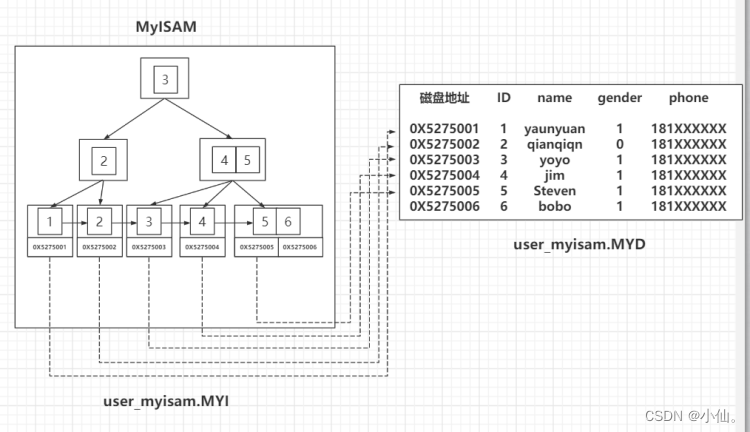
MySQL -- index of MyISAM storage engine

ESP自动下载电路设计

447-哔哩哔哩面经1
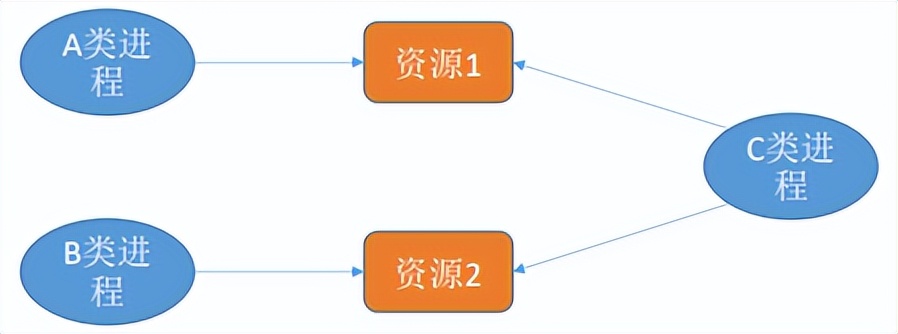
Deadlock handling strategies - prevent deadlock, avoid deadlock, detect and remove deadlock

正则系列之组和范围(Groups and Ranges)

SAP GUI 里的收藏夹事务码管理工具
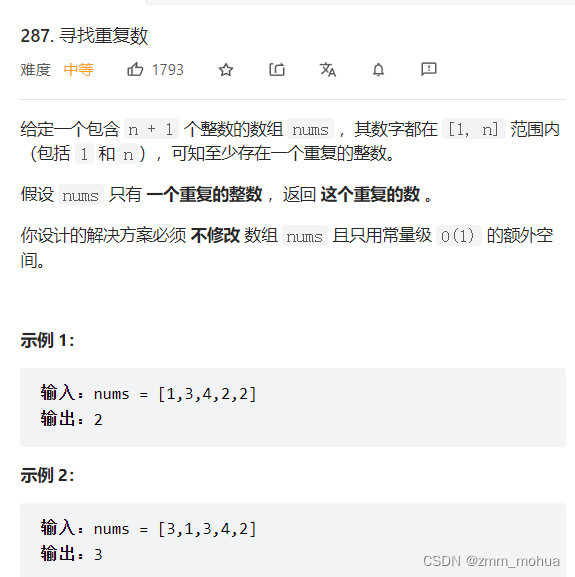
leetcode - 287. Find duplicates
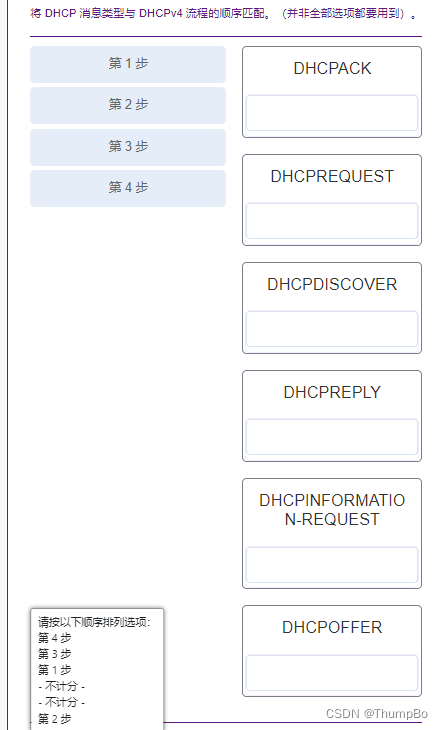
思科--高可用和高可靠网络考试
随机推荐
C#/VB. Net to add text / image watermarks to PDF documents
Mysql database detailed learning tutorial
el-input文本域字数限制,超过显示变红并禁止输入
聊一聊Zabbix都监控哪些参数
Pytorch nn. functional. Simple understanding and usage of unfold()
Share some feelings of a programmer who has experienced layoffs twice a year
Mixconv code
SAP UI5 应用开发教程之一百零四 - SAP UI5 表格控件的支持复选(Multi-Select)以及如何用代码一次选中多个表格行项目
每日刷题记录 (十)
业务可视化-让你的流程图'Run'起来
map容器
MySQL view exercise
思科考试--路由的概念和配置考试
转--原来gdb的底层调试原理这么简单
思科考试--冗余网络
Mysql5.7 set password policy (etc. three-level password transformation)
redis配置文件中常用配置详解[通俗易懂]
“信任机器”为发展赋能
Origin2018 installation tutorial "recommended collection"
MySQL5.7 设置密码策略(等保三级密码改造)