当前位置:网站首页>3Dunity游戏项目实战——飞机大战
3Dunity游戏项目实战——飞机大战
2022-07-26 10:52:00 【ha_lee】
一、游戏策划
1、游戏介绍
游戏背景是在火星的上空,主角和敌人是不同的太空飞行器,敌人迎面向主角飞来,主角通过射击消灭敌人来获得分数。如果主角战败,则游戏结束。
2、游戏UI
屏幕上显示主角生命值以及得分。如果游戏结束,屏幕上显示“游戏结束“,同时显示“再来一次”按钮。按ESC键,游戏会处于暂停状态,显示“继续游戏”,“退出游戏”。
3、主角
主角有三条性命,被敌人撞击一次性命直接清零,被敌方子弹命中,性命减一,当性命值为0时,游戏结束。
4、操作
游戏在pc上进行开发,键盘上的上下左右键控制角色在相应位置上移动。空格键和鼠标左键控制发射子弹。
5、敌人
敌人分为两类:初级敌人,装甲较弱,以撞击主角为主;高级敌人,装甲较强,可以发射子弹,也可以撞击主角。
二、代码分析
1、创建地图
- 在Scene中创建一个3D的Plane对象,用星空的图像作为背景
- 另外创建一个3D对象,用火星的图像贴图
- 为星空的Plane对象添加动画效果,使在太空的背景更加逼真。
- 在地图的周围设置空对象,当敌人走出地图时,要及时销毁对象,节省内存。
2、创建主角和子弹
- 创建主角的Object对象,并贴图
- 创建子弹的Object对象,并贴图。这里由于子弹是可重复使用对象,于是将其变为profeb预设对象,只要将Scene中创建好的对象拖进Project相应文件夹中即可。
- 为场景中的对象添加相关tag,并在对象中指定tag名

- 为主角添加碰撞容器,并在脚本里实现碰撞效果
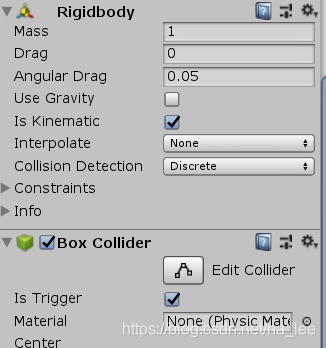
- 为主角添加Audio source容器,这样才能有声音,并在脚本中添加开枪声音以及爆炸特效。
- 为主角和子弹创建相应脚本,指定脚本中的Transform对象
// Palyer.cs

using System.Collections;
using System.Collections.Generic;
using UnityEngine;

[AddComponentMenu("MyGame/Player")]
public class Player : MonoBehaviour
{

    public float m_life = 3;//主角共3条命
    public float m_speed = 3; //控制主角移动速度
    float m_rocketRate = 0.3f; //控制子弹发射频率

    private float m_rocketspeed = 0;
    public Transform m_rocket;
    protected Transform m_transform;


    public AudioClip m_shootClip; //声音
    protected AudioSource m_audio; //声音源
    public Transform m_explosionFX; //爆炸特效
    public Transform m_explosionFX2; //爆炸特效

    // Start is called before the first frame update
    void Start()
    {

        m_transform = this.transform;
        m_audio = this.GetComponent<AudioSource>();
    }

    private void OnTriggerEnter(Collider other)
    {

        if (other.tag.CompareTo("EnemyRocket") == 0)  //碰到敌人的子弹,生命值减一
        {

            m_life -= 1;

            //主角掉血反馈
            Instantiate(m_explosionFX2, m_transform.position, Quaternion.identity);
            if (m_life <= 0)
            {


                //主角死亡爆炸特效
                Instantiate(m_explosionFX, m_transform.position, Quaternion.identity);
                Destroy(this.gameObject);
            }
        }
        if (other.tag.CompareTo("Enemy") == 0)  //碰到敌人,生命值清零并销毁
        {

            m_life = 0;

            //主角死亡爆炸特效
            Instantiate(m_explosionFX, m_transform.position, Quaternion.identity);
            Destroy(this.gameObject);
        }
    }
    // Update is called once per frame
    void Update()
    {

        float moveV = 0; //纵向距离
        float moveH = 0; //横向距离


        if (Input.GetKey(KeyCode.DownArrow))
        {

            moveV += m_speed * Time.deltaTime;
        }
        if (Input.GetKey(KeyCode.UpArrow))
        {

            moveV -= m_speed * Time.deltaTime;
        }
        if (Input.GetKey(KeyCode.RightArrow))
        {

            moveH -= m_speed * Time.deltaTime;
        }
        if (Input.GetKey(KeyCode.LeftArrow))
        {

            moveH += m_speed * Time.deltaTime;
        }

        m_rocketspeed -= Time.deltaTime;
        if (m_rocketspeed <= 0)
        {

            m_rocketspeed = m_rocketRate;
            if (Input.GetKey(KeyCode.Space) || Input.GetMouseButton(0))
            {

                Instantiate(m_rocket, new Vector3(m_transform.position.x,m_transform.position.y,m_transform.position.z + 0.5f), m_transform.rotation);

                m_audio.PlayOneShot(m_shootClip);
            }
            //移动
        }
        m_transform.Translate(new Vector3(moveH, 0, moveV));

    }
}
//Rocket.cs
using System.Collections;
using System.Collections.Generic;
using UnityEngine;

[AddComponentMenu("MyGame/Rocket")]
public class Rocket : MonoBehaviour
{

    public float m_speed = 10; //设置子弹速度
    public float m_liveTime = 1; //设置子弹生存时间
    public float m_power = 1; //设置子弹威力
    protected Transform m_transform;
    // Start is called before the first frame update
    void Start()
    {

        m_transform = this.transform;
    }

    private void OnTriggerEnter(Collider other)
    {

        if(other.tag.CompareTo("Enemy") == 0)
        {

            Destroy(this.gameObject);
        }
    }
    // Update is called once per frame
    void Update()
    {

        m_liveTime -= Time.deltaTime;
        if (m_liveTime <= 0)
            Destroy(this.gameObject);

        m_transform.Translate(new Vector3(0, 0, -m_speed * Time.deltaTime));
    }
}
//Explosion.cs
using System.Collections;
using System.Collections.Generic;
using UnityEngine;


[AddComponentMenu("MyGame/Explosion")]
public class Explosion : MonoBehaviour
{

    public float m_life = 2;
    // Start is called before the first frame update
    void Start()
    {


    }

    // Update is called once per frame
    void Update()
    {

        m_life -= Time.deltaTime;
        if(m_life <= 0)
        {

            m_life = 2;
            Destroy(this.gameObject);
        }
    }
}
3、创建敌人
- 分别创建普通敌人和高级敌人的object对象,高级敌人可以继承普通敌人
- 为敌人添加tag以及以下容器,并设定相应值,高级敌人还要在脚本容器里设置子弹的预设对象。


- 创键敌人脚本
// Enemy.cs
using System.Collections;
using System.Collections.Generic;
using UnityEngine;

[AddComponentMenu("MyGame/Enemy")]
public class Enemy : MonoBehaviour
{

    public float e_life = 20;//敌人的生命值
    public float m_speed = 1; //敌人的移动速度
    public float m_rotSpeed = 30; //旋转速度
    protected float m_timer = 1.5f; //变向间隔时间
    public int m_point = 10; //消灭一个敌人获得的分数


    public Transform m_explosionFX; //爆炸特效

    protected Transform m_transform;
    // Start is called before the first frame update
    void Start()
    {

        m_transform = this.transform;
    }

    // Update is called once per frame
    void Update()
    {

        updataMove();
    }

    private void OnTriggerEnter(Collider other)
    {

        if (other.tag.CompareTo("PlayerRocket") == 0)  //如果碰到玩家子弹
        {

            Rocket rocket = other.GetComponent<Rocket>(); //获取Rocket 的脚本Component
            if (rocket != null)
            {


                e_life -= rocket.m_power;
                if (e_life <= 0)
                {

                    //敌人死亡时爆炸特效
                    //Quaternion.identity,该四元数对应于“no rotation”- 对象与世界轴或父轴完全对齐
                    Instantiate(m_explosionFX, m_transform.position, Quaternion.identity);

                    Destroy(this.gameObject);

                    GameManager.instance.AddScore(m_point); //给主角加分
                }
            }

        }

        if(other.tag.CompareTo("bound") == 0)  //敌人飞出屏幕后自动销毁
        {

            e_life = 0;

            Destroy(this.gameObject);
        }
    }

    virtual protected void updataMove()
    {

        m_timer -= Time.deltaTime;
        if(m_timer <= 0)
        {

            m_timer = 3;   //每间隔3改变一次旋转的方向
            m_rotSpeed = -m_rotSpeed;
        }

        //Rotate()函数会一直旋转,参数一表示轴,参数二表示旋转角度,参数三表示旋转参考系
        m_transform.Rotate(Vector3.up, m_rotSpeed * Time.deltaTime, Space.World);//旋转方向
        m_transform.Translate(new Vector3(0, 0, -m_speed * Time.deltaTime)); //前进
    }
}
//SuperEnemy.cs
using System.Collections;
using System.Collections.Generic;
using UnityEngine;

[AddComponentMenu("MyGame/SuperEnemy")]
public class SuperEnemy : Enemy
{

    public Transform m_rocket;
    protected float m_fireTime = 2;
    protected Transform m_player;

    void Awake() //在游戏全体实例化时执行一次,并先于stat 方法
    {

        GameObject obj = GameObject.FindGameObjectWithTag("player");
        if (obj != null)
        {

            m_player = obj.transform;
        }

    }
    // Start is called before the first frame update
    protected override void updataMove()
    {

        m_fireTime -= Time.deltaTime;
        if(m_fireTime <= 0)
        {

            m_fireTime = 2;
            if(m_player != null)
            {

                Vector3 relativePos = m_transform.position - m_player.position;
                Instantiate(m_rocket, m_transform.position, Quaternion.LookRotation(relativePos));
            }
        }
        //前进
        m_transform.Translate(new Vector3(0, 0, -m_speed * Time.deltaTime));
    }

    private void OnTriggerEnter(Collider other)
    {

        if (other.tag.CompareTo("PlayerRocket") == 0)  //如果碰到玩家子弹
        {

            Rocket rocket = other.GetComponent<Rocket>(); //获取Rocket 的脚本Component
            if (rocket != null)
            {


                e_life -= rocket.m_power;
                if (e_life <= 0)
                {

                    //敌人死亡时爆炸特效
                    Instantiate(m_explosionFX, m_transform.position, Quaternion.identity);
                    Destroy(this.gameObject);

                    GameManager.instance.AddScore(m_point); //给主角加分
                }
            }

        }

        if (other.tag.CompareTo("bound") == 0)  //敌人飞出屏幕后自动销毁
        {

            e_life = 0;
            Destroy(this.gameObject);
        }
    }
}
4、创建敌人生成器
- 在地图的上方的指定地点,放置几个空对象,用于生成敌人
- 敌人生成器有两种类型,分别生成不同类型的敌人,需要在脚本容器中指定敌人
- 为敌人生成器创建脚本
// EnemySpawn.cs
using System.Collections;
using System.Collections.Generic;
using UnityEngine;

[AddComponentMenu("MyGame/EnemySpawn")]
public class EnemySpawn : MonoBehaviour
{


    public Transform m_enemy; //敌人的prefab
    public float m_timer = 5; //生成敌人的间隔时间
    protected Transform m_transform;
    // Start is called before the first frame update
    void Start()
    {

        m_transform = this.transform;
    }

    // Update is called once per frame
    void Update()
    {

        m_timer -= Time.deltaTime;
        if (m_timer <= 0)
        {

            m_timer = 5 + Random.value * 15.0f;  //产生5 - 15之间的随机数

            // Quaternion.identity就是指Quaternion(0,0,0,0)
            Instantiate(m_enemy, m_transform.position, Quaternion.identity);
        }
    }

    //用一幅图填充空对象,在控制台方便知道生成器的位置,游戏中看不到
    void OnDrawGizmos()
    {

        Gizmos.DrawIcon(transform.position, "item.png", true);
    }
}
5、创建游戏管理器
游戏管理器是一个空对象,有且只能有一个,用于控制游戏界面,以及控制游戏开始和退出。
- 创建一个空对象,命名为GameManager,为其添加脚本
- 为其添加Audio Source容器,并在脚本容器中指定背景音乐文件
// GameManager.cs

using System.Collections;
using System.Collections.Generic;
using UnityEngine;

[AddComponentMenu("MyGame/GameManager")]
public class GameManager : MonoBehaviour
{

    public static GameManager instance;

    public float m_score = 0;
    public static int m_hiscore = 0;
    public AudioClip m_musicClip; //指定音乐片段
    protected Player m_player;
    protected AudioSource m_audio;


    private void Awake()
    {

        instance = this;
    }
    // Start is called before the first frame update
    void Start()
    {

        m_audio = this.GetComponent<AudioSource>();
        //获取主角
        GameObject obj = GameObject.FindGameObjectWithTag("player");
        if(obj != null)
        {

            m_player = obj.GetComponent<Player>();
        }
    }

    // Update is called once per frame
    void Update()
    {

        //循环播放背景音乐
        if (!m_audio.isPlaying)
        {

            m_audio.clip = m_musicClip;
            m_audio.Play();
        }

        //暂停游戏
        if(Time.timeScale > 0 && Input.GetKeyDown(KeyCode.Escape))
        {

            Time.timeScale = 0;
        }
    }

    [System.Obsolete]
    private void OnGUI()
    {

        //暂停游戏
        if(Time.timeScale == 0)
        {

            //继续游戏按钮
            if(GUI.Button(new Rect(Screen.width * 0.5f -50,Screen.height * 0.4f, 100, 30), "继续游戏"))
            {

                Time.timeScale = 1;
            }

            //退出游戏按钮
            if (GUI.Button(new Rect(Screen.width * 0.5f - 50, Screen.height * 0.6f, 100, 30), "退出游戏"))
            {

                Application.Quit(); //只有当工程打包编译后的程序使用Application.Quit()才奏效
            }
        }

        int life = 0;
        if(m_player != null)
        {

            life = (int)m_player.m_life; //获取主角的生命值
        }
        else  //主角被销毁,即游戏失败
        {

            //放大字体
            GUI.skin.label.fontSize = 50;

            //显示游戏失败
            GUI.skin.label.alignment = TextAnchor.LowerCenter;
            GUI.Label(new Rect(0, Screen.height * 0.2f, Screen.width, 60), "游戏失败");

            GUI.skin.label.fontSize = 20;

            //显示再来一次按钮
            if(GUI.Button(new Rect(Screen.width * 0.5f - 50, Screen.height * 0.5f, 100, 30), "再来一次"))
            {

                //读取当前关卡
                Application.LoadLevel(Application.loadedLevelName);
            }
        }

        GUI.skin.label.fontSize = 15;
        //显示主角生命
        GUI.Label(new Rect(5, 5, 100, 30), "装甲:" + life);
        //显示最高分
        GUI.skin.label.alignment = TextAnchor.LowerCenter;
        GUI.Label(new Rect(0, 5, Screen.width, 30), "最高分:" + m_hiscore);

        //显示当前得分
        GUI.Label(new Rect(0, 25, Screen.width, 30), "得分:" + m_score);

    }

    public void AddScore(int point)
    {

        m_score += point;

        // 更高分记录
        if(m_hiscore < m_score)
        {

            m_hiscore = (int)m_score;
        }
    }
}
6、创建游戏开始标题
这里游戏基本已经完成,现在需要创建一个开始的标题Scene,然后点击“开始游戏”跳转到当前的level1。
- 创建一个新的Scene,保存为start
- 在这个start中创建一个摄像机和一个UI->RowImage对象,用图片填充,布置好游戏一开始的画面
- 为摄像机添加一个脚本文件
//TitleSceen.cs

using System.Collections;
using System.Collections.Generic;
using UnityEngine;

[AddComponentMenu("MyGame/TitleScreen")]
public class TitleSceen : MonoBehaviour
{

    // Start is called before the first frame update
    void Start()
    {


    }

    // Update is called once per frame
    void Update()
    {


    }

    [System.Obsolete]
    private void OnGUI()
    {

        GUI.skin.label.fontSize = 48;
        GUI.skin.label.alignment = TextAnchor.LowerCenter; //UI中心对齐
        GUI.Label(new Rect(0, 30, Screen.width, 100), "太空大战");

        //开始游戏按钮
        if (GUI.Button(new Rect(Screen.width * 0.5f - 100, Screen.height * 0.7f, 200, 30), "开始游戏"))
        {

            Application.LoadLevel("level1");
        }
    }
}
三、游戏编译发布
设置游戏图标,以及相应的一些参数。不懂就用默认。
编译时必须把两个Scene全勾上,并调整顺序。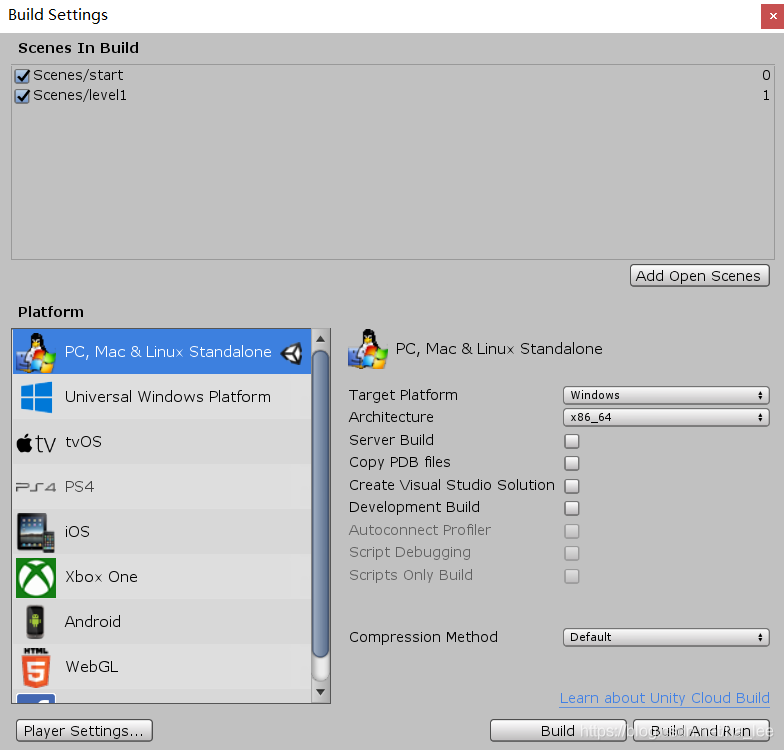
边栏推荐
- 微信公众号开发 获取openid时报错40029 invalid code 问题的解决
- WIRESHARK基础教程以太帧的分析。
- Pengge C language lesson 4 (3)
- 经典蓝牙的连接过程
- Solve the problem of the popularity of org.apache.commons.codec.binary.base64
- Bash shell学习笔记(一)
- During the interview, how did the interviewer evaluate the level of rust engineers?
- Capture ZABBIX performance monitoring chart with selenium
- MFC图片控件
- BigDecimal's addition, subtraction, multiplication and division, size comparison, rounding up and down, and BigDecimal's set accumulation, judge whether BigDecimal has decimal
猜你喜欢




随机推荐
pytest conftest.py和fixture的配合使用
BigDecimal's addition, subtraction, multiplication and division, size comparison, rounding up and down, and BigDecimal's set accumulation, judge whether BigDecimal has decimal
27. Remove elements
Bash shell学习笔记(二)
Simple use of MFC multithreading
Bash shell学习笔记(一)
1748.唯一元素的和
Bash shell学习笔记(三)
Logging learning final edition - configured different levels of log printing colors
Bash shell学习笔记(四)
Kali view IP address
104. Maximum depth of binary tree
Bash shell learning notes (4)
nmap弱点扫描结果可视化转换
Logging advanced use
Multipartfil to file
SparseArray of the source code for novices
C language pengge 20210812c language function
27.移除元素
-bash: ./build.sh: /bin/bash^M: 坏的解释器: 没有那个文件或目录