当前位置:网站首页>Swagger2.9.2 tutorial and swagger3.0.0 tutorial
Swagger2.9.2 tutorial and swagger3.0.0 tutorial
2022-07-26 11:34:00 【CodeMartain】
Programmer's daily :

Programmer's conversation one day
Learning is a lifetime thing , isn't it? ?
There is nothing else in this part , Just look at action !
swagger Use
springboot Integrate swagger
What programmers do is practice and practice
- Prepare a classic project
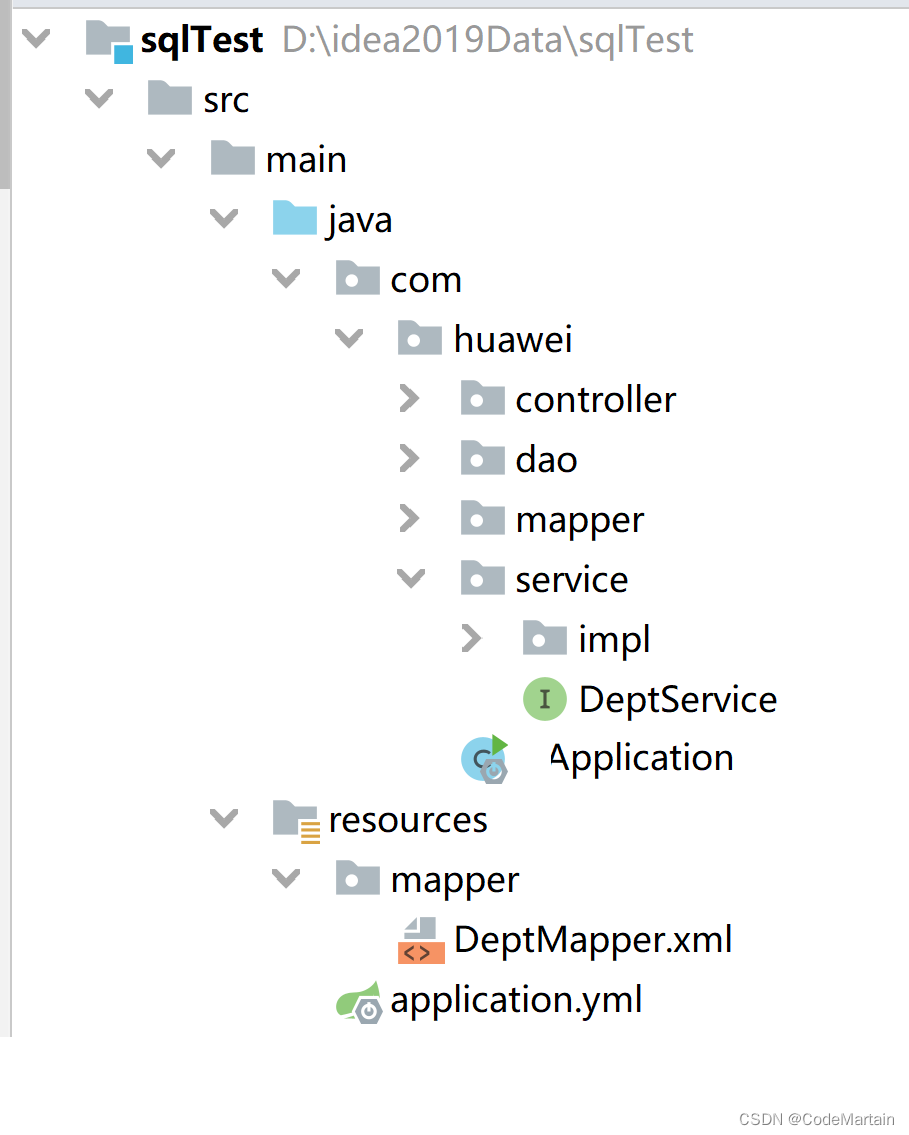
- Import swagger Related packages
swagger The relevant package
If using swagger_2 Version then use the following swagger Version is OK ,
Be careful : Use here springboot Of 2.5 Up to , ---- But this involves loopholes , So it's better to use 2.7.1( The latest version )
    <dependency>
        <groupId>io.springfox</groupId>
        <artifactId>springfox-swagger-ui</artifactId>
        <version>2.9.2</version>
    </dependency>
    <dependency>
        <groupId>io.springfox</groupId>
        <artifactId>springfox-swagger2</artifactId>
        <version>2.9.2</version>
    </dependency>
swagger_2 Dependency details related to version 
Use springboot2.5 function
 <dependency>
            <groupId>org.springframework.boot</groupId>
            <artifactId>spring-boot-starter</artifactId>
            <version>2.5.13</version>
        </dependency>
- To configure swagger
@Configuration
@EnableSwagger2// Turn on swagger Annotations
public class SwaggerConfig {

}
- Operation engineering
visit Url---->>http://localhost:8888/swagger-ui.html
swagger Interface function introduction –>>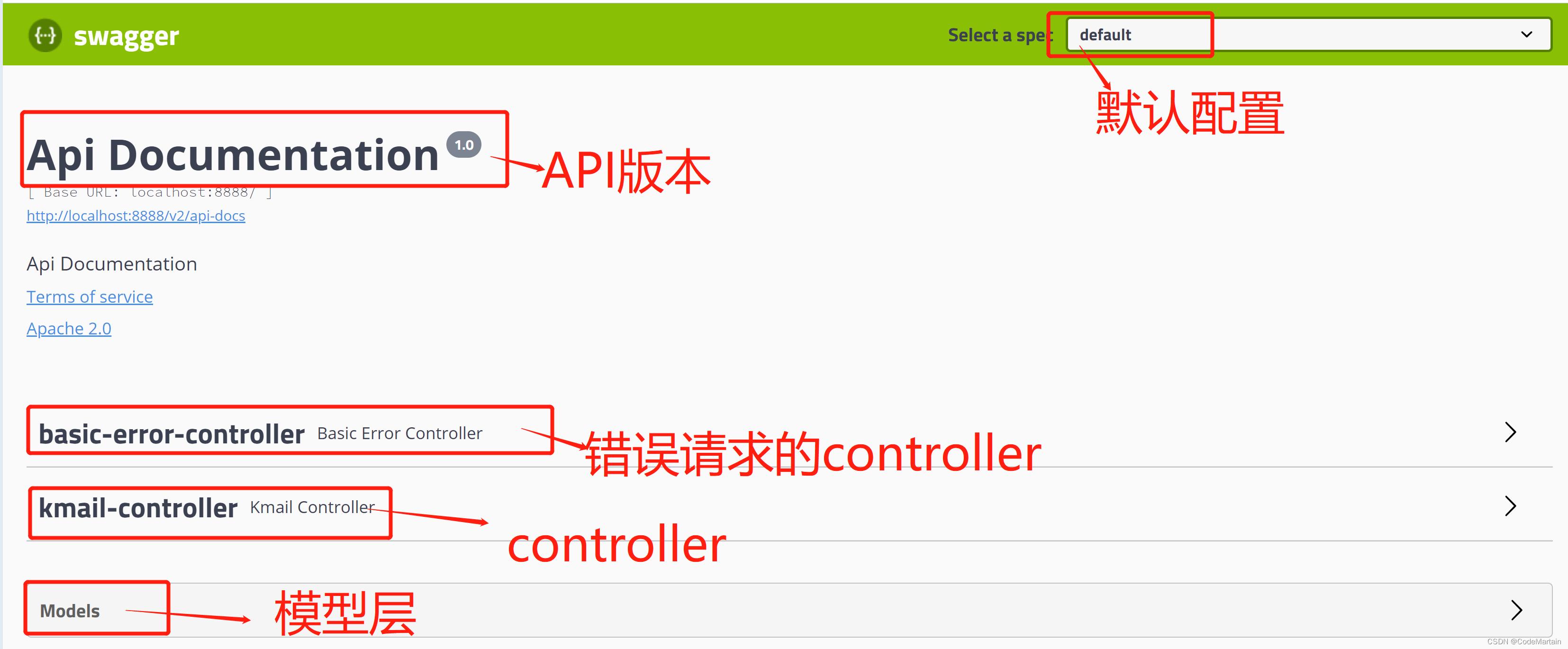
File storage location when accessing —>>(swagger-ui 2.9.2 And 3.0.0 The access address has changed
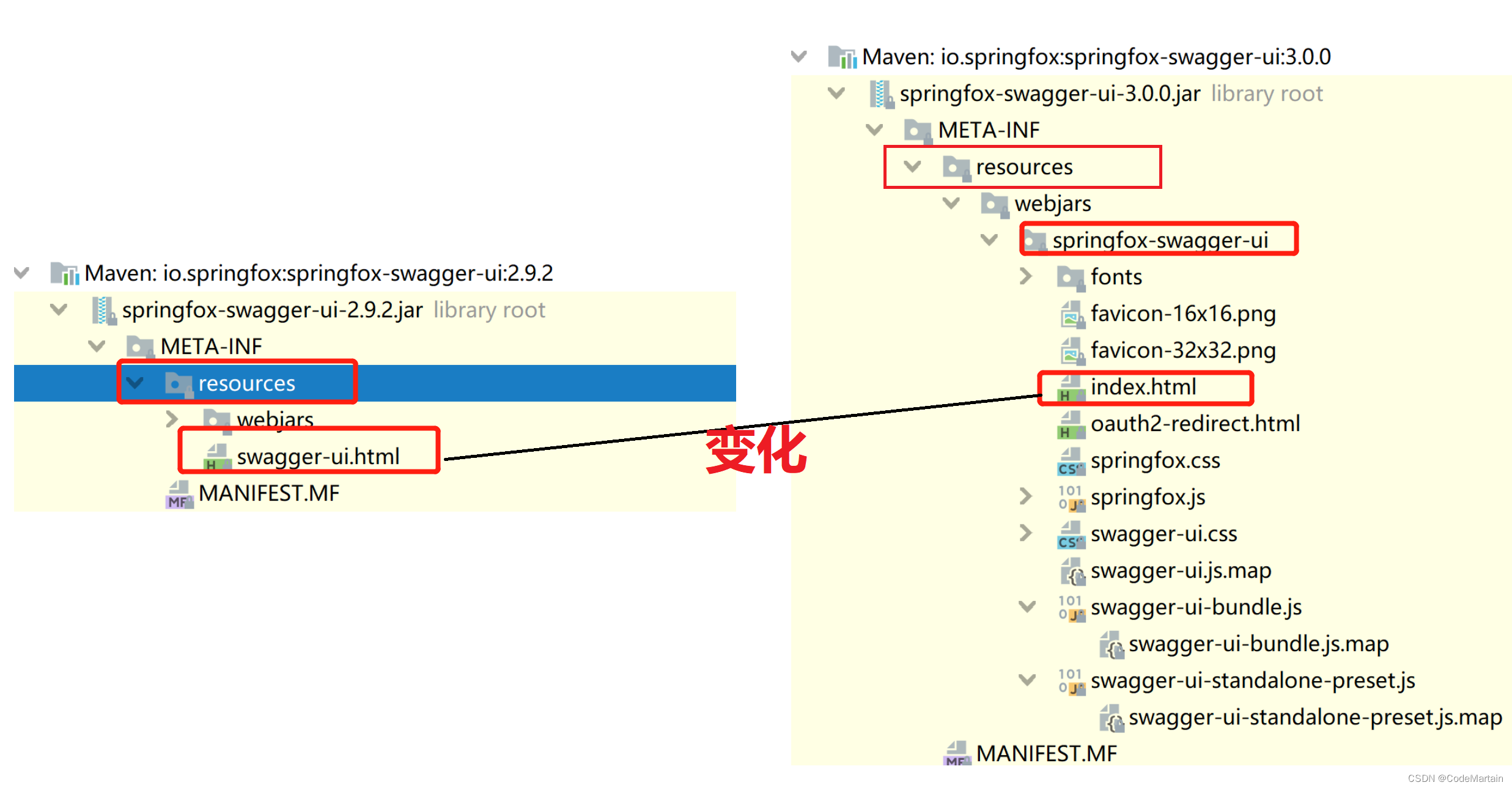
Here we don't actually write any configuration in the configuration file , Let's take a look , How to configure swagger
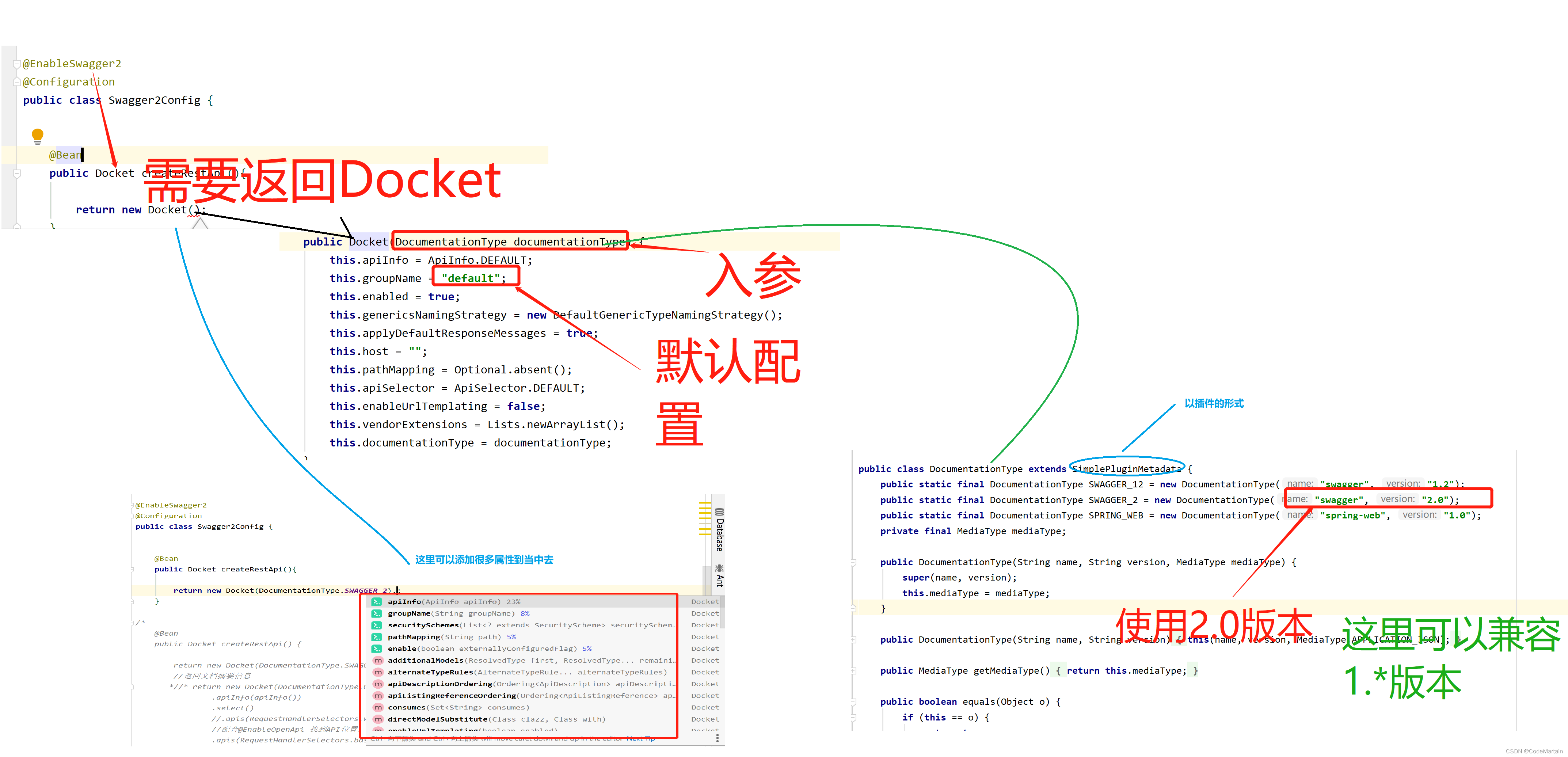
Let's configure it manually
@EnableSwagger2
@Configuration
public class Swagger2Config {


    Contact contact = new Contact("Gavin", "https://varyu-program.gitee.io/road2-coding/", "[email protected]");

    @Bean
    public Docket createRestApi() {


        return new Docket(DocumentationType.SWAGGER_2).apiInfo(createApiInfo());
    }


    @Bean
    public ApiInfo createApiInfo() {


        return new ApiInfo("swagger2 Use ",
                " Study makes me happy ",
                " edition 1.0",
                "localhost:8888/test",
                contact, "GPL",
                "http://wwww.baidu.com",
                new ArrayList<>());
    }

Switch here to swagger 3.0 edition
If using swagger3.0 Version can be used spring Provided swagger3 The startup package of , Convenient and quick , At the same time, the latest version of springboot edition , I think it will be upgraded to swagger 3.0.0, It's better to go straight to the liver swagger3.0.0,
Anyway, there is little change ,
<dependency>
            <groupId>io.springfox</groupId>
            <artifactId>springfox-boot-starter</artifactId>
            <version>3.0.0</version>
        </dependency>

Just introduce a startup dependency –springfox-boot-starter
And then start the project ---->>http://localhost:8888/swagger-ui/index.html
stay controller layer , We can see various requests , It is also very convenient when testing 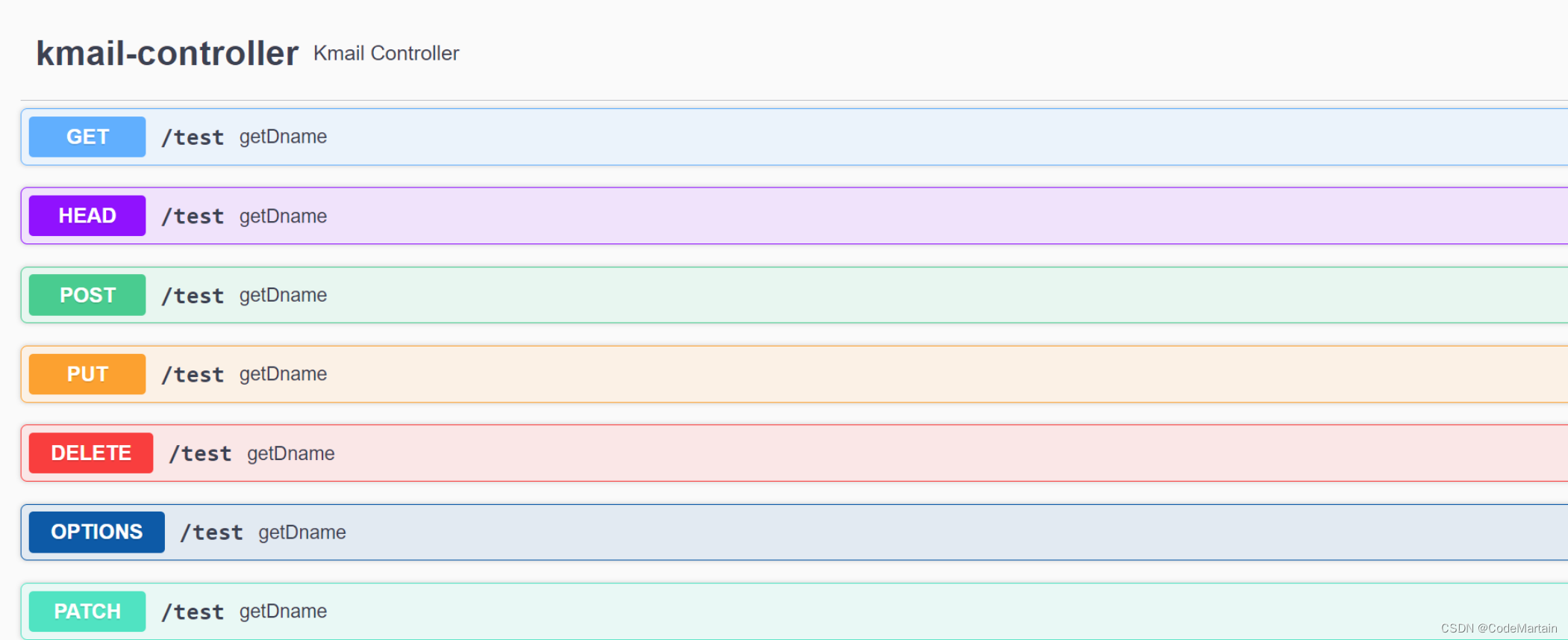
- Optional interface display ---- Filter
The default is to scan all interfaces , But sometimes we only need to provide some interfaces —>>

    @Bean
    public Docket createRestApi() {


        return new Docket(DocumentationType.SWAGGER_2)
                //api document information
                .apiInfo(createApiInfo())
                // Configure the optional scanning interface
                .select()
                //RequestHandlerSelectors Configure how to scan the interface
                //any  Scan all
                //withClassAnnotation  Scan annotations on classes
                //withMethodAnnotation  Notes on the scanning method
                .apis(RequestHandlerSelectors.basePackage("com.gavin.controller")).build();
    }
- close swagger scanning
   @Bean
    public Docket createRestApi() {

        return new Docket(DocumentationType.SWAGGER_2)
                //api document information
                .apiInfo(createApiInfo())
                // close swagger scanning
                .enable(false)
                 .build();
    }

swagger In the development environment / Test environment enabled , Not enabled in the production environment
First of all, we usually don't publish swagger Relevant code removed , Instead, choose to pass enable(false) The way to shut down swagger,
So the solution is
1, Determine whether it is a production environment ----
2, close swagger

The code is as follows —
  @Bean
    public Docket createRestApi(Environment environment) {

        // Get the property value in the configuration file
        String environmentProperty = environment.getProperty("spring.profiles.active");
        if (environmentProperty.equals("dev")){

            return new Docket(DocumentationType.SWAGGER_2)
                    //api document information
                    .apiInfo(createApiInfo())
                    // close swagger scanning
                    .enable(false)
                    ;
        }
// Profiles profiles= Profiles.
        return new Docket(DocumentationType.SWAGGER_2)
                //api document information
                .apiInfo(createApiInfo())
                // close swagger scanning
                .enable(true);
    }
Pass in a –Environment ( Interface ) object , Four methods are provided under this interface , One has been abandoned ,
package org.springframework.core.env;

public interface Environment extends PropertyResolver {

    String[] getActiveProfiles();

    String[] getDefaultProfiles();

    /** @deprecated */
    @Deprecated
    boolean acceptsProfiles(String... profiles);

    boolean acceptsProfiles(Profiles profiles);
}
getActiveProfiles And getDefaultProfiles The bottom is the same 
acceptsProfiles Incoming Profiles( Interface ) object , It's from the inside static Method 
The whole demo code –>>
    @Bean
    public Docket createRestApi(Environment environment) {

        // Get the property value in the configuration file
        String environmentProperty = environment.getProperty("spring.profiles.active");

        // Directly judge whether you are in the production environment
        boolean flag = environment.acceptsProfiles(Profiles.of("pro"));
        System.out.println(false);
        if(flag){

            return new Docket(DocumentationType.SWAGGER_2)
                    //api document information
                    .apiInfo(createApiInfo())
                    // close swagger scanning
                    .enable(false)
                    ;
        }
       if (environmentProperty.equals("dev")){

            return new Docket(DocumentationType.SWAGGER_2)
                    //api document information
                    .apiInfo(createApiInfo())
                    // close swagger scanning
                    .enable(false)
                    ;
        }

        return new Docket(DocumentationType.SWAGGER_2)
                //api document information
                .apiInfo(createApiInfo())
                // close swagger scanning
                .enable(true);
    }
- Set multiple groups
Set up multiple Docket that will do
We can configure some different rough to meet different needs 
- Set entity class
@ApiModel(description = " Department ")
public class Dept implements Serializable {

    @ApiModelProperty(" Department number ")
    private Integer deptno;
    @ApiModelProperty(" Department name ")
    private String dname;
    @ApiModelProperty(" Department position ")
    private String loc;

    private static final long serialVersionUID = 1L;

    public Integer getDeptno() {

        return deptno;
    }

    public void setDeptno(Integer deptno) {

        this.deptno = deptno;
    }

    public String getDname() {

        return dname;
    }

    public void setDname(String dname) {

        this.dname = dname;
    }

    public String getLoc() {

        return loc;
    }

    public void setLoc(String loc) {

        this.loc = loc;
    }
}
stay model layer —>> As soon as card sees the change ---- Added remarks
 swagger Some common notes
 Some common notes

     @Api: Use in controller class , describe API Interface
     @ApiOperation: Describe the interface method
     @ApiModel: Describe objects
     @ApiModelProperty: Describe object properties
     @ApiImplicitParams: Describes the interface parameters
     @ApiResponses: Describe the interface response
     @ApiIgnore: Ignore interface methods
@ApiImplicitParams: Describes the interface parameters Use
@EnableOpenApi
@Api(description = " department API")
@RestController("/dept")
public class KmailController {
    @Resource
    private DeptService deptService;

    @ApiOperation("/ Query whether the position exists ")
    @RequestMapping("/test")
    public String getDname() {
        String sales = deptService.queryDbname("SALES");
        return sales;
    }

    @ApiOperation(" Inquiry Department ")
    @ApiImplicitParams(@ApiImplicitParam(name = "deptno",value = " Department number ",required =true,dataType = "Integer") )
    @GetMapping("/Dept")
    public Dept getDeptInfo(@ApiParam("deptno") Integer deptno) {
        return deptService.queryDeptByDeptNo(deptno);
    }

}
边栏推荐
猜你喜欢



随机推荐
Dichotomous template summary
swagger2.9.2教程 与swagger3.0.0教程
What does it mean that the configuration file ends in RC
10 个 Reduce 常用“奇技淫巧”
Several ways of communication between threads
想让照片中的云飘起来?视频编辑服务一键动效3步就能实现
leetcode-209. 长度最小的子数组(二分、前缀和、滑动窗口)
李宏毅《机器学习》丨2. Regression(回归)
《微信小程序-进阶篇》Lin-ui组件库源码分析-Button组件(一)
702 horsepower breaks through 100 in only 4.5 seconds! The strongest pickup truck comes, safe and comfortable
Scrapy IP agent is not responding
MySQL basic knowledge summary
Query advanced alias
3dunity game project actual combat - aircraft war
Att request of ble
ESP8266-Arduino编程实例-认识ESP8266
Cmake常用命令总结
如何配置JdbcRealm数据源呢?
How to configure the jdbcrealm data source?
PostgreSQL在Linux和Windows安装和入门基础教程