当前位置:网站首页>3dunity game project actual combat - aircraft war
3dunity game project actual combat - aircraft war
2022-07-26 11:30:00 【ha_ lee】
One 、 Game planning
1、 Introduction to the game
The background of the game is over Mars , The protagonist and the enemy are different spacecraft , The enemy flies head-on to the protagonist , The protagonist gets points by shooting to destroy the enemy . If the protagonist loses , Then the game is over .
2、 game UI
The screen shows the protagonist's HP and score . If the game is over , The screen shows “ Game over “, Show at the same time “ Once again ” Button . Press ESC key , The game will be suspended , Show “ Keep playing ”,“ Quit the game ”.
3、 Lead
The protagonist has three lives , Hit by the enemy, one-time life is directly cleared , Hit by enemy bullets , Lose one life , When life value is 0 when , Game over .
4、 operation
In the game pc Upper development , The up, down, left and right keys on the keyboard control the character to move in the corresponding position . The space bar and the left mouse button control the firing of bullets .
5、 The enemy
The enemy is divided into two categories : Primary enemy , Armor is weak , Mainly to hit the protagonist ; Advanced enemy , Strong armor , Can fire bullets , You can also hit the protagonist .
Two 、 The code analysis
1、 Create map
- stay Scene Create a 3D Of Plane object , Use the image of the starry sky as the background
- Create another 3D object , Map with the image of Mars
- For starry Plane Add animation effects to objects , Make the background in space more realistic .
- Set an empty object around the map , When the enemy walks out of the map , Destroy the object in time , Save memory .
2、 Create protagonists and bullets
- Create the protagonist's Object object , And map
- To create a bullet Object object , And map . Here, because bullets are reusable objects , So turn it into profeb Preset object , As long as Scene Drag the created object into Project In the corresponding folder .
- Add correlation to the objects in the scene tag, And specify tag name

- Add collision containers for protagonists , And realize the collision effect in the script
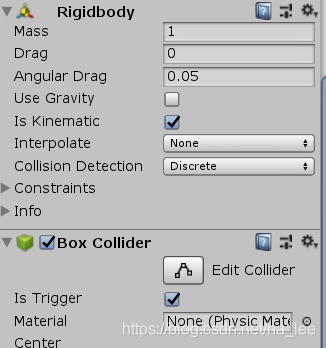
- Add Audio source Containers , Only in this way can there be sound , And add shooting sound and explosion effects to the script .
- Create corresponding scripts for the protagonist and bullets , Specify Transform object
// Palyer.cs

using System.Collections;
using System.Collections.Generic;
using UnityEngine;

[AddComponentMenu("MyGame/Player")]
public class Player : MonoBehaviour
{

    public float m_life = 3;// The protagonists are 3 Life
    public float m_speed = 3; // Control the moving speed of the protagonist
    float m_rocketRate = 0.3f; // Control the firing frequency of bullets

    private float m_rocketspeed = 0;
    public Transform m_rocket;
    protected Transform m_transform;


    public AudioClip m_shootClip; // voice
    protected AudioSource m_audio; // Sound source
    public Transform m_explosionFX; // Explosive effects
    public Transform m_explosionFX2; // Explosive effects

    // Start is called before the first frame update
    void Start()
    {

        m_transform = this.transform;
        m_audio = this.GetComponent<AudioSource>();
    }

    private void OnTriggerEnter(Collider other)
    {

        if (other.tag.CompareTo("EnemyRocket") == 0)  // Hit the enemy's bullet , Life reduced by one
        {

            m_life -= 1;

            // The protagonist loses blood feedback
            Instantiate(m_explosionFX2, m_transform.position, Quaternion.identity);
            if (m_life <= 0)
            {


                // The death explosion effect of the protagonist
                Instantiate(m_explosionFX, m_transform.position, Quaternion.identity);
                Destroy(this.gameObject);
            }
        }
        if (other.tag.CompareTo("Enemy") == 0)  // Meet the enemy , HP is cleared and destroyed
        {

            m_life = 0;

            // The death explosion effect of the protagonist
            Instantiate(m_explosionFX, m_transform.position, Quaternion.identity);
            Destroy(this.gameObject);
        }
    }
    // Update is called once per frame
    void Update()
    {

        float moveV = 0; // Longitudinal distance
        float moveH = 0; // Lateral distance


        if (Input.GetKey(KeyCode.DownArrow))
        {

            moveV += m_speed * Time.deltaTime;
        }
        if (Input.GetKey(KeyCode.UpArrow))
        {

            moveV -= m_speed * Time.deltaTime;
        }
        if (Input.GetKey(KeyCode.RightArrow))
        {

            moveH -= m_speed * Time.deltaTime;
        }
        if (Input.GetKey(KeyCode.LeftArrow))
        {

            moveH += m_speed * Time.deltaTime;
        }

        m_rocketspeed -= Time.deltaTime;
        if (m_rocketspeed <= 0)
        {

            m_rocketspeed = m_rocketRate;
            if (Input.GetKey(KeyCode.Space) || Input.GetMouseButton(0))
            {

                Instantiate(m_rocket, new Vector3(m_transform.position.x,m_transform.position.y,m_transform.position.z + 0.5f), m_transform.rotation);

                m_audio.PlayOneShot(m_shootClip);
            }
            // Move
        }
        m_transform.Translate(new Vector3(moveH, 0, moveV));

    }
}
//Rocket.cs
using System.Collections;
using System.Collections.Generic;
using UnityEngine;

[AddComponentMenu("MyGame/Rocket")]
public class Rocket : MonoBehaviour
{

    public float m_speed = 10; // Set the bullet speed
    public float m_liveTime = 1; // Set the bullet lifetime
    public float m_power = 1; // Set the bullet power
    protected Transform m_transform;
    // Start is called before the first frame update
    void Start()
    {

        m_transform = this.transform;
    }

    private void OnTriggerEnter(Collider other)
    {

        if(other.tag.CompareTo("Enemy") == 0)
        {

            Destroy(this.gameObject);
        }
    }
    // Update is called once per frame
    void Update()
    {

        m_liveTime -= Time.deltaTime;
        if (m_liveTime <= 0)
            Destroy(this.gameObject);

        m_transform.Translate(new Vector3(0, 0, -m_speed * Time.deltaTime));
    }
}
//Explosion.cs
using System.Collections;
using System.Collections.Generic;
using UnityEngine;


[AddComponentMenu("MyGame/Explosion")]
public class Explosion : MonoBehaviour
{

    public float m_life = 2;
    // Start is called before the first frame update
    void Start()
    {


    }

    // Update is called once per frame
    void Update()
    {

        m_life -= Time.deltaTime;
        if(m_life <= 0)
        {

            m_life = 2;
            Destroy(this.gameObject);
        }
    }
}
3、 Create enemies
- Create ordinary enemies and advanced enemies respectively object object , Advanced enemies can inherit ordinary enemies
- Add tag And the following containers , And set the corresponding value , Advanced enemies also set the preset object of bullets in the script container .


- Create key enemy script
// Enemy.cs
using System.Collections;
using System.Collections.Generic;
using UnityEngine;

[AddComponentMenu("MyGame/Enemy")]
public class Enemy : MonoBehaviour
{

    public float e_life = 20;// Enemy's life value
    public float m_speed = 1; // The movement speed of the enemy
    public float m_rotSpeed = 30; // Rotation speed
    protected float m_timer = 1.5f; // Change direction interval
    public int m_point = 10; // Points gained by destroying an enemy


    public Transform m_explosionFX; // Explosive effects

    protected Transform m_transform;
    // Start is called before the first frame update
    void Start()
    {

        m_transform = this.transform;
    }

    // Update is called once per frame
    void Update()
    {

        updataMove();
    }

    private void OnTriggerEnter(Collider other)
    {

        if (other.tag.CompareTo("PlayerRocket") == 0)  // If you encounter a player's bullet
        {

            Rocket rocket = other.GetComponent<Rocket>(); // obtain Rocket  Script for Component
            if (rocket != null)
            {


                e_life -= rocket.m_power;
                if (e_life <= 0)
                {

                    // Explosion effect when the enemy dies
                    //Quaternion.identity, The quaternion corresponds to “no rotation”-  The object is perfectly aligned with the world axis or the parent axis
                    Instantiate(m_explosionFX, m_transform.position, Quaternion.identity);

                    Destroy(this.gameObject);

                    GameManager.instance.AddScore(m_point); // Add points to the protagonist
                }
            }

        }

        if(other.tag.CompareTo("bound") == 0)  // The enemy will be destroyed automatically after flying out of the screen
        {

            e_life = 0;

            Destroy(this.gameObject);
        }
    }

    virtual protected void updataMove()
    {

        m_timer -= Time.deltaTime;
        if(m_timer <= 0)
        {

            m_timer = 3;   // Every interval 3 Change the direction of a rotation
            m_rotSpeed = -m_rotSpeed;
        }

        //Rotate() The function will rotate all the time , Parameter 1 indicates axis , Parameter 2 represents the rotation angle , Parameter three represents the rotating reference system
        m_transform.Rotate(Vector3.up, m_rotSpeed * Time.deltaTime, Space.World);// Direction of rotation
        m_transform.Translate(new Vector3(0, 0, -m_speed * Time.deltaTime)); // Forward
    }
}
//SuperEnemy.cs
using System.Collections;
using System.Collections.Generic;
using UnityEngine;

[AddComponentMenu("MyGame/SuperEnemy")]
public class SuperEnemy : Enemy
{

    public Transform m_rocket;
    protected float m_fireTime = 2;
    protected Transform m_player;

    void Awake() // Execute once when the game is all instantiated , And before stat  Method
    {

        GameObject obj = GameObject.FindGameObjectWithTag("player");
        if (obj != null)
        {

            m_player = obj.transform;
        }

    }
    // Start is called before the first frame update
    protected override void updataMove()
    {

        m_fireTime -= Time.deltaTime;
        if(m_fireTime <= 0)
        {

            m_fireTime = 2;
            if(m_player != null)
            {

                Vector3 relativePos = m_transform.position - m_player.position;
                Instantiate(m_rocket, m_transform.position, Quaternion.LookRotation(relativePos));
            }
        }
        // Forward
        m_transform.Translate(new Vector3(0, 0, -m_speed * Time.deltaTime));
    }

    private void OnTriggerEnter(Collider other)
    {

        if (other.tag.CompareTo("PlayerRocket") == 0)  // If you encounter a player's bullet
        {

            Rocket rocket = other.GetComponent<Rocket>(); // obtain Rocket  Script for Component
            if (rocket != null)
            {


                e_life -= rocket.m_power;
                if (e_life <= 0)
                {

                    // Explosion effect when the enemy dies
                    Instantiate(m_explosionFX, m_transform.position, Quaternion.identity);
                    Destroy(this.gameObject);

                    GameManager.instance.AddScore(m_point); // Add points to the protagonist
                }
            }

        }

        if (other.tag.CompareTo("bound") == 0)  // The enemy will be destroyed automatically after flying out of the screen
        {

            e_life = 0;
            Destroy(this.gameObject);
        }
    }
}
4、 Create enemy generator
- The designated place at the top of the map , Place several empty objects , Used to generate enemies
- There are two types of enemy generators , Generate different types of enemies , You need to specify the enemy in the script container
- Create a script for the enemy generator
// EnemySpawn.cs
using System.Collections;
using System.Collections.Generic;
using UnityEngine;

[AddComponentMenu("MyGame/EnemySpawn")]
public class EnemySpawn : MonoBehaviour
{


    public Transform m_enemy; // Of the enemy prefab
    public float m_timer = 5; // The interval between enemy generation
    protected Transform m_transform;
    // Start is called before the first frame update
    void Start()
    {

        m_transform = this.transform;
    }

    // Update is called once per frame
    void Update()
    {

        m_timer -= Time.deltaTime;
        if (m_timer <= 0)
        {

            m_timer = 5 + Random.value * 15.0f;  // produce 5 - 15 Random number between

            // Quaternion.identity Is refers to Quaternion(0,0,0,0)
            Instantiate(m_enemy, m_transform.position, Quaternion.identity);
        }
    }

    // Fill an empty object with a picture , It is convenient to know the location of the generator on the console , I can't see it in the game
    void OnDrawGizmos()
    {

        Gizmos.DrawIcon(transform.position, "item.png", true);
    }
}
5、 Create game manager
The game manager is an empty object , There is one and only one , Used to control the game interface , And control the start and exit of the game .
- Create an empty object , Name it GameManager, Add a script to it
- To add Audio Source Containers , And specify the background music file in the script container
// GameManager.cs

using System.Collections;
using System.Collections.Generic;
using UnityEngine;

[AddComponentMenu("MyGame/GameManager")]
public class GameManager : MonoBehaviour
{

    public static GameManager instance;

    public float m_score = 0;
    public static int m_hiscore = 0;
    public AudioClip m_musicClip; // Specify music clips
    protected Player m_player;
    protected AudioSource m_audio;


    private void Awake()
    {

        instance = this;
    }
    // Start is called before the first frame update
    void Start()
    {

        m_audio = this.GetComponent<AudioSource>();
        // Get the protagonist
        GameObject obj = GameObject.FindGameObjectWithTag("player");
        if(obj != null)
        {

            m_player = obj.GetComponent<Player>();
        }
    }

    // Update is called once per frame
    void Update()
    {

        // Loop back the background music
        if (!m_audio.isPlaying)
        {

            m_audio.clip = m_musicClip;
            m_audio.Play();
        }

        // Pause the game
        if(Time.timeScale > 0 && Input.GetKeyDown(KeyCode.Escape))
        {

            Time.timeScale = 0;
        }
    }

    [System.Obsolete]
    private void OnGUI()
    {

        // Pause the game
        if(Time.timeScale == 0)
        {

            // Continue game button
            if(GUI.Button(new Rect(Screen.width * 0.5f -50,Screen.height * 0.4f, 100, 30), " Keep playing "))
            {

                Time.timeScale = 1;
            }

            // Exit game button
            if (GUI.Button(new Rect(Screen.width * 0.5f - 50, Screen.height * 0.6f, 100, 30), " Quit the game "))
            {

                Application.Quit(); // Only when the project is packaged and compiled, the program uses Application.Quit() It works
            }
        }

        int life = 0;
        if(m_player != null)
        {

            life = (int)m_player.m_life; // Get the life value of the protagonist
        }
        else  // The protagonist is destroyed , That is, the game fails
        {

            // Enlarge the font
            GUI.skin.label.fontSize = 50;

            // Show game failure
            GUI.skin.label.alignment = TextAnchor.LowerCenter;
            GUI.Label(new Rect(0, Screen.height * 0.2f, Screen.width, 60), " The game failed ");

            GUI.skin.label.fontSize = 20;

            // Show the button again
            if(GUI.Button(new Rect(Screen.width * 0.5f - 50, Screen.height * 0.5f, 100, 30), " Once again "))
            {

                // Read the current level
                Application.LoadLevel(Application.loadedLevelName);
            }
        }

        GUI.skin.label.fontSize = 15;
        // Show the protagonist's life
        GUI.Label(new Rect(5, 5, 100, 30), " armor :" + life);
        // Show the highest score
        GUI.skin.label.alignment = TextAnchor.LowerCenter;
        GUI.Label(new Rect(0, 5, Screen.width, 30), " The highest :" + m_hiscore);

        // Show current score
        GUI.Label(new Rect(0, 25, Screen.width, 30), " score :" + m_score);

    }

    public void AddScore(int point)
    {

        m_score += point;

        //  Higher scores
        if(m_hiscore < m_score)
        {

            m_hiscore = (int)m_score;
        }
    }
}
6、 Create game start Title
The game here is basically finished , Now you need to create a starting Title Scene, And then click “ Start the game ” Jump to current level1.
- Create a new Scene, Save as start
- In this start Create a camera and a UI->RowImage object , Fill in with pictures , Set up the picture at the beginning of the game
- Add a script file for the camera
//TitleSceen.cs

using System.Collections;
using System.Collections.Generic;
using UnityEngine;

[AddComponentMenu("MyGame/TitleScreen")]
public class TitleSceen : MonoBehaviour
{

    // Start is called before the first frame update
    void Start()
    {


    }

    // Update is called once per frame
    void Update()
    {


    }

    [System.Obsolete]
    private void OnGUI()
    {

        GUI.skin.label.fontSize = 48;
        GUI.skin.label.alignment = TextAnchor.LowerCenter; //UI Center alignment
        GUI.Label(new Rect(0, 30, Screen.width, 100), " Space war ");

        // Start game button
        if (GUI.Button(new Rect(Screen.width * 0.5f - 100, Screen.height * 0.7f, 200, 30), " Start the game "))
        {

            Application.LoadLevel("level1");
        }
    }
}
3、 ... and 、 Game compilation and release
Set the game icon , And some corresponding parameters . If you don't understand, use default .
When compiling, you must put two Scene Full hook up , And adjust the order .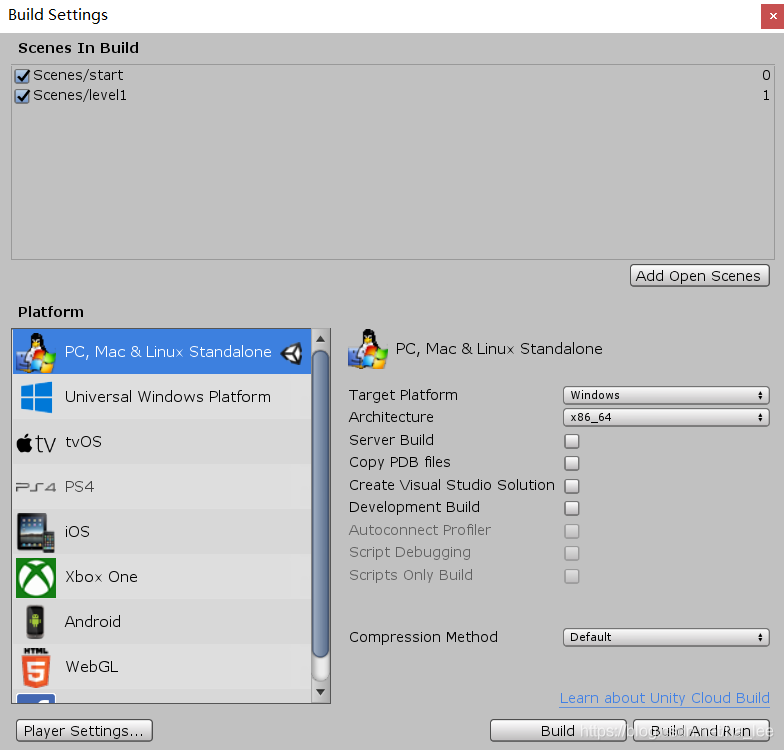
边栏推荐
猜你喜欢

After 4 months of job search and 15 interviews, I finally got 3 offers, ranking P7+

Basic concepts of JVM and memory management model

pytest pytest. Ini configuration case grouping case skipping

The company cannot access station B
![[idea] how to create a new project](/img/33/f210d59ccd3664487f401929dac24c.png)
[idea] how to create a new project

Pytest fixture decorator

复现php一句话木马

easyui03

C notes
Simple use of MySQL database
随机推荐
Simple use of MySQL database
梅科尔工作室-华为14天鸿蒙设备开发实战笔记八
The company cannot access station B
Static routing and dynamic routing
[报错]看日志看什么
MySQL learning notes
Classified by the number of 1 in binary number
Simple use of MFC multithreading
Dictionary and int matrix
雨课堂 《知识产权法》笔记
Mysql database advanced
MySQL锁机制
常用库安装
Load orb dictionary
BLE之ATT请求
SparkSQL的UDF及分析案例,220725,
Ten year structure five year life-06 impulse to leave
mysql数据库进阶
leetcode-209. 长度最小的子数组(二分、前缀和、滑动窗口)
3Dunity游戏项目实战——第一人称射击游戏