当前位置:网站首页>How to modify data file path in DM database
How to modify data file path in DM database
2022-07-02 04:38:00 【Song Xiaorong】
In real business , We sometimes encounter the situation that the disk is full , At this point, you need to transfer the data file to the newly attached disk , This is the path modification of the data file . The path modification of the data file includes ordinary table spaces 、 SYSTEM tablespace 、TEMP Table spaces and ROLL Rollback the data file of the tablespace , And redo log files , The following will be explained according to the situation .
Common tablespace data file path modification
The path of the data file can only be modified in the offline state of the ordinary table space , So before we modify the data file path of the ordinary table space , You need to query the tablespace information where the data file is located .
(1) Query tablespace and data file information
Use as follows SQL Statement to query tablespace and data file information :
select a.file_name,a.file_id,a.tablespace_name,a.status,a.bytesfrom dba_data_files aorder by a.tablespace_name,a.file_id;The query results are as follows :

(2) Modify data file path information
If we need to modify TBS Two data files of ordinary table space to TBS Under the folder ( To be guaranteed TBS Folder exists ), At this time, you can use the following SQL sentence , The operation steps are as follows :
① Take the tablespace where the data file is located offline :
alter tablespace TBS offline;② Modify data file path :
alter tablespace TBS rename datafile'/dm/data/DAMENG/TBS01.dbf'to'/dm/data/DAMENG/TBS/TBS01.dbf';alter tablespace TBS rename datafile'/dm/data/DAMENG/TBS02.dbf'to'/dm/data/DAMENG/TBS/TBS02.dbf';
③ Online the tablespace where the data file is located :
alter tablespace TBS online;Complete the above steps , Reexamine dba_data_files, At this time, the data file path has been modified to a new path . As shown in the figure below :

Be careful , When transferring data files , Because you want to take the tablespace offline for a short time , It will affect the operation of related businesses , Therefore, it is necessary to inform customers in advance of short-term business interruption . in addition , When transferring data files , Note that the new data file path exists , And belongs to dmdba User group .
in addition ,DM The client management tool can also modify the data file path of the table space , This principle is similar to the above SQL Agreement , After the interface operation, the bottom layer calls three of the above operation steps .
Redo log file path modification
Because redo logs are online , Cannot take redo logs offline , Therefore, the path of the redo log file can only be modified in mount Modify in status .
(1) Query redo log file information
Before modifying the data file , First understand the redo log file information , Use as follows SQL Statement query :
select t.group_id,t.file_id, t.path, t.rlog_size from v$rlogfile t;The query results are as follows :

(2) Modify the path information of redo log file
Before modifying the redo log file path , You need to set the database to mount state , Then modify the path information of redo log file . For example, we modify the redo log to /dm/data/DAMENG/REDO route , The operation steps are as follows :
① Switch the database to mount state :
alter database mount;② Modify the path of redo log file :
alter database rename logfile'/dm/data/DAMENG/DAMENG01.log'to'/dm/data/DAMENG/REDO/DAMENG01.log';alter database rename logfile'/dm/data/DAMENG/DAMENG02.log'to'/dm/data/DAMENG/REDO/DAMENG02.log';
③ Switch the database to open state :
alter database open;Complete the above steps , Reexamine V$RLOGFILE, At this time, the path of redo log file has been changed to a new path . As shown in the figure below :

Be careful , When transferring redo log files , Because the database should be set to mount state , At this time, the database cannot provide normal services , It will affect the operation of the business . When transferring redo log files, you should pay attention to the existence of new paths , And belongs to dmdba User group .
in addition ,DM The client management tool can also modify the redo log file path , This principle is similar to the above SQL The sentences are consistent .DM The management tool needs to set the database to the configuration state first (MOUNT), Then modify the path of redo log file .
SYSTEM tablespace 、ROLL Table space data file
Path modification
because SYSTEM SYSTEM tablespace 、ROLL Rollback tablespace does not allow offline , System tablespaces and ROLL The path modification of the tablespace data file can only be completed by modifying the path of the corresponding data file in the control file .
DM The control file is a binary file , Cannot edit directly , Need to use dmctlcvt After the tool is converted to a text file, edit . Be careful , Modify the system tablespace 、UNDO Tablespaces require manual copying of files , To maintain data consistency , Need to close database , Then copy the data file . The specific operation steps are as follows :
① The control file dm.ctl Convert to text file
perform dmctlcvt help You can view help for using this command . As shown in the figure below :

Execute the following command , The control file dm.ctl Convert to text file dmctl.txt:
[[email protected]~]$ dmctlcvt type=1src=/dm/data/DAMENG/dm.ctldest=/dm/data/DAMENG/dmctl.txt
② Modify the data file path in the text file
perform vi dmctl.txt Edit the generated text file , Modify the system tablespace 、ROLL The tablespace data file path is a new path , If it is modified to /dm/data/DAMENG/NEW Folder .

③ Convert the modified text file into the target control file
Execute the following command , The modified text file dmctl.txt Convert to new control file dmnew.ctl:
[[email protected]~]$ dmctlcvt type=2src=/dm/data/DAMENG/dmctl.txtdest=/dm/data/DAMENG/dmnew.ctl
④ Close the database , Copy the data file to the new path
Close the database , Copy SYSTEM.DBF and ROLL.DBF To the new data file path /dm/data/DAMENG/NEW, After copying , Rename the new control file to overwrite the original control file . Start the database after completion , Reexamine dba_data_files View , You can see the system table space and ROLL The tablespace file path has been modified . Here's the picture :

actually , This method can also be used to modify the path of data files and redo log files in ordinary table spaces , But this method requires closing the database , And transform the control documents , The operation did not SQL Sentence or DM The management tool interface is direct and convenient , If only for ordinary table spaces and online redo logs , This method is not recommended .
TEMP Table space data file path modification
TEMP The path of the table space is dm.ini Configured in , The parameter name is TEMP_PATH. Only need to modify when modifying dm.ini in TEMP_PATH Parameter values , because TEMP_PATH by READONLY type , So you can only modify it manually dm.ini file , And restart the database to take effect .TEMP The modification of table space path does not need to be copied TEMP.DBF, When the database starts, the file will be regenerated under the configuration path .
Here's the picture , Use vi dm.ini modify dm.ini In file TEMP_PATH by /dm/data/DAMENG/NEW.

After the modification is completed , Restart the database , Inquire about dba_data_files View , You can see TEMP The data file path of the tablespace has been modified . Here's the picture :

边栏推荐
- Several methods of capturing packets under CS framework
- Free drawing software recommended - draw io
- Embedded-c language-9-makefile/ structure / Consortium
- GeoTrust ov multi domain SSL certificate is 2100 yuan a year. How many domain names does it contain?
- Gin framework learning code
- Binary tree problem solving (2)
- Keil compilation code of CY7C68013A
- Deeply understand the concepts of synchronization and asynchrony, blocking and non blocking, parallel and serial
- Homework of the 16th week
- idea自動導包和自動删包設置
猜你喜欢
DC-1靶场搭建及渗透实战详细过程(DC靶场系列)
A summary of common interview questions in 2022, including 25 technology stacks, has helped me successfully get an offer from Tencent
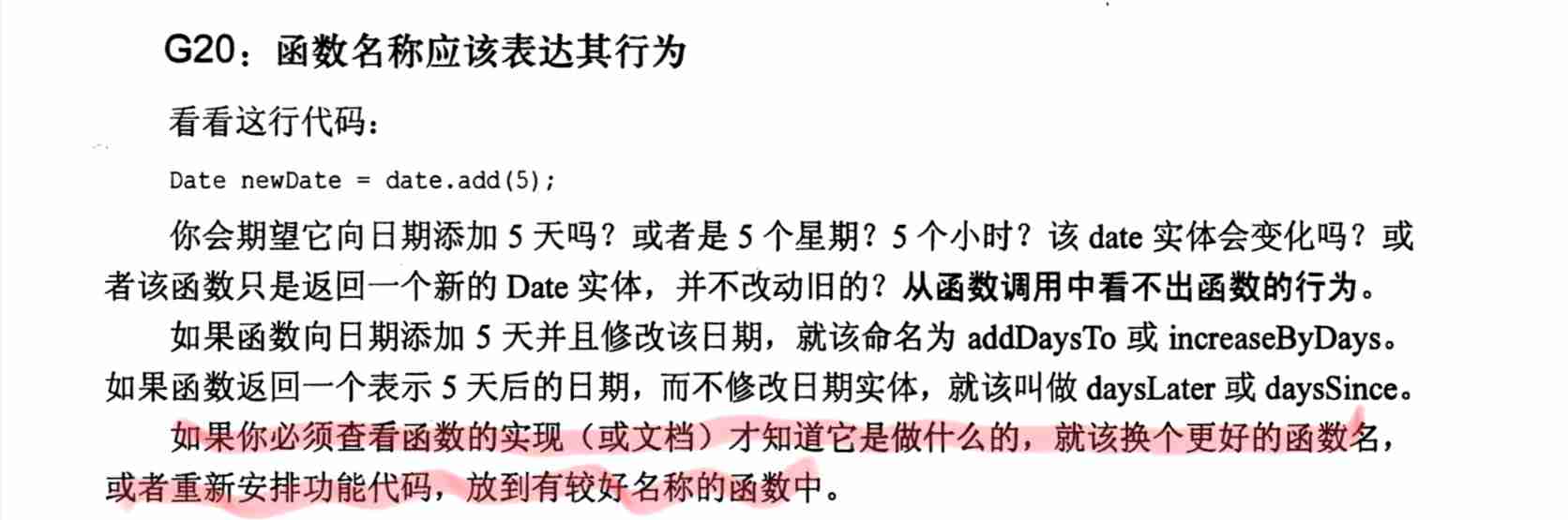
Read "the way to clean code" - function names should express their behavior
ThinkPHP kernel work order system source code commercial open source version multi user + multi customer service + SMS + email notification

云服务器的安全设置常识

MySQL table insert Chinese change? Solution to the problem of No
LeetCode-归并排序链表
Leetcode- insert and sort the linked list

Pytoch --- use pytoch to predict birds
LeetCode-对链表进行插入排序
随机推荐
June book news | 9 new books are listed, with a strong lineup and eyes closed!
IDEA xml中sql没提示,且方言设置没用。
cookie、session、tooken
深圳打造全球“鸿蒙欧拉之城”将加快培育生态,优秀项目最高资助 1000 万元
正大留4的主账户信息汇总
洛谷入门3【循环结构】题单题解
【毕业季·进击的技术er】年少有梦,何惧彷徨
win10 磁盘管理 压缩卷 无法启动问题
[source code analysis] NVIDIA hugectr, GPU version parameter server - (1)
Pytoch --- use pytoch to predict birds
云服务器的安全设置常识
10 minutes to understand CMS garbage collector in JVM
Tawang food industry insight | current situation, consumption data and trend analysis of domestic infant complementary food market
Binary tree problem solving (1)
unable to execute xxx. SH: operation not permitted
【提高课】ST表解决区间最值问题【2】
Handling of inconsistency between cursor and hinttext position in shutter textfield
Pit encountered in win11 pytorch GPU installation
Leetcode merge sort linked list
Deeply understand the concepts of synchronization and asynchrony, blocking and non blocking, parallel and serial