当前位置:网站首页>Tkinter drawing component (29) -- Radio Group Control
Tkinter drawing component (29) -- Radio Group Control
2022-06-21 21:46:00 【Smart-Space】
tkinter Draw components (29)—— Radio group control
introduction
Actually , Light see TinUI The name of this control ——“ Radio group control ”, Do you think of the previous TinUI Radio buttons ?
in fact , Radio group control (radiobox) Much like radio boxes , Both allow the user to determine a unique option , So that the program can decide what to do . however , Do the two really repeat ? Not always , First look at it. radiobutton Some of the shortcomings of , Or characteristics :
Solidification specifies the single choice case of the problem type
Arrange the layout vertically
Style is TinUI Original style
Of course , The above is not a disadvantage of radio boxes , It can only be said that its specific project . therefore ,radiobutton It is more like an encapsulated control , The radio group control is like a standard control . Of course , They can't replace each other , That's why TinUI add radiobox Control .
It has recently been proposed that radiobutton Add border parameters , And joining add_image function . But I hope you can explain your requirements more clearly , Otherwise I have no way to start , Because I have my own improvement plan .
Layout
Function structure
    def add_radiobox(self,pos:tuple,fontfg='black',font=' Microsoft YaHei  12',fg='#8b8b8b',bg='#ededed',activefg='#898989',activebg='#e5e5e5',onfg='#3041d8',onbg='#ffffff',content:tuple=('1','','2'),padx=10,pady=5,command=None):# Draw radio group control
        ''' - pos:: Location  - fontfg:: text color  - fg:: Identifier border color  - bg:: Identifier background color  - activefg:: Mouse into the identifier border color  - activebg:: The mouse enters the identifier background color  - onfg:: Select the identifier border color  - onbg:: Select identifier background color  - content:: Choose text content . If it is an empty string, it means newline  - padx:: Horizontal spacing  - pady:: Row spacing  - command:: Callback function , Must accept a parameter , The text of the selected option  '''
Identify fixed elements
The fixed elements here , Include :
Identifier normal diameter and border width
The diameter and border width when the identifier is activated
boxesDictionaries , The identifier used to place each radio element 、 Text 、 backgroundCurrently selected item ( Initialize to
-1)
        # Identifier internal width width And border width line
        back_width=16
        back_line=1#16+1*2=18
        #active... = back...
        on_width=8
        on_line=4#8+(4+1)*2=18
        boxes=[]#[(sign_id,text_id,back_id),...], Change behavior (None,'\n',None)
        nowx,nowy=pos#x Coordinates are the upper left corner insertion coordinates ,y The coordinates are the bottom coordinates
        uid='radiobox'+str(id(pos))
        select=-1# Currently selected
        count=-1
        t_bbox=None
Draw radio elements
These texts are in tuples content in , however , We can't just have horizontal layout , How to make TinUI You know that you should arrange radio elements in a new line ? That is to use empty characters in text tuples . When the string is empty , It means a new line is added . It is worth noting that , When there are currently no radio elements , That is, when there is no text or all empty characters in front , The number of lines on the vertical axis of the next line we add is pady, When there are radio elements in this line , Just add the height of the bank .
        for i in content:
            count+=1# Count
            if i=='':
                if t_bbox==None:# No bottom coordinate data
                    nowy+=pady
                else:
                    nowy=t_bbox[3]+pady
                nowx=pos[0]
                boxes.append((None,'\n',None))
                continue
            x1=nowx+back_line
            y1=nowy+back_line
            x2=nowx+back_line+back_width
            y2=nowy+back_line+back_width
            ar=(x1,y1,x2,y2)
            sign=self.create_oval(ar,width=back_line,fill=bg,outline=fg,tags=uid)
            text=self.create_text((x2+5,nowy),text=i,font=font,fill=fontfg,anchor='nw',tags=uid)
            s_bbox=self.bbox(sign)
            t_bbox=self.bbox(text)
            back=self.create_rectangle((s_bbox[0],s_bbox[1],t_bbox[2],t_bbox[3]),width=0,fill='',tags=uid)
            boxes.append((sign,text,back))
            nowx=t_bbox[2]+padx
backElements are background elements , Its fill color is transparent , But the level is above the identifier element and the text element , So even though we are clicking on a single element , But it's actually a layer over it “ membrane ”, The identifier is only responsible for changing the prompt color . as time goes on , I am right. TinUI The logic of development is continuously optimized >^<.
Mouse in and out
        def button_in(area,sel,sign):
            if sel==select:
                return
            self.itemconfig(sign,outline=activefg,fill=activebg)
        def button_out(area,sel,sign):
            if sel==select:
                return
            self.itemconfig(sign,outline=fg,fill=bg)
There is also a new logic : Record the previous selected item , According to this value , That is to say select Value , Make style changes to the previous selected item , Not like the early days , Find the selected direction by looping . This logic greatly improves the operation efficiency .
Although the early logic code still exists , Yes issue Re reform .
Project selection
        def sel_it(area,sel,sign):
            nonlocal select
            #...
The selection of the project is divided into three logics .
Determine whether the selected item has been :
        def sel_it(area,sel,sign):
            nonlocal select
            if sel==select:
                return
If there is a previous selection , Replace it with the normal style :
            #...
            old_select=select# Serial number of the originally selected item
            select=sel
            if old_select>=0:# Restore the original radio group
                old_sign=boxes[old_select][0]
                self.itemconfig(old_sign,width=1)
                button_out(None,None,old_sign)
                self.update()
            #...
Change the current to the selected identity style :
            self.itemconfig(sign,outline=onfg,fill=onbg,width=on_line)
            if command!=None:
                textid=boxes[sel][1]
                text=self.itemcget(textid,'text')
                command(text)
Binding style :
            self.tag_bind(back,'<Enter>',lambda event,ar=ar,sel=count,sign=sign:button_in(ar,sel,sign))
            self.tag_bind(back,'<Leave>',lambda event,ar=ar,sel=count,sign=sign:button_out(ar,sel,sign))
            self.tag_bind(back,'<Button-1>',lambda event,ar=ar,sel=count,sign=sign:sel_it(ar,sel,sign))
Complete code function
    def add_radiobox(self,pos:tuple,fontfg='black',font=' Microsoft YaHei  12',fg='#8b8b8b',bg='#ededed',activefg='#898989',activebg='#e5e5e5',onfg='#3041d8',onbg='#ffffff',content:tuple=('1','','2'),padx=10,pady=5,command=None):# Draw radio group control
        def button_in(area,sel,sign):
            if sel==select:
                return
            self.itemconfig(sign,outline=activefg,fill=activebg)
        def button_out(area,sel,sign):
            if sel==select:
                return
            self.itemconfig(sign,outline=fg,fill=bg)
        def sel_it(area,sel,sign):
            nonlocal select
            if sel==select:
                return
            old_select=select# Serial number of the originally selected item
            select=sel
            if old_select>=0:# Restore the original radio group
                old_sign=boxes[old_select][0]
                self.itemconfig(old_sign,width=1)
                button_out(None,None,old_sign)
                self.update()
            self.itemconfig(sign,outline=onfg,fill=onbg,width=on_line)
            if command!=None:
                textid=boxes[sel][1]
                text=self.itemcget(textid,'text')
                command(text)
        # Identifier internal width width And border width line
        back_width=16
        back_line=1#16+1*2=18
        #active... = back...
        on_width=8
        on_line=4#8+(4+1)*2=18
        boxes=[]#[(sign_id,text_id,back_id),...], Change behavior (None,'\n',None)
        nowx,nowy=pos#x Coordinates are the upper left corner insertion coordinates ,y The coordinates are the bottom coordinates
        uid='radiobox'+str(id(pos))
        select=-1# Currently selected
        count=-1
        t_bbox=None
        for i in content:
            count+=1# Count
            if i=='':
                if t_bbox==None:# No bottom coordinate data
                    nowy+=pady
                else:
                    nowy=t_bbox[3]+pady
                nowx=pos[0]
                boxes.append((None,'\n',None))
                continue
            x1=nowx+back_line
            y1=nowy+back_line
            x2=nowx+back_line+back_width
            y2=nowy+back_line+back_width
            ar=(x1,y1,x2,y2)
            sign=self.create_oval(ar,width=back_line,fill=bg,outline=fg,tags=uid)
            text=self.create_text((x2+5,nowy),text=i,font=font,fill=fontfg,anchor='nw',tags=uid)
            s_bbox=self.bbox(sign)
            t_bbox=self.bbox(text)
            back=self.create_rectangle((s_bbox[0],s_bbox[1],t_bbox[2],t_bbox[3]),width=0,fill='',tags=uid)
            boxes.append((sign,text,back))
            self.tag_bind(back,'<Enter>',lambda event,ar=ar,sel=count,sign=sign:button_in(ar,sel,sign))
            self.tag_bind(back,'<Leave>',lambda event,ar=ar,sel=count,sign=sign:button_out(ar,sel,sign))
            self.tag_bind(back,'<Button-1>',lambda event,ar=ar,sel=count,sign=sign:sel_it(ar,sel,sign))
            nowx=t_bbox[2]+padx
        return boxes,uid
effect
Test code
def test8(rbtext):
    print(f' The radio group control selects values =>{
      rbtext}')
if __name__=='__main__':
    #...
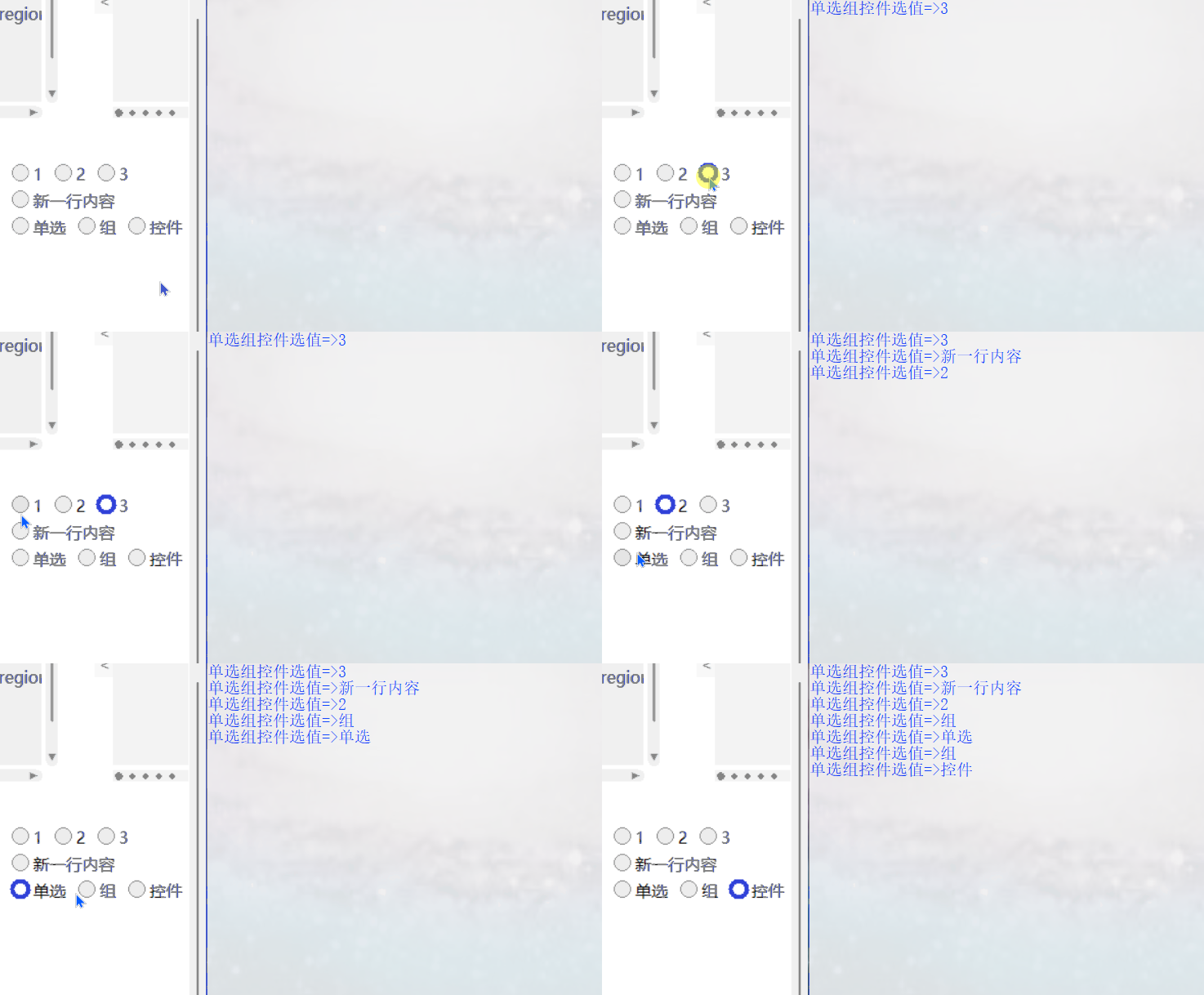
    b.add_radiobox((320,1150),content=('1','2','3','',' New line content ','',' The radio ',' Group ',' Control '),command=test8)
    #...
Final effect
github project
TinUI Of github Project address
pip download
pip install tinui
Conclusion
TinUI The next main task is to improve the controls , For the new modules, please send them by email .
tkinter innovation
边栏推荐
- Merge two ordered arrays
- 如何解决idea文件被锁Make File Read-Only?
- Installing component and package libraries in Ad
- Data types in JS (basic)
- China micro semiconductor has passed the registration: the annual revenue is 1.1 billion, and the actual controller is New Zealand nationality
- Constructor in JS (emphasis)
- Principle and application of user mode hot patch
- 数据库管理:Navicat Premium 15
- 2022 National latest fire facility operator (intermediate fire facility operator) simulation question bank and answers
- How to make file read only when an idea file is locked?
猜你喜欢

JS中的构造函数(重点)

Write your own compiler: intermediate code generation for loop statements such as while, for, and do
![There is no sound solution to the loopback when jerryzhi launches Bluetooth [chapter]](/img/ba/377ec19ca22c2c106f227e864f1e9e.png)
There is no sound solution to the loopback when jerryzhi launches Bluetooth [chapter]
![When Jerry made Bluetooth transmission, when he modified stereo to mono differential output, there was a jam sound at the receiving end [chapter]](/img/ef/35a74fe3b1a8035afb6c50e6880860.png)
When Jerry made Bluetooth transmission, when he modified stereo to mono differential output, there was a jam sound at the receiving end [chapter]

杰理之开启四声道通话近端变调问题【篇】

基于接口划分VLAN:静态VLAN【未完善】

Caricature scientifique | Vous pouvez apprendre l'EEG en regardant les images. Voulez - vous essayer?
Yanyu saltalk obtained USD 8million round a financing: continue to expand team and market coverage

杰理之配对成对耳后,想保持两个耳机都输出立体声【篇】

What is the standard format for writing citations in academic papers?
随机推荐
Uibutton implements left text and right picture
unity动态读取外部音乐并播放
微信小程序js把数字转化成字母
Which iPad apps can read English literature well?
ARP协议及ARP攻击
F - Phone List HDU - 1671 (字典树查前缀)
For in JS In function
Can I open an account for online stock trading? Is it safe
Tx9118 Synchronous Boost IC
InteliJ-IDEA-高效技巧(二)
Caricature scientifique | Vous pouvez apprendre l'EEG en regardant les images. Voulez - vous essayer?
从随便到无聊到有病
提升四大性能!D-Wave发布下一代量子退火机原型
Data types in JS (basic)
Wechat applet JS converts numbers into letters
杰理之做蓝牙发射的时候,回链没有声音解决方法【篇】
怎样有效率地进行外文文献检索?
N - String Problem HDU - 3374(最大最小表示法模板)
What is the standard format for writing citations in academic papers?
When Jerry made Bluetooth transmission, when he modified stereo to mono differential output, there was a jam sound at the receiving end [chapter]