当前位置:网站首页>Tab control of MFC advanced control (CTabCtrl)
Tab control of MFC advanced control (CTabCtrl)
2022-07-27 19:34:00 【Bill66】
The label control provides a set of label buttons and the display page corresponding to the buttons , Users can click the label button to select different display pages , This different page is actually a different dialog . The header file to use the label control is afxcmn.h, You can add the following code to the header file :
#include <afxcmn.h>
CTabCtrl The member functions of the class are as follows ( Excerpt from MSDN Library):
structure
| CTabCtrl | Construct a CTabCtrl object |
| Create | Create a label control and associate it with a CTabCtrl Object connection |
attribute
| GetImageList | Get a list of images related to a label control |
| SetImageList | Assign an image list to a label control |
| GetItemCount | Get the number of tags in this tag control |
| GetItem | Get the information of a label in this label control |
| SetItemExtra | Set the number of bytes reserved by each label in a label control for the data defined by the application |
| GetItemRect | Get the bounding rectangle of a label in a label control |
| GetCurSel | Determines the currently selected label in a label control |
| SetCurSel | Select a label in a label control |
| SetCurFocus | Set the focus to the specified label in a label control |
| SetItemSize | Set the width and height of an item |
| SetPadding | Set the icon of each label in a label control and the space around the label ( Packing ) |
| GetRowCount | Get the current number of rows of labels in a label control |
| GetToolTips | Get the handle of the tooltip control associated with a label control |
| SetToolTips | Assign a tooltip control to a label control |
| GetCurFocus | Get the tag with current focus of a tag control |
| SetMinTabWidth | Set the minimum width of items in a label control |
| GetExtendedStyle | Get the extension style currently used by the label control |
| SetExTendedStyle | Set the extension style of a label control |
| GetItemState | Get the status of the specified label control item |
| SetItemState | Set the state of the specified label control item |
operation
| InsertItem | Insert a new label into a label control |
| DeleteItem | Delete an item from a label control |
| DeleteAllItems | Delete all items from a label control |
| AdjustRect | Estimate the display area of a label control according to a given window rectangle , Or estimate the corresponding window rectangle according to a given display area |
| RemoveImage | Delete an image from the image list of a label control |
| HitTest | Determine which label ( If any ) At the specified screen location |
| DeselectAll | Reset items in a label control , Clear any pressed items |
| HighlightItem | Set the highlighted state of a label item |
Overloadable functions
| DrawItem | Draw the specified item of a label control |
The following is an example to demonstrate CTabCtrl Control creation , Application of common member functions .
1. newly build MFC Dialog project . Add a... In the dialog box CTabCtrl Control , as follows :

2. Associate a variable with this price control , as follows :

3. In order to make the running program interface look better , Add a... In the dialog box GroupBox Control , And add the previously added CTabCtrl Control to GroupBox Control , And add a button , As shown in the figure below :

There is a display order on it , If GroupBox The order of the controls is 1,CTabCtrl Control will be GroupBox Control is overwritten and cannot be displayed .
4. Insert content In the dialog box OnInitDialog() Add the following code to the function :
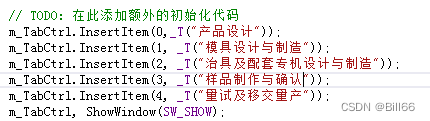
complete OnInitDialog() The function code is as follows :
BOOL CCTabCtrlTestDlg::OnInitDialog()
{
	CDialogEx::OnInitDialog();

	//  take “ About ...” Menu items are added to the system menu .

	// IDM_ABOUTBOX  Must be within the scope of the system command .
	ASSERT((IDM_ABOUTBOX & 0xFFF0) == IDM_ABOUTBOX);
	ASSERT(IDM_ABOUTBOX < 0xF000);

	CMenu* pSysMenu = GetSystemMenu(FALSE);
	if (pSysMenu != nullptr)
	{
		BOOL bNameValid;
		CString strAboutMenu;
		bNameValid = strAboutMenu.LoadString(IDS_ABOUTBOX);
		ASSERT(bNameValid);
		if (!strAboutMenu.IsEmpty())
		{
			pSysMenu->AppendMenu(MF_SEPARATOR);
			pSysMenu->AppendMenu(MF_STRING, IDM_ABOUTBOX, strAboutMenu);
		}
	}

	//  Set the icon for this dialog .   When the application's main window is not a dialog box , The frame will automatically
	//   Do this
	SetIcon(m_hIcon, TRUE);			//  Set the big icon
	SetIcon(m_hIcon, FALSE);		//  Set up small icons

	// TODO:  Add additional initialization code here
	m_TabCtrl.InsertItem(0,_T(" The product design "));
	m_TabCtrl.InsertItem(1, _T(" Mold design and manufacturing "));
	m_TabCtrl.InsertItem(2, _T(" Design and manufacture of fixtures and supporting special machines "));
	m_TabCtrl.InsertItem(3, _T(" Sample making and confirmation "));
	m_TabCtrl.InsertItem(4, _T(" Trial production and handover for mass production "));
	m_TabCtrl, ShowWindow(SW_SHOW);
	return TRUE;  //  Unless you set the focus to the control , Otherwise return to  TRUE
}
Start execution without debugging , give the result as follows :

5. Design label dialog Design corresponding dialog boxes respectively , The newly designed dialog box Style Set to child, And add corresponding classes for the dialog . as follows :


6. stay CTabCtrlTestDlg.h Contains the header file of the new dialog response class , as follows :
#include "CPTest.h"
#include "CSample.h"
#include "CMoldDesignAndManufacture.h"
#include "CTMDesignAndManufacture.h"
#include "CDialog_PDesign.h"
7. stay CTabCtrlTestDlg.h Declare variables in , as follows :
CDialog_PDesign* pCDialog_PDesign;
CPTest* pCPTest;
CSample* pCSample;
CMoldDesignAndManufacture* pCMoldDesignAndManufacture;
CTMDesignAndManufacture* pCTMDesignAndManufacture;
8. CTabCtrlTestDlg.cpp Of OnInitDialog() Add the following code to :

After adding code OnInitDialog() as follows :
BOOL CCTabCtrlTestDlg::OnInitDialog()
{
	CDialogEx::OnInitDialog();

	//  take “ About ...” Menu items are added to the system menu .

	// IDM_ABOUTBOX  Must be within the scope of the system command .
	ASSERT((IDM_ABOUTBOX & 0xFFF0) == IDM_ABOUTBOX);
	ASSERT(IDM_ABOUTBOX < 0xF000);

	CMenu* pSysMenu = GetSystemMenu(FALSE);
	if (pSysMenu != nullptr)
	{
		BOOL bNameValid;
		CString strAboutMenu;
		bNameValid = strAboutMenu.LoadString(IDS_ABOUTBOX);
		ASSERT(bNameValid);
		if (!strAboutMenu.IsEmpty())
		{
			pSysMenu->AppendMenu(MF_SEPARATOR);
			pSysMenu->AppendMenu(MF_STRING, IDM_ABOUTBOX, strAboutMenu);
		}
	}

	//  Set the icon for this dialog .   When the application's main window is not a dialog box , The frame will automatically
	//   Do this
	SetIcon(m_hIcon, TRUE);			//  Set the big icon
	SetIcon(m_hIcon, FALSE);		//  Set up small icons

	// TODO:  Add additional initialization code here
	m_TabCtrl.InsertItem(0,_T(" The product design "));
	m_TabCtrl.InsertItem(1, _T(" Mold design and manufacturing "));
	m_TabCtrl.InsertItem(2, _T(" Design and manufacture of fixtures and supporting special machines "));
	m_TabCtrl.InsertItem(3, _T(" Sample making and confirmation "));
	m_TabCtrl.InsertItem(4, _T(" Trial production and handover for mass production "));
	pCDialog_PDesign = new CDialog_PDesign();
	pCDialog_PDesign->Create(IDD_DIALOG_PDESIGN,&m_TabCtrl);
	pCPTest = new CPTest();
	pCPTest->Create(IDD_DIALOG_PTEST, &m_TabCtrl);
	pCSample = new CSample();
	pCSample->Create(IDD_DIALOG_SAMPLING, &m_TabCtrl);
	pCMoldDesignAndManufacture = new CMoldDesignAndManufacture();
	pCMoldDesignAndManufacture->Create(IDD_DIALOG_MOLDDM, &m_TabCtrl);
	pCTMDesignAndManufacture = new CTMDesignAndManufacture();
	pCTMDesignAndManufacture->Create(IDD_DIALOG_TMDM, &m_TabCtrl);
	pCDialog_PDesign->CenterWindow();
	pCDialog_PDesign->ShowWindow(SW_SHOW);

	return TRUE;  //  Unless you set the focus to the control , Otherwise return to  TRUE
}
9. For in conversation CTabCtrl Controls to add OnTcnSelchange Message handler , as follows :
void CCTabCtrlTestDlg::OnTcnSelchangeTab1(NMHDR *pNMHDR, LRESULT *pResult)
{
	// TODO:  Add control notification handler code here
	int mSel = m_TabCtrl.GetCurSel();
	switch (mSel)
	{
	case 0:
		pCDialog_PDesign->CenterWindow();
		pCDialog_PDesign->ShowWindow(SW_SHOW);
		pCPTest-> ShowWindow(SW_HIDE);
		pCSample-> ShowWindow(SW_HIDE);
		pCMoldDesignAndManufacture-> ShowWindow(SW_HIDE);
		pCTMDesignAndManufacture-> ShowWindow(SW_HIDE);
		break;
	case 1:
		pCDialog_PDesign->ShowWindow(SW_HIDE);
		pCPTest->ShowWindow(SW_HIDE);
		pCSample->ShowWindow(SW_HIDE);
		pCMoldDesignAndManufacture->CenterWindow();
		pCMoldDesignAndManufacture->ShowWindow(SW_SHOW);
		pCTMDesignAndManufacture->ShowWindow(SW_HIDE);
		break;
	case 2:
		pCDialog_PDesign->ShowWindow(SW_HIDE);
		pCPTest->ShowWindow(SW_HIDE);
		pCSample->ShowWindow(SW_HIDE);
		pCMoldDesignAndManufacture->ShowWindow(SW_HIDE);
		pCTMDesignAndManufacture->CenterWindow();
		pCTMDesignAndManufacture->ShowWindow(SW_SHOW);
		break;
	case 3:
		pCDialog_PDesign->ShowWindow(SW_HIDE);
		pCPTest->ShowWindow(SW_HIDE);
		pCSample->CenterWindow();
		pCSample->ShowWindow(SW_SHOW);
		pCMoldDesignAndManufacture->ShowWindow(SW_HIDE);
		pCTMDesignAndManufacture->ShowWindow(SW_HIDE);
		break;
	case 4:
		pCDialog_PDesign->ShowWindow(SW_HIDE);
		pCPTest->CenterWindow();
		pCPTest->ShowWindow(SW_SHOW);
		pCSample->ShowWindow(SW_HIDE);
		pCMoldDesignAndManufacture->ShowWindow(SW_HIDE);
		pCTMDesignAndManufacture->ShowWindow(SW_HIDE);
		break;
	default:
		pCDialog_PDesign->CenterWindow();
		pCDialog_PDesign->ShowWindow(SW_SHOW);
		pCPTest->ShowWindow(SW_HIDE);
		pCSample->ShowWindow(SW_HIDE);
		pCMoldDesignAndManufacture->ShowWindow(SW_HIDE);
		pCTMDesignAndManufacture->ShowWindow(SW_HIDE);
		break;
	}
	*pResult = 0;
}
Execution procedure ( Don't debugging ), give the result as follows :

Click on “ Mold design and manufacturing ”, give the result as follows :
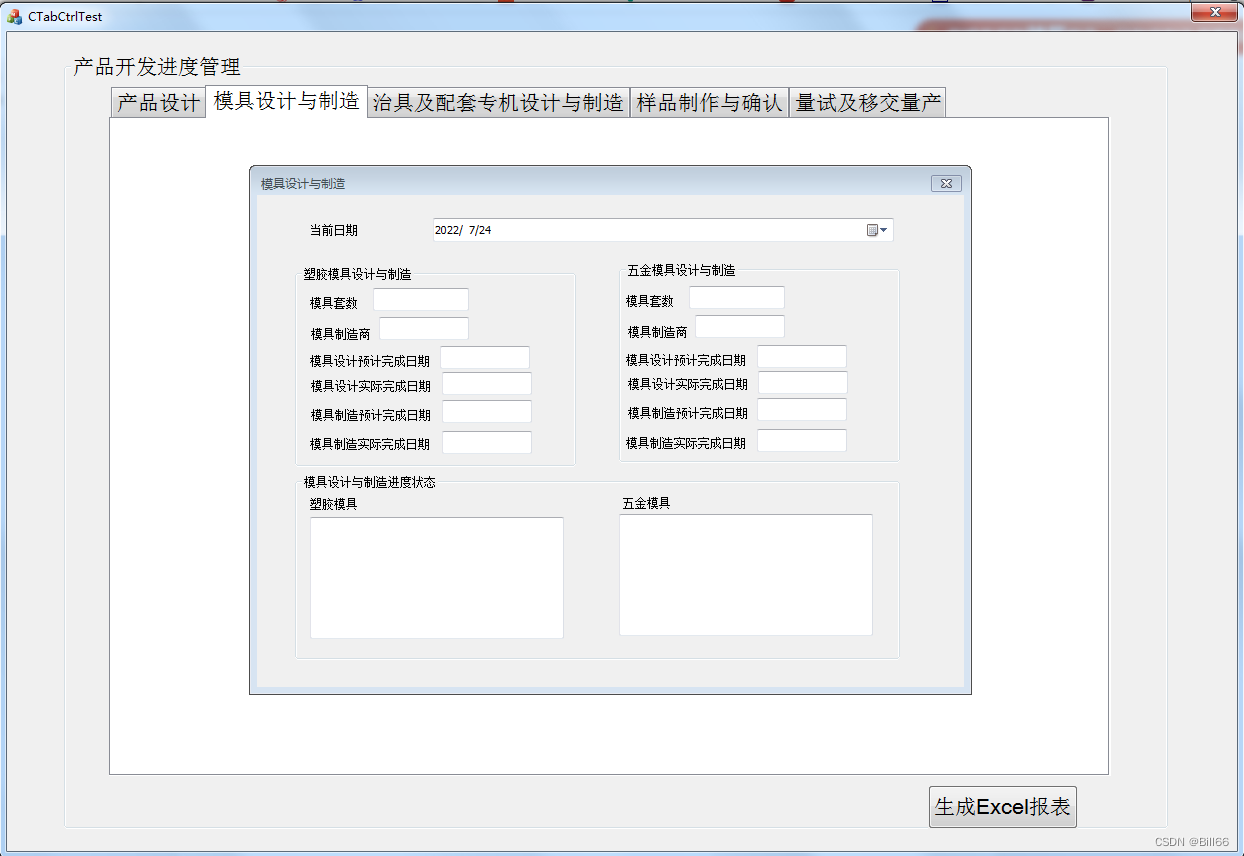
Here is a complete demonstration CTabCtrl( label ) Control creation process , The implementation in the dialog box is not completed .
边栏推荐
- What if idea successfully connects to the database without displaying the table
- kettle EXCEL 累计输出数据
- 27、golang基础-互斥锁、读写锁
- 落实责任到人,广州多措并举筑牢儿童暑期“安全线”
- C language: 5. Multidimensional array
- SQL field type conversion
- kettle8.2 安装及常见问题
- C language printing diamond
- Time complexity and space complexity
- ES6 learning notes (1) - quick start
猜你喜欢






随机推荐
利用 Fastjson json (简单粗暴版)
HDU1323_Perfection【水题】
[cloud picture theory] the first time to know Huawei cloud micro service engine CSE in issue 250
Basic knowledge of C language (for personal use)
SQL Server top keyword usage
Role authorization --- complete the addition and deletion of secondary menus by adding and deleting primary menus
c语言:10、输入流,输出流,错误流
C language printing diamond
kettle引用外部脚本完成电话号码清洗、去重缩进
What if idea successfully connects to the database without displaying the table
HDU1171_Big Event in HDU【01背包】
Cyclic multi-Variate Function for Self-Supervised Image Denoising by Disentangling Noise from Image
The first entry-level operation of kettle (reading excel, outputting Excel)
c语言:5、多维数组
Cumulative output data of kettle Excel
Code interview of Amazon
kettle学习——8.2版本的资源库配置变为灰色,且没有了Connect按钮
Browser rendering principle analysis suggestions collection
Memory management A4
Usage of ref keyword