当前位置:网站首页>ES6 learning notes (1) - quick start
ES6 learning notes (1) - quick start
2022-07-27 19:10:00 【Xiao Li, who loves traveling】
ES6 Learning notes (1)—— Quick start
List of articles
Preface : What is? ES6?
ES6, Full name ECMAScript 6.0 , yes JavaScript The next version of the standard ,2015.06 release .
ES6 Mainly to solve ES5 The innate deficiency of , such as JavaScript There's no concept of class in it , But the current browser's JavaScript yes ES5
edition , Most advanced browsers also support ES6, But only achieved ES6 Part of the features and functions of .
Quick start
1.let keyword
Format : let Variable name = value
Be careful : let Is valid within the code block ,var Is valid globally , Call the code block outside the code block let The defined variable will report an error
<script>

        //es6 How to define variables
        // var a = 1;  The original definition variable

        //es6 Defining variables
        //1. Create code blocks , Defining variables
        {

            var a = 10;
            let b = 20;
            //let The variables defined can only be in
            console.log(b);
        }

        //2  Output outside the code block
        console.log(a);
        console.log(b);//Uncaught ReferenceError: b is not defined

    </script>
Console output :
2.const keyword
Format : const Variable name = value
Be careful :const Keywords define constants , Do not modify , And it must be assigned at one time .
<script>
        // Define constants
        const PI = 3.14;
        console.log(PI);
        // const a;// Constants define that initial values must be assigned
        const a;
        console.log(a);

    </script>
Console output :
The result is a direct error , Even defined PI Can't output .
Test the first definition and then assignment , Not allowed
<script>
        const b;
        b = 1;
        console.log(b);
    </script>
3. An array of deconstruction :
ES6 A new way to define multiple variables at one time is given , It can simplify the traditional long writing
Format : let [ Variable 1, Variable 2…] = [ value 1, value 2…]
Be careful : The variables and values in the left and right brackets must correspond to each other .
<script>

        // The traditional way of writing
        var a=1,b=2,c=3;
        console.log(a,b,c);

        //es6 How to write it
        let [x,y,z] = [1,2,3];
        console.log(x,y,z);

    </script>
Console output :
4. Object to deconstruct :
Format : let{key1,key2…} = object
<script>
    // Define the object
    let user = {
    "name":"lucy","age":18};

    // Traditional methods get values from objects
    console.log(user.name,user.age)

    //es6 How to write it ·
    let{
     name, age} = user;

    console.log(name,age);
</script>
Console output :
5. Template string `
The template string is equivalent to the enhanced version of the string , Use back quotes `, Except as a normal string , It can also be used to define multiline strings , You can also add variables and expressions to a string .
Format : · Content ·(` It's a back quote , It's on the keyboard ESC The following buttons , Not single quotes )
<script>
    // Use  `  Symbols can realize line breaking

    let str1 = `hello, es6`

    console.log(str1);

    //2. stay  ` In the symbol, you can use an expression to get the variable value
    let name = "lucy";
    let age = 20;

    let str2 = `hello,${
      name},age is ${
      age}`;

    console.log(str2)


    //3. stay ` The method can be called in the symbol
    function fun(){

        return "hello es6";
    }

    let str3 = `demo, ${
      fun()}`;
    console.log(str3);


</script>
Console output :
6. Declaration object abbreviation
<script>
    const name = "lucy";
    const age = 10;

    // The traditional way
    const person = {
    "name":name,"age":age};

    console.log(person);

    //es6 How to write it
    const person2 = {
    name,age};
    console.log(person2);
</script>
Console output 
7. Object shorthand
<script>

    // The traditional way of definition
    const person1 = {

        say:function(){

            console.log("hello es6");
        }
    }

    person1.say();

    //es6 How to write it : It can be omitted function
    const person2 = {

        say(){

            console.log("hello es6");
        }
    }

    person2.say();
</script>
Console output :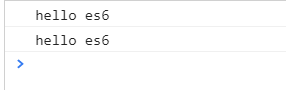
8. Object extension operator …
Extension operators **(…)** Used to extract all traversable properties of the parameter object and copy it to the current object .
<script>


    // Object Copy
    let person1 = {
    "name":"lucy","age":18};

    //person1 The content in will be copied to person2
    let person2 = {
    ...person1};

    console.log(person1);
    console.log(person2);


    // Merge objects
    let name = {
    "name":"mary"};
    let age = {
    "age":16};

    let person3 = {
    ...name,...age};
    console.log(person3);

</script>
Console output

9. Arrow function
Arrow function : Be similar to Java Inside lambda expression
Format : var Method name = Parameters => The body of the function ( Return value )
<script>
    // Arrow function  var  Method name  =  Parameters  =>  The body of the function ( Return value )
    // traditional method
    var fun = function(m){


        return m;
    };

    // Use the arrow function to create
    var fun2 = m => m;

    console.log(fun(8));
    console.log(fun2(8));

    // Complex methods
    var fun3 = function(a,b){

        return a+b;
    }

    console.log(fun3(1,2));

    // Arrow function simplification
    var fun4 = (a,b) => a+b;

    console.log(3,4);

</script>
Console output 
边栏推荐
猜你喜欢

JMeter interface automation - how to solve the content type conflict of request headers

Kinect for unity3d - backgroundremovaldemo learning

Ruiji takeout notes
Jmeter接口自动化-如何解决请求头Content-Type冲突问题

MongoDB
Kinect for Unity3d----KinectManager

Blog Garden beautification tutorial
npm的身份证和依赖
连续时间系统的性能分析(1)-控制系统性能指标及一二阶分析

The understanding of string in C.
随机推荐
What if idea successfully connects to the database without displaying the table
Using MATLAB to generate graphics for journals and conferences - plot
Leetcode first day of question brushing
怎样产生标准分布或高斯分布的随机数
Greedy method, matroid and submodular function (refer)
Collection of software design suggestions of "high cohesion and low coupling"
Unity学习笔记——物体移动六种常见函数
Matrix of shell programming -- it's cute and cool
微机原理学习笔记-通用整数指令及应用
Power control
Led learning eye protection table lamp touch chip-dlt8t10s-jericho
Sentinel1.8.4 persistent Nacos configuration
MySQL学习笔记(2)——存储过程与存储函数
MicaZ+Tinyos学习笔记(1)
「测试新手百科」5 分钟快速上手Pytest 自动化测试框架
Extension of ES6 value
C interface knowledge collection suggestions collection
NPM's ID card and dependence
正则表达式的扩展
webservice的疑问