当前位置:网站首页>FastAPI学习(二)——FastAPI+Jinjia2模板渲染网页(跳转返回渲染页面)
FastAPI学习(二)——FastAPI+Jinjia2模板渲染网页(跳转返回渲染页面)
2022-07-22 21:23:00 【武念】
文章目录
通过前面的学习,现在我们来看看如何渲染网页,别总是一串原始字母。
官方文档位置:
https://fastapi.tiangolo.com/advanced/templates/
(B站学习网址https://www.bilibili.com/video/av93282315)
一、简单实现
首先,必须注意的是,FastAPI这个Python Web框架并没有带渲染的网页模板引擎,但是也正因为如此,它可以使用任何网页模板。
官方例子是jinjia2 。
1、依赖库安装
pip install jinja2 aiofiles
aiofiles是静态网页需要的包
特别说明的是,Starlette 是一个轻量级 ASGI 框架/工具包,FastAPI一大特色。
然后,
2、建立目录

需要上图箭头目录和文件。注意,其他目录和文件都是我没找到官方这个案例时候,自己尝试拼接jinjia2的弯路。
萌新表示,仔细翻文档是硬道理!!!
然后,
3、item.html文件代码
<html>
<head>
    <title>Item Details</title>
    <link href="{
       { url_for('static', path='/styles.css') }}" rel="stylesheet">
</head>
<body>
    <h1>Item ID: {
     { id }}</h1>
</body>
</html>
然后,
4、main.py文件代码
from fastapi import FastAPI
import uvicorn as u
from starlette.requests import Request
from starlette.staticfiles import StaticFiles
from starlette.templating import Jinja2Templates
app = FastAPI()
app.mount("/static", StaticFiles(directory="static"), name="static")
# 创建一个templates(模板)对象,以后可以重用。
templates = Jinja2Templates(directory="templates")
# Request在路径操作中声明一个参数,该参数将返回模板。
# 使用templates您创建的渲染并返回TemplateResponse,并request在Jinja2“上下文” 中将用作键值对之一。
@app.get("/items/{id}")
async def read_item(request: Request, id: str):
    return templates.TemplateResponse("item.html", {
      "request": request, "id": id})
if __name__ == '__main__':
    u.run(app, host="127.0.0.1", port=8080)
最后跑起来,
5、浏览器输入
http://127.0.0.1:8080/items/888888
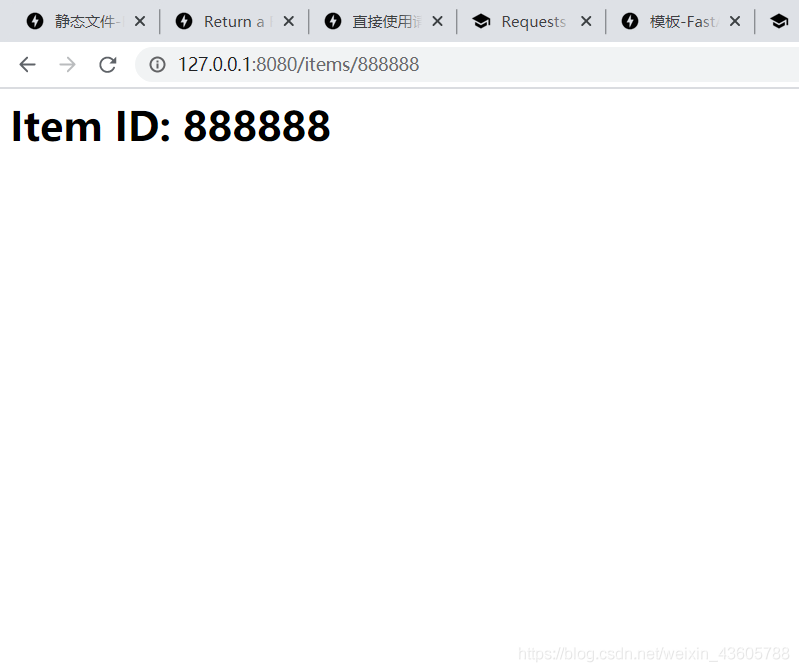
h1效果出来咯,剩下的就交给前端的框架啦。。。。
注意:看后台的话,这里没有加CSS样式错误。
二、借用bootstrap模板
1、目录结构与名称:

2、index.html代码:
<!DOCTYPE html>
<html lang="en">
<head>
<meta charset="utf-8">
<meta http-equiv="X-UA-Compatible" content="IE=edge">
<meta name="viewport" content="width=device-width, initial-scale=1">
<!-- The above 3 meta tags *must* come first in the head; any other head content must come *after* these tags -->
<meta name="description" content="">
<meta name="author" content="">
<link rel="icon" href="../../../../favicon.ico">
<title>Jumbotron Template for Bootstrap</title>
<!-- Bootstrap core CSS -->
<!-- 最新版本的 Bootstrap 核心 CSS 文件 -->
<link rel="stylesheet" href="https://cdn.jsdelivr.net/npm/[email protected]/dist/css/bootstrap.min.css" integrity="sha384-BVYiiSIFeK1dGmJRAkycuHAHRg32OmUcww7on3RYdg4Va+PmSTsz/K68vbdEjh4u" crossorigin="anonymous">
<!-- Custom styles for this template -->
<link href="../static/jumbotron.css" rel="stylesheet">
</head>
<body>
<nav class="navbar navbar-inverse navbar-fixed-top">
<div class="container">
<div class="navbar-header">
<button type="button" class="navbar-toggle collapsed" data-toggle="collapse" data-target="#navbar" aria-expanded="false" aria-controls="navbar">
<span class="sr-only">Toggle navigation</span>
<span class="icon-bar"></span>
<span class="icon-bar"></span>
<span class="icon-bar"></span>
</button>
<a class="navbar-brand" href="#">Project name</a>
</div>
<div id="navbar" class="navbar-collapse collapse">
<form class="navbar-form navbar-right">
<div class="form-group">
<input type="text" placeholder="Email" class="form-control">
</div>
<div class="form-group">
<input type="password" placeholder="Password" class="form-control">
</div>
<button type="submit" class="btn btn-success">Sign in</button>
</form>
</div><!--/.navbar-collapse -->
</div>
</nav>
<!-- Main jumbotron for a primary marketing message or call to action -->
<div class="jumbotron">
<div class="container">
<h1>Item ID: {
{ id }}</h1>
<h1>Hello, world!</h1>
<p>This is a template for a simple marketing or informational website. It includes a large callout called a jumbotron and three supporting pieces of content. Use it as a starting point to create something more unique.</p>
<p><a class="btn btn-primary btn-lg" href="#" role="button">Learn more »</a></p>
</div>
</div>
<div class="container">
<!-- Example row of columns -->
<div class="row">
<div class="col-md-4">
<h2>Heading</h2>
<p>Donec id elit non mi porta gravida at eget metus. Fusce dapibus, tellus ac cursus commodo, tortor mauris condimentum nibh, ut fermentum massa justo sit amet risus. Etiam porta sem malesuada magna mollis euismod. Donec sed odio dui. </p>
<p><a class="btn btn-default" href="#" role="button">View details »</a></p>
</div>
<div class="col-md-4">
<h2>Heading</h2>
<p>Donec id elit non mi porta gravida at eget metus. Fusce dapibus, tellus ac cursus commodo, tortor mauris condimentum nibh, ut fermentum massa justo sit amet risus. Etiam porta sem malesuada magna mollis euismod. Donec sed odio dui. </p>
<p><a class="btn btn-default" href="#" role="button">View details »</a></p>
</div>
<div class="col-md-4">
<h2>Heading</h2>
<p>Donec sed odio dui. Cras justo odio, dapibus ac facilisis in, egestas eget quam. Vestibulum id ligula porta felis euismod semper. Fusce dapibus, tellus ac cursus commodo, tortor mauris condimentum nibh, ut fermentum massa justo sit amet risus.</p>
<p><a class="btn btn-default" href="#" role="button">View details »</a></p>
</div>
</div>
<hr>
<footer>
<p>© 2016 Company, Inc.</p>
</footer>
</div> <!-- /container -->
<!-- Bootstrap core JavaScript ================================================== -->
<!-- Placed at the end of the document so the pages load faster -->
<script src="https://ajax.googleapis.com/ajax/libs/jquery/1.12.4/jquery.min.js"></script>
<script>window.jQuery || document.write('<script src="../static/jquery.min.js"><\script>')</script>
<!-- 最新的 Bootstrap 核心 JavaScript 文件 -->
<script src="https://cdn.jsdelivr.net/npm/[email protected]/dist/js/bootstrap.min.js" integrity="sha384-Tc5IQib027qvyjSMfHjOMaLkfuWVxZxUPnCJA7l2mCWNIpG9mGCD8wGNIcPD7Txa" crossorigin="anonymous"></script>
</body>
</html>
3、main.py代码:
from fastapi import FastAPI
import uvicorn as u
from starlette.requests import Request
from starlette.staticfiles import StaticFiles
from starlette.templating import Jinja2Templates
app = FastAPI()
app.mount("/static", StaticFiles(directory="static"), name="static")
templates = Jinja2Templates(directory="templates")
@app.get("/items/{id}")
async def read_item(request: Request, id: str):
    return templates.TemplateResponse("index.html", {
      "request": request, "id": id})
if __name__ == '__main__':
    u.run(app, host="127.0.0.1", port=8080)

4、浏览器输入
http://127.0.0.1:8080/items/super888888
- 1
这里使用在线css和js文件的方式,所以电脑没有联网是看不错效果的。需要本地css和js文件的方式,则按照bootstrap的开发方式即可。
5、总结
可以说,FastAPI在灵活性上非常nice,如果有更棒或者更喜欢的网页模板引擎,即可替换jinja2。由于,使用的是Starlette工具包,所以还有更加丰富的应用与功能,更多帮助,可以前往Starlette小星星(名字好可爱)官网帮助。
https://www.starlette.io/templates/
边栏推荐
- 如何配置CANoe Network-based access模式的以太网网络拓扑
- 真人踩过的坑,告诉你避免自动化测试常犯的10个错误
- Leetcode 757 set the intersection size to at least 2[sort greedy] the leetcode path of heroding
- Talk about 12 business scenarios of concurrent programming
- 局域网SDN硬核技术内幕 17 从一到百
- 11.37万的星瑞是怎样一个产品和表现力?一起来看看吧
- Interpretation of URL structure
- Basic commands of redis' five basic data types
- UE4引擎的CopyTexture, CopyToResolveTarget
- Get to know layer in fluent for the first time
猜你喜欢
![[technology popularization] alliance chain layer2- on a new possibility](/img/e1/be9779eee3d3d4dcf56e103ba1d3d6.jpg)
[technology popularization] alliance chain layer2- on a new possibility

Small program completion work wechat campus second-hand book trading small program graduation design finished product (2) small program function
Application of the latest version of Ontrack easyrecovery computer data recovery software

How to make a high-quality VR panorama? Are there any simple ones that can be taken?

Kubernetes 部署策略

使用Flutter与贝塞尔曲线画一个波浪球

【09】程序装载:“640K内存”真的不够用么?

Classes and objects (1)

【翻译】宣布Krius--加速你对Kubernetes的监控采用

zabbix agent创建监控项
随机推荐
局域网SDN技术硬核内幕 4 从计算虚拟化到网络虚拟化
7、学习MySQL 选择数据库
局域网SDN硬核技术内幕 20 亢龙有悔——规格与限制(上)
无代码生产新模式探索
Get to know layer in fluent for the first time
对比学习下的跨模态语义对齐是最优的吗?---自适应稀疏化注意力对齐机制 IEEE Trans. MultiMedia
Wechat hotel reservation applet graduation project (6) opening defense ppt
LAN SDN hard core technology insider 17 from one to 100
remove函数的实现
Mysql的索引为什么用B+树而不是跳表?
一文深入浅出理解国产开源木兰许可系列协议
局域网SDN硬核技术内幕 19 团结一切可以团结的力量
Summary in the development process BaseService provides a public access service file for all controllers or services to reduce repeated injection
Implementation of remove function
NB-IOT的四大特性
Why does MySQL index use b+ tree instead of jump table?
ETL tool (data synchronization)
如何配置CANoe Network-based access模式的以太网网络拓扑
tensorflow2.0稀疏矩阵输入操作
Understand the domestic open source Magnolia license series agreement in simple terms