当前位置:网站首页>TFTP下载kernel,nfs挂载文件系统
TFTP下载kernel,nfs挂载文件系统
2022-06-30 16:16:00 【曹乐乐爱学习】
TFTP下载功能:
1、首先要搭建tftp服务器:虚拟机下的Ubuntu20
sudo apt-get install tftp-hpa tftpd-hpa
sudo apt-get install xinetdmkdir -p /home/ckl/my_board/tftp
sudo chmod 777 /home/ckl/my_board/tftp
2、配置 tftp:
新建文件/etc/xinetd.d/tftp
server tftp
{
		socket_type = dgram
		protocol = udp
		wait = yes
		user = root
		server = /usr/sbin/in.tftpd
		server_args = -s /home/ckl/my_board/tftp
		disable = no
		per_source = 11
		cps = 100 2
		flags = IPv4
}
修改文件:/etc/default/tftpd-hpa
# /etc/default/tftpd-hpa

TFTP_USERNAME="tftp"
TFTP_DIRECTORY="/home/ckl/my_board/tftp"
TFTP_ADDRESS=":69"
TFTP_OPTIONS="-l -c -s"
3、将Image和dtb放到tftp目录下

挂载:
1、格式化一张SD卡(fat32格式)
2、只烧录原子修改后的uboot
sudo dd if=./u-boot.imx of=/dev/sdc bs=1024 seek=1
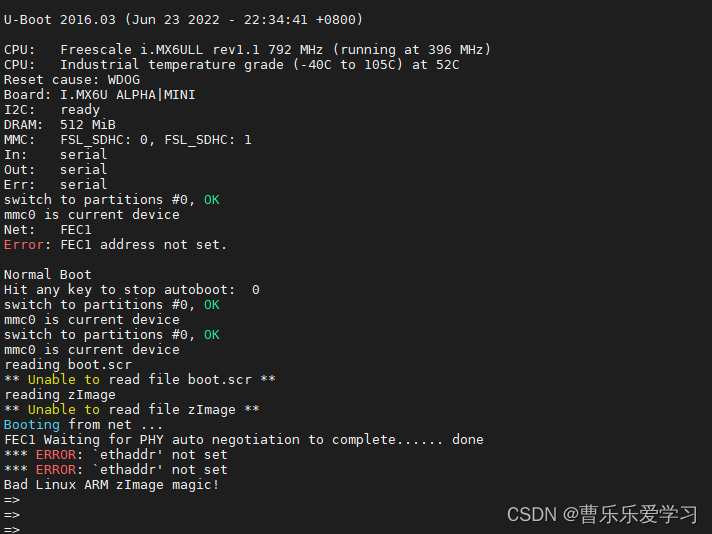
3、设置网络相关参数:
==> setenv ipaddr 192.168.1.100
==> setenv ethaddr 0:0c:29:c6:ff:c9
==> setenv gatewayip 192.168.1.1
==> setenv netmask 255.255.255.0
==> setenv serverip 192.168.1.99
【前提:已经设置好】:参考:uboot下使用nfs网络下载kernel
4、重点:
1、设置bootarges(设置nfs挂载文件系统)
setenv bootargs 'console=ttymxc0,115200 root=/dev/nfs nfsroot=192.168.1.99:/home/ckl/my_board/nfs/rootfs,proto=tcp nfsvers=4 rw ip=192.168.1.100:192.168.1.99:192.168.1.1:255.255.255.0:ckl:eth0:off'$ root=/dev/nfs nfsroot=[<server-ip>:]<root-dir>[,<nfs-options>] ip=<client-ip>:<server-ip>:<gwip>:<netmask>:<hostname>:<device>:<autoconf>:<dns0-ip>:<dns1-ip>
<server-ip>:服务器 IP 地址,也就是存放根文件系统主机的 IP 地址
<root-dir>: 根文件系统的存放路径
<nfs-options>: NFS 的其他可选选项,一般不设置
<client-ip>: 客户端 IP 地址,也就是我们开发板的 IP 地址
<server-ip>: 服务器 IP 地址,同上<gw-ip>: 网关地址
<netmask>:子网掩码,一般是 255.255.255.0<hostname>:客户机的名字,此值可以空着
<device>: 设备名,也就是网卡名,原子的阿尔法使用的使用 ENET2,网卡名是eth0
<autoconf>: 自动配置,一般不使用,所以设置为 off
<dns0-ip>: DNS0 服务器 IP 地址,不使用
<dns1-ip>: DNS1 服务器 IP 地址,不使用
所以:root=/dev/nfs nfsroot=192.168.1.99:/home/ckl/my_board/nfs/rootfs,proto=tcp rw ip=192.168.1.100:192.168.1.99:192.168.1.1:255.255.255.0:ckl:eth0:off
proto=tcp”表示使用 TCP 协议,“rw”表示 nfs 挂载的根文件系统为可读可写
百度:nfs挂载有不兼容,所以将bootargs改成指定NFSv4
2、设置bootcmd
setenv bootcmd 'tftp 80800000 zImage;tftp 83000000 standerd.dtb;bootz 80800000 - 83000000'=> saveenv
=> reset
边栏推荐
- splitting.js密码显示隐藏js特效
- addmodule_allmerge_ams_im
- splitting. JS password display hidden JS effect
- Parker proportional overflow valve rs10r35s4sn1jw
- addmodule_ allmerge_ ams_ im
- redis淘汰策略
- Implementation of graduation project management system based on SSM
- Write the simplest small program in C language Hello World
- 开发那些事儿:如何在视频中添加文字水印?
- Interview shock 60: what will cause MySQL index invalidation?
猜你喜欢

.NET ORM框架HiSql实战-第一章-集成HiSql

期未课程设计:基于SSM的产品销售管理系统

【C语言】详解线程 — 线程分离函数 pthread_detach

6 張圖帶你搞懂 TCP 為什麼是三次握手?

parker比例溢流阀RS10R35S4SN1JW

Splitting. JS text title slow loading JS effect

基于51单片机的计件器设计

Implementation of graduation project management system based on SSM

Hyper-v:在虚拟网络中启用 SR-IOV

开发那些事儿:Linux系统中如何安装离线版本MySQL?
随机推荐
Property or method “approval1“ is not defined on the instance but referenced during render
Write the simplest small program in C language Hello World
6 张图带你搞懂 TCP 为什么是三次握手?
Redis data structure analysis
Exch: repair the missing system mailbox
China Infrastructure Development Association: electronic contract is recommended
【网易云信】播放demo构建:无法将参数 1 从“AsyncModalRunner *”转换为“std::nullptr_t”**
Splitting. JS text title slow loading JS effect
leetcode:1042. Do not plant flowers adjacent to each other [randomly fill in qualified + no contradiction will be formed behind + set.pop]
Booking UI effect implemented by svg
Pref usage record
【C语言】详解线程 — 开启两个线程
分享 5 大常用的特征选择方法,机器学习入门必看!!!
svg实现的订票UI效果
Exch:完整性检查 Database Integrity Checking
【C语言】详解线程 — 线程分离函数 pthread_detach
Nut cloud - sync files on your mobile hard drive on your new computer
广电5G正式启航,黄金频段将如何应用引关注
splitting.js密码显示隐藏js特效
阿里云盘分享压缩包