当前位置:网站首页>Cobbler Automated Deployment
Cobbler Automated Deployment
2022-06-30 09:54:00 【thengsd】
Catalog
- One 、 Experiment preparation
- Two 、 Related services
- 3、 ... and 、 The experimental steps
- 1、 Import epel Source
- 2、 install Cobbler And its related service packages
- 3、 modify cobbler Master profile
- 4、 Start the relevant services and turn off the firewall and selinux
- 5、 Use cobbler check Command to Cobbler Make check settings , Query the items that need to change the configuration
- 6、 Turn on tftp Service and rsync service
- 7、 Download the boot operating system file
One 、 Experiment preparation
a Linux The server (Centos7 System , IP:192.168.163.10)
A blank virtual machine
Need to connect to the Internet , And virtual machines all use NAT Pattern
Official website :http://cobbler.github.io/
Related packages : link :https://pan.baidu.com/s/1HfwJtUD41oNtDePdMfS4ug
Two 、 Related services
cobbler : Used to quickly establish Linux Network installation environment
dhcp : Used to automatically allocate... For blank hosts IP Address
tftp-server : Download the boot image file
pykickstart : Realize unattended installation
httpd : Run as a console program
rsync : Data synchronization
xinetd : Provide access control 、 Enhanced log and resource management capabilities
3、 ... and 、 The experimental steps
1、 Import epel Source
rmp -ivh epel-release-latest-7.noarch.rpm # Install dependency packages
yum list # Automatically load online update sources
2、 install Cobbler And its related service packages
yum install -y cobbler dhcp tftp-server pykickstart httpd rsync xinetd
3、 modify cobbler Master profile
vim /etc/cobbler/settings
# Modify the following
next_server: 192.168.163.10 # Point to tftp Server's IP, This is the machine IP
server: 192.168.163.10 # Point to cobbler Server's IP, This is the machine IP
manage_dhcp: 1 # Give Way cobbler management dhcp service
manage_rsync: 1 # Give Way cobbler management rsync service
manage_tftpd: 1 # Give Way cobbler management tftp service
4、 Start the relevant services and turn off the firewall and selinux
systemctl start httpd.service # Turn on httpd service
systemctl start cobblerd.service # Turn on cobbler service
systemctl stop firewalld
setenforce 0
5、 Use cobbler check Command to Cobbler Make check settings , Query the items that need to change the configuration
cobbler check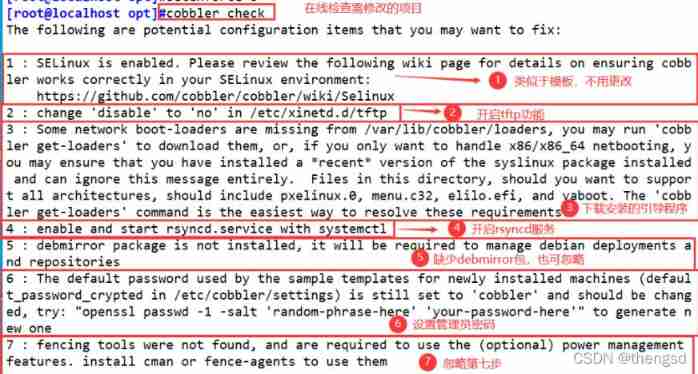
6、 Turn on tftp Service and rsync service
(1) modify tftp Configuration file for
vim /etc/xinetd.d/tftp
disable = no
(2) Opening service
systemctl restart xinetd.service
systemctl start rsyncd.service
7、 Download the boot operating system file

Add the generated key Cobbler In profile
vim /etc/cobbler/settings
default_password_crypted: “$1 123456 123456 123456wOSEtcyiP2N/IfIl15W6Z0” # Replace this line with the generated secret key “” Contents of Li
modify Cobbler management dhcp Service template file
vim /etc/cobbler/dhcp.template
subnet 192.168.163.0 netmask 255.255.255.0 {
option routers 192.168.163.2; # Modify gateway
option domain-name-servers 192.168.163.2; # modify DNS, If the network card uses dhcp Pattern , It can be done by nslookup 127.0.0.1 | grep server Inquire about DNS Address
option subnet-mask 255.255.255.0;
range dynamic-bootp 192.168.163.100 192.168.163.200; # Modify the address pool
边栏推荐
- Enum demo
- Enterprise data center "cloud" transformation solution
- 工作小记: sendto失败 errno 22
- 2021-11-15
- (zero) most complete JVM knowledge points
- Initialize static resource demo
- Flume learning 4
- JWT expiration processing - single token scheme
- Numpy (time date and time increment)
- Self service terminal handwritten Chinese character recognition input method library tjfink introduction
猜你喜欢

NER – Named Entity Recognition Summary

How to build an all-in-one database cloud machine that meets the needs of information innovation?
![[new book recommendation] mongodb performance tuning](/img/2c/e5a814df4412a246c703ca548a4f68.png)
[new book recommendation] mongodb performance tuning

Numpy (time date and time increment)

Dart development skills

Properties of string

CentOS MySQL installation details

Eight sorts (I)

Flume learning 1
![[new book recommendation] cleaning data for effective data science](/img/42/1258694fc55a178a666391669a67ad.png)
[new book recommendation] cleaning data for effective data science
随机推荐
Redis docker 主从模式与哨兵sentinel
Based on svelte3 X desktop UI component library svelte UI
Redis + MySQL implements the like function
Shenhe thermomagnetic: Super fusion dual active cluster solution for MES system
MySQL knowledge summary (useful for thieves)
Follow the wechat oauth2.0 access scheme
MySQL优化
DataTableToModelList实体类
utils session&rpc
Numpy (constant)
How do databases go to the enterprise cloud? Click to view the answer
Horrible bug records
Flutter的特别之处在哪里
Comparison problems encountered in recent study
[Ubuntu redis installation]
Design of mfc+mysql document data management system based on VS2010
Hospital integration platform super fusion infrastructure transformation scheme
Mysq database remote connection error, remote connection is not allowed
Flutter 中的 ValueNotifier 和 ValueListenableBuilder
训练一个图像分类器demo in PyTorch【学习笔记】