当前位置:网站首页>1. project environment construction
1. project environment construction
2022-06-24 10:15:00 【xjhqre】
Development environment construction
1、 Database environment construction
1、 Create database

Or use the command line to create :
create database reggie character set utf8mb4
2、 Import SQL file db_reggie.sql, You can get it on Heima wechat
Command line import :source D:\db_reggie.sql
3、 Database table description
| Serial number | Table name | explain |
|---|---|---|
| 1 | employee | The employee table |
| 2 | category | Classification of dishes and packages |
| 3 | dish | Menu |
| 4 | setmeal | Package list |
| 5 | setmeal_dish | Relationship table of package dishes |
| 6 | dish_flavor | Table of dish taste relationship |
| 7 | user | User table (C End ) |
| 8 | address_book | Address book table |
| 9 | shopping_cart | Shopping cart table |
| 10 | orders | The order sheet |
| 11 | order_detail | Order details |
2、maven Project structures,
1、 establish maven engineering , Of course, it can also be created directly SpringBoot engineering
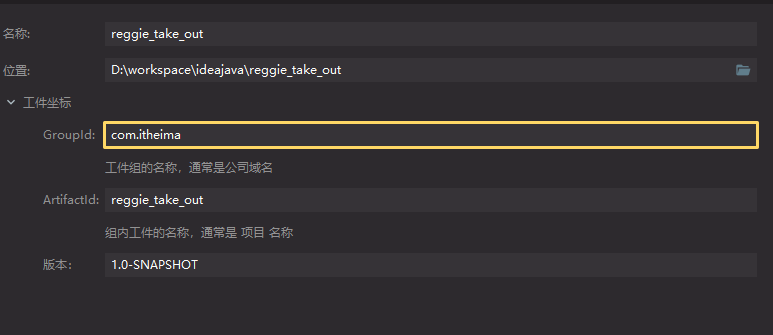
2、 Import maven To configure
- add to spring-boot-starter-parent
- Appoint java edition
- Import dependence
- add to spring-boot-maven-plugin plug-in unit
complete pom.xml file :
<?xml version="1.0" encoding="UTF-8"?>
<project xmlns="http://maven.apache.org/POM/4.0.0" xmlns:xsi="http://www.w3.org/2001/XMLSchema-instance" xsi:schemaLocation="http://maven.apache.org/POM/4.0.0 http://maven.apache.org/xsd/maven-4.0.0.xsd">
    <modelVersion>4.0.0</modelVersion>

    <parent>
        <groupId>org.springframework.boot</groupId>
        <artifactId>spring-boot-starter-parent</artifactId>
        <version>2.4.5</version>
        <relativePath/> <!-- lookup parent from repository -->
    </parent>

    <groupId>com.itheima</groupId>
    <artifactId>reggie_take_out</artifactId>
    <version>1.0-SNAPSHOT</version>

    <properties>
        <java.version>1.8</java.version>
        <maven.compiler.source>8</maven.compiler.source>
        <maven.compiler.target>8</maven.compiler.target>
    </properties>

    <dependencies>

        <dependency>
            <groupId>org.springframework.boot</groupId>
            <artifactId>spring-boot-starter</artifactId>
        </dependency>

        <dependency>
            <groupId>org.springframework.boot</groupId>
            <artifactId>spring-boot-starter-test</artifactId>
            <scope>test</scope>
        </dependency>

        <dependency>
            <groupId>org.springframework.boot</groupId>
            <artifactId>spring-boot-starter-web</artifactId>
            <scope>compile</scope>
        </dependency>

        <dependency>
            <groupId>com.baomidou</groupId>
            <artifactId>mybatis-plus-boot-starter</artifactId>
            <version>3.4.2</version>
        </dependency>

        <dependency>
            <groupId>org.projectlombok</groupId>
            <artifactId>lombok</artifactId>
            <version>1.18.20</version>
        </dependency>

        <dependency>
            <groupId>com.alibaba</groupId>
            <artifactId>fastjson</artifactId>
            <version>1.2.76</version>
        </dependency>

        <dependency>
            <groupId>commons-lang</groupId>
            <artifactId>commons-lang</artifactId>
            <version>2.6</version>
        </dependency>

        <dependency>
            <groupId>mysql</groupId>
            <artifactId>mysql-connector-java</artifactId>
            <scope>runtime</scope>
        </dependency>

        <dependency>
            <groupId>com.alibaba</groupId>
            <artifactId>druid-spring-boot-starter</artifactId>
            <version>1.1.23</version>
        </dependency>

    </dependencies>

    <build>
        <plugins>
            <plugin>
                <groupId>org.springframework.boot</groupId>
                <artifactId>spring-boot-maven-plugin</artifactId>
                <version>2.4.5</version>
            </plugin>
        </plugins>
    </build>

</project>
3、 To configure application.yml
- stay resources Create under directory application.yml
- configure port
- Configuration item name
- Configure database connections
complete application.yml:
server:
  port: 8080
spring:
  application:
    name: reggie_take_out
  datasource:
    druid:
      driver-class-name: com.mysql.cj.jdbc.Driver
      url: jdbc:mysql://localhost:3306/reggie?serverTimezone=Asia/Shanghai&useUnicode=true&characterEncoding=utf-8&zeroDateTimeBehavior=convertToNull&useSSL=false&allowPublicKeyRetrieval=true
      username: root
      password: 123456
mybatis-plus:
  configuration:
    # When mapping entities or attributes , Remove the underscores from the table names and field names in the database , Map according to the hump nomenclature
    map-underscore-to-camel-case: true
    log-impl: org.apache.ibatis.logging.stdout.StdOutImpl
  global-config:
    db-config:
      id-type: ASSIGN_ID
4、 start-up SpringBoot
Create startup class ReggieApplication, Click on the run
package com.itheima.reggie;

import lombok.extern.slf4j.Slf4j;
import org.springframework.boot.SpringApplication;
import org.springframework.boot.autoconfigure.SpringBootApplication;

/** * @Author: xjhqre * @DateTime: 2022/6/15 16:20 */
@Slf4j
@SpringBootApplication
public class ReggieApplication {

    public static void main(String[] args) {

        SpringApplication.run(ReggieApplication.class, args);
        log.info(" The project started successfully ...");
    }
}
3、 Import the front page
1、 Put the backend and front Copy directory to resources Under the table of contents
2、 Create configuration class WebMvcConfig Configure front-end resource request mapping
package com.itheima.reggie.config;

import lombok.extern.slf4j.Slf4j;
import org.springframework.context.annotation.Configuration;
import org.springframework.web.servlet.config.annotation.ResourceHandlerRegistry;
import org.springframework.web.servlet.config.annotation.WebMvcConfigurationSupport;

/** * @Author: xjhqre * @DateTime: 2022/6/15 16:24 */
@Slf4j
@Configuration
public class WebMvcConfig extends WebMvcConfigurationSupport {


    /** *  Set static resource mapping  * @param registry */
    @Override
    protected void addResourceHandlers(ResourceHandlerRegistry registry) {

        super.addResourceHandlers(registry);
        log.info(" Start static resource mapping ...");
        registry.addResourceHandler("/backend/**").addResourceLocations("classPath:/backend/");
        registry.addResourceHandler("/front/**").addResourceLocations("classPath:/front/");
    }
}
3、 Restart the service , visit http://localhost:8080/backend/index.html See the effect
边栏推荐
- p5.js千纸鹤动画背景js特效
- 3.员工的增删改查
- 整理接口性能优化技巧,干掉慢代码
- canvas管道动画js特效
- 上升的气泡canvas破碎动画js特效
- dedecms模板文件讲解以及首页标签替换
- How large and medium-sized enterprises build their own monitoring system
- 2022-06-23: given a nonnegative array, select any number to make the maximum cumulative sum a multiple of 7, and return the maximum cumulative sum. N is larger, to the 5th power of 10. From meituan. 3
- 微信小程序学习之 实现列表渲染和条件渲染.
- Phpstrom code formatting settings
猜你喜欢

线程的 sleep() 方法与 wait() 方法的区别

Cicflowmeter source code analysis and modification to meet requirements

Leetcode - 498: traversée diagonale
SVG+js拖拽滑块圆形进度条

Machine learning perceptron and k-nearest neighbor

NVIDIA's CVPR 2022 oral is on fire! 2D images become realistic 3D objects in seconds! Here comes the virtual jazz band!

微信小程序学习之 实现列表渲染和条件渲染.

How does home office manage the data center network infrastructure?

H5网页如何在微信中自定义分享链接

Groovy obtains Jenkins credentials through withcredentials
随机推荐
有关二叉树 的基本操作
Record the range of data that MySQL update will lock
MYSQL数据高级
El table Click to add row style
Wechat cloud hosting launch public beta: in the appointment of the publicity meeting
411 stack and queue (20. valid parentheses, 1047. delete all adjacent duplicates in the string, 150. inverse Polish expression evaluation, 239. sliding window maximum, 347. the first k high-frequency
Binary tree part I
涂鸦智能携多款重磅智能照明解决方案,亮相2022美国国际照明展
canvas无限扫描js特效代码
oracle池式连接请求超时问题排查步骤
Wechat applet learning to achieve list rendering and conditional rendering
Producer / consumer model
Arbre binaire partie 1
如何在一个页面上使用多个KindEditor编辑器并将值传递到服务器端
Desktop software development framework reward
Jcim | AI based protein structure prediction in drug discovery: impacts and challenges
MySQL data advanced
Groovy obtains Jenkins credentials through withcredentials
消息队列的作用
SQL Server AVG函数取整问题