当前位置:网站首页>Gui+sqlserver examination system
Gui+sqlserver examination system
2022-06-26 16:33:00 【Can't learn java】
List of articles
1、 summary
1.1、 Purpose and requirements
With the development of science and technology , Almost all organizations with a certain amount of data have started to use computer databases for management . Almost everyone is studying now , Will do a lot of questions . The course design requires the design of a data management system , The database contains the basic information of users , Basic information of question bank , And the user's wrong question set . It should be convenient for users to sort out and summarize questions , Through the course design , We should consolidate and deepen the theoretical knowledge of database , Strengthen hands-on ability and practical ability , Put this to use , And the application in real life .
1.2、 design environment
- Microsoft SQL Server 2019
- JDK 1.8
- IntelliJ IDEA 2021
2、 Demand analysis
2.1、 System functional requirements design
- This system realizes the following functions :
- Make the user practice questions , Sort out the mistakes 、 Be organized 、 automation .
- Log in to the system through account and password , Administrators add, delete, modify, and query the provision and users .
- Design man-machine exchange interface , The function arrangement is reasonable , Easy to operate , And further consider the security of the system , integrity , Concurrency control and other functional requirements .
2.2、 System module design
- The exercise system can be divided into two modules, such as , The first is the administrator module , It contains the question bank and the basic information of users ; Another is the user module , This module should include the query question bank , And the addition of wrong question set .
- You can get the system flow chart :

2.3、 The data dictionary
- A data item is an inseparable data unit in the relationship of a database , The following table lists the names of the data respectively 、 data type 、 length 、 Can the value be null . utilize SQL Server 2019 establish “exam” database , The basic table list and table structure are described as follows :
- Tables used in the database :

- Usertable Data sheet , The structure is as follows :

- Title Data sheet , The structure is as follows :

- Error The data table structure is as follows :

3、 Conceptual model design
- According to the result of requirement analysis , The entities of this system include :
- user : account number , password , full name , jurisdiction
- Question bank : Title number , subject , Options A, Options B, Options C, Options D, Options E, Topic type , answer
- Set of wrong questions :errorid, Wrong time
- Administrators can add multiple questions , Users can answer multiple questions . From the above analysis, the systematic E—R chart :

4、 Logical and physical structure design
4.1、 By system E—R The relationship pattern obtained from graph transformation is as follows
- user (userid, full name , password , jurisdiction )
- Question bank (topicid, subject , Options A, Options B, Options C, Options D, Options E, Topic type , answer ,userid)
- Set of wrong questions (errorid, Wrong time ,userid,topicid)
4.2、 Determine the access method of the relational model
After converting the conceptual model to the physical model , We can design physical models , Double click the relationship of the physical model , The name of the relationship can be 、 Comments and other information . You can design the session column of the relationship , Its name can be set separately 、 code 、 Data type and main code 、 Whether it's a wait or not . The most commonly used access method in practical design is purple trigger , Using purple quotation can greatly reduce the query time of data , When establishing Ziyin, you should visit fu : Create a purple index on a column that often needs to be searched : Create purple rise on the primary keyword ; Index columns that are often used for joins , That is, index the foreign key : Create a search column on a column that often needs to be searched based on a range , Because the index has been sorted , The specified range is a continuous equal rule . In order to make full use of the function of the index and avoid the negative
effect .
4.3、 Determine the storage structure of the database
Create a user table :
CREATE TABLE [dbo].[usertable](
	[userid] [varchar](10) NOT NULL,
	[password] [varchar](16) NOT NULL,
	[name] [varchar](10) NOT NULL,
	[power] [int] NOT NULL,
 CONSTRAINT [PK_user] PRIMARY KEY CLUSTERED
(
	[userid] ASC
)WITH (PAD_INDEX = OFF, STATISTICS_NORECOMPUTE = OFF, IGNORE_DUP_KEY = OFF, ALLOW_ROW_LOCKS = ON, ALLOW_PAGE_LOCKS = ON, OPTIMIZE_FOR_SEQUENTIAL_KEY = OFF) ON [PRIMARY]
) ON [PRIMARY]
GO
ALTER TABLE [dbo].[usertable]  WITH CHECK ADD  CONSTRAINT [CK_usertable] CHECK  (([power]=(1) OR [power]=(0)))
GO
ALTER TABLE [dbo].[usertable] CHECK CONSTRAINT [CK_usertable]
GO
Create a question bank table :
CREATE TABLE [dbo].[title](
		[topicid] [int] IDENTITY(1,1) NOT NULL,
		[topic] [varchar](800) NOT NULL,
		[A] [varchar](800) NOT NULL,
		[B] [varchar](800) NOT NULL,
		[C] [varchar](800) NOT NULL,
		[D] [varchar](800) NOT NULL,
		[E] [varchar](800) NULL,
		[type] [char](6) NOT NULL,
		[value] [varchar](5) NOT NULL,
		[userid] [varchar](10) NULL,
 CONSTRAINT [PK_title] PRIMARY KEY CLUSTERED
(
		[topicid] ASC
)WITH (PAD_INDEX = OFF, STATISTICS_NORECOMPUTE = OFF, IGNORE_DUP_KEY = OFF, ALLOW_ROW_LOCKS = ON, ALLOW_PAGE_LOCKS = ON, OPTIMIZE_FOR_SEQUENTIAL_KEY = OFF) ON [PRIMARY]
) ON [PRIMARY]
GO
ALTER TABLE [dbo].[title]  WITH CHECK ADD  CONSTRAINT [FK_title_title] FOREIGN KEY([topicid])
REFERENCES [dbo].[title] ([topicid])
GO
ALTER TABLE [dbo].[title] CHECK CONSTRAINT [FK_title_title]
GO
ALTER TABLE [dbo].[title]  WITH CHECK ADD  CONSTRAINT [FK_title_title1] FOREIGN KEY([topicid])
REFERENCES [dbo].[title] ([topicid])
GO
ALTER TABLE [dbo].[title] CHECK CONSTRAINT [FK_title_title1]
GO
Create an error table :
CREATE TABLE [dbo].[error](
	[errorid] [int] IDENTITY(1,1) NOT NULL,
	[userid] [varchar](10) NOT NULL,
	[topicid] [int] NOT NULL,
	[errortime] [date] NOT NULL,
 CONSTRAINT [PK_error] PRIMARY KEY CLUSTERED
(
	[errorid] ASC
)WITH (PAD_INDEX = OFF, STATISTICS_NORECOMPUTE = OFF, IGNORE_DUP_KEY = OFF, ALLOW_ROW_LOCKS = ON, ALLOW_PAGE_LOCKS = ON, OPTIMIZE_FOR_SEQUENTIAL_KEY = OFF) ON [PRIMARY]
) ON [PRIMARY]
GO
ALTER TABLE [dbo].[error]  WITH CHECK ADD  CONSTRAINT [FK_error_title] FOREIGN KEY([topicid])
REFERENCES [dbo].[title] ([topicid])
GO
ALTER TABLE [dbo].[error] CHECK CONSTRAINT [FK_error_title]
GO

ALTER TABLE [dbo].[error]  WITH CHECK ADD  CONSTRAINT [FK_error_usertable] FOREIGN KEY([userid])
REFERENCES [dbo].[usertable] ([userid])
GO
ALTER TABLE [dbo].[error] CHECK CONSTRAINT [FK_error_usertable]
GO
5、 Implementation and maintenance of database
- The main tasks in this phase include creating a database , Load initial data , Database trial run , Database security and integrity control database backup and recovery , Monitoring, analysis and modification of database performance , The reorganization and reconstruction of database . First of all, a student achievement management system database is established in the database , Then create a new data source . The main codes are as follows :
	import java.sql.*;
	import java.util.ArrayList;
	import java.util.List;
	import java.util.Vector;
	import java.util.concurrent.CopyOnWriteArrayList;

	public class ConnectSQLserver {

	    public ConnectSQLserver( ) {

	        String url = "jdbc:sqlserver://127.0.0.1:1433;databaseName=exam;user=sa;password=123";//sa Identity connection
	        Connection con = null;  // Session connection
	        try {

	            //1- Register drive , Drive manager class loading SQLServerDriver Class static methods , If you don't add this driver , Then create this driver
	            Class.forName("com.microsoft.sqlserver.jdbc.SQLServerDriver");
	            System.out.println(" Driver loaded successfully !");
	            //2- Get connected to the data source
	            con = DriverManager.getConnection(url);
	            System.out.println(" Database connection successful !");
	        } catch (Exception e) {

	            e.printStackTrace();
	        } finally {

	            try {

	                con.close();
	            } catch (SQLException throwables) {

	                throwables.printStackTrace();
	            }

	        }
	    }

	    public User login( String userid, String password ) {

	        User user = new User();
	        String url = "jdbc:sqlserver://127.0.0.1:1433;databaseName=exam;user=sa;password=123";//sa Identity connection
	        Connection con = null;  // Session connection
	        Statement stmt = null;  // For execution static SQL Statement and return its generated result .
	        ResultSet rs = null;  // Data table of database result set
	        try {

	            //1- Register drive , Drive manager class loading SQLServerDriver Class static methods , If you don't add this driver , Then create this driver
	            Class.forName("com.microsoft.sqlserver.jdbc.SQLServerDriver");
	            System.out.println(" Driver loaded successfully !");
	            //2- Get connected to the data source
	            con = DriverManager.getConnection(url);
	            System.out.println(" Database connection successful !");
	            //3- Create a Statement object , Is used to SQL Statements are sent to the database
	            stmt = con.createStatement();
	            //4- SQL sentence
	            String SQL = "SELECT name,power FROM usertable where userid="
	                    + "'" + userid + "'and password=" + "'" + password + "'";
	            //5- perform SQL, Return the data
	            rs = stmt.executeQuery(SQL);
	            //6- Traverse
	            if (rs.next()) {

	                user.setUserid(rs.getString("name"));
	                user.setPower(rs.getString("power"));
	            }
	        } catch (Exception e) {

	            e.printStackTrace();
	        } finally {

	            if (rs != null)
	                try {

	                    rs.close();
	                } catch (Exception e) {

	                }
	            if (stmt != null)
	                try {

	                    stmt.close();
	                } catch (Exception e) {

	                }
	            if (con != null)
	                try {

	                    con.close();
	                } catch (Exception e) {

	                }
	            return user;
	        }
	    }

	    public int addexam( String topic, String A, String B, String C, String D, String E, String type, String value ,String userid) {

	        User user = new User();
	        String url = "jdbc:sqlserver://127.0.0.1:1433;databaseName=exam;user=sa;password=123";//sa Identity connection
	        Connection con = null;  // Session connection
	        Statement stmt = null;  // For execution static SQL Statement and return its generated result .
	        int rs = 0;  // Data execution results
	        try {

	            //1- Register drive , Drive manager class loading SQLServerDriver Class static methods , If you don't add this driver , Then create this driver
	            Class.forName("com.microsoft.sqlserver.jdbc.SQLServerDriver");
	            System.out.println(" Driver loaded successfully !");
	            //2- Get connected to the data source
	            con = DriverManager.getConnection(url);
	            System.out.println(" Database connection successful !");
	            //3- Create a Statement object , Is used to SQL Statements are sent to the database
	            stmt = con.createStatement();
	            //4- SQL sentence
	            String SQL = "insert into title values('" + topic + "','" + A + "','" + B + "','" +
	                    C + "','" + D + "','" + E + "','" + type + "','" + value + "','" +userid+"')";
	            //5- perform SQL, Return the data
	            System.out.println(SQL);
	            rs = stmt.executeUpdate(SQL);
	        } catch (Exception e) {

	            e.printStackTrace();
	        } finally {

	            if (stmt != null)
	                try {

	                    stmt.close();
	                } catch (Exception e) {

	                }
	            if (con != null)
	                try {

	                    con.close();
	                } catch (Exception e) {

	                }
	            return rs;
	        }
	    }

	    public Vector[] delExam( ) {

	        String url = "jdbc:sqlserver://127.0.0.1:1433;databaseName=exam;user=sa;password=123";//sa Identity connection
	        Connection con = null;  // Session connection
	        Statement stmt = null;  // For execution static SQL Statement and return its generated result .
	        ResultSet rs = null;  // Data execution results
	        Vector rowData, columnNames;
	        columnNames = new Vector();
	        columnNames.add(" Title number ");
	        columnNames.add(" subject ");
	        rowData = new Vector();
	        try {

	            //1- Register drive , Drive manager class loading SQLServerDriver Class static methods , If you don't add this driver , Then create this driver
	            Class.forName("com.microsoft.sqlserver.jdbc.SQLServerDriver");
	            System.out.println(" Driver loaded successfully !");
	            //2- Get connected to the data source
	            con = DriverManager.getConnection(url);
	            System.out.println(" Database connection successful !");
	            //3- Create a Statement object , Is used to SQL Statements are sent to the database
	            stmt = con.createStatement();
	            //4- SQL sentence
	            String SQL = "select topicid,topic from title";
	            //5- perform SQL, Return the data
	            rs = stmt.executeQuery(SQL);
	            while (rs.next()) {

	                Vector hang = new Vector();
	                hang.add(rs.getString(1));
	                hang.add(rs.getString(2));
	                rowData.add(hang.clone());
	            }
	        } catch (Exception e) {

	            e.printStackTrace();
	        } finally {

	            if (rs != null)
	                try {

	                    rs.close();
	                } catch (Exception e) {

	                }
	            if (stmt != null)
	                try {

	                    stmt.close();
	                } catch (Exception e) {

	                }
	            if (con != null)
	                try {

	                    con.close();
	                } catch (Exception e) {

	                }
	            Vector[] vectors = {
    rowData, columnNames};
	            return vectors;
	        }
	    }

	    public int bDelExam( int i ) {

	        String url = "jdbc:sqlserver://127.0.0.1:1433;databaseName=exam;user=sa;password=123";//sa Identity connection
	        Connection con = null;  // Session connection
	        Statement stmt = null;  // For execution static SQL Statement and return its generated result .
	        int rs = 0;  // Data execution results
	        try {

	            //1- Register drive , Drive manager class loading SQLServerDriver Class static methods , If you don't add this driver , Then create this driver
	            Class.forName("com.microsoft.sqlserver.jdbc.SQLServerDriver");
	            System.out.println(" Driver loaded successfully !");
	            //2- Get connected to the data source
	            con = DriverManager.getConnection(url);
	            System.out.println(" Database connection successful !");
	            //3- Create a Statement object , Is used to SQL Statements are sent to the database
	            stmt = con.createStatement();
	            //4- SQL sentence
	            String SQL0 = "delete from title where topicid=" + i;
	            String SQL1 = "delete from error where topicid=" + i;
	            //5- perform SQL, Return the data
	            System.out.println(SQL1);
	            stmt.executeUpdate(SQL1);
	            rs = stmt.executeUpdate(SQL0);
	        } catch (Exception e) {

	            e.printStackTrace();
	        } finally {

	            if (stmt != null)
	                try {

	                    stmt.close();
	                } catch (Exception e) {

	                }
	            if (con != null)
	                try {

	                    con.close();
	                } catch (Exception e) {

	                }
	            return rs;
	        }
	    }

	    public int bAltExam( int i ) {

	        String url = "jdbc:sqlserver://127.0.0.1:1433;databaseName=exam;user=sa;password=123";//sa Identity connection
	        Connection con = null;  // Session connection
	        Statement stmt = null;  // For execution static SQL Statement and return its generated result .
	        ResultSet rs = null;  // Data execution results
	        int rs1 = 0;
	        try {

	            //1- Register drive , Drive manager class loading SQLServerDriver Class static methods , If you don't add this driver , Then create this driver
	            Class.forName("com.microsoft.sqlserver.jdbc.SQLServerDriver");
	            System.out.println(" Driver loaded successfully !");
	            //2- Get connected to the data source
	            con = DriverManager.getConnection(url);
	            System.out.println(" Database connection successful !");
	            //3- Create a Statement object , Is used to SQL Statements are sent to the database
	            stmt = con.createStatement();
	            //4- SQL sentence
	            String SQL = "select topicid from title where topicid=" + i;
	            //5- perform SQL, Return the data
	            rs = stmt.executeQuery(SQL);
	            while (rs.next()) {

	                rs1 = new Integer(rs.getInt(1));
	            }
	        } catch (Exception e) {

	            e.printStackTrace();
	        } finally {

	            if (rs != null) {

	                try {

	                    rs.close();
	                } catch (Exception e) {

	                }
	            }
	            if (stmt != null)
	                try {

	                    stmt.close();
	                } catch (Exception e) {

	                }
	            if (con != null)
	                try {

	                    con.close();
	                } catch (Exception e) {

	                }
	            return rs1;
	        }
	    }

	    public int setExam( int topicid, String topic, String A, String B, String C, String D, String E, String type, String value ) {

	        User user = new User();
	        String url = "jdbc:sqlserver://127.0.0.1:1433;databaseName=exam;user=sa;password=123";//sa Identity connection
	        Connection con = null;  // Session connection
	        Statement stmt = null;  // For execution static SQL Statement and return its generated result .
	        int rs = 0;  // Data execution results
	        try {

	            //1- Register drive , Drive manager class loading SQLServerDriver Class static methods , If you don't add this driver , Then create this driver
	            Class.forName("com.microsoft.sqlserver.jdbc.SQLServerDriver");
	            System.out.println(" Driver loaded successfully !");
	            //2- Get connected to the data source
	            con = DriverManager.getConnection(url);
	            System.out.println(" Database connection successful !");
	            //3- Create a Statement object , Is used to SQL Statements are sent to the database
	            stmt = con.createStatement();
	            //4- SQL sentence
	            String SQL = "update title set topic='" + topic + "',A='" + A + "',B='" + B + "',C='" +
	                    C + "',D='" + D + "',E='" + E + "',type='" + type + "',value='" + value + "'" + "where topicid=" + topicid;
	            //5- perform SQL, Return the data
	            System.out.println(SQL);
	            rs = stmt.executeUpdate(SQL);
	        } catch (Exception e) {

	            e.printStackTrace();
	        } finally {

	            if (stmt != null)
	                try {

	                    stmt.close();
	                } catch (Exception e) {

	                }
	            if (con != null)
	                try {

	                    con.close();
	                } catch (Exception e) {

	                }
	            return rs;
	        }
	    }

	    public int addUser( String userid, String password, String name, int power ) {

	        String url = "jdbc:sqlserver://127.0.0.1:1433;databaseName=exam;user=sa;password=123";//sa Identity connection
	        Connection con = null;  // Session connection
	        Statement stmt = null;  // For execution static SQL Statement and return its generated result .
	        int rs = 0;  // Data execution results
	        try {

	            //1- Register drive , Drive manager class loading SQLServerDriver Class static methods , If you don't add this driver , Then create this driver
	            Class.forName("com.microsoft.sqlserver.jdbc.SQLServerDriver");
	            System.out.println(" Driver loaded successfully !");
	            //2- Get connected to the data source
	            con = DriverManager.getConnection(url);
	            System.out.println(" Database connection successful !");
	            //3- Create a Statement object , Is used to SQL Statements are sent to the database
	            stmt = con.createStatement();
	            //4- SQL sentence
	            String SQL = "insert into usertable(userid,password,name,power) " +
	                    "values('" + userid + "','" + password + "','" + name + "'," +
	                    power  + ")";
	            //5- perform SQL, Return the data
	            System.out.println(SQL);
	            rs = stmt.executeUpdate(SQL);
	        } catch (Exception e) {

	            e.printStackTrace();
	        } finally {

	            if (stmt != null)
	                try {

	                    stmt.close();
	                } catch (Exception e) {

	                }
	            if (con != null)
	                try {

	                    con.close();
	                } catch (Exception e) {

	                }
	            return rs;
	        }
	    }

	    public Vector[] delUser( ) {

	        String url = "jdbc:sqlserver://127.0.0.1:1433;databaseName=exam;user=sa;password=123";//sa Identity connection
	        Connection con = null;  // Session connection
	        Statement stmt = null;  // For execution static SQL Statement and return its generated result .
	        ResultSet rs = null;  // Data execution results
	        Vector rowData, columnNames;
	        columnNames = new Vector();
	        columnNames.add(" The user account ");
	        columnNames.add(" User name ");
	        columnNames.add(" jurisdiction ");
	        rowData = new Vector();
	        try {

	            //1- Register drive , Drive manager class loading SQLServerDriver Class static methods , If you don't add this driver , Then create this driver
	            Class.forName("com.microsoft.sqlserver.jdbc.SQLServerDriver");
	            System.out.println(" Driver loaded successfully !");
	            //2- Get connected to the data source
	            con = DriverManager.getConnection(url);
	            System.out.println(" Database connection successful !");
	            //3- Create a Statement object , Is used to SQL Statements are sent to the database
	            stmt = con.createStatement();
	            //4- SQL sentence
	            String SQL = "select userid,name,power from usertable";
	            //5- perform SQL, Return the data
	            rs = stmt.executeQuery(SQL);
	            while (rs.next()) {

	                Vector hang = new Vector();
	                hang.add(rs.getString(1));
	                hang.add(rs.getString(2));
	                hang.add(rs.getString(3));
	                rowData.add(hang.clone());
	            }
	        } catch (Exception e) {

	            e.printStackTrace();
	        } finally {

	            if (rs != null)
	                try {

	                    rs.close();
	                } catch (Exception e) {

	                }
	            if (stmt != null)
	                try {

	                    stmt.close();
	                } catch (Exception e) {

	                }
	            if (con != null)
	                try {

	                    con.close();
	                } catch (Exception e) {

	                }
	            Vector[] vectors = {
    rowData, columnNames};
	            return vectors;
	        }
	    }
5.2、 Screenshot of some operations
- The following shows the temporary interface for logging in to the system for query :

- The following shows the temporary interface for adding question bank and inserting :

- The temporary insertion interface for adding users is shown below :

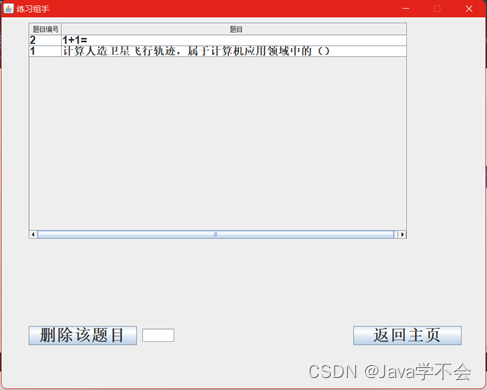
- The delete question bank interface is shown below :
- The following shows how to do the questions , Query interface :

6、 Source access address
边栏推荐
- 内存分区模型
- 5G未平6G再启,中国引领无线通信,6G的最大优势在哪里?
- R语言plotly可视化:plotly可视化归一化的直方图(historgram)并在直方图中添加密度曲线kde、并在直方图的底部边缘使用geom_rug函数添加边缘轴须图
- 11 introduction to CNN
- 【207】Apache崩溃的几个很可能的原因,apache崩溃几个
- Detailed explanation of cookies and sessions
- 长安链交易防重之布谷鸟过滤器
- What is flush software? Is it safe to open an account online?
- 无需人工先验!港大&同济&LunarAI&旷视提出基于语义分组的自监督视觉表征学习,显著提升目标检测、实例分割和语义分割任务!...
- The details of the first pig heart transplantation were fully disclosed: human herpes virus was found in the patient, the weight of the heart doubled after death, and myocardial cell fibrosis
猜你喜欢

知道这几个命令让你掌握Shell自带工具

用Attention和微调BERT进行自然语言推断-PyTorch

若依如何实现接口限流?
Practice of federal learning in Tencent micro vision advertising

【从删库到跑路】JDBC 完结篇(一天学完系列!!学完赶紧跑!)
Quickly get started with federal learning -- the practice of Tencent's self-developed federal learning platform powerfl

When a programmer is disturbed 10 times a day, the consequences are amazing!
Redis Guide (8): principle and implementation of Qianfan Jingfa distributed lock

油田勘探问题

长安链交易防重之布谷鸟过滤器


随机推荐
Codeforces Round #802 (Div. 2)
【力扣刷题】单调栈:84. 柱状图中最大的矩形
What is the process of switching C # read / write files from user mode to kernel mode?
5G未平6G再启,中国引领无线通信,6G的最大优势在哪里?
Redis order sorting command
Codeforces Round #802 (Div. 2)
Redis Guide (8): principle and implementation of Qianfan Jingfa distributed lock
R语言广义线性模型函数GLM、glm函数构建逻辑回归模型(Logistic regression)、分析模型是否过离散(Overdispersion)、使用残差偏差与二项式模型中的剩余自由度的比率评估
SAP OData development tutorial - from getting started to improving (including segw, rap and CDP)
R language generalized linear model function GLM, GLM function to build logistic regression model, analyze whether the model is over discrete, and use the ratio of residual deviation and residual degr
Exquisite makeup has become the "soft power" of camping, and the sales of vipshop outdoor beauty and skin care products have surged
I regard it as a dry product with a monthly income of more than 30000 yuan for sidelines and more than 10000 yuan for novices!
Tsinghua's "magic potion" is published in nature: reversing stem cell differentiation, and the achievements of the Nobel Prize go further. Netizen: life can be created without sperm and eggs
Unlock the value of data fusion! Tencent angel powerfl won the "leading scientific and Technological Achievement Award" at the 2021 digital Expo
R language plot visualization: plot visualizes the normalized histogram, adds the density curve KDE to the histogram, and uses geom at the bottom edge of the histogram_ Adding edge whisker graph with
What is flush software? Is it safe to open an account online?
[understanding of opportunity -31]: Guiguzi - Daoyu [x ī] Crisis is the coexistence of danger and opportunity
In a bad mood, I just write code like this
Cookie和Session详解
安信证券排名第几位?开户安全吗?