当前位置:网站首页>What is the process of switching C # read / write files from user mode to kernel mode?
What is the process of switching C # read / write files from user mode to kernel mode?
2022-06-26 16:03:00 【Dotnet cross platform】
One : background
1. A curious question
We are learning C# In the process of , I always hear a word called Kernel mode , For example, with C# Read and write files , It will involve code from User mode To Kernel mode Handoff , use HttpClient Get remote data , It will also involve User mode To Kernel mode Handoff , What kind of interaction process is this ? After all, our program is unmanageable Kernel mode , Today we will explore together .
Two : Explore the interaction process of two states
1. Where is the junction of the two states
We know the boundary between the world and the underworld Gate of hell , Same thing User mode and Kernel mode At the junction of ntdll.dll layer , Draw a picture like this :
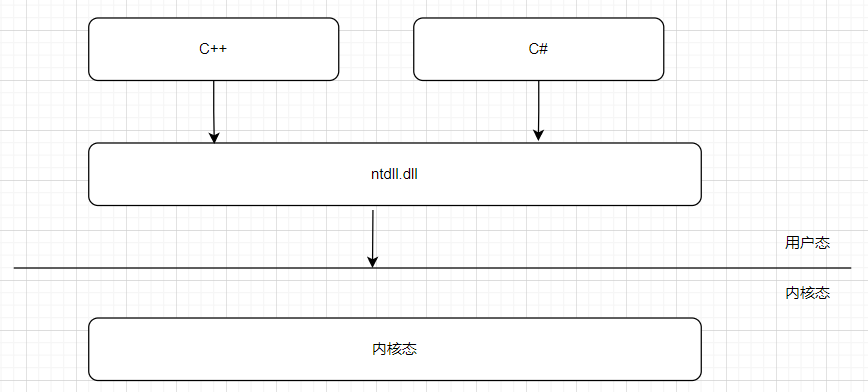
The operating system is for protection Kernel mode Code for , It is definitely not possible to use a pointer directly in the user mode , After all, one is ring 3, In a ring 0, and cpu Hardware protection is also provided , How do you get in ? For the convenience of research , Let's start with a small example .
2. A simple file read
We use File.ReadAllLines() Realize file reading , The code is as follows :
internal class Program
    {
        public static object lockMe = new object();

        static void Main(string[] args)
        {
            var txt= File.ReadAllLines(@"D:\1.txt");

            Console.WriteLine(txt);

            Console.ReadLine();
        }
    }
stay Windows On the platform , The external entry of all kernel functions is Win32 Api , Between the lines , This file also needs to be used for reading , Can be in WinDbg Use in bp ntdll!NtReadFile stay Gate of hell Intercept at .
0:000> bp ntdll!NtReadFile
breakpoint 0 redefined
0:000> g
ModLoad: 00007ffe`fdb20000 00007ffe`fdb50000   C:\Windows\System32\IMM32.DLL
ModLoad: 00007ffe`e2660000 00007ffe`e26bf000   C:\Program Files\dotnet\host\fxr\6.0.5\hostfxr.dll
Breakpoint 0 hit
ntdll!NtReadFile:
00007ffe`fe24c060 4c8bd1          mov     r10,rcx
ha-ha , Successfully intercepted , Next use uf ntdll!NtReadFile Display the assembly code of the method body .
0:000> uf ntdll!NtReadFile
ntdll!NtReadFile:
00007ffe`fe24c060  mov     r10,rcx
00007ffe`fe24c063  mov     eax,6
00007ffe`fe24c068  test    byte ptr [SharedUserData+0x308 (00000000`7ffe0308)],1
00007ffe`fe24c070  jne     ntdll!NtReadFile+0x15 (00007ffe`fe24c075)
00007ffe`fe24c072  syscall
00007ffe`fe24c074  ret
00007ffe`fe24c075  int     2Eh
00007ffe`fe24c077  ret
From the perspective of assembly code , The logic is very simple , It's just one. if Judge , Decide whether to go syscall still int 2Eh, It is obvious that no matter which way you take, you can enter Kernel mode , Let's talk about it one by one .
3. int 2Eh Entry method
I believe no one in the debugging world does not know int do , After all, I have seen it countless times int 3, In essence , In the kernel layer, a Interrupt vector table , Each number is mapped to a piece of function code , When you turn on the computer and get windows Taking over also relies on Interrupt vector table , Okay , Next, let's take a brief look at how to find 3 Corresponding function code .
windbg There is one of them. !idt The command is used to find the function code corresponding to the number .
lkd> !idt 3

Dumping IDT: fffff804347e1000

03: fffff80438000f00 nt!KiBreakpointTrap
You can see , It corresponds to the kernel level nt!KiBreakpointTrap function , In the same way, let's look at 2E.
lkd> !idt 2E

Dumping IDT: fffff804347e1000

2e: fffff804380065c0 nt!KiSystemService
Now it's finally clear , The first way to enter the kernel state is KiSystemService, From the name , It is a similar general method , The next step is how to get into the kernel state Read the file In the way ?
To find the answer , You can look back at the assembly code mov eax,6 , there 6 Is the method number to which the kernel state needs to be routed , ha-ha , Which method does it correspond to ? because windows Closed source of , We don't know , Fortunately github Someone on the has made a list :https://j00ru.vexillium.org/syscalls/nt/64/ , Corresponding to my machine is .

As you can see from the picture, it is actually nt!NtReadFile , Here I think the truth should be revealed , Let's talk about syscall.
4. syscall How to walk
syscall yes CPU A special feature , be called The system quickly calls , Between the lines , It relies on a set of MSR register Help code quickly from User mode Cut to Kernel mode , Efficiency is far better than walking Interrupt routing table It's much faster , This is why the code has if Judge , In fact, it's judgment cpu Is this feature supported .
Just now I said that it has the help of MSR register , One of the registers MSR_LSTAR The address of the kernel state entry function is stored , We can use rdmsr c0000082 Take a look at .
lkd> rdmsr c0000082
msr[c0000082] = fffff804`38006cc0

lkd> uf fffff804`38006cc0
nt!KiSystemCall64:
fffff804`38006cc0 0f01f8          swapgs
fffff804`38006cc3 654889242510000000 mov   qword ptr gs:[10h],rsp
fffff804`38006ccc 65488b2425a8010000 mov   rsp,qword ptr gs:[1A8h]
...
You can see that in the code , It enters nt!KiSystemCall64 function , And then execute the following 6 Corresponding nt!NtReadFile Complete the business logic , Finally, it is nt!KiSystemCall64 complete Kernel mode To User mode Handoff .
Knowing these two ways , Next, you can patch up the picture a little , increase syscall and int xxx Two ways to enter the customs .

3、 ... and : summary
Through assembly code analysis , We finally know User mode To Kernel mode Switching principle of , There are two ways , One is int 2e, One is syscall , Deepen our understanding of C# Read the file A deeper understanding of .
边栏推荐
猜你喜欢








随机推荐
Binding method of multiple sub control signal slots under QT
NFT合约基础知识讲解
NFT 项目的开发、部署、上线的流程(1)
Solana capacity expansion mechanism analysis (2): an extreme attempt to sacrifice availability for efficiency | catchervc research
NFT transaction principle analysis (1)
Handwritten numeral recognition, run your own picture with the saved model
【leetcode】331. 验证二叉树的前序序列化
Svg canvas canvas drag
Swiftui retrieves the missing list view animation
[untitled]
「干货」NFT 上中下游产业链全景分析
NFT Platform Security Guide (1)
11 cnn简介
NFT transaction principle analysis (2)
Practice of federal learning in Tencent micro vision advertising
Audio and video learning (III) -- SIP protocol
svg环绕地球动画js特效
PCIe Capabilities List
feil_ The working directory on the left of uvission4 disappears
Nanopi duo2 connection WiFi