当前位置:网站首页>Maui uses Masa blazor component library
Maui uses Masa blazor component library
2022-06-24 07:01:00 【Dotnet cross platform】
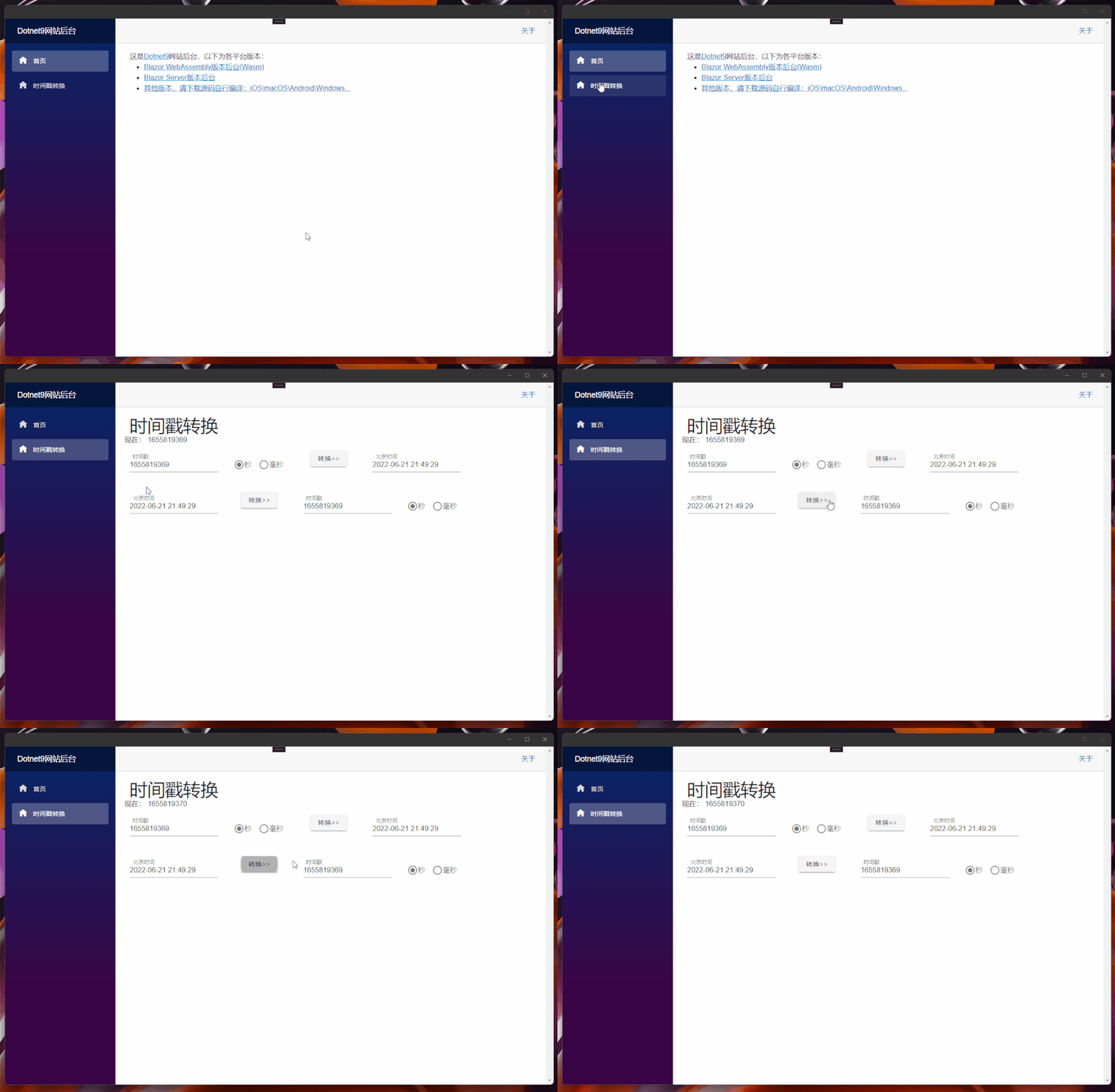
Last one ( Click here to read ) We did UI stay Web End (Blazor Server/Wasm) And the client (Windows/macOS/Android/iOS) share , I add Masa Blazor[2] Reference to component library , And convert the timestamps written in the previous months [3] Tools plus .
1. Pre knowledge
About Masa Blazor Please click on Masa Blazor Official website [4] understand :
MASA Blazor
be based on Material Design and BlazorComponent Provides a standard base component library . Provide such as layout 、 Bullet frame standard 、Loading、 Preset components for standard scenarios such as global exception handling .
2. Reference to component library
Add reference of component library Masa Official website [5], Write it here Dotnet9 backstage [6] Add records :
2.1 UI Modification of shared library -Dotnet9.WebApp
UI Shared library
Dotnet9.WebAppadd toMaas.Blazorpackage , Just today (21 Number )Masa Released0.5.0-preview.3edition , We download and use :
Install-Package Masa.Blazor -Version 0.5.0-preview.3
encapsulation
Maas.BlazorComponent references
Add files ./MasaExtensions/MasaSetup.cs, The code is as follows :
using Microsoft.Extensions.DependencyInjection;

namespace Dotnet9.WebApp.MasaExtensions;

public static class MasaSetup
{
    public static void AddMasaSetup(this IServiceCollection services)
    {
        if (services == null) throw new ArgumentNullException(nameof(services));

        services.AddMasaBlazor();   //  This key code
    }
}
There is only one line of critical code services.AddMasaBlazor();, The extension class is added for function extension , For the convenience of other projects ...
_Imports.razorintroduceMasa.BlazorNamespace
@using Masa.Blazor Is this 3 Step by step Dotnet9.WebApp Modification of .
2.2 Cross platform project modification -Dotnet9.MAUI
modify
MauiProgram.csfile , Add the extension method encapsulated aboveAddMasaSetup():
using Dotnet9.WebApp.MasaExtensions;    //  The first 1 It's about : Add this namespace

namespace Dotnet9.MAUI;

public static class MauiProgram
{
    public static MauiApp CreateMauiApp()
    {
        var builder = MauiApp.CreateBuilder();
        builder
            .UseMauiApp<App>()
            .ConfigureFonts(fonts => { fonts.AddFont("OpenSans-Regular.ttf", "OpenSansRegular"); });

        builder.Services.AddMauiBlazorWebView();
#if DEBUG
        builder.Services.AddBlazorWebViewDeveloperTools();
#endif
        builder.Services.AddMasaSetup();    //  The first 2 Outside : Add an extension method to introduce Masa Blazor

        return builder.Build();
    }
}
add to
Masa.BlazorResource file
modify wwwwroot/index.html file , Add the following styles ( Direct copy Masa.Blazor[7]Blazor WebAssembly Resource files used )
<link href="_content/Masa.Blazor/css/masa-blazor.css" rel="stylesheet" />
<link href="_content/Masa.Blazor/css/masa-extend-blazor.css" rel="stylesheet" />

<link href="https://cdn.masastack.com/npm/@mdi/[email protected]/css/materialdesignicons.min.css" rel="stylesheet">
<link href="https://cdn.masastack.com/npm/materialicons/materialicons.css" rel="stylesheet">
<link href="https://cdn.masastack.com/npm/fontawesome/v5.0.13/css/all.css" rel="stylesheet">

<script src="_content/BlazorComponent/js/blazor-component.js"></script>
2.3 Blazor WebAssembly Project modification -Dotnet9.Wasm
modify
Program.csfile , Add the extension method encapsulated aboveAddMasaSetup():
using Dotnet9.WebApp;
using Dotnet9.WebApp.MasaExtensions;        //  The first 1 It's about : Add this namespace
using Microsoft.AspNetCore.Components.Web;
using Microsoft.AspNetCore.Components.WebAssembly.Hosting;

var builder = WebAssemblyHostBuilder.CreateDefault(args);
builder.RootComponents.Add<Main>("#app");
builder.RootComponents.Add<HeadOutlet>("head::after");

builder.Services.AddMasaSetup();            //  The first 2 Outside : Add an extension method to introduce Masa Blazor
builder.Services.AddScoped(sp => new HttpClient { BaseAddress = new Uri(builder.HostEnvironment.BaseAddress) });

await builder.Build().RunAsync();
add to
Masa.BlazorResource file
Same as Dotnet9.MAUI
2.4 Blazor Server Project modification -Dotnet9.Server
modify
Program.csfile , Add the extension method encapsulated aboveAddMasaSetup():
using Dotnet9.WebApp.MasaExtensions;        //  The first 1 It's about : Add this namespace

var builder = WebApplication.CreateBuilder(args);

// Add services to the container.
builder.Services.AddRazorPages();
builder.Services.AddServerSideBlazor();
builder.Services.AddMasaSetup();            //  The first 2 Outside : Add an extension method to introduce Masa Blazor

var app = builder.Build();

// Configure the HTTP request pipeline.
if (!app.Environment.IsDevelopment())
{
    app.UseExceptionHandler("/Error");
    // The default HSTS value is 30 days. You may want to change this for production scenarios, see https://aka.ms/aspnetcore-hsts.
    app.UseHsts();
}

app.UseHttpsRedirection();

app.UseStaticFiles();

app.UseRouting();

app.MapBlazorHub();
app.MapFallbackToPage("/_Host");

app.Run();
add to
Masa.BlazorResource file
modify Pages/_Layout.cshtml file , Add the following styles ( Copy Masa.Blazor[8]Blazor Server Resource files used )
<!-- masa blazor css style -->
<link href="_content/Masa.Blazor/css/masa-blazor.css" rel="stylesheet" />
<link href="_content/Masa.Blazor/css/masa-extend-blazor.css" rel="stylesheet" />

<!--icon file,import need to use-->
<link href="https://cdn.masastack.com/npm/@("@mdi")/[email protected]/css/materialdesignicons.min.css" rel="stylesheet">
<link href="https://cdn.masastack.com/npm/materialicons/materialicons.css" rel="stylesheet">
<link href="https://cdn.masastack.com/npm/fontawesome/v5.0.13/css/all.css" rel="stylesheet">

<!--js(should lay the end of file)-->
<script src="_content/BlazorComponent/js/blazor-component.js"></script>
Be careful :MAUI Blazor and Blazor WebAssembly Two projects are introduced Masa Blazor The code of the resource file is the same ,Blazor Server The main difference from the former two is materialdesignicons.min.css file :

Here's about Masa.Blazor The introduction of , Summarize the three key steps :
add to
Masa.BlazorNuget package :Install-Package Masa.Blazor;Masa.BlazorComponent registration use :services.AddMasaBlazor();;add to
Masa.BlazorResource file :Wasm yeswwwwroot/index.html, blazor server yes_Layout.cshtml, Note the difference between adding resource files .
3. Add timestamp function
Doing it Blazor Server Version web site , There was an introduction to the development of timestamp function ( Click here to read [9]), The code is simple , I won't go into details here , No more water ....
4. summary
Masa.Blazor The component library has been added , And the timestamp function is restored , next step , Is to continue to build the website background , Use Masa.Blazor Build a framework .
this paper Blazor Server Site Preview :https://server.dotnet9.com/
this paper Blazor Wasm Site Preview :https://wasm.dotnet9.com/
MAUI(Android\Windows\macOS\iOS) preview :https://github.com/dotnet9/Dotnet9/tree/develop/src/Dotnet9.MAUI( No release document is made , You need to compile the source code yourself )
Reference material
[1]
Click here to read : https://dotnet9.com/2022/06/Share-razor-library-between-maui-and-blazor-server-or-client
[2]Masa Blazor: https://masa-blazor-docs-dev.lonsid.cn/
[3]Timestamp conversion : https://dotnet9.com/2022/02/Use-Blazor-to-be-a-simple-online-timestamp-conversion-tool
[4]Masa Blazor Official website : https://masa-blazor-docs-dev.lonsid.cn/
[5]Masa Official website : https://masa-blazor-docs-dev.lonsid.cn/
[6]Dotnet9 backstage : https://github.com/dotnet9/Dotnet9
[7]Masa.Blazor: https://masa-blazor-docs-dev.lonsid.cn/getting-started/installation
[8]Masa.Blazor: https://masa-blazor-docs-dev.lonsid.cn/getting-started/installation
[9]Click here to read : https://dotnet9.com/2022/02/Use-Blazor-to-be-a-simple-online-timestamp-conversion-tool
边栏推荐
- 成为 TD Hero,做用技术改变世界的超级英雄 | 来自 TDengine 社区的邀请函
- About Stacked Generalization
- 35岁危机?内卷成程序员代名词了
- 程序员使用个性壁纸
- puzzle(019.1)Hook、Gear
- RS485 serial port wiring description of smart lamp post smart gateway
- 为什么要用lock 【readonly】object?为什么不要lock(this)?
- Cloudcompare & PCL point cloud clipping (based on clipping box)
- Spark参数调优实践
- leetcode:84. The largest rectangle in the histogram
猜你喜欢

Arduino融资3200万美元,进军企业市场
![Jumping game ii[greedy practice]](/img/e4/f59bb1f5137495ea357462100e2b38.png)
Jumping game ii[greedy practice]

About Stacked Generalization
![[binary tree] - middle order traversal of binary tree](/img/93/442bdbecb123991dbfbd1e5ecc9d64.png)
[binary tree] - middle order traversal of binary tree
原神方石机关解密

Interpreting top-level design of AI robot industry development

You have a chance, here is a stage

leetcode:剑指 Offer 26:判断t1中是否含有t2的全部拓扑结构

智能视觉组A4纸识别样例

puzzle(019.1)Hook、Gear
随机推荐
面渣逆袭:MySQL六十六问,两万字+五十图详解
数据同步工具 DataX 已经正式支持读写 TDengine
Project demo
Free and easy-to-use screen recording and video cutting tool sharing
leetcode:84. 柱状图中最大的矩形
typescript vscode /bin/sh: ts-node: command not found
leetcode:84. The largest rectangle in the histogram
Do you know about Statistics?
Leetcode: Sword finger offer 26: judge whether T1 contains all topologies of T2
Rockscache schematic diagram of cache operation
展锐芯片之GPU频率
Kangaroo cloud: the overall architecture and key technical points of building a real-time computing platform based on Flink
What is JSP technology? Advantages of JSP technology
Arduino融资3200万美元,进军企业市场
mysql中的 ON UPDATE CURRENT_TIMESTAMP
setInterval里面的函数不能有括号
FreeRTOS MPU使系统更健壮!
为什么要用lock 【readonly】object?为什么不要lock(this)?
Flutter environment installation & operation
[binary tree] - middle order traversal of binary tree