当前位置:网站首页>零基础学习CANoe Panel(17)—— Panel CAPL Function
零基础学习CANoe Panel(17)—— Panel CAPL Function
2022-07-25 21:10:00 【蚂蚁小兵】
- 我是蚂蚁小兵,专注于车载诊断领域,尤其擅长于对CANoe工具的使用
- 寻找组织 ,答疑解惑,摸鱼聊天,博客源码,点击加入【相亲相爱一家人】
- 零基础学习CANoe Panel设计目录汇总,点击跳转
前言
Panel的属性基本上在创建的时候就定义完毕了; CANoe 内置了几个CAPL Function,允许我们在CAPL运行时动态的更改Panel 控件的属性,比如打开某个panel ,禁用某个控件,更改控件颜色等。
演示软硬件环境
Windows11 x64;CANoe 11 SP2 x64
目录

打开关闭Panel
- 如下图,在这个系列课程中,我演示创建了那么多Panel ,且都是Closed Windows,CANoe环境中没打开一个Panel

1️⃣ 通过openPanel和closePanel可以打开/关闭一个Panel
- 在一些测试场景中,测试到某一步骤,必须要Panel输入的情况,可以调出Panel
- Panel的名字必须是已经被被Added进入CANoe环境中的,直接填入Panel名字就ok
 on key 'b'
{

  openPanel("PanelCAPL_Fucntions");
}
 on key 'c'
{

  closePanel("PanelCAPL_Fucntions");
}
2️⃣ 按下按键‘b’ 就调出了PanelCAPL_Fucntions控件
设置Panel控件的可见性
- SetControlVisibility可以设置Panel 控件的可见性,可以用来隐藏某些控件

隐藏一个控件
- 隐藏一个Button控件
 on key 'd'
{

  SetControlVisibility("PanelCAPL_Fucntions","Button",0);
}

隐藏全部控件
- 只要第二个参数指定为“”,就可以隐藏全部控件
 on key 'd'
{

  SetControlVisibility("PanelCAPL_Fucntions","",0);
}

隐藏全部Panel的全部控件
- 第一个和第二个的参数都为空,则隐藏全部打开的Panel的全部控件
 on key 'd'
{

  SetControlVisibility("","",0);
}
隐藏全部Panel的指定控件
- 第一个为空,第二个参数不为空,如下,则隐藏所有打开的Panel中的所有名字为Button的控件
 on key 'd'
{

  SetControlVisibility("","Button",0);
}

设置Panel的可操作性
- enableControl 函数可以设置控件是否允许操作
- 第三个参数为0,不可操作;1,可操作
- 第一个参数和第二个参数为空的情况,和上面的描述相同,都是作用于所有。

 on key 'e'
{

  enableControl("PanelCAPL_Fucntions","Button",0);
}

控件的颜色和背景色
主要有这4个函数SetControlForeColor ;SetControlBackColor ;SetControlColors ;SetDefaultControlColors
这里作用的是控件的颜色,不是控件描述标签的颜色
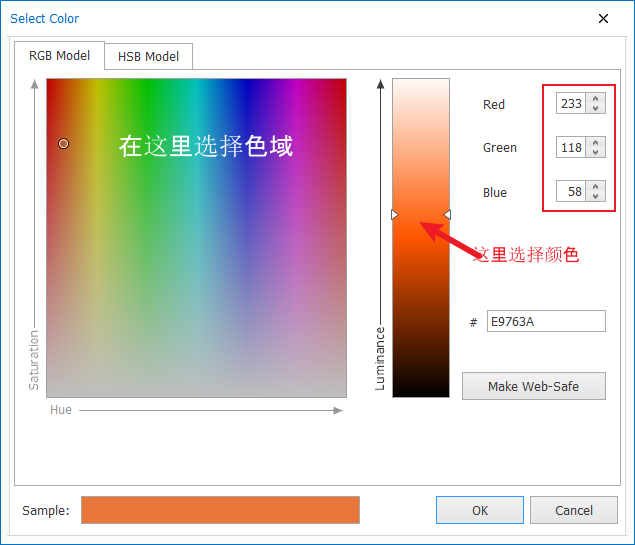
第三个颜色通过MakeRGB(255,0,0)函数 计算得到。
可以得到RGB三个值,可以通过下图的方式,或者网络上的色值表

控件字体颜色(SetControlForeColor )
- 函数原型:
void SetControlForeColor(char[] panel, char[] control, long color);
 on key 'f'
{

  SetControlForeColor("PanelCAPL_Fucntions", "Button", MakeRGB(252,64,17));
}
- 按下’f’键,看到button被设置成红色了。

控件背景色(SetControlBackColor )
- 函数原型:
void SetControlBackColor (char[] panel, char[] control, long color); - 注意,这个Button控件的 Button Style属性要设置成 非 Standard 类型
- 针对任何控件,如果背景色在Panel Edior中不可选,则CAPL函数也无法设置,所以,如果你设置不成功,注意检查下。
on key 'g'
{

  SetControlBackColor("PanelCAPL_Fucntions", "Button", MakeRGB(48,242,41));//绿色
}
- 按下’f’键和’g’键,看到button被设置成红色了,背景色也设置成绿色了。

控件字体颜色和背景色(SetControlColors )
- 函数原型:
void SetControlColors(char[] panel, char[] control, long backcolor, long textcolor); - 是上面两个函数的功能集合,可以同时设置字体颜色和背景色
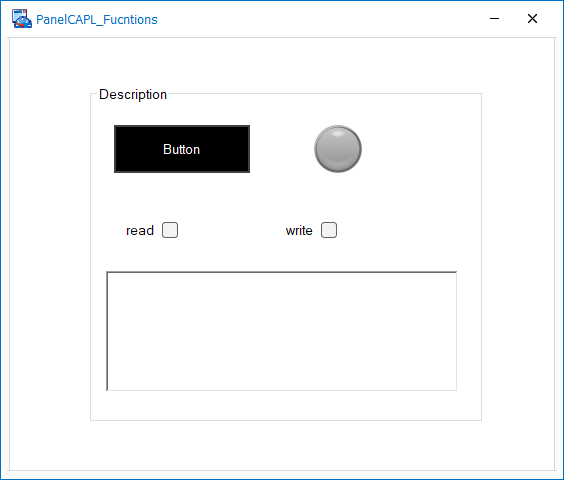
- 下面设置成黑纸白字
on key 'h'
{

  SetControlColors("PanelCAPL_Fucntions", "Button", MakeRGB(0,0,0),MakeRGB(255,255,255));
}
- 按下’h键,
控件默认配色(SetDefaultControlColors )
函数原型:
void SetDefaultControlColors(char[] panel, char[] control);恢复控件的默认色。

总结


- 要有最朴素的生活,最遥远的梦想,即使明天天寒地冻,路遥马亡!
- 如果这篇博客对你有帮助,请 “点赞” “评论”“收藏”一键三连 哦!码字不易,大家的支持就是我坚持下去的动力。

边栏推荐
- Array of arm disassembly
- 图片怎么存储到数据库里「建议收藏」
- Recommend a website that converts curl commands into PHP code & a website that initiates and executes curl requests online
- How to store pictures in the database "suggested collection"
- All non isomorphic subgraphs of a directed complete graph of order 3 (number of different hook graphs)
- An interview question about interface and implementation in golang
- Airtest解决“自动装包”过程中需要输入密码的问题(同适用于随机弹框处理)
- yuv422转rgb(422sp转420p)
- Basic method of black box (function) test
- When facing complex problems, systematic thinking helps you understand the essence of the problem
猜你喜欢

How to realize reliable transmission with UDP?
As a test, how to understand thread synchronization and asynchrony
![[online tutorial] iptables official tutorial -- learning notes 2](/img/7d/5f8328d1b4c8878f17c95d2658d2d6.jpg)
[online tutorial] iptables official tutorial -- learning notes 2

Brush questions with binary tree (4)

leetcode-6127:优质数对的数目

Canvas 填充渐变

Pycharm跑程序时自动进入测试模式

leetcode-6125:相等行列对
![[depth] the new LAAS agreement elephant: the key to revitalizing the development of the defi track](/img/ef/33f93225171e2c3e14b7d090c68196.png)
[depth] the new LAAS agreement elephant: the key to revitalizing the development of the defi track
![[FAQ] access the HMS core push service, and the server sends messages. Cause analysis and solutions of common error codes](/img/65/4dd3a521946e753c79d3db1fa0a4f4.png)
[FAQ] access the HMS core push service, and the server sends messages. Cause analysis and solutions of common error codes
随机推荐
Leetcode-79: word search
使用oap切面导致controller被重复调用
Pychart automatically enters the test mode when running the program
Leetcode-155: minimum stack
Remote - basic principle introduction
Temperature and humidity environment monitoring system based on stm32
Implementation of simple registration and login
Airtest solves the problem that a password needs to be entered in the process of "automatic packaging" (the same applies to random bullet frame processing)
浅谈web性能优化(一)
测试用例和缺陷报告模板
leetcode-6131:不可能得到的最短骰子序列
How to automatically generate short chains? How to generate links with UTM parameters online in batches?
Unity vs -- the default debugging in VS is to start rather than attach to unity debugging
An interview question combining defer and function in golang
Test cases and defect report templates
DDD go practice
[online tutorial] iptables official tutorial -- learning notes 2
3阶有向完全图的所有非同构的子图(不同钩子图个数)
Yolov7 training error indexerror: list index out of range
476-82(322、64、2、46、62、114)