当前位置:网站首页>Numpy 常见函数及使用
Numpy 常见函数及使用
2022-07-29 00:10:00 【Darchan】
Numpy常见函数及使用
本文后续边补充,边更新!
参考:
1. Numpy基本使用
2. numpy的文件存储.npy .npz 文件详解
3. np.hstack 用法
4. 图解
5. 菜鸟教程
6. python之np.argmax()及对axis=0或者1的理解
1. np.delete()
删除指定行
np.delete(x, i, axis=0) #删除x矩阵 第i行
2. np.where()
返回输入数组中满足给定条件的元素的索引,返回值为元组类型。
import numpy as np
x = np.arange(9.).reshape(3,  3)
print ('我们的数组是:')
print (x)
print ( '大于 3 的元素的索引:')
y = np.where(x > 3)
print (y)
print ('使用这些索引来获取满足条件的元素:')
print (x[y])
结果:
我们的数组是:
[[0. 1. 2.]
 [3. 4. 5.]
 [6. 7. 8.]]
大于 3 的元素的索引(元组):
(array([1, 1, 2, 2, 2]), array([1, 2, 0, 1, 2]))
使用这些索引来获取满足条件的元素:
[4. 5. 6. 7. 8.]
3. np.load()
读取npy文件。
默认情况下,数组是以未压缩的原始二进制格式保存在扩展名为.npy的文件中。.npz为压缩文件。
参考:numpy的文件存储.npy .npz 文件详解
>>> np.save('/tmp/123', np.array([[1, 2, 3], [4, 5, 6]]))
>>> np.load('/tmp/123.npy')
array([[1, 2, 3],
       [4, 5, 6]])

>>> a=np.array([[1, 2, 3], [4, 5, 6]])
>>> b=np.array([1, 2])
>>> np.savez('/tmp/123.npz', a=a, b=b)
>>> data = np.load('/tmp/123.npz')
>>> data['a']
array([[1, 2, 3],
       [4, 5, 6]])
>>> data['b']
array([1, 2])
>>> data.close()

>>> X = np.load('/tmp/123.npy', mmap_mode='r')
>>> X[1, :]
memmap([4, 5, 6])
4.np.item()
可以获取在numpy数组上给定索引处找到的数据元素。
# import the important module in python
import numpy as np

# make an array with numpy
gfg = np.array([[1, 2, 3, 4, 5],
                [6, 5, 4, 3, 2]])

print(gfg.item((1, 2)))   ## 结果为4
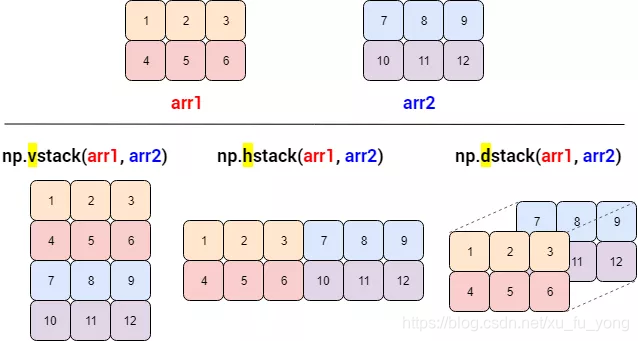
5. 连接数组
| 函数 | 描述 |
|---|---|
| concatenate() | 连接沿现有轴的数组序列 |
| stack() | 增加新一维度方式堆叠 |
| hstack() | 水平堆叠 |
| vstack() | 垂直堆叠 |
| dstack() | 深度堆叠 |
eg1.
a = np.array([[1,2],[3,4]])
b = np.array([[5,6],[7,8]])
print ('沿轴 0 连接两个数组:')
print (np.concatenate((a,b)))    # 默认是0轴
print ('沿轴 1 连接两个数组:')
print (np.concatenate((a,b),axis = 1))
#结果
第一个数组:
[[1 2]
 [3 4]]
第二个数组:
[[5 6]
 [7 8]]
沿轴 0 连接两个数组:
[[1 2]
 [3 4]
 [5 6]
 [7 8]]
沿轴 1 连接两个数组:
[[1 2 5 6]
 [3 4 7 8]]
eg2.
print(np.stack((arr1, arr2),0)) # 堆叠后维度增加,axis=0/1效果相同
print(np.vstack((arr1, arr2)))
print(np.hstack((arr1, arr2)))
print(np.dstack((arr1, arr2)))
# 结果
[[[1 2]
  [3 4]]
 [[5 6]
  [7 8]]]

[[ 1  2  3]
 [ 4  5  6]
 [ 7  8  9]
 [10 11 12]]
[[ 1  2  3  7  8  9]
 [ 4  5  6 10 11 12]]
[[[ 1  7]
  [ 2  8]
  [ 3  9]]

 [[ 4 10]
  [ 5 11]
  [ 6 12]]]
6. 修改数组维度
6.1 np.squeeze()
从数组的形状中删除一维条目,及shape中是1的维度。
例如维度为(1,2,5)->(2,5), (3,4)->(3,4)
np.squeeze()
eg.
c  = np.arange(10).reshape(2,5)
np.squeeze(c)
c.shape   # (2,5)
d  = np.arange(10).reshape(1,2,5)
np.squeeze(d)
d.shape   # (2,5)

x = np.arange(9).reshape(1,3,3)
y = np.squeeze(x)
print (x.shape, y.shape)
# 结果
(1, 3, 3) (3, 3)
6.2 np.expand_dims()
扩展数组的形状.
cat_mask = np.expand_dims(cat_mask, 0) # cat_mask从原来的[256,256]变为[1,256,256]
7. np.unique()
用于去除数组中的重复元素。
函数原型:
numpy.unique(arr, return_index, return_inverse, return_counts)
- arr:输入数组,如果不是一维数组则会展开
- return_index:如果为true,返回新列表元素在旧列表中的位置(下标),并以列表形式储
- return_inverse:如果为true,返回旧列表元素在新列表中的位置(下标),并以列表形式储
- return_counts:如果为true,返回去重数组中的元素在原数组中的出现次数
eg.
a = np.array([5,2,6,2,7,5,6,8,2,9])
print (a)       # [5 2 6 2 7 5 6 8 2 9]

u = np.unique(a)
print (u)       # [2 5 6 7 8 9], 顺便排序了

u,indices = np.unique(a, return_index = True)
print (indices)     # [1 0 2 4 7 9]
8. 排序、条件筛选函数
用于给多个序列进行排序,想象成电子表格,优先排序后面的列。
numpy.lexsort()
eg.
nm =  ('raju','anil','ravi','amar')
dv =  ('f.y.',  's.y.',  's.y.',  'f.y.')
ind = np.lexsort((dv,nm))

print (ind)
print ([nm[i]  +  ", "  + dv[i]  for i in ind])
# 结果
[3 1 0 2]
['amar, f.y.', 'anil, s.y.', 'raju, f.y.', 'ravi, s.y.']
9. 连续内存数组
Numpy中,随机初始化的数组默认都是C连续的,经过不规则的slice操作,则会改变连续性。ascontiguousarray函数将一个内存不连续存储的数组转换为内存连续存储的数组,使得运行速度更快。
np.ascontiguousarray()
eg.
>>> x = np.arange(8).reshape(2,4)
>>> np.ascontiguousarray(x, dtype=np.float32)
array([[0., 1., 2., 3.],
       [4., 5., 6., 7.]], dtype=float32)
>>> x.flags['C_CONTIGUOUS']
True
10. 统计频率
像直方图一样,统计元素出现频率,并返回ndarray。
np.bincount()
参考:np.bincount用法
eg.
x=np.array([0,1,1,3,2,1,7])
print(np.bincount(x))
# 结果
[1 3 1 1 0 0 0 1]
11. np.argmax()
返回数组中较大值所在的索引,这里针对一维、二维、三维或者高维数据。
参考:python之np.argmax()及对axis=0或者1的理解
import numpy as np
# 三维数组
a = np.array([
              [
                  [1, 5, 5, 2],
                  [9, -6, 2, 8],
                  [-3, 7, -9, 1]
              ],

              [
                  [-1, 5, -5, 2],
                  [9, 6, 2, 8],
                  [3, 7, 9, 1]
              ]
            ])
print(np.argmax(a, axis=0))
结果:从[2,3,4]->[3,4]
[[0 0 0 0]
 [0 1 0 0]
 [1 0 1 0]]
边栏推荐
猜你喜欢

Univariate function integration 1__ Indefinite integral

mysql分表之后怎么平滑上线?

🧐 table1 | 一秒搞定你的三线表

20220728-不纯为数字的字符串排序

Time series prediction | MATLAB realizes time series prediction of TCN time convolution neural network

Day2:三种语言暴刷牛客130题

Connect with Alipay payment

【树莓派】widows电脑如何与树莓派连接

大页内存原理及使用设置
SystemVerilog join and copy operators
随机推荐
Plato launched the LAAS protocol elephant swap, which allows users to earn premium income
LeTax记录\documentclass{},authoryear属性使用
“index [hotel/jXLK5MTYTU-jO9WzJNob4w] already exists“
Summary of process and thread knowledge points 1
State compression DP Mondrian's dream
【mysql】多指标历史累计去重问题
【刷题笔记】链表内指定区间反转
mysql分表之后怎么平滑上线?
How to carry out engineering implementation of DDD Domain Driven Design
Synchronized关键字详解
How to check the redis Version (check the redis process)
【unity】将unity编辑c#配置为vscode
(update 20211130) about the download and installation of Jupiter notebook and its own configuration and theme
18 diagrams, intuitive understanding of neural networks, manifolds and topologies
【ManageEngine】局域网监控软件是什么,有什么作用
如何处理项目中的时间、范围和成本限制?
nep 2022 cat
[notes for question brushing] delete continuous nodes with a total value of zero from the linked list
Visual full link log tracking
How to smoothly go online after MySQL table splitting?