当前位置:网站首页>FTP server
FTP server
2022-07-27 10:22:00 【Xiaobai won't run away】
FTP brief introduction
FTP(File Transfer Protocol, File transfer protocol ) Is a set of standard protocols for file transfer on the network , It belongs to the application layer of network transmission protocol . Its main function is to transfer files between the server and the client . This protocol uses clear text transmission . For safer use FTP agreement , Only safe but less functional vsftpd This software .
FTP The function of the server is not only to transfer and manage files , According to the configuration architecture of the server software , It can also provide the following The main function :
1、 Different users :
FTP The server is by default , There are three different identities according to the user's login , Namely : Physical users ,real user; visitor ,guest; Anonymous users ,anonymous.
2、 Command record and log file record
FTP Can take advantage of the syslogd To record data , The recorded data includes the commands used by the user and the data transmitted by the user ( Transmission time 、 File size, etc ) The record of , So you can /var/log/ Find all log information in it .
3、 Restricted user activity Directory (change root, abbreviation chroot).
In order to avoid users in your linux Switch directories freely in the system , The user's scope of work is limited to the following main directory .FTP You can restrict users to only be active in their own user home directory . When the user logs in FTP after , Because users cannot leave their home directory , The displayed root directory is the contents of your user's home directory . This environment is called change root, namely chroot, Change the root directory .
ftp working process
FTP Our transmission uses TCP Packet protocol .FTP The server uses two connections , They are command channel and data flow channel . Because it is TCP Data packets , Both connections require three handshakes .
The process of establishing a command channel
The client will randomly obtain a value greater than 1024 The above ports come with FTP Server side port 21 To connect , This process requires Three handshakes . After the connection is implemented, the client can connect to FTP The server executes the command , Query file name 、 download 、 Upload and other commands are executed through this channel .
The process of establishing a data channel
FTP The server actively connects to the client
(1) notice FTP The server uses active connection and informs the connected port number **FTP The port of the server 21 Number is mainly used in the execution of commands , But when it comes to data flow , Instead of using this connection .** When the client needs data , Will tell the server how to connect , In case of active connection , The client will enable a port randomly first , And inform... Through the command channel FTP Server these two information , And wait for FTP Server connection .
FTP The server actively connects to the client
FTP After the server understands the requirements of the client through the command channel , Will take the initiative by port 20 Connect to the data port of the client , This connection will also go through three handshakes . here FTP Two connections will be established between the client and the server , It is used in the execution of commands and the transmission of data . And default FTP The active connection port used on the server side is port 20.
Data transmission channel is a channel established only when there is data transmission behavior , Not initially connected to FTP The server immediately establishes the channel .
Be careful :port 21 It mainly receives active connections from clients ,port 20 Then for FTP The server actively connects to the client .
The illustration :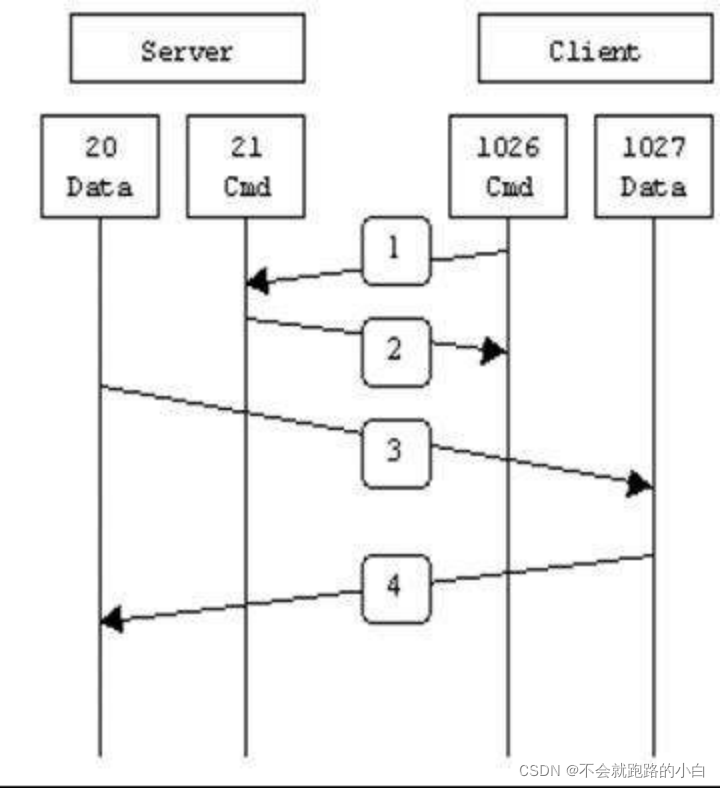
The client selects the passive connection mode
The client sends a passive connection request through the command channel , And wait for the server to respond .
FTP Server boot data port , And notify the client to connect
If you use FTP The server can handle passive connections , here FTP The server will start a listening port first . This port number can be random , You can also customize a range of ports , It depends FTP Depending on the server software . then FTP The server will inform the client of the port that has been started through the command channel port pasv, And wait for the client to connect .
Client random access is greater than 1024 Connect to the port of
Then the client will randomly take a value greater than 1024 The port number of the host port pasv Connect . If everything is OK , that FTP The data can pass through the random port of the client and the port of the server port pasv Here we go .
The illustration :
build ftp The server
ftp Profile parsing
[[email protected] ~]# vim /etc/vsftpd/vsftpd.conf
12 anonymous_enable=YES   # Whether anonymous users are allowed to log in vsftpd host
16 local_enable=YES       # Whether to allow /etc/passwd Login with the account in vsftpd The server
19 write_enable=YES     # Whether users are allowed to upload data
23 local_umask=022     # The default local user uploads the normal file permission mask
29 #anon_upload_enable=YES # Allow anonymous users to upload files
33 #anon_mkdir_write_enable=YES # Whether anonymous users are allowed to establish directories .
37 dirmessage_enable=YES  # When a user enters a directory , The contents of the directory that need attention will be displayed
40 xferlog_enable=YES    # Set to YES when , Users upload and download files will be recorded
43 connect_from_port_20=YES   # Actively requested data port
53 #xferlog_file=/var/log/xferlog # If xferlog_enable=YES, Here you can set the file name of the log file
57 xferlog_std_format=YES
60 #idle_session_timeout=600 # If the user is 600 No command operation in seconds , Force offline .
63 #data_connection_timeout=120 # If the data connection between the server and the client has been successfully established , However, due to line problems 120 The data transmission cannot be completed smoothly within seconds , Then the connection of the client will be forcibly disconnected
67 #nopriv_user=ftpsecure # Set an execution vsftpd Users of the service
82 #ascii_upload_enable=YES # by YES Indicates that the client defaults to ascii Format upload file
83 #ascii_download_enable=YES # If set to YES, that client Use by default ASCII Download file in format
90 #deny_email_enable=YES # Some special email address Block
92 #banned_email_file=/etc/vsftpd/banned_emails # If deny_email_enable=YES, You can use this setting item to specify which email address You cannot log in to our vsftpd. In the file set above , Enter one on a line email address that will do
100 #chroot_local_user=YES # Whether to restrict users to their home directory , If it is YES On behalf of users will be limited to their own home directory
101 #chroot_list_enable=YES  Is it enabled? chroot Write list function
103 #chroot_list_file=/etc/vsftpd/chroot_list  If chroot_list_enable=YES You can set this item , This project is related to chroot_local_user of
114 listen=NO
123 listen_ipv6=YES
125 pam_service_name=vsftpd  # Set up PAM The name of the authentication module is vsftpd
126 userlist_enable=YES  # Whether to use vsftpd Blocking mechanism to deal with some unpopular accounts
127 tcp_wrappers=YES # Server and client access control policies
Experiment 1 Anonymous user login
The experimental requirements :
a. Have the permission to upload files
b. Have permission to create directory
c. Have permission to delete directories and files
First step : Configuration resolution file : /etc/vsftpd/vsftpd.conf
[[email protected] vsftpd]# vim vsftpd.conf
anonymous_enable=yes # Allow anonymous users to log in vsftpd host
anon_umask=022 # Anonymous users upload normal file permission mask
ftp_username=ftp # Define the user name for anonymous login . The default value is ftp.
anon_upload_enable=YES # Allow anonymous logons to upload files ( Non catalogue ) Authority , Only in write_enable=YES when , This item is only valid . Of course , Anonymous users must have write access to the upper directory .
no_anon_password=YES # When using anonymous login , Don't ask for the password
anon_mkdir_write_enable=YES # Allow anonymous logons to have permission to add directories , Only in write_enable=YES when , This item is only valid . Of course , Anonymous users must have write access to the upper directory .
anon_other_write_enable=YES # Allow anonymous logons more permission than uploading or creating directories , Such as deleting or renaming .
anon_root=/var/ftp # When logging in anonymously , Directory logged in . The default value is /var/ftp. Be careful ftp The catalog cannot be 777 The permission property of , That is, the home directory of anonymous users cannot have 777 Authority .
write_enable=YES # Allow the login user to have write permission
Be careful : Need here /var/ftp/ In the catalog pub Directory permissions
[[email protected]gon ftp]# ll
total 4
drwxr-xr-x. 2 root root  6 Feb 17  2020 pub
[[email protected] ftp]# chmod 777 pub/
The second step : start-up ftp service
[[email protected] vsftpd]# systemctl restart vsftpd
[[email protected] vsftpd]# systemctl stop firewall
[[email protected] vsftpd]# setenforce 0
The third step : Client authentication
1. First, anonymous login succeeded 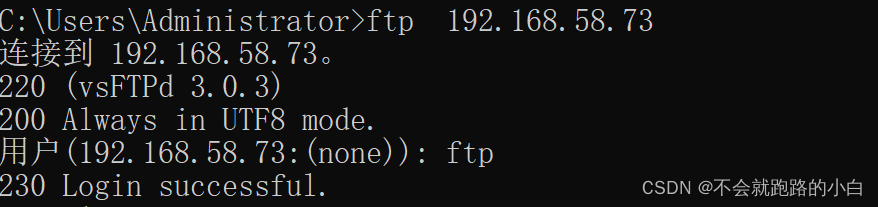
2. You can delete and create directories , file 
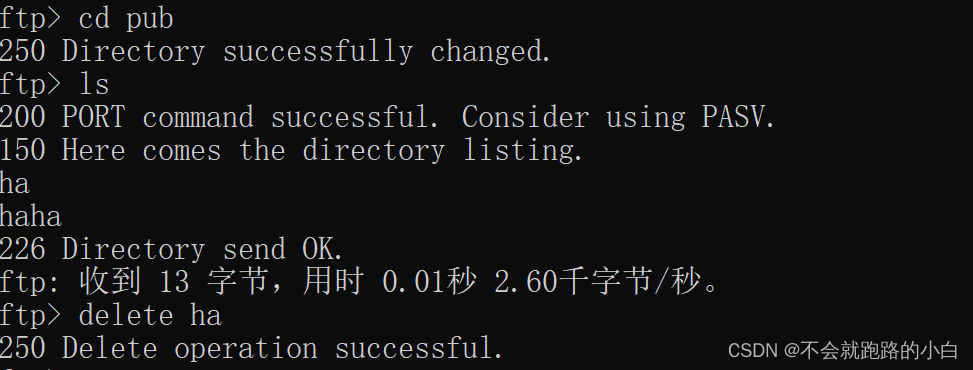
3. Files can be uploaded 
4. You can download files 
Experiment 2 configuration ftp Local user login
a. Set up umask by 002 And create a directory and view permissions
Set welcome message :
Connecting welcome : Welcome to connect my ftp server
Welcome to the directory : Welcome to access my directory
First step : Configuration resolution file
[[email protected] vsftpd]# vim /etc/vsftpd/vsftpd.conf
anonymous_enable=NO # Anonymous user login vsftpd host
local_enable=YES # allow /etc/passwd Login with the account in vsftpd The server
write_enable=YES # Allow users to upload data
local_umask=022 # The default local user uploads the normal file permission mask
userlist_enable=YES # With the help of permission vsftpd Blocking mechanism to deal with some unpopular accounts
The second step : Start the service
[[email protected] vsftpd]# systemctl restart vsftpd
[[email protected] vsftpd]# systemctl stop firewall
[[email protected] vsftpd]# setenforce 0
The third step : Client access verification
Through here windows visit
Be careful : The user logged in here actually exists on the server , That is, you need to create users 
Experiment three : Access control
Access control is related to two files , Namely /etc/vsftpd/ftpuser and /etc/vsftpd/user_list Two documents decide .
ftpuser The priority of the file is higher than user_list. stay ftpuser Users in the file cannot log in .
user_list The user needs in the file depend on the configuration file /etc/vsftpd/vsftpd.conf Medium uselistr_deny Configuration items determine . If userlist_deny=no, Then only user_lisy Users in can access . If userlist_deny=YES, that user_list Users in are not allowed to access .
1. adopt ftpuser File control user login
[[email protected] vsftpd]# vim ftpusers
# Users that are not allowed to login via ftp
root
bin
daemon
adm
lp
sync
shutdown
halt
mail
news
uucp
operator
games
nobody
ftpuser1 # Add users
 Be careful : The user logged in here actually exists on the server , That is, you need to create users
Validation experiment ,ftpuser1 No landing .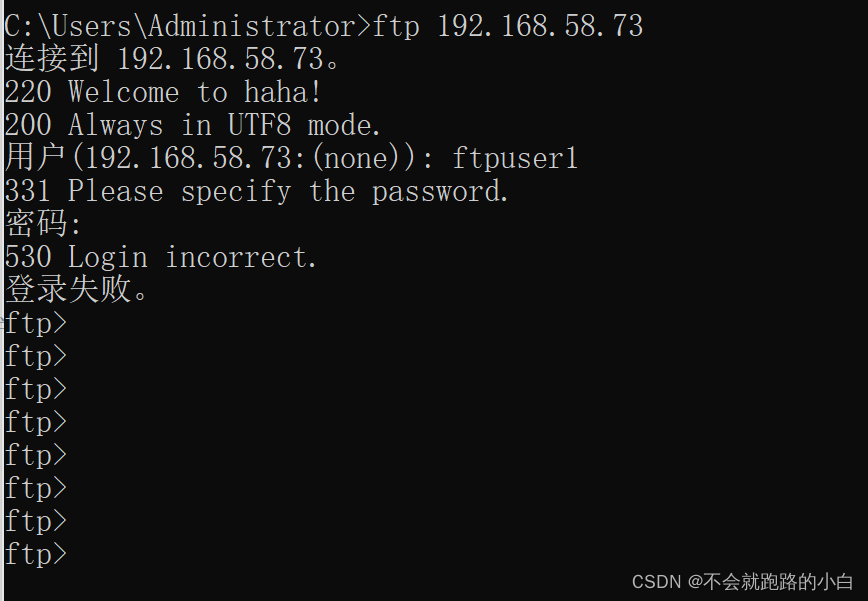
2. Through configuration items userlist_deny Control user login
 Profile add configuration item
[[email protected] vsftpd]# vim vsftpd.conf
userlist_deny=YES # stay use_list Users in are forbidden to ask
[[email protected] vsftpd]# vim user_list
root
bin
daemon
adm
lp
sync
shutdown
halt
mail
news
uucp
operator
games
nobody
ftpuser2 # Add access users
 Be careful : The user logged in here actually exists on the server , That is, you need to create users
The verification results , stay user_list Users in are forbidden to access .
Experiment four Control user switching directory
First step : Configuration profile
[[email protected] vsftpd]# vim /etc/vsftpd/vsftpd.conf
local_enable=YES
write_enable=YES
local_umask=022
userlist_enable=YES
dirmessage_enable=YES

#chroot_list To configure
chroot_list_enable=YES
chroot_list_file=/etc/vsftpd/chroot_list
chroot_local_user=NO
allow_writeable_chroot=YES # If this field is not added ,chroot Remove the notes from the three important documents , Is not written in chroot_list The user of the file cannot log in
The following two commands are explained here :
chroot_local_user= chroot_list_enable=
 When chroot_list_enable=YES,chroot_local_user=YES when , stay /etc/vsftpd/chroot_list Users listed in the file , You can switch other directories . Users who are not in the file , Cannot switch other directories .
 When chroot_list_enable=YES,chroot_local_user=NO At the time /etc/vsftpd/chroot_list Users listed in the file , Cannot switch other directories . Users who are not in the file , You can switch other directories .
 When chroot_list_enable=NO,chroot_local_user=YES when , All users cannot switch directories .
 When chroot_list_enable=NO,chroot_local_user=NO when , So ordinary users can switch directories .
The second step : To configure /etc/vsftpd/chroot_list User list
[[email protected] vsftpd]# vim /etc/vsftpd/chroot_list
ftpuser1
ftpuser2
 Be careful : The user logged in here actually exists on the server , That is, you need to create users
The third step : Start service validation configuration
stay chroot_list Users in the file cannot switch directories .
be not in chroot_list Users in can switch users .
Experiment five Welcome
[[email protected] vsftpd]# vim /etc/vsftpd/vsftpd.conf
ftpd_banner=Welcome to haha! # Add a welcome message to the login interface

Experiment five Virtual user settings
Virtual users use PAM authentication .
Because in linux under , Use vsftp After establishing users , By default ftp At the time of the visit , Yes, you will access the corresponding user home directory . If you want multiple users to access a directory at the same time , At the same time, they have different permissions under the same directory , For example, some users can only see , Don't modify , Or some users can only download and cannot upload these permissions , These settings can only be set through vsftp Virtual users in , Ordinary users cannot achieve this effect . So first, set up a common system user , Create a home directory , Then map all virtual users to the corresponding ordinary system user home directory , Then control the permissions of each virtual user , Achieve the above effect .
First step : Enable virtual users in the configuration file
[[email protected] vsftpd]# vim vsftpd.conf
guest_enable=YES # Enable virtual users
guest_username=ftpuser3 # The home directory of the virtual user after successful login   And this user must exist
virtual_use_local_privs=YES # Opening the privileges of local virtual users means that the permissions are the same as those of local users when accessing , If NO Indicates that virtual users and anonymous users have the same permissions .
pam_service_name=ftppam  # Set up PAM The name of the authentication module is ftppam
The second step : Create a virtual user file
 [[email protected] vsftpd]# vim /etc/vsftpd/vuserlist
vuser1
vuser1
vuser2
vuser2
 Be careful : Odd row behavior virtual user name , Even behavior virtual user login password .
The third step : Convert virtual user files into database files
[[email protected] ~]# db_load -T -t hash -f /etc/vsftpd/vuserlist /etc/vsftpd/vuser.db

-T Indicates that the application is allowed to translate and load text files into the database
-t hash Said the use of hash Code encryption
-f Specify a text file that contains user names and passwords . This file format is : Odd behavior user name 、 Even behavior code
Step four : edit pam Authentication profile
[email protected] pam.d]# vim /etc/pam.d/ftppam
auth required pam_userdb.so db=/etc/vsftpd/vuser
account required pam_userdb.so db=/etc/vsftpd/vuser
 notes : there ftppam It was created by myself , It can also be written directly in /etc/vsftpd/vsftpd( You need to comment out the contents ) In file .
(.so Dynamic link database ) Extension of database file name “.db” Do not write .
Step five : Start the service , validate logon .
[[email protected] pam.d]# systemctl restart vsftpd
[[email protected] pam.d]# systemctl stop firewall
[[email protected] pam.d]# setenforce 0


边栏推荐
- Shell process control (emphasis), if judgment, case statement, let usage, for ((initial value; loop control condition; variable change)) and for variable in value 1 value 2 value 3..., while loop
- Metaaploit-后渗透技知识
- Anaconda安装(非常详细)
- Ubuntu and MySQL quick start tutorial
- Matlab create the logo of MATLAB
- Dcgan paper improvements + simplified code
- Wind10 configure ADB command
- Color segmentation using kmeans clustering
- hdu5289(Assignment)
- Uninstall cuda11.1
猜你喜欢

warning: remote HEAD refers to nonexistent ref, unable to checkout报错信息

Oracle view hard parsing

怎样关闭电脑开机自启动的应用
![Shell function, system function, basename [string / pathname] [suffix] can be understood as taking the file name in the path, dirname file absolute path, and user-defined function](/img/3d/d7276d2010f1d77a3bd572cc66eced.png)
Shell function, system function, basename [string / pathname] [suffix] can be understood as taking the file name in the path, dirname file absolute path, and user-defined function

Program translation and execution, from editing, preprocessing, compilation, assembly, linking to execution

【Flutter】SharedPreferences使用

Pytorch installation (very detailed)

NFS 服务器的搭建

Shell process control (emphasis), if judgment, case statement, let usage, for ((initial value; loop control condition; variable change)) and for variable in value 1 value 2 value 3..., while loop

Matlab底层源代码实现图像的中值滤波(用于消除图像上一些杂点)
随机推荐
window平台下本地连接远程服务器数据库(一)
语音数据采集-实时语音数据可视化
Sound processing - Mel frequency cepstrum coefficient (MFCC)
Failure of CUDA installation nsight visual studio edition failed
备战金九银十Android面试准备(含面试全流程,面试准备工作面试题和资料等)
Matlab create the logo of MATLAB
Discussion on a problem
Uninstall cuda11.1
Metaspolit
Visual slam lecture notes (I): Lecture 1 + Lecture 2
Shell function, system function, basename [string / pathname] [suffix] can be understood as taking the file name in the path, dirname file absolute path, and user-defined function
Echats关系图les-miserables的图表详细解析(和弦图)
使用 LSM-Tree 思想基于.NET 6.0 C# 写个 KV 数据库(案例版)
Ant高级-task
Shell中的文本处理工具、cut [选项参数] filename 说明:默认分隔符是制表符、awk [选项参数] ‘/pattern1/{action1}filename 、awk 的内置变量
Sub query of database performance series
warning package.json: No license field报错
R语言管道符(%>%)及占位(.)的简单介绍
【Flutter】SharedPreferences使用
Oracle RAC 19C PDB instance is down