当前位置:网站首页>Spark bug practice (including bug:classcastexception; connectexception; NoClassDefFoundError; runtimeException, etc.)
Spark bug practice (including bug:classcastexception; connectexception; NoClassDefFoundError; runtimeException, etc.)
2022-06-27 22:51:00 【wr456wr】
List of articles
Environmental Science
scala edition :2.11.8
jdk edition :1.8
spark edition :2.1.0
hadoop edition :2.7.1
ubuntu edition :18.04
window edition :win10
scala Code in windows End programming ,ubuntu Install... On virtual machine ,scala,jdk,spark,hadoop All installed in ubuntu End
Question 1
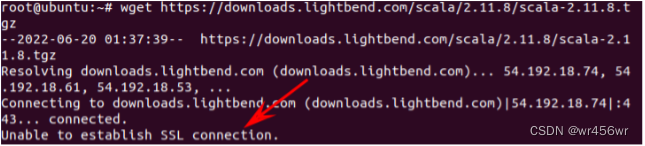
Problem description : In the use of wget download scala when , appear Unable to establish SSL connection
solve :
Add the parameter to skip verifying the certificate --no-check-certificate
Question two
Problem description : In the use of scala Program testing wordCount There was an error in the program :
(scala Program on host ,spark Install on the virtual machine )
22/06/20 22:35:38 INFO StandaloneAppClient$ClientEndpoint: Connecting to master spark://192.168.78.128:7077...
22/06/20 22:35:41 WARN StandaloneAppClient$ClientEndpoint: Failed to connect to master 192.168.78.128:7077
org.apache.spark.SparkException: Exception thrown in awaitResult:
	at org.apache.spark.util.ThreadUtils$.awaitResult(ThreadUtils.scala:226)
	...
	Caused by: io.netty.channel.AbstractChannel$AnnotatedConnectException: Connection refused: no further information: /192.168.78.128:7077
Caused by: java.net.ConnectException: Connection refused: no further information

solve :
Yes spark Under the conf In the catalogue spark-env.sh The configuration is as follows

After configuration spark Start... In the directory master and worker
bin/start-all.sh
Then run it again wordCount Program , The following error occurred
Using Spark's default log4j profile: org/apache/spark/log4j-defaults.properties
22/06/20 22:44:09 INFO SparkContext: Running Spark version 2.4.8
Exception in thread "main" java.lang.NoClassDefFoundError: org/apache/hadoop/conf/Configuration$DeprecationDelta
	at org.apache.hadoop.mapreduce.util.ConfigUtil.addDeprecatedKeys(ConfigUtil.java:54)
	at org.apache.hadoop.mapreduce.util.ConfigUtil.loadResources(ConfigUtil.java:42)
	at org.apache.hadoop.mapred.JobConf.<clinit>(JobConf.java:123)
![[ Failed to transfer the external chain picture , The origin station may have anti-theft chain mechanism , It is suggested to save the pictures and upload them directly (img-935LgtJu-1655814306434)( Development process .assets/1655736581056.png)]](/img/05/ced290f170c5a54cf5f6e8b3085318.png)
stay pom Introduce hadooop rely on
<dependency>
            <groupId>org.apache.hadoop</groupId>
            <artifactId>hadoop-hdfs</artifactId>
            <version>3.3.2</version>
        </dependency>
        <dependency>
            <groupId>org.apache.hadoop</groupId>
            <artifactId>hadoop-common</artifactId>
            <version>3.3.2</version>
        </dependency>
        <dependency>
            <groupId>org.apache.hadoop</groupId>
            <artifactId>hadoop-core</artifactId>
            <version>1.2.1</version>
</dependency>
Run the program after refreshing the dependency , appear :
22/06/20 22:50:31 INFO spark.SparkContext: Running Spark version 2.4.8
22/06/20 22:50:31 INFO spark.SparkContext: Submitted application: wordCount
22/06/20 22:50:31 INFO spark.SecurityManager: Changing view acls to: Administrator
22/06/20 22:50:31 INFO spark.SecurityManager: Changing modify acls to: Administrator
22/06/20 22:50:31 INFO spark.SecurityManager: Changing view acls groups to:
22/06/20 22:50:31 INFO spark.SecurityManager: Changing modify acls groups to:
22/06/20 22:50:31 INFO spark.SecurityManager: SecurityManager: authentication disabled; ui acls disabled; users  with view permissions: Set(Administrator); groups with view permissions: Set(); users  with modify permissions: Set(Administrator); groups with modify permissions: Set()
Exception in thread "main" java.lang.NoSuchMethodError: io.netty.buffer.PooledByteBufAllocator.metric()Lio/netty/buffer/PooledByteBufAllocatorMetric;
	at org.apache.spark.network.util.NettyMemoryMetrics.registerMetrics(NettyMemoryMetrics.java:80)
	at org.apache.spark.network.util.NettyMemoryMetrics.<init>(NettyMemoryMetrics.java:76)

to update spark-core Dependent version , It was 2.1.0, Now update to 2.3.0,spark-core Of pom Depends on the following
<dependency>
            <groupId>org.apache.spark</groupId>
            <artifactId>spark-core_2.10</artifactId>
            <version>2.3.0</version>
</dependency>
The connection problem occurs again after refreshing the dependency
![[ Failed to transfer the external chain picture , The origin station may have anti-theft chain mechanism , It is suggested to save the pictures and upload them directly (img-5aCGosbR-1655814306436)( Development process .assets/1655737140250.png)]](/img/62/19cc73fb261628bd758bd1cc02ac9e.png)
modify pom Rely on
<dependency>
            <groupId>org.apache.spark</groupId>
            <artifactId>spark-mesos_2.11</artifactId>
            <version>2.1.0</version>
</dependency>
An error is reported again after refreshing :java.lang.RuntimeException: java.lang.NoSuchFieldException: DEFAULT_TINY_CACHE_SIZE
![[ Failed to transfer the external chain picture , The origin station may have anti-theft chain mechanism , It is suggested to save the pictures and upload them directly (img-a2eBPfzi-1655814306436)( Development process .assets/1655779696035.png)]](/img/ea/521961d605216fe83d5422faffc33f.png)
add to io.netty rely on
<dependency>
                <groupId>io.netty</groupId>
                <artifactId>netty-all</artifactId>
                <version>4.0.52.Final</version>
</dependency>
The connection problem occurs again after the operation
![[ Failed to transfer the external chain picture , The origin station may have anti-theft chain mechanism , It is suggested to save the pictures and upload them directly (img-b9NjY23a-1655814306437)( Development process .assets/1655780018354.png)]](/img/63/09ae16b7418166366aa161ee9177ee.png)
Check out the spark Of master Start up
![[ Failed to transfer the external chain picture , The origin station may have anti-theft chain mechanism , It is suggested to save the pictures and upload them directly (img-TAi3JuIs-1655814306437)( Development process .assets/1655780121179.png)]](/img/5f/6b896bd68648184d028f9cc85eb78d.png)
They all started successfully , Eliminate the reason for failure to start successfully
modify spark Of conf Under the spark-env .sh file
![[ Failed to transfer the external chain picture , The origin station may have anti-theft chain mechanism , It is suggested to save the pictures and upload them directly (img-VY3mBPyk-1655814306437)( Development process .assets/1655780670484.png)]](/img/ee/66bbe637481253ae3a9ecd0df678e9.png)
Restart spark
sbin/start-all.sh
Successfully connected to the virtual machine after starting the program spark Of master
![[ Failed to transfer the external chain picture , The origin station may have anti-theft chain mechanism , It is suggested to save the pictures and upload them directly (img-LnC2GfcA-1655814306438)( Development process .assets/1655780808544.png)]](/img/dd/2ccd07fea591e7b0950517d92d97ab.png)
Question 3
Problem description :
function scala Of wordCount appear :com.fasterxml.jackson.databind.JsonMappingException: Incompatible Jackson version: 2.13.0
![[ Failed to transfer the external chain picture , The origin station may have anti-theft chain mechanism , It is suggested to save the pictures and upload them directly (img-BFx03mtx-1655814306438)( Development process .assets/1655781028153.png)]](/img/46/b28492219cd898cf3cc30b2e7b227e.png)
This is because Jackson The version of this tool library is inconsistent . Solution : First, in the Kafka In the dependencies of , Exclude for Jackon Dependence , Thereby preventing Maven Automatically import a higher version of the library , Then manually add the lower version Jackon Dependencies of the library , again import that will do .
Add dependency :
<dependency>
            <groupId> org.apache.kafka</groupId>
            <artifactId>kafka_2.11</artifactId>
            <version>1.1.1</version>
            <exclusions>
                <exclusion>
                    <groupId>com.fasterxml.jackson.core</groupId>
                    <artifactId>*</artifactId>
                </exclusion>
            </exclusions>
        </dependency>
        <dependency>
            <groupId>com.fasterxml.jackson.core</groupId>
            <artifactId>jackson-core</artifactId>
            <version>2.6.6</version>
</dependency>
Re run the program after import , There's another problem :
NoClassDefFoundError: com/fasterxml/jackson/core/util/JacksonFeature
![[ Failed to transfer the external chain picture , The origin station may have anti-theft chain mechanism , It is suggested to save the pictures and upload them directly (img-SLr4iDc6-1655814306438)( Development process .assets/1655781408043.png)]](/img/44/bac3f27b5292f815a7d430dfbbd675.png)
as a result of jackson Incomplete dependence , Import jackson rely on
<dependency>
            <groupId>com.fasterxml.jackson.core</groupId>
            <artifactId>jackson-databind</artifactId>
            <version>2.6.7</version>
        </dependency>
        <dependency>
            <groupId>com.fasterxml.jackson.core</groupId>
            <artifactId>jackson-core</artifactId>
            <version>2.6.7</version>
        </dependency>
        <dependency>
            <groupId>com.fasterxml.jackson.core</groupId>
            <artifactId>jackson-annotations</artifactId>
            <version>2.6.7</version>
</dependency>
Run again and the :Exception in thread “main” java.net.ConnectException: Call From WIN-P2FQSL3EP74/192.168.78.1 to 192.168.78.128:9000 failed on connection exception: java.net.ConnectException: Connection refused: no further information; For more details see: http://wiki.apache.org/hadoop/ConnectionRefused
at sun.reflect.NativeConstructorAccessorImpl.newInstance0(Native Method)
at sun.reflect.NativeConstructorAccessorImpl.newInstance(NativeConstructorAccessorImpl.java:62)
at sun.reflect.DelegatingConstructorAccessorImpl.newInstance(DelegatingConstructorAccessorImpl.java:45)
at java.lang.reflect.Constructor.newInstance(Constructor.java:423)

Presumably this should be hadoop Connection denied , instead of spark Of master Connection problem
modify hadoop Of etc Under the core-site.xml file

Then restart hadoop Run the program , There are new problems :
WARN scheduler.TaskSetManager: Lost task 1.0 in stage 0.0 (TID 1, 0.0.0.0, executor 0): java.lang.ClassCastException: cannot assign instance of scala.collection.immutable.List$SerializationProxy to field org.apache.spark.rdd.RDD.org$apache$spark$rdd$RDD$$dependencies_ of type scala.collection.Seq in instance of org.apache.spark.rdd.MapPartitionsRDD
	at java.io.ObjectStreamClass$FieldReflector.setObjFieldValues(ObjectStreamClass.java:2301)
	at java.io.ObjectStreamClass.setObjFieldValues(ObjectStreamClass.java:1431)
	at java.io.ObjectInputStream.defaultReadFields(ObjectInputStream.java:2411)
	at java.io.ObjectInputStream.readSerialData(ObjectInputStream.java:2329)
	at java.io.ObjectInputStream.readOrdinaryObject(ObjectInputStream.java:2187)
	at java.io.ObjectInputStream.readObject0(ObjectInputStream.java:1667)
	at java.io.ObjectInputStream.defaultReadFields(ObjectInputStream.java:2405)
	at java.io.ObjectInputStream.readSerialData(ObjectInputStream.java:2329)
	at java.io.ObjectInputStream.readOrdinaryObject(ObjectInputStream.java:2187)
	at java.io.ObjectInputStream.readObject0(ObjectInputStream.java:1667)
	at java.io.ObjectInputStream.readObject(ObjectInputStream.java:503)
	at java.io.ObjectInputStream.readObject(ObjectInputStream.java:461)
	at org.apache.spark.serializer.JavaDeserializationStream.readObject(JavaSerializer.scala:75)
	at org.apache.spark.serializer.JavaSerializerInstance.deserialize(JavaSerializer.scala:114)
	at org.apache.spark.scheduler.ShuffleMapTask.runTask(ShuffleMapTask.scala:85)
	at org.apache.spark.scheduler.ShuffleMapTask.runTask(ShuffleMapTask.scala:53)
	at org.apache.spark.scheduler.Task.run(Task.scala:99)
	at org.apache.spark.executor.Executor$TaskRunner.run(Executor.scala:282)
	at java.util.concurrent.ThreadPoolExecutor.runWorker(ThreadPoolExecutor.java:1149)
	at java.util.concurrent.ThreadPoolExecutor$Worker.run(ThreadPoolExecutor.java:624)
	at java.lang.Thread.run(Thread.java:748)
![[ Failed to transfer the external chain picture , The origin station may have anti-theft chain mechanism , It is suggested to save the pictures and upload them directly (img-N6EssLDt-1655814306440)( Development process .assets/1655786575000.png)]](/img/17/4845ada83ca6314a4380e990c95499.png)
From the screenshot of the problem, you can see that the connection should be OK , And started the scheduled wordCount Work , This time it may be a code level problem .
wordCount complete scala Code :
import org.apache.spark.{
    SparkConf, SparkContext}

object WordCount {

  def main(arg: Array[String]): Unit = {

    val ip = "192.168.78.128";
    val inputFile = "hdfs://" + ip + ":9000/hadoop/README.txt";
    val conf = new SparkConf().setMaster("spark://" + ip + ":7077").setAppName("wordCount");
    val sc = new SparkContext(conf)
    val textFile = sc.textFile(inputFile)
    val wordCount = textFile.flatMap(line => line.split(" "))
      .map(word => (word, 1)).reduceByKey((a, b) => a + b)
    wordCount.foreach(println)
  }
}
Need to set up jar package , Package the project
![[ Failed to transfer the external chain picture , The origin station may have anti-theft chain mechanism , It is suggested to save the pictures and upload them directly (img-1fgMuGMF-1655814306440)( Development process .assets/1655812962723.png)]](/img/10/7a769ec1c6a72cc1ccb9090a8d5163.png)
Then the packaged project is in target Under the path , To find the corresponding jar Bag location , Copy
![[ Failed to transfer the external chain picture , The origin station may have anti-theft chain mechanism , It is suggested to save the pictures and upload them directly (img-nnVVC8Xn-1655814306440)( Development process .assets/1655813012337.png)]](/img/34/6dc70b2b48b184ebcaa6f745cd341e.png)
Copy path added to configuration setJar In the way , complete Scala WordCount Code
import org.apache.spark.{
    SparkConf, SparkContext}


object WordCount {

  def main(arg: Array[String]): Unit = {

    // After packaging jar Package address
    val jar = Array[String]("D:\\IDEA_CODE_F\\com\\BigData\\Proj\\target\\Proj-1.0-SNAPSHOT.jar")
    //spark Virtual machine address
    val ip = "192.168.78.129";
    val inputFile = "hdfs://" + ip + ":9000/hadoop/README.txt";
    val conf = new SparkConf()
      .setMaster("spark://" + ip + ":7077") //master Node address
      .setAppName("wordCount")      //spark The program name
      .setSparkHome("/root/spark")  //spark Installation address ( It should not be necessary )
      .setIfMissing("spark.driver.host", "192.168.1.112")
      .setJars(jar) // Set the packaged jar package
    val sc = new SparkContext(conf)
    val textFile = sc.textFile(inputFile)
    val wordCount = textFile.flatMap(line => line.split(" "))
      .map(word => (word, 1)).reduceByKey((a, b) => a + b)
	val str1 = textFile.first()
    println("str: " + str1)
    val l = wordCount.count()
    println(l)
    println("------------------")
    val tuples = wordCount.collect()
    tuples.foreach(println)
    sc.stop()
  }
}
The approximate result of the operation :
![[ Failed to transfer the external chain picture , The origin station may have anti-theft chain mechanism , It is suggested to save the pictures and upload them directly (img-i1D32Pdr-1655814306441)( Development process .assets/1655814085565.png)]](/img/b2/c56726e066147097086358d8bec899.png)
md,csdn When can I import directly markdown Complete documents , Every time the machine finishes writing the imported picture, it cannot be imported directly , And paste one screenshot after another
边栏推荐
- OpenSSL Programming II: building CA
- Structured machine learning project (I) - machine learning strategy
- ABAP随笔-物料主数据界面增强-页签增强
- Re recognize G1 garbage collector through G1 GC log
- Stunned! The original drawing function of markdown is so powerful!
- PHP连接数据库实现用户注册登录功能
- Zabbix6.0升级指南-数据库如何同步升级?
- 爬虫笔记(2)- 解析
- PE买下一家内衣公司
- PHP connects to database to realize user registration and login function
猜你喜欢

结构化机器学习项目(二)- 机器学习策略(2)

Improving deep neural networks: hyperparametric debugging, regularization and optimization (III) - hyperparametric debugging, batch regularization and program framework

Infiltration learning - problems encountered during SQL injection - explanation of sort=left (version(), 1) - understanding of order by followed by string
Spatial relation query and graph based query in secondary development of ArcGIS Engine

Learn to go concurrent programming in 7 days go language sync Application and implementation of cond

爬虫笔记(3)-selenium和requests

C # QR code generation and recognition, removing white edges and any color

Penetration learning - shooting range chapter - detailed introduction to Pikachu shooting range (under continuous update - currently only the SQL injection part is updated)

元气森林的5元有矿之死

First knowledge of the second bullet of C language
随机推荐
ABAP随笔-关于ECC后台server读取Excel方案的想法
Penetration learning - shooting range chapter -dvwa shooting range detailed introduction (continuous updating - currently only the SQL injection part is updated)
游戏手机平台简单介绍
「R」 Using ggpolar to draw survival association network diagram
Memoirs of actual combat: breaking the border from webshell
移动端避免使用100vh[通俗易懂]
mongodb基础操作之聚合操作、索引优化
Livox lidar+apx15 real-time high-precision radar map reproduction and sorting
OpenSSL programming I: basic concepts
Beijing University of Posts and Telecommunications - multi-agent deep reinforcement learning for cost and delay sensitive virtual network function placement and routing
How to use RPA to achieve automatic customer acquisition?
雪糕还是雪“高”?
Crawler notes (2) - parse
资深猎头团队管理者:面试3000顾问,总结组织出8大共性(茅生)
Infiltration learning - problems encountered during SQL injection - explanation of sort=left (version(), 1) - understanding of order by followed by string
月薪3万的狗德培训,是不是一门好生意?
Structured machine learning project (II) - machine learning strategy (2)
Basic data type and complex data type
Zabbix6.0 upgrade Guide - how to synchronize database upgrades?
STM32与RC522简单公交卡系统的设计