当前位置:网站首页>A blazor webassembly application that can automatically generate page components based on objects or types
A blazor webassembly application that can automatically generate page components based on objects or types
2022-06-21 13:41:00 【Guo Mahua】
A component that can automatically generate pages based on objects or types Blazor WebAssembly application
- Github ma-hua/blazor-auto
- be based on Ant.Design-Blazor Component library
- need dotnet-sdk v3.1.6 And above


Requirements describe
- Business requirements related to promotional activities often change frequently , be based on Sql Server in json Storage technology , Reconstruct the original system of the company . Divide the activity rules into several categories , The objects of each class are no longer stored in the database in the way of corresponding fields , But rather Json How to store , When you need to add or delete some fields , Just modify the corresponding entity , Without modifying the database design .
- After that, new requirements are put forward for the activity management system , That is, according to the newly released Nuget package , Auto generate rule settings page . be based on html+js Our front-end technology may not be able to do this , Therefore, it is proposed to use Blazor technology +C#, To achieve this goal : Automatically generate page components according to objects or types , And complete data binding , To complete operations such as adding or editing .
Project introduction
This project is for reference only , I'm not very talented , Please give more advice on the shortcomings
- Blazor.Auto Including reflection, field description and other related tools
- Blazor.Auto.Components A component library that automatically completes data binding based on field descriptors ( be based on Ant.Design-Blazor)
Get the main information of the field
- Field descriptors FieldDescriptor Contains the field name , Field description ,IsRequired, Value descriptor
- Value descriptor ValueDescriptor The type that contains the value , value , Drop down list
Field component : Input box Date Pickers switch List selector
- According to the value type , The input fields are divided into : String input box , Integer input box , Decimal input box
- Switches are divided into controllable switches and non empty switches (bool? and bool Two kinds of )
- The list selector is displayed as a modal box , It is divided into single choice list and multi choice list
Field components are inherited from the parent component BaseComponent, The parent component contains virtual methods ValueChangedCallBack, Complete parameter binding in the way of link binding .
List selector
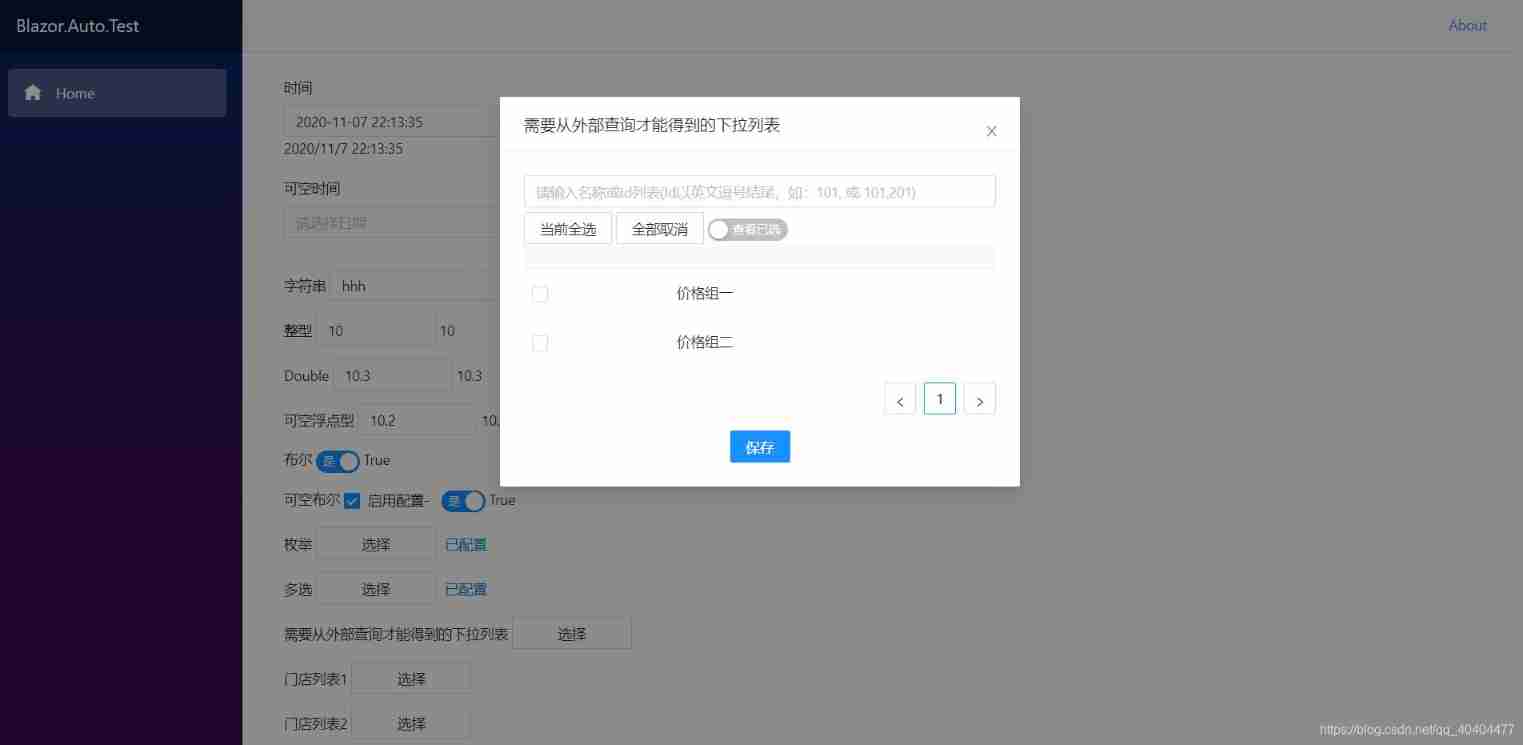
List selectors usually correspond to types List<T> Field of , The acquisition of selector content is critical . If the generic type is enumeration , You can get the selection list directly through reflection technology .
But if you need to query some interfaces to get the selection list , Need to achieve ISelectItemProvider Interface . And specify a for its implementation class Keyword, Use properties on fields [SelectDescriptionAttribute] Mark the same Keyword. When generating components , Can pass Keyword from IOC Get... In the container SelectItemProvider, And call the implementation method , To get the options .
It is usually required to use Named Way of injection ISelectItemProvider Implementation class , In this project , I'm using Autofac Containers .
builder.Services.AddScoped(sp => new HttpClient { BaseAddress = new Uri(builder.HostEnvironment.BaseAddress) });
// Inject ISelectItemProvider Implementation class
builder.ConfigureContainer(new AutofacServiceProviderFactory(cfg =>
    {
        cfg.RegisterAssemblyTypes(Assembly.GetExecutingAssembly());
        cfg.RegisterType<StoreGroupProvider>().Named<ISelectItemProvider>(StoreGroupProvider.Keyword).SingleInstance();
        cfg.RegisterType<PriceGroupProvider>().Named<ISelectItemProvider>(PriceGroupProvider.Keyword).SingleInstance();
    }));
In the list selector component , According to the Keyword from IOC Get the selection list item in the container
[Inject]
public IComponentContext ComponentContext { get; set; }

protected override async Task OnParametersSetAsync()
{
    if (!ValueComponentExtension.IsEnumSelect(Descriptor.Value) && !string.IsNullOrWhiteSpace(Keyword))
    {
        try
        {
            Items = await ComponentContext.ResolveNamed<ISelectItemProvider>(Keyword).GetSelectItemAsync();
        }
        catch (Exception ex)
        {
            Console.WriteLine(ex.Message);
        }
    }
}
边栏推荐
- Repair for a while, decisively reconstruct and take responsibility -- talk about CRM distributed cache optimization
- C language elementary (VII) structure
- 对app和微信小程序进行接口测试
- PHP uses grafika to synthesize pictures and generate poster images
- seaborn数据总体分布的可视化策略
- Kubernetes' fast practice and core principle analysis
- 还在用generator生成xxx管理系统的CRUD代码?来看看我是怎么写的
- Eureka's timedsupersortask class (periodic task with automatic interval adjustment)
- Setting of Seaborn drawing style
- MySQL constraints (descriptions of various conditions when creating tables)
猜你喜欢

Chapter IX Cisco ASA application nat

C language -- program compilation and linking

Map collection traversal, adding, replacing and deleting elements

How to read AI summit papers?

SCCM creates a client collection based on the installed app and periodically pushes application updates

Pingcap was selected as the "voice of customers" of Gartner cloud database in 2022, and won the highest score of "outstanding performer"

Web3.js connection to metamask wallet transfer

Generalized Focal Loss: Learning Qualified and Distributed Bounding Boxes for Dense Object Detection
MySQL约束(创建表时的各种条件说明)

PHP uses grafika to synthesize pictures and generate poster images

随机推荐
[deeply understand tcapulusdb technology] tcapulusdb import data
Iterm2 file transfer with remote server
hands-on-data-analysis 第二单元 第四节数据可视化
Isn't this another go bug?
Artifacial Intelligent Project
Atguigu---- conditional rendering
How to write test cases
3000 frame animation illustrating why MySQL needs binlog, redo log and undo log
还在用generator生成xxx管理系统的CRUD代码?来看看我是怎么写的
Lamp architecture 5 - MySQL Cluster and master-slave structure
Comment utiliser un moteur de recherche?
Kotlin - i/o flow
5000 word analysis: the way of container security attack and defense in actual combat scenarios
Solution to the problem of long waiting (ttfb) time during web page loading
The new plan for national treasures - the exclusive digital collection of the four museums is coming!
Numpy | insert variable length character array test OK
Unbounded territory won the title of innovative brand of digital culture industry in 2022
Kubernetes快速實戰與核心原理剖析
Is the micro securities account opening regular and safe? How to open an account?
Leetcode height checker