当前位置:网站首页>VSCode插件:嵌套注释
VSCode插件:嵌套注释
2022-07-31 01:28:00 【发与少年】
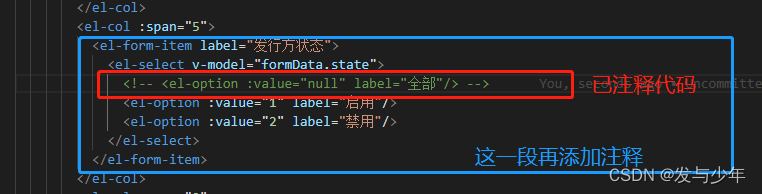
1、大家有没有遇到这种情况,代码中已经有一行注释了,然后想给一段再加一个注释,如下图所示:
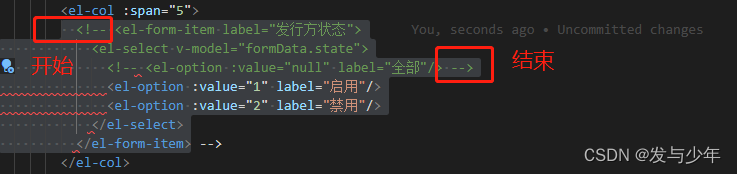
2、然后想给蓝色框内代码段再添加注释,就会变成下面这样,最开始的注释开始部分和上次注释的结束部分形成了一个注释区域,所以就会乱
3、解决方案:安装 Nested Comments 插件

快捷键:
- Mac: cmd + alt + /
- Windows: ctrl + alt + /
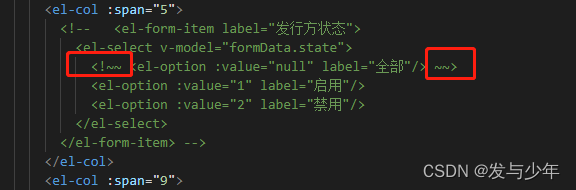
4、效果:然后我们再来注释的话,之前的注释就会被替换成 以<~~ 开头 以~~>结尾
快去试起来吧~~
边栏推荐
猜你喜欢
《实战》基于情感词典的文本情感分析与LDA主题分析
MySQL (6)
数字图像隐写术之卡方分布
typescript9 - common base types

ECCV 2022丨轻量级模型架构火了,力压苹果MobileViT(附代码和论文下载)
Bert usage and word prediction based on Keras_bert model

RTL8720DN开发笔记一 环境搭建与mqtt实例
Xiaohei's leetcode journey: 117. Fill the next right node pointer of each node II
勾股数元组 od js

观察者(observer)模式(一)
随机推荐
link与@import的区别
验证 XML 文档
Sping.事务的传播特性
剑指offer17---打印从1到最大的n位数
ShardingSphere's vertical sub-database sub-table actual combat (5)
24. 请你谈谈单例模式的优缺点,注意事项,使用场景
The sword refers to offer17---print the n digits from 1 to the largest
The client series of the DOM series
TiDB之rawkv升级之路v5.0.4--&gt;v6.1.0
ShardingSphere read-write separation (8)
typescript13 - type aliases
16、注册中心-consul
typescript9 - common base types
Mysql: Invalid default value for TIMESTAMP
PDF 拆分/合并
typescript16-void
822. Walk the Grid
一万了解 Gateway 知识点
1782. 统计点对的数目 双指针
九州云入选“可信云最新评估体系及2022年通过评估企业名单”