当前位置:网站首页>Quickly master asp Net authentication framework identity - reset password by mail
Quickly master asp Net authentication framework identity - reset password by mail
2022-06-27 03:47:00 【Dotnet cross platform】
This is a ASP.NET Core Identity The fourth article in the series , The last article explained how to ASP.NET Core Identity Realize user login and logout in .
This article talks about how to ASP.NET Core Identity To reset the password of the user account through the mail service .
Click on the blue word above or behind , read ASP.NET Core Identity Collection of series .
The sample project for this article :https://github.com/zilor-net/IdentitySample/tree/main/Sample04

Password reset
The most common function in user management is password reset .
Password reset process , System administrators should not be involved , Because the user should be able to complete the whole process independently .
Usually , The login page will provide users with a link to forget their password , To reset the password , This is what we will do next .
Briefly explain the password reset process :
The user clicks the forgot password link , Then jump to the page with the email field .
After the user fills in this field , The application will send a password reset connection to this email .
The user clicks the password reset link in the email , The password reset token is used , Redirect to password reset page .
After the user fills in all the fields in the form , The application will reset the password , The user is redirected to the login page or home page .
The mail service
The mail service has been integrated in the sample project 「EmailService」 , To help us send mail ,
The specific implementation of email sending is not the subject of this series , Don't elaborate too much . You can check the examples by yourself 「EmailService」 The code about mail sending in the project .
The mail service is registered in the dependency injection framework through the extension method , The specific configuration is shown in 「appsettings.json」 in .
Forget the password
First , We need to create 「 Forget the password 」 The view of .
stay 「Models」 In the folder , Create a 「ForgotPasswordModel」 class :
public class ForgotPasswordModel
{
    [Display(Name = " email ")]
    [Required(ErrorMessage = " Email cannot be empty ")]
    [EmailAddress(ErrorMessage = " Incorrect email format ")]
    public string Email { get; set; }
}
It will be used in 「 Forget the password 」 In the view , Here we just need to get the user's email , So there's only one 「Email」 attribute .
Next , stay 「Account」 The controller , Create two operation methods :
[HttpGet]
public IActionResult ForgotPassword()
{
    return View();
}

[HttpPost]
[ValidateAntiForgeryToken]
public async Task<IActionResult> ForgotPassword(ForgotPasswordModel forgotPasswordModel)
{
    return View(forgotPasswordModel);
}

public IActionResult ForgotPasswordConfirmation()
{
    return View();
}
We are already familiar with this routine , first 「ForgotPassword」 Just to create views ; the second 「ForgotPassword」 To implement logic ;「ForgotPasswordConfirmation」 Return to the confirmation view .
Next , Then create related views in turn :

<h1>ForgotPasswordConfirmation</h1>

<p>
     A link to reset your password has been sent to your email address !
</p>
And then in 「Login」 In the view , Add a link to forget your password :
<div class="form-group">
    <a asp-action="ForgotPassword"> Forget the password </a>
</div>
Now? , Let's implement the logic of forgetting the password :
[HttpPost]
[ValidateAntiForgeryToken]
public async Task<IActionResult> ForgotPassword([FromServices]IEmailSender emailSender, ForgotPasswordModel forgotPasswordModel)
{
    if (!ModelState.IsValid)
        return View(forgotPasswordModel);

    var user = await _userManager.FindByEmailAsync(forgotPasswordModel.Email);
    if (user == null)
        return RedirectToAction(nameof(ForgotPasswordConfirmation));

    var token = await _userManager.GeneratePasswordResetTokenAsync(user);
    var callback = Url.Action(nameof(ResetPassword), "Account", new { token, email = user.Email }, Request.Scheme);

    var message = new Message(new string[] { user.Email }, " Reset password ", callback, null);
    await emailSender.SendEmailAsync(message);

    return RedirectToAction(nameof(ForgotPasswordConfirmation));
}
If the model is valid , Just through the user's email , Get users from the database .
If it doesn't exist , Just put the user , Redirect to the confirmation page where the message has been sent , Instead of creating a message that the user does not exist .
This is mainly done for security reasons , To prevent someone from using this feature , Verify the validity of the user name .
If the user exists , Just through 「GeneratePasswordResetTokenAsync」 Method , Generate a token , And create a callback link , To the operation we will use to reset the password logic .
Last , E-mail we provide to users , Send a mail message , And redirect the user to the confirmation page .
Now? , The program has not been able to create a token , Because we haven't registered the token service yet , This needs to be registered 「Identity」 Method :
builder.Services.AddIdentity<User, IdentityRole>()
    .AddEntityFrameworkStores<ApplicationContext>()
    .AddDefaultTokenProviders();
If we want the password reset token to be valid only for a limited time , for example : 2 Hours , Then we need to configure the token lifetime :
builder.Services.Configure<DataProtectionTokenProviderOptions>(opt =>
                opt.TokenLifespan = TimeSpan.FromHours(2));
Reset password
next , So let's do that 「ResetPassword」 How to reset the password , Create a 「ResetPasswordModel」 class :
public class ResetPasswordModel
{
    [Display(Name = " password ")]
    [Required(ErrorMessage = " The password cannot be empty ")]
    [DataType(DataType.Password)]
    public string Password { get; set; }

    [Display(Name = " Confirm the password ")]
    [DataType(DataType.Password)]
    [Compare("Password", ErrorMessage = " The password does not match the confirmation password .")]
    public string ConfirmPassword { get; set; }

    public string Email { get; set; }
    public string Token { get; set; }
}
then , stay 「Account」 The controller , establish 「ResetPassword」 Operation method :
[HttpGet]
public IActionResult ResetPassword(string token, string email)
{
    var model = new ResetPasswordModel { Token = token, Email = email };
    return View(model);
}

[HttpPost]
[ValidateAntiForgeryToken]
public async Task<IActionResult> ResetPassword(ResetPasswordModel resetPasswordModel)
{
    return View();
}

[HttpGet]
public IActionResult ResetPasswordConfirmation()
{
    return View();
}
Here with 「ForgotPassword」 The operation is similar to .
「HttpGet」ResetPassword The operation will accept messages from the e-mail , Password reset connection request , Extract tokens and e-mails , And create a view .
「HttpPost」ResetPassword The operation is the logic that handles resetting the password .
ResetPasswordConfirmation Just a password reset confirmation view .
Create these views in turn :
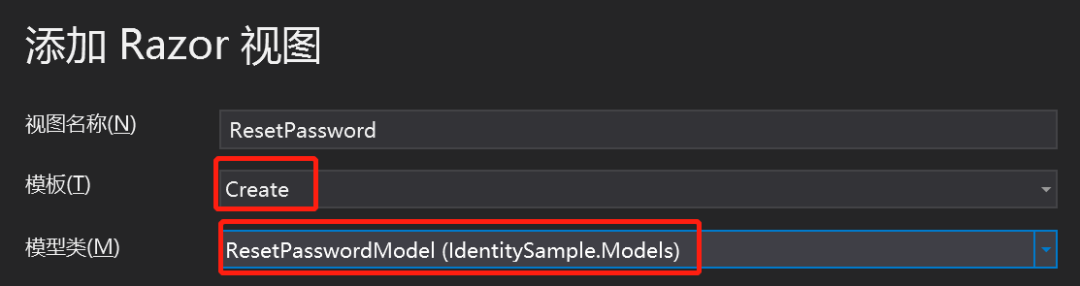
It should be noted that , We need to take 「Email」 and 「Token」 Two fields are hidden , Because these two values are provided by the application , No user settings are required :
<input type="hidden" asp-for="Email" class="form-control" />
<input type="hidden" asp-for="Token" class="form-control" />
「ResetPasswordConfirmation」 View :
<h1>ResetPasswordConfirmation</h1>
<p>
     Your password has been reset .  Please click here  <a asp-action="Login">  Sign in  </a>!
</p>
Last , Then revise 「POST」ResetPassword Operation method :
[HttpPost]
[ValidateAntiForgeryToken]
public async Task<IActionResult> ResetPassword(ResetPasswordModel resetPasswordModel)
{
    if (!ModelState.IsValid)
        return View(resetPasswordModel);

    var user = await _userManager.FindByEmailAsync(resetPasswordModel.Email);

    if (user == null)
        RedirectToAction(nameof(ResetPasswordConfirmation));

    var resetPassResult = await _userManager.ResetPasswordAsync(user, resetPasswordModel.Token, resetPasswordModel.Password);

    if(!resetPassResult.Succeeded)
    {
        foreach (var error in resetPassResult.Errors)
        {
            ModelState.TryAddModelError(error.Code, error.Description);
        }
        return View();
    }

    return RedirectToAction(nameof(ResetPasswordConfirmation));
}
First , Check the validity of the model , And whether the user exists in the database .
after , Use 「ResetPasswordAsync」 Method , Perform password reset operation .
If the operation fails , Just add an error to the model state and return to the view . otherwise , We redirect the user to the confirmation page .
It should be noted that , If you want to test the final effect , The configuration of the mail service and the email address of the user must be true and valid .
Summary
Now? , We have implemented the user via email , Function of resetting password , The next article will explain how to register users , Must confirm whether email is a valid function .
More highlights , Please pay attention to me. ▼▼

If you like my article , that
Watching and forwarding is my greatest support !
( Stamp the blue words below to read )ASP.NET 6 The most easy to understand dependency injection series
Check and fill gaps, and learn from the system EF Core 6 series

Recommends WeChat official account : Code Xia Jianghu
 I think it's good , Point and watch before you go
边栏推荐
- 办公室VR黄片,骚操作!微软HoloLens之父辞职!
- 流沙画模拟器源码
- 2021:Check it again:Progressive Visual Question Answering via Visual Entailment通过视觉暗示进行渐进式视觉问答
- Crowd simulation
- Promise source code class version [III. promise source code] [detailed code comments / complete test cases]
- IDEA中好用的插件
- How do I simplify the development of interfaces in open source systems?
- 基于MobileNet-Yolov4搭建轻量化目标检测
- SAI钢笔工具如何使用,入门篇
- resnet152 辣椒病虫害图像识别1.0
猜你喜欢

Nacos调用微服务两个问题:1.Load balancer does not contain an instance for the service 2.Connection refused

Career outlook, money outlook and happiness outlook

Kotlin Compose 自定义 CompositionLocalProvider CompositionLocal

2019LXMERT:Learning Cross-Modality Encoder Representations from Transformers

Pat grade a 1023 have fun with numbers

Fplan powerplan instance

Implementation of window encryption shell
2021:Beyond Question-Based Biases:Assessing Multimodal Shortcut Learning in Visual Question Answeri
Window 加密壳实现
快速掌握 ASP.NET 身份认证框架 Identity - 通过邮件重置密码
随机推荐
IDEA中好用的插件
MySql的开发环境
How does the brain do arithmetic? Both addition and subtraction methods have special neurons, and the symbol text can activate the same group of cell sub journals
Pat grade a 1020 tree Traversals
733. image rendering
JMeter takes the result of the previous request as the parameter of the next request
MATLAB | 基于分块图布局的三纵坐标图绘制
Super detailed, 20000 word detailed explanation, thoroughly understand es!
jmeter分布式压测
Overview of Tsinghua & Huawei | semantic communication: Principles and challenges
Ldr6028 OTG data transmission scheme for mobile devices while charging
Logarithm
Qingscan use
PAT甲级 1021 Deepest Root
如何让 EF Core 6 支持 DateOnly 类型
Pat grade a 1019 general palindromic number
fplan-布局
Method of decoding iPhone certificate file
TopoLVM: 基于LVM的Kubernetes本地持久化方案,容量感知,动态创建PV,轻松使用本地磁盘
CVPR2021:Separating Skills and Concepts for Novel Visual Question Answering将技巧与概念分开的新视觉问答