当前位置:网站首页>RT-Thread 学习笔记(五)---编辑、下载、调试程序
RT-Thread 学习笔记(五)---编辑、下载、调试程序
2022-07-26 10:38:00 【aping_cs_dn】
软件环境:Win7,Keil MDK 4.72a, IAR EWARM 7.2, GCC 4.2,Python 2.7 ,SCons 2.3.2
硬件环境:Armfly STM32F103ZE-EK v3.0开发板
接前文,当程序编译完成后,就可以接上JLINK 或其他调试工具下载和调试了。
【1】开发环境设置
(1)修改用scons --taget=mdk4 -s命令生成的keilMDK工程的Options->Output页面的Brows information选项默认没有选择问题
使用Notepad++打开开发分支目录的下的template.uvproj文件,定位到52行附近,使能<BrowseInfromation>标签,修如下:
<DebugInformation>1</DebugInformation>
<BrowseInformation>1</BrowseInformation>
<ListingPath>.\build\</ListingPath>
修改完成后保存并关闭该文件。
(2)需要说明两点(针对MDK4开发环境):
第一,如果改动了源文件的路径,需要重新用scons --tartget=mdk4 -s生成一次,以更新文件路径。
第二,需要在MDK 环境中重新设置目标代码的位置,如下图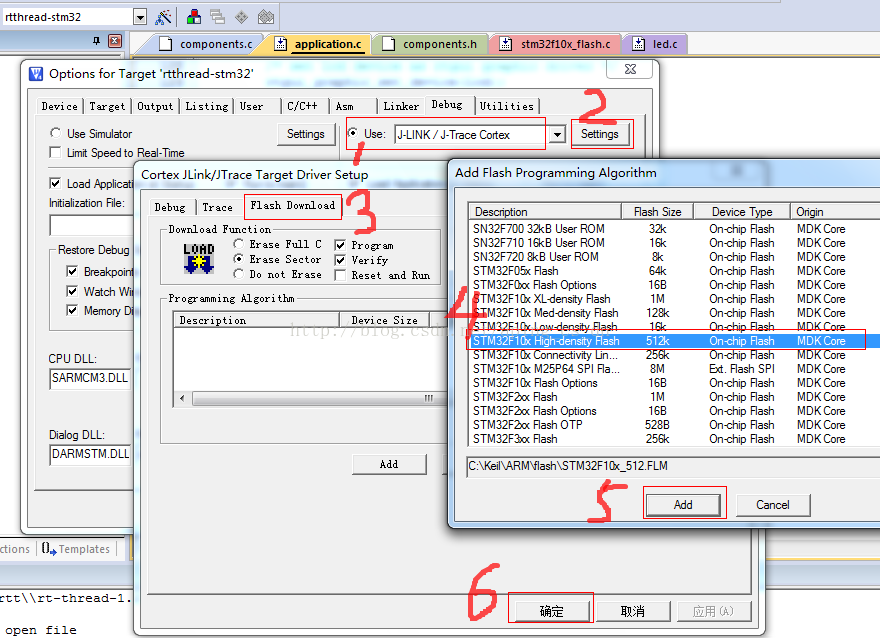
设置完毕后,点击KeilMDK IDE界面的Download按钮,开始下载代码,结果如下图。

按下开发板上的Reset按钮,可以在串口终端上看到如下信息:

如果看不到上面信息,请看下终端的COM口有没连接对。
如果一切正确,按下Debug按钮就可以进入调试界面。
【2】解决使用Scons编译和使用KeilMDK编译输出目录不一致问题
在测试过程中发现,在命令终端使用Scons编译时,中间文件输出到Build目录,如下图

rtthread-stm32.bin和rtthread-stm32.axf文件输出到了所建分支的根目录下,但是在KeilMDK环境中下载时,KeilMDK 默认定位的输出目录是Build,这样会导致使用KeilMDK编译时中间文件会输出到分支的根目录下,看起来很乱。网上也没找到解决办法,经过对编译脚本的一番研究,找到了解决办法。
打开rt-rthread-1.2.2/tools/building.py,定位到196行,可以看到如下代码:
# board build script
objs = SConscript('SConscript', variant_dir='build', duplicate=0)
Repository(Rtt_Root)
# include kernel
编译产生的build目录就是从这里来的,所以只需在分支根目录下的Sconstruct文件的第13行修改成如下代码:
TARGET = 'build/rtthread-stm32.' + rtconfig.TARGET_EXT
上面一行红色字题的只添加上去的注意那个斜杠可linux风格是一致的,可不是反斜杠,然后保存,用scons -c清除之前的编译结果,重新运行scons编译,结果如下:

再在管理器中浏览一下,如下图。

rtthread-stm32.axf文件生成在了build目录之下,这样就解决了上面遇到的问题。
【3】,点亮开发板上的LED灯
开发板上的LED1 和LED2硬件接口对应PF6和PF7引脚, 打开stm32f103ze-ek/diriver/led.c,定位到29行,修改如下:
#else
#define led1_rcc RCC_APB2Periph_GPIOF
#define led1_gpio GPIOF
#define led1_pin (GPIO_Pin_6)
#define led2_rcc RCC_APB2Periph_GPIOF
#define led2_gpio GPIOF
#define led2_pin (GPIO_Pin_7)
#endif // led define #ifdef STM32_SIMULATOR
然后保存,用scons命令编译下,下载到开发板上,然后按下复位按钮,OK,LED1在闪烁,LED2常亮。
【4】rtconfig.h配置文件中关于FINSH_USING_MSH编译选项问题
在默认情况下,FINSH_USING_MSH编译选项是没有打开的,当希望使用msh命令行风格时,就需要打开此选项可参考RT-Thread编程指南。
(1)打开rtconfig.h,定位到80行附近,代码修改如下:
/* SECTION: finsh, a C-Express shell */
#define RT_USING_FINSH
/*Support MSH style*/
#define FINSH_USING_MSH
/*Support MSH style only,not support C-Express*/
//#define FINSH_USING_MSH_ONLY
/*Support work dictionary,when use MSH style shell,suggest open this option*/
#define DFS_USING_WORKDIR
/*Support historical retrospect*/
#define FINSH_USING_HISTORY
/* Using symbol table */
#define FINSH_USING_SYMTAB
#define FINSH_USING_DESCRIPTION
(2)将msh相关代码加入到工程
msh功能的代码在msh.c和msh_cmd.c文件中,文件components/finsh目录下,将其加入工程中,如下图。

(3)修该Sconscript脚本,确保在componets/finsh目录下Sconscript文件的24行加入了如下代码:
msh_src = Split('''
msh_cmd.c
msh.c
''')
上面这些代码在默认情况下是已经加入进去了的,一般情况下不用修改。
然后保存编译,下载到开发板中,
finsh />list()
--Function List:
led -- set led[0 - 1] on[1] or off[0].
fs_test -- file system R/W test. e.g: fs_test(3)
list_mem -- list memory usage information
mkfs -- make a file system
df -- get disk free
ls -- list directory contents
rm -- remove files or directories
cat -- print file
copy -- copy file or dir
mkdir -- create a directory
cd -- change current working directory
hello -- say hello world
version -- show RT-Thread version information
list_thread -- list thread
list_sem -- list semaphone in system
list_event -- list event in system
list_mutex -- list mutex in system
list_mailbox -- list mail box in system
list_msgqueue -- list message queue in system
list_mempool -- list memory pool in system
list_timer -- list timer in system
list_device -- list device in system
list -- list all symbol in system
msh -- use module shell
--Variable List:
dummy -- dummy variable for finsh
0, 0x00000000
finsh />msh()
0, 0x00000000
msh />
可以看到命令提示符已经变成msh了
msh />help
RT-Thread shell commands:
version - show RT-Thread version information
list_thread - list thread
list_sem - list semaphore in system
list_event - list event in system
list_mutex - list mutex in system
list_mailbox - list mail box in system
list_msgqueue - list message queue in system
list_mempool - list memory pool in system
list_timer - list timer in system
list_device - list device in system
ls - List information about the FILEs.
cp - Copy SOURCE to DEST.
mv - Rename SOURCE to DEST.
cat - Concatenate FILE(s)
rm - Remove (unlink) the FILE(s).
cd - Change the shell working directory.
pwd - Print the name of the current working directory.
mkdir - Create the DIRECTORY.
ps - List threads in the system.
time - Execute command with time.
free - Show the memory usage in the system.
exit - return to RT-Thread shell mode.
help - RT-Thread shell help.
msh />
边栏推荐
- Inheritance method of simplified constructor (I) - combined inheritance
- .NET操作Redis List列表
- .net operation redis set unordered collection
- 同步方法中不使用asyncTask<T> 修饰和await获取异步返回值(同步方法中调用异步方法)
- 一文详解Nodejs中fs文件模块与path路径模块
- Phase 4: one of College Students' vocational skills preparation in advance
- Zongzi battle - guess who can win
- Analysis of the transaction problem of chained method call
- 第5期:大学生入职必备技能之二
- MD5 encryption
猜你喜欢

Uniapp uses the simple method signalr (only for web debugging, cannot package apps)

【机器学习小记】【风格迁移】deeplearning.ai course4 4th week programming(tensorflow2)
![[leetcode每日一题2021/2/13]448. 找到所有数组中消失的数字](/img/9b/624416fa6a408bf64ca5438273176b.png)
[leetcode每日一题2021/2/13]448. 找到所有数组中消失的数字
【机器学习小记】【搭建循环神经网络及其应用】deeplearning.ai course5 1st week programming(keras)

oracle 启动不了 tnslistener服务启动不了

Redis Docker实例与数据结构
![[Halcon vision] threshold segmentation](/img/1c/e2463a796f99804a55680b69e714a6.png)
[Halcon vision] threshold segmentation

.NET5WTM(ASP.NET Core) PGSql开箱操作

Tradingview 使用教程

文案秘籍七步曲至----文献团队协作管理
随机推荐
Okaleido ecological core equity Oka, all in fusion mining mode
将json文件中数组转换为struct
剑指Offer(五十二):正则化表达式
干货likeshop外卖点餐系统开源啦100%开源无加密
剑指Offer(七):斐波那契数列
Our Web3 entrepreneurship project is yellow
文案秘籍七步曲至----文献团队协作管理
Application of.Net open source framework in industrial production
Parallelism, concurrency and several directions for high concurrency optimization
【机器学习小记】【风格迁移】deeplearning.ai course4 4th week programming(tensorflow2)
.NET操作Redis Hash对象
Inheritance method of simplified constructor (II) - class inheritance in ES6
同步方法中不使用asyncTask<T> 修饰和await获取异步返回值(同步方法中调用异步方法)
20210807#1 C语言程序结构
抽象工厂及其改进示例
第6期:大学生应该选择哪种主流编程语言
sigmod 函数与softmax 函数对比
[leetcode每日一题2021/5/8]1723. 完成所有工作的最短时间
[Halcon vision] morphological expansion
MD5 encryption