当前位置:网站首页>ArcGIS batch render layer script
ArcGIS batch render layer script
2022-06-26 14:23:00 【Chaoying.】
Script files render.py
import arcpy


def renderbatch(rlayer):
    # rLayer arcpy.mapping.Layer
    rtype = None
    if rlayer.isFeatureLayer:
        rtype = 0
    elif rlayer.isRasterLayer:
        rtype = 1
    else:
        arcpy.AddMessage("Reference Layer can only be feature layer or raster layer!")
        return
    mxd = arcpy.mapping.MapDocument('CURRENT')
    df = arcpy.mapping.ListDataFrames(mxd)[0]
    layers = arcpy.mapping.ListLayers(mxd, data_frame=df)
    for layer in layers:
        stype = None
        if layer.isFeatureLayer:
            stype = 0
        elif layer.isRasterLayer:
            stype = 1
        else:
            continue
        if stype == rtype:
            arcpy.mapping.UpdateLayer(df, layer, rlayer, True)
            pass


rLayer = arcpy.GetParameter(0)
renderbatch(rLayer)
arcpy.AddMessage("finished!")
stay Arcgis Add this script to
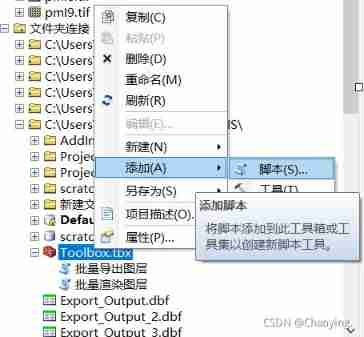

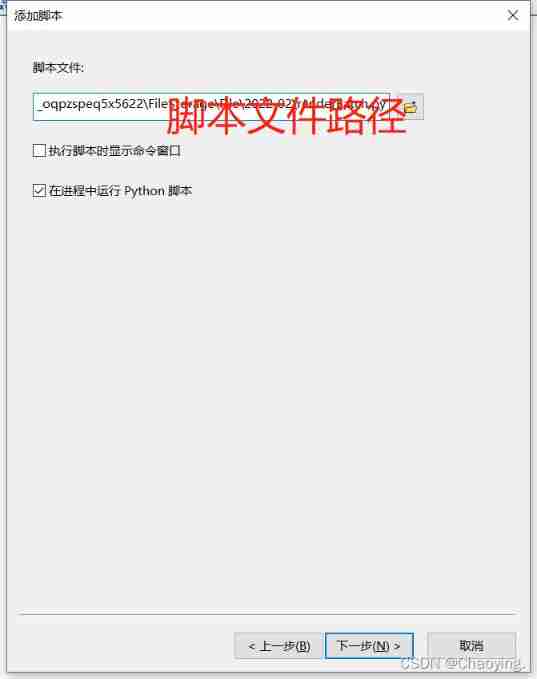
- Add script parameters

- Tool operation interface

边栏推荐
- Sword finger offer 05.58 Ⅱ string
- ICML 2022 | limo: a new method for rapid generation of targeted molecules
- 团队管理的最关键因素
- Intellij IDEA--格式化SQL文件的方法
- One article of the quantification framework backtrader read observer
- Leaflet loading ArcGIS for server map layers
- transformers DataCollatorWithPadding类
- Why is there always a space (63 or 2048 sectors) in front of the first partition when partitioning a disk
- 在线牛人博主
- vmware部分设置
猜你喜欢

Usage of unique function

Common operation and Principle Exploration of stream

From Celsius to the three arrows: encrypting the domino of the ten billion giants, and drying up the epic liquidity

AGCO AI frontier promotion (6.26)

ThreadLocal巨坑!内存泄露只是小儿科...

Pycharm远程连接服务器来跑代码
从Celsius到三箭:加密百亿巨头们的多米诺,史诗级流动性的枯竭

数学建模经验分享:国赛美赛对比/选题参考/常用技巧
Experience sharing of mathematical modeling: comparison between China and USA / reference for topic selection / common skills

Hard (magnetic) disk (II)
随机推荐
Self created notes (unique in the whole network, continuously updated)
Sword finger offer 45.61 Sort (simple)
Build your own PE manually from winpe of ADK
数学建模经验分享:国赛美赛对比/选题参考/常用技巧
[hnoi2010] flying sheep
Pychar remotely connects to the server to run code
[jsoi2015] string tree
On insect classes and objects
虫子 内存管理 上
9 articles, 6 interdits! Le Ministère de l'éducation et le Ministère de la gestion des urgences publient et publient conjointement neuf règlements sur la gestion de la sécurité incendie dans les établ
《三体》摘录
虫子 内存管理 下 内存注意点
虫子 STL string 下 练习题
C language | Consortium
[hcsd application development training camp] one line of code second cloud evaluation article - experience from the experiment process
STM32F1和GD32F1有什么区别?
transformers DataCollatorWithPadding类
Experience sharing of mathematical modeling: comparison between China and USA / reference for topic selection / common skills
Win10 home vs pro vs enterprise vs enterprise LTSC
Sword finger offer 09.30 Stack