当前位置:网站首页>String Basics
String Basics
2022-06-12 20:53:00 【Maccy37】
character string
- #include<string.h>
- With 0( Integers 0) A string of characters at the end
->0 or “\0” It's the same , But and ‘0’ Different
- 0 String end flag , But it's not part of a string , The string length is the literal length of the character we see with our eyes ( Exclude this end flag 0)
- The string exists as an array , Access as an array or pointer ( You can traverse the string in an array )
String variable
- char work[10] = "working";
- char work_arr[] = "working"; // The string literal is used to initialize the array
- char *work_str = "working";
#define _CRT_SECURE_NO_WARNINGS
#include<stdio.h>
#include<iostream>
#include<string.h>
using namespace std;

int main()
{
	printf(" character string ---------------\n");
	char work[10] = "working";
	printf("work sizeof :%d\n", sizeof(work));
	printf("work strlen :%d\n", strlen(work));
	char work_arr[] = "working";
	printf("work_arr sizeof :%d\n", sizeof(work_arr));
	printf("work_arr 1strlen :%d\n", strlen(work_arr));
	char *work_str = "working";
	printf("work_str sizeof :%d\n", sizeof(work_str));// Indicates the pointer byte length
	printf("work_str 1strlen :%d\n", strlen(work_str));

	while (1)
	{}
	return 0;
}
Output :(strlen Calculate string length )

String input and output
String input and output
- char string[8];
- scanf("%s",string);
- printf("%s",string);
- scanf Read in a word ( Until space /tab/ Until you return )
- scanf unsafe , I don't know the length of the read content
#define _CRT_SECURE_NO_WARNINGS
#include<stdio.h>
#include<iostream>
#include<string.h>
using namespace std;

int main()
{
	printf(" String input and output --------------\n");
	char str[20];
	char str2[20];
	scanf("%s", str);
	scanf("%s", str2);
	printf("*** %s &&& %s\n", str, str2);

	while (1)
	{}
	return 0;
}
Output :scanf Output stops when it encounters a space , The input characters of the display screen are not completely output , They were given to str、str2 Two variables

Safe input
- char string[8];
- scanf("%7s",string);
- 7: Indicates the maximum number of characters allowed to be read , Smaller than array 1,7 = 8 - 1
Common mistakes
- char *string; // The pointer does not point to an actual valid address
- scanf("%s",string);
- Define string class type variables string, But it is not initialized to 0, There may be errors during all operations
An empty string
- char buffer[100] =" ";// An empty string ,buffer[0] == '\0'
- char buffer[ ] =" "; // Array length only 1
Array of strings
char **a
a It's a pointer , Point to another pointer , This pointer points to a character ( strand )
- char a[ ][ ] Two dimensional array variables The second bit length is a definite value (a Is an array a[0]->char [10])
- char *a[ ] (a[0]->char*)
#define _CRT_SECURE_NO_WARNINGS
#include<iostream>
#include<string.h>
using namespace std;

int main()
{
	printf(" Array of strings --------------\n");
	char a[][10] = { "Hello","World","abcdefg" }; //a[0] ->char[10]
	char *a[] = { "Hello","World","abcdefg" }; //a[0] ->char *
    char *seasons[4] = {"Winter","Spring","Summer","Fall"};
	while (1)
	{}
	return 0;
}
Program parameters
- int main(int argc,const char *argv[ ])
- argv[0] It's the command itself
- Use Unix The symbolic link itself , Reflect the name of the symbolic link ( Represents the input parameter )

#define _CRT_SECURE_NO_WARNINGS
#include<iostream>
#include<string.h>
using namespace std;

int main(int argc, const char *argv[])
{
	printf(" Array of strings --------------\n");
	printf("\n");
	for (int i = 0; i < argc; i++)
	{
		printf("string-->%d:%s\n",i,argv[i]);
	}
	while (1)
	{}
	return 0;
}
Output :

Single character input and output
getchar
- int getchar(void)
- Read in a character from standard input
- The return type is int In order to return EOF(-1)
- Windows ->Ctrl-Z
- Unix ->Ctrl-D
putchar
- int putchar(int c)
- Write a character to standard output
- Return write a few characters ,EOF(end of file)(-1) Indicates write failure
#define _CRT_SECURE_NO_WARNINGS
#include<iostream>
#include<string.h>
using namespace std;

int main(int argc, const char *argv[])
{
	printf(" Single character input and output --------------\n");
	int ch = 0;
	while ((ch = getchar()) != EOF)
	{
		putchar(ch);
	}
	printf("EOF\n");
	while (1)
	{}
	return 0;
}
Output :

Buffered input : After the user enters characters , Characters are stored in a buffer , Until the user presses Enter key , Will print the characters in the buffer .
while loop , Enter a string , Determine whether this string is EOF character , If not , perform putchar(), The characters entered by the user are stored in the buffer , The user did not press
First, enter a character , Determine whether this character is EOF character , If it is not , execute putchar(), At this time, the characters entered by the user are stored in the buffer , But I didn't press Enter key , Then even if the program is executed to putchar(), This character will not be printed , Because there is no flush buffer at all , When the user presses Enter After the key , Computer flush buffer , Print the contents of this buffer .
String function strlen
strlen strcmp strcpy strcat strchr strstr
#include <string.h>
strlen
- size_t strlen(const char*s);
- return s The character length of ( Not including the ending 0)
#define _CRT_SECURE_NO_WARNINGS
#include<iostream>
#include<string.h>
using namespace std;
int mylen(const char* c_str);

int main(int argc, const char *argv[])
{
    printf(" String function strlen--------------\n");
	char word[] = "Hello good good study,day day up!";
	printf("word strlen: %lu\n", strlen(word));
	printf("word mylen: %lu\n", mylen(word));
	printf("word sizeof: %lu\n", sizeof(word));
	while (1)
	{}
	return 0;
}

int mylen(const char* c_str)
{
	int cnt = 0;
	while (*c_str++ != '\0')
	{
		cnt++;
	}
	return cnt;
}
String function strcmp
strcmp
- int strcmp(const char *s1,const char*s2)
- Compare two strings , Return value :
- 0:s1 == s2
- 1:s1 > s2
- -1:s1 < s2
#define _CRT_SECURE_NO_WARNINGS
#include<iostream>
#include<string.h>
using namespace std;
int mycmp(const char* s1, const char* s2);

int main(int argc, const char *argv[])
{
    printf(" String function strcmp--------------\n");
	char s1[] = "Abc";
	char s2[] = "ab";
	printf("strcmp: %d\n",strcmp(s1,s2));
	printf("mycmp: %d\n", mycmp(s1, s2));
	while (1)
	{}
	return 0;
}

int mycmp(const char* s1, const char* s2)
{
	int ret = 0;
	while (*s1 ==*s2 && *s1 != '\0')
	{
		s1++;
		s2++;
	}
	if (*s1 - *s2 > 0)
	{
		ret = 1;
	}
	else if (*s1 - *s2 < 0)
	{
		ret = -1;
	}

	return ret;
}

// The first strcmp The source code of
int __cdecl strcmp (
        const char * src,
        const char * dst
        )
{
        int ret = 0 ;

        while((ret = *(unsigned char *)src - *(unsigned char *)dst) == 0 && *dst)
                ++src, ++dst;

        if ( ret < 0 )
                ret = -1 ;
        else if ( ret > 0 )
                ret = 1 ;

        return( ret );
}
String function strcpy
strcpy
- char *strcpy(char*dst,char*src)
- src Copy the string to dst, return dst
Copy a string
- char *dst = (char*)malloc(strlen(src)+1) ;
- strcpy(dst,src);
#define _CRT_SECURE_NO_WARNINGS
#include<iostream>
#include<string.h>
using namespace std;
char *mycpy(char *dst, const char*src);

int main(int argc, const char *argv[])
{
	printf("\n");
	printf(" String function strcpy--------------\n");
	char cpy1[] = "";
	char cpy2[] = "abcd------";
	char cpy3[] = "";
	char cpy4[] = "good good study,day day up";
	strcpy(cpy1, cpy2);
	mycpy(cpy3, cpy4);
	printf("strcpy %s\n", cpy1);
	printf("mycpy %s\n", cpy3);
	while (1)
	{}
	return 0;
}

char *mycpy(char *dst, const char*src)
{
	char *ret = dst;
	while (*dst++ = *src++)
	{
		;
	}
	*dst = '\0';
	return ret;
}
Output :
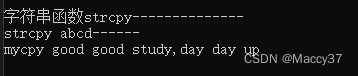
Reference resources :B standing ->《C Introduction and advanced language Weng Kai 》 video
边栏推荐
- 20 shortcut keys for vs code!
- UVa11991 Easy Problem from Rujia Liu
- [tutorial] Firefox send: deployment method of Firefox open source temporary file sharing service platform
- Can tonghuashun open an account? Can tonghuashun directly open the security of securities companies on the app? How to open an account online when buying stocks
- Understanding of functions
- 多机房动环状态网络触摸屏监控解决方案
- 一致性哈希的简单认识
- How to implement overloading in JS
- 对闭包的理解
- EDI 855 purchase order confirmation
猜你喜欢
Introduction to scala basic grammar (III) various operators in Scala

跳槽前恶补面试题,金三成功上岸腾讯,拿到30k的测开offer

Design rule check constraint (set_max_transition, set_max_capability)

Fcpx tutorial, how to export video graphics and text in Final Cut Pro?

Algorinote_2_主定理与 Akra-Bazzi 定理

中小型机房动力环境综合监控解决方案

Design and practice of Hudi bucket index in byte skipping

Listener in JSP
Data visualization - biaxial comparison effect

牛客網:三數之和
随机推荐
Data visualization diagram microblog forwarding diagram
HR SaaS unicorn is about to emerge. Will the employee experience be the next explosive point?
没有学历,自学软件测试,找到一份月入过万的测试工作真的有可能吗?
Maximize tensorflow* CPU performance (shell)
Algorinote_ 2_ Main theorem and Akra bazzi theorem
A Zhu and Xu Baobao's high-rise game - difference
P5076 【深基16.例7】普通二叉樹(簡化版)
Proxy and reflection
Large and small end conversion
Scalars, vectors, arrays, and matrices
Restful API interface specification
centos7 安装 mysql 5.7
Lightroom Ambassador series: capturing nostalgia with MEG loeks
Solve the cvxpy error the solver GLPK_ MI is not installed
QT pro文件配置ffmpeg宏
Is foreign exchange speculation formal and is the fund safe?
JS deep and shallow copy
new做了哪几件事
Social metauniverse: start from redefining yourself
阿里前辈给我推荐的软件测试人员必读书籍(附电子书),让我受益匪浅...