当前位置:网站首页>[MySQL basic] general syntax 1
[MySQL basic] general syntax 1
2022-06-27 08:30:00 【Minor items ~】

Database related concepts
- database :
A warehouse for storing data , Data is organized and stored .DataBase(DB)
- Database management system :
Large software for manipulating and managing databases .DataBase Management System(DBMS)
- SQL:
Programming language for operating relational databases , A set of unified standards for operational relational database are defined .
mysql Data model
- Relational database (RDBMS):
- Concept :
Based on the relational model , A database consisting of multiple interconnected two-dimensional tables .
- Two-dimensional table :
A table of rows and columns ( Include header 、 That's ok 、 Column , You can also associate a column of data in another table through one column ).
- A database that stores data based on two-dimensional tables becomes a relational database ; Not a database that stores data based on two-dimensional tables , It's a non relational database .
- characteristic :
(1) Use tables to store data , use the same pattern , Easy to maintain ;
(2) Use SQL Language operation , Unified standards , Easy to use .
- Data model : database 、 surface
- adopt mysql Client connection database management system DBMS, And then through DBMS Operating the database ;
- Use SQL sentence , adopt DBMS Operating the database , And operate the table structure and data in the database ;
- Multiple databases can be created in one database server , A database can also contain multiple tables , A table can contain multiple rows of records .
General grammar and classification :
- SQL General grammar :
- SQL Statements can be written in one or more lines , It ends with a semicolon ;
- SQL Statements can use spaces / Indent To enhance the readability of statements ;
- mysql Database SQL Statement is case insensitive , It is recommended to use uppercase ;
- notes :
(1) Single-line comments :
– The comment or # Knowledge content
(2) Multiline comment :
/* The comment */
- SQL classification :
According to the function , There are four main categories :DDL、DML、DQL、DCL
- DDL:Data Definition Language
(1) Concept :
Data definition language , Used to define database objects ( database 、 surface 、 Field )
(2) Database operation :
- Query all databases :
SHOW DATABASES;
- Querying the current database :
SELECT DATABSE();
- Create database :
CREATE DATABASE [IF NOT EXISTS] Database name DEFAULT CHARSET ‘ Character set ’ COLLATE ‘ Sort rule ’
- Delete database :
DROP DATABASE IF EXISTS Database name ;
- Using a database :
USE Database name ;
(3) Table operations :
- Table operations - Query creation
- Query all tables in the current database :
SHOW TABLES;
- View the specified table structure :
DESC Table name ;
- Query the table creation statement of the specified table :
SHOW CREATE TABLE Table name ;
- Create a table structure :
CREATE TABLE Table name (
Field 1 Field 1 type {COMMENT Field 1 notes },
Field 2 Field 2 type {COMMENT Field 2 notes },
…){COMMENT Table annotation };
- Table operations - data type
- value type :

- String type :

- Date time type :

- Table operations - modify
- Add fields :
ALTER TABLE Table name ADD Field name type ( length ) COMMENT ‘ notes ’ constraint ;
- Change data type :
ALTER TABLE Table name MODIFY Field name New data types ( length );
- Modify the field name and field type :
ALTER TABLE Table name CHANGE Old field name new field name type ( length ) COMMENT ‘ notes ’ constraint ;
- Delete field :
ALTER TABLE Table name DROP Field name ;
- Modify the name of the table :
ALTER TABLE Table name RENAME TO The new name of the table ;
- Table operations - Delete
- Delete table :
DROP TABLE [IF EXISTS] Table name ;
- Delete the specified table , And recreate the table :( Delete table , The data in the table will also be deleted )
TRUNCATE TABLE Table name ;
- DML:Data Manipulation Language
(1) Concept :
Data operation language , Used to add, delete, and modify data in database tables
(2) Add data (INSERT)
- Add data to the specified field :
INSERT INTO Table name ( Field name 1, Field name 2, …) VALUES ( value 1, value 2, …);
- Add data to all fields :
INSERT INTO Table name VALUES ( value 1, value 2, …);
- Batch add data :
INSERT INTO Table name ( Field name 1, Field name 2, …) VALUES ( value 1, value 2, …),( value 1, value 2, …),( value 1, value 2, …);
INSERT INTO Table name VALUES ( value 1, value 2, …),( value 1, value 2, …),( value 1, value 2, …);
matters needing attention :
A、 When inserting data , The specified field order needs to be the same as the order of values A corresponding .
B、 String and date data should be enclosed in quotation marks ;
C、 The size of the inserted data , It should be within the specified range of the field .
(3) Modifying data (UPDATE)
UPDATE Table name SET Field name 1 = value 1 , Field name 2 = value 2 , … WHERE Conditions ;
matters needing attention :
- The conditions for modifying the statement can be , There can be no . If there is no condition , All data of the whole table will be modified .
(4) Delete data (DELETE)
DELETE FROM Table name WHERE Conditions ;
matters needing attention :
- Conditions can be , There can be no . If there is no condition , Delete the data of the entire table .
- You cannot delete the value of a field , have access to update Set the field value to null.
- DQL:Data Query Language
(1) Concept :
Data query language , A record used to query data in a database table .
(2) sentence :
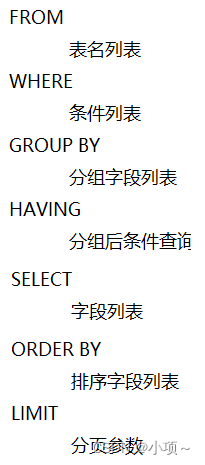
SELECT Field list FROM Table name WHERE List of conditions GROUP BY Group field list HAVING Condition list after grouping ORDER BY Sort field list LIMIT Paging parameters ;
(3) Split :
The basic query : Without any conditions ;
Conditions of the query :where;
Aggregate query :count、max、min、avg、sum;
Group query :group by;
Sort query :order by;
Pagination :limit.
(4) Basic query :
A、 Query multiple fields :
- select Field 1, Field 2, Field 3…from Table name ;
- select * from Table name ;
B、 Field set alias :
- select Field 1 as Alias 1, Field 2 as Alias 2,…from Table name ;
- select Field 1 Alias 1, Field 2 Alias 2,…from Table name ;
C、 Remove duplicate records :
- select distinct Field list from Table name ;
(5) Conditions of the query :
A、 grammar :
- SELECT Field list FROM Table name WHERE List of conditions ;
B、 Conditions : Fractional comparison operator 、 Logical operators
① Comparison operator :

② Logical operators :

(6) Aggregate functions
A、 Common aggregate functions :

B、 grammar :SELECT Aggregate functions ( Field list ) FROM Table name ;
matters needing attention :
- NULL Value is not involved in all aggregate function operations .
- about count Aggregate functions , Count the total number of qualified records , You can also use count( Numbers / character string ) Statistical query in the form of .
(7) Group query :
A、 grammar :
- SELECT Field list FROM Table name WHERE Conditions GROUP BY Group field name HAVING Filter conditions after grouping ;
B、where And having The difference between :
- The timing of execution is different :
where Is to filter before grouping , dissatisfaction where Conditions , Don't participate in grouping ;
having Is to filter the results after grouping .- Different judgment conditions :
where Aggregate functions cannot be judged ;
having You can judge the aggregation function .
C、 matters needing attention :
- After grouping , The query fields are generally aggregate functions and grouping fields , The query field has no meaning .
- Execution order :where > Aggregate functions > having
- Support multi field grouping , Specific syntax :group by Field 1, Field 2
(8) Sort query :
A、 grammar :
- SELECT Field list FROM Table name ORDER BY Field 1 sort order 1, Field 2 sort order 2;
B、 sort order :
- ASC: Ascending ( The default value is )
- DSC: Descending
C、 matters needing attention :
- If it's in ascending order , You may not specify the sorting method as ASC;
- If it is multi field sorting , When the first field is the same , Will be sorted according to the second field .
(9) Paging query :
A、 grammar :
- SELECT Field list FROM Table name LIMIT Starting index , Number of query records ;
B、 matters needing attention :
- Starting index from 0 Start , Starting index = ( Look up the page number - 1) * Each page shows the number of records ;
- If the query is the first page of data , The starting index can be omitted , Directly abbreviated as limit Number of query records ;
(10) Execution order :
A、 Writing order :

B、 Execution order :
- DCL:Data Control Language
(1) Concept :
Data control language , Used to manage database users 、 Control access to the database .
(2) Manage users :
Query the user :
- SELECT * FROM MYSQL.UAER;
Create user :
- CREATE USER ‘ user name ’@‘ Host name ’ IDENTIFIED BY ‘ password ’;
Change user password :
- ALTER USER ‘ user name ’@‘ Host name ’ IDENTIFIED WITH MYSQL_NATIVE_PASSWORD BY ‘ New password ’;
Delete user :
- DROP USER ‘ user name ’@‘ Host name ’ ;
matters needing attention :
- stay MySQL The user name is required in @ Host name method , To uniquely identify a user ;
- Host name can be used % Pass through .
(3) Access control :
- Common permissions :

Query authority :
- SHOW GRANTS FOR ‘ user name ’@‘ Host name ’;
Grant authority :
- SHOW GRANTS FOR ‘ user name ’@‘ Host name ’;
Revoke authority :
- REVOKE Permission list ON Database name . Table name FROM’ user name ’@‘ Host name ’;
matters needing attention :
- Between multiple permissions , Separated by commas ;
- Authorization time , Database name and table name can use * Carry out general matching , On behalf of all .
边栏推荐
猜你喜欢

MATLAB小技巧(19)矩阵分析--主成分分析

JVM层次上的对象的创建过程和内存布局

After working in a large factory for ten years with an annual salary of 400000 yuan, I was suddenly laid off. If the company wanted to abandon you, it wouldn't leave any kindness

05 observer mode

Code source AQS sous - jacent pour la programmation simultanée juc

RMAN-08137 主库无法删除归档文件
Eight misunderstandings, broken one by one (final): the cloud is difficult to expand, the customization is poor, and the administrator will lose control?

MySQL环境变量配置的教程

Object含有Copy方法?

Correctly understand MySQL mvcc
随机推荐
Oracle uses an SQL to find out which data is not in a table
"Short video" Linxia fire rescue detachment carries out fire safety training
[11. two dimensional difference]
Install Jenkins
Mysql事务中MVCC理解超简单
How Oracle converts strings to multiple lines
Rough reading DS transunet: dual swing transformer u-net for medical image segmentation
Object含有Copy方法?
准备好迁移上云了?请收下这份迁移步骤清单
[13. number and bit operation of 1 in binary]
ArrayList和LinkedList的区别
Lvgl GUI guide porting code to stm32
VIM from dislike to dependence (20) -- global command
oracle怎样将字符串转为多行
Redis configuration file details
MATLAB小技巧(18)矩阵分析--熵权法
No matter how good LCD and OLED display technologies are, they cannot replace this ancient display nixie tube
March into machine learning -- Preface
冒牌构造函数???
MATLAB小技巧(19)矩阵分析--主成分分析