当前位置:网站首页>【C#】WCF和TCP消息通信练习,实现聊天功能
【C#】WCF和TCP消息通信练习,实现聊天功能
2022-07-29 12:35:00 【南蓬幽】
文章目录
WCF和TCP消息通信练习
客户端
MainWindow.xaml
主页面
<Window x:Class="Lab_5.MainWindow"
        xmlns="http://schemas.microsoft.com/winfx/2006/xaml/presentation"
        xmlns:x="http://schemas.microsoft.com/winfx/2006/xaml"
        xmlns:d="http://schemas.microsoft.com/expression/blend/2008"
        xmlns:mc="http://schemas.openxmlformats.org/markup-compatibility/2006"
        xmlns:local="clr-namespace:Lab_5"
        mc:Ignorable="d"
        Title="主界面" Height="450" Width="800">
    <Grid>
        <Button Name="bt1" Content="同时启动两个客户端(测试用)" HorizontalAlignment="Left" Margin="259,150,0,0" VerticalAlignment="Top" Width="265" Height="27" Click="bt1_Click"/>
        <Button Name="bt2" Content="只启动一个客户端(实际情况)" HorizontalAlignment="Left" Margin="259,252,0,0" VerticalAlignment="Top" Width="265" Height="28" Click="bt2_Click"/>
    </Grid>
</Window>
MainWindow.xaml.cs
using System;
using System.Collections.Generic;
using System.Linq;
using System.Text;
using System.Threading.Tasks;
using System.Windows;
using System.Windows.Controls;
using System.Windows.Data;
using System.Windows.Documents;
using System.Windows.Input;
using System.Windows.Media;
using System.Windows.Media.Imaging;
using System.Windows.Navigation;
using System.Windows.Shapes;

namespace Lab_5
{

    /// <summary>
    /// MainWindow.xaml 的交互逻辑
    /// </summary>
    public partial class MainWindow : Window
    {

        public MainWindow()
        {

            InitializeComponent();
        }

        private void StartWindow(string userName, int left, int top)
        {

            ChatCline w = new ChatCline();
            w.Left = left;
            w.Top = top;
            w.UserName = userName;
            w.Owner = this;
            w.Closed += (sender, e) => this.Activate();//关闭子窗体时激活父窗体
            w.Show();
        }

        private void bt1_Click(object sender, RoutedEventArgs e)
        {

            StartWindow("用户1", 0, 0);
            StartWindow("用户2", 400, 300);
        }

        private void bt2_Click(object sender, RoutedEventArgs e)
        {

            ChatCline w = new ChatCline();
            w.Owner = this;
            w.Closed += (sendObj, args) => this.Activate();
            w.Show();
        }
    }
}
ChatCline.xaml
聊天界面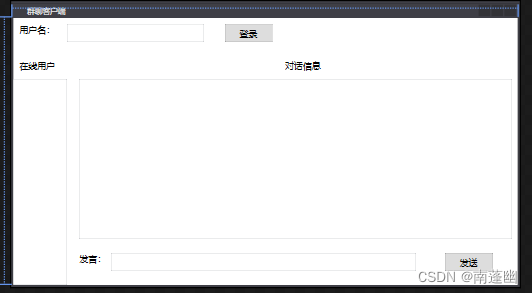
<Window x:Class="Lab_5.ChatCline"
        xmlns="http://schemas.microsoft.com/winfx/2006/xaml/presentation"
        xmlns:x="http://schemas.microsoft.com/winfx/2006/xaml"
        xmlns:d="http://schemas.microsoft.com/expression/blend/2008"
        xmlns:mc="http://schemas.openxmlformats.org/markup-compatibility/2006"
        xmlns:local="clr-namespace:Lab_5"
        mc:Ignorable="d"
        Title="群聊客户端" Height="450" Width="800">
    <Grid>
        <TextBlock HorizontalAlignment="Left" Margin="10,10,0,0" TextWrapping="Wrap" Text="用户名:" VerticalAlignment="Top" Height="28" Width="69" FontSize="14"/>
        <TextBox Name="textbox" HorizontalAlignment="Left" Height="28" Margin="84,10,0,0" TextWrapping="Wrap" Text="" VerticalAlignment="Top" Width="217" FontSize="14"/>
        <Button Name="login" Content="登录" HorizontalAlignment="Left" Margin="333,10,0,0" VerticalAlignment="Top" Width="75" Height="28" FontSize="14" Click="login_Click"/>
        <Canvas Name="box" HorizontalAlignment="Left" Height="363" Margin="0,57,-0.4,0" VerticalAlignment="Top" Width="794">
            <TextBlock Canvas.Left="10" TextWrapping="Wrap" Text="在线用户" Canvas.Top="10" Height="24" Width="74" FontSize="14"/>
            <ListBox Name="listbox" Height="324" Canvas.Top="39" Width="84" FontSize="14"/>
            <TextBlock Canvas.Left="127" TextWrapping="Wrap" Text="对话信息" Canvas.Top="10" Height="24" Width="657" TextAlignment="Center" FontSize="14"/>
            <ListBox Name="listmessage" Height="252" Canvas.Left="104" Canvas.Top="39" Width="680" FontSize="14"/>
            <TextBlock Canvas.Left="104" TextWrapping="Wrap" Text="发言:" Canvas.Top="314" Height="27" Width="50" FontSize="14"/>
            <TextBox Name="messagebox" Height="27" Canvas.Left="154" TextWrapping="Wrap" Text="" Canvas.Top="314" Width="481" FontSize="14" KeyDown="messagebox_KeyDown"/>
            <Button Name="launch" Content="发送" Canvas.Left="679" Canvas.Top="314" Width="75" Height="27" FontSize="14" Click="launch_Click"/>
        </Canvas>

    </Grid>
</Window>
ChatCline.xaml.cs
using Lab_5.ServiceReference1;
using System;
using System.Collections.Generic;
using System.ComponentModel;
using System.Linq;
using System.ServiceModel;
using System.Text;
using System.Threading.Tasks;
using System.Windows;
using System.Windows.Controls;
using System.Windows.Data;
using System.Windows.Documents;
using System.Windows.Input;
using System.Windows.Media;
using System.Windows.Media.Imaging;
using System.Windows.Shapes;

namespace Lab_5
{

    /// <summary>
    /// ChatCline.xaml 的交互逻辑
    /// </summary>
    public partial class ChatCline : Window,IService1Callback
    {

        public ChatCline()
        {

            InitializeComponent();
            this.Closing += ChatCline_Closing;
            box.Visibility = System.Windows.Visibility.Hidden;
        }

        private Service1Client client;

        public string UserName
        {

            get {
     return textbox.Text; }
            set {
     textbox.Text = value; }
        }

        private void ChatCline_Closing(object sender, CancelEventArgs e)
        {

            if (client != null)
            {

                client.Logout(UserName);
                client.Close();
            }
        }

        private void AddMessage(string str)
        {

            TextBlock t = new TextBlock();
            t.Text = str;
            listmessage.Items.Add(t);
        }

        public void InitUsersInfo(string UsersInfo)
        {

            if (UsersInfo.Length == 0) return;
            string[] users = UsersInfo.Split('、');
            for (int i = 0; i < users.Length; i++)
            {

                listbox.Items.Add(users[i]);
            }
        }

        public void ShowLogin(string loginUserName)
        {

            if (loginUserName == UserName)
            {

                box.Visibility = System.Windows.Visibility.Visible;
            }
            listbox.Items.Add(loginUserName);
        }

        public void ShowLogout(string userName)
        {

            listbox.Items.Remove(userName);
        }

        public void ShowTalk(string userName, string message)
        {

            AddMessage(userName+"说: "+message);
        }

        private void login_Click(object sender, RoutedEventArgs e)
        {

            UserName = textbox.Text;
            InstanceContext context = new InstanceContext(this);
            client = new Service1Client(context);
            try
            {

                client.Login(textbox.Text);
                login.IsEnabled = false;
            }
            catch (Exception ex)
            {

                MessageBox.Show("与服务端连接失败:" + ex.Message);
                return;
            }
        }

        private void launch_Click(object sender, RoutedEventArgs e)
        {

            client.Talk(UserName, messagebox.Text);
            messagebox.Text = "";
        }


        private void messagebox_KeyDown(object sender, KeyEventArgs e)
        {

            if (e.Key == Key.Enter)
            {

                client.Talk(UserName, messagebox.Text);
                messagebox.Text = "";
            }
        }
    }
}
服务端
Users.cs
using System;
using System.Collections.Generic;
using System.Linq;
using System.Text;
using System.Threading.Tasks;

namespace WcfServiceLibrary1
{

    class Users
    {

        public string UserName {
     get; set; }
        public readonly IService1Callback callback;

        public Users(string userName, IService1Callback callback)
        {

            this.UserName = userName;
            this.callback = callback;
        }
    }
}
CC.cs
using System;
using System.Collections.Generic;
using System.Linq;
using System.Text;
using System.Threading.Tasks;

namespace WcfServiceLibrary1
{

    class CC
    {

        public static List<Users> Users {
     get; set; }

        static CC()
        {

            Users = new List<Users>();
        }

        public static Users GetUser(string userName)
        {

            Users user = null;
            foreach (var v in Users)
            {

                if (v.UserName == userName)
                {

                    user = v;
                    break;
                }
            }
            return user;
        }
    }
}
IService1.cs
using System;
using System.Collections.Generic;
using System.Linq;
using System.Runtime.Serialization;
using System.ServiceModel;
using System.Text;

namespace WcfServiceLibrary1
{

    [ServiceContract(Namespace = "IService", CallbackContract = typeof(IService1Callback))]
    // 注意: 使用“重构”菜单上的“重命名”命令,可以同时更改代码和配置文件中的接口名“IService1”。
    public interface IService1
    {


        // TODO: 在此添加您的服务操作
        [OperationContract(IsOneWay = true)]
        void Login(string userName);

        [OperationContract(IsOneWay = true)]
        void Logout(string userName);

        [OperationContract(IsOneWay = true)]
        void Talk(string userName, string message);
    }


    public interface IService1Callback
    {

        [OperationContract(IsOneWay = true)]
        void ShowLogin(string loginUserName);

        [OperationContract(IsOneWay = true)]
        void ShowLogout(string userName);

        [OperationContract(IsOneWay = true)]
        void ShowTalk(string userName, string message);

        [OperationContract(IsOneWay = true)]
        void InitUsersInfo(string UsersInfo);
    }

}
Service1.cs
using System;
using System.Collections.Generic;
using System.Linq;
using System.Runtime.Serialization;
using System.ServiceModel;
using System.Text;

namespace WcfServiceLibrary1
{

    // 注意: 使用“重构”菜单上的“重命名”命令,可以同时更改代码和配置文件中的类名“Service1”。
    public class Service1 : IService1
    {

        public void Login(string userName)
        {

            OperationContext context = OperationContext.Current;
            IService1Callback callback = context.GetCallbackChannel<IService1Callback>();
            Users newUser = new Users(userName, callback);
            string str = "";
            for (int i = 0; i < CC.Users.Count; i++)
            {

                str += CC.Users[i].UserName + "、";
            }
            newUser.callback.InitUsersInfo(str.TrimEnd('、'));
            CC.Users.Add(newUser);
            foreach (var user in CC.Users)
            {

                user.callback.ShowLogin(userName);
            }
        }

        public void Logout(string userName)
        {

            Users logoutUser = CC.GetUser(userName);
            CC.Users.Remove(logoutUser);
            logoutUser = null;
            foreach (var user in CC.Users)
            {

                user.callback.ShowLogout(userName);
            }
        }

        public void Talk(string userName, string message)
        {

            Users user = CC.GetUser(userName);
            foreach (var v in CC.Users)
            {

                v.callback.ShowTalk(userName, message);
            }
        }
    }
}
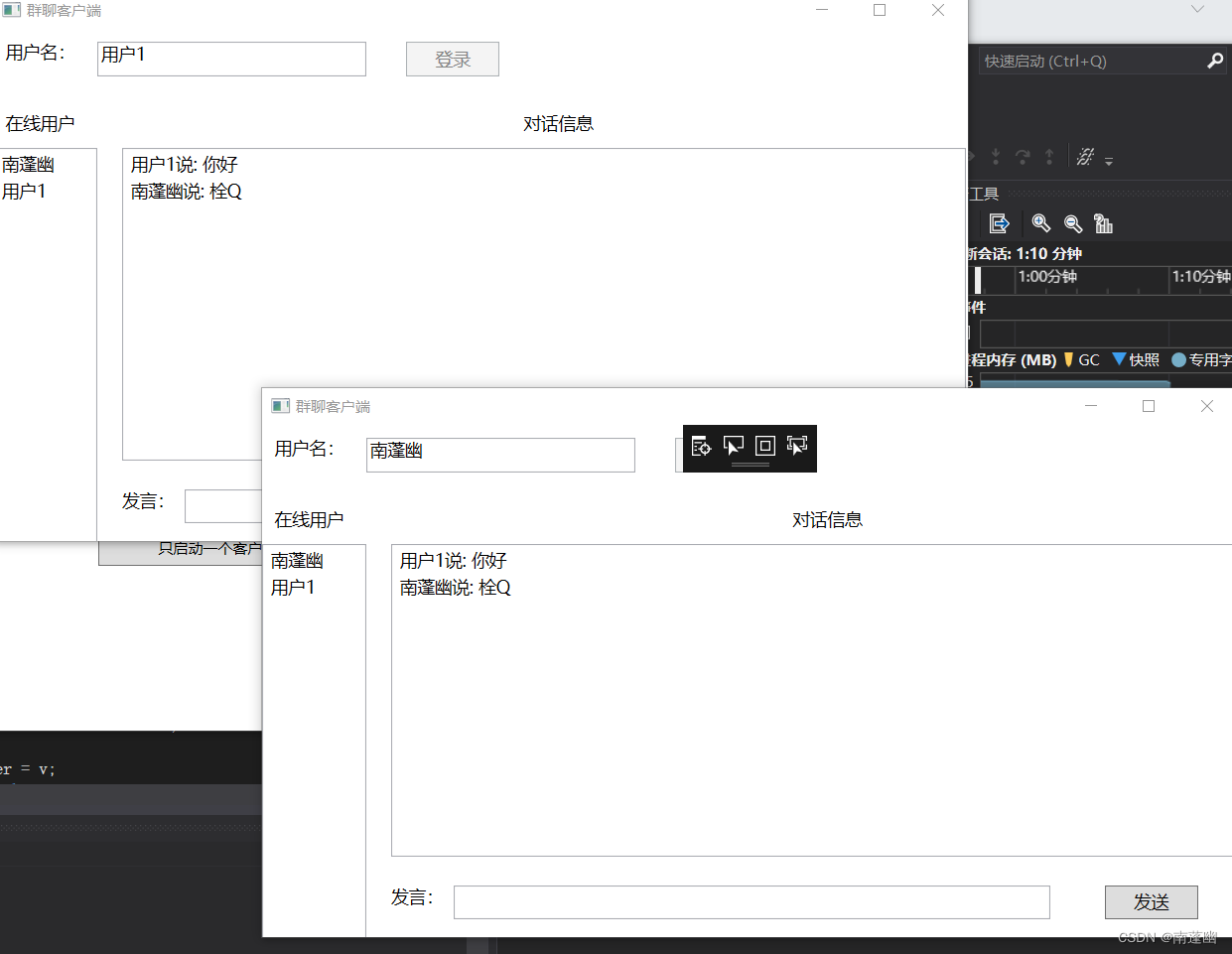
实验结果
边栏推荐
- WPF 截图控件之绘制方框与椭圆(四) 「仿微信」
- Navicat如何连接MySQL
- 为什么用了大牌工具后报表开发依然头痛
- The IDEA of Database plug-in Database Navigator plug-in
- Bika LIMS - SENAITE using open source LIMS set (users, roles and departments)
- Wu En 07 regularization of teacher machine learning course notes
- PD 源码分析- Checker: region 健康卫士
- Error EPERM operation not permitted, mkdir ‘Dsoftwarenodejsnode_cache_cacach两种解决办法
- gee引擎修改UI界面图文教程
- 图解 Attention(完整版)!
猜你喜欢


![[MySQL view] View concept, create, view, delete and modify](/img/dc/436dbaa0419b76cdab02a57436a782.png)
![[纯理论] FPN (Feature Pyramid Network)](/img/30/cfb6e3197bc2f4e7e0f1d492976c47.png)


随机推荐
sleep()方法和wait()方法的区别?安全
"Pure theory" FPN (Feature Pyramid Network)
MIT指出公开预训练模型不能乱用
MLX90640 红外热成像仪测温传感器模块开发笔记(九)
网页被劫持跳转怎么办?发布网修复方法
piglit_get_gl_enum_from_name 参数遍历
DVWA全级别通关教程
数组及其内存管理三问
Go-Excelize API源码阅读(七)—— CopySheet(from, to int)
Py之eli5:eli5库的简介、安装、使用方法之详细攻略
图解 Attention(完整版)!
3D激光SLAM:LeGO-LOAM论文解读---硬件系统部分
pycharm专业版使用
nacos集群搭建
拦截器与过滤器(三)@interface自定义注解拦截
piglit_get_gl_enum_name 参数遍历
一口气说出4种主流数据库ID自增长,面试官懵了
IDEA2021.2安装与配置(持续更新)
【c ++ primer 笔记】第6章 函数
[WeChat applet] One article to solve button, input, image components