当前位置:网站首页>Tidb upgrade version
Tidb upgrade version
2022-06-22 05:15:00 【On the way to data communication】
One 、 Introduction to the environment
current version :4.0.15
Upgraded version :5.3.1
Two 、 Operation steps
1. upgrade tiup edition
tiup update --self
tiup --version
2. upgrade tiup cluster edition
tiup update cluster
tiup cluster --version
3. Preparation for offline deployment ( This step can be skipped for non offline deployment )
3.1 Update offline image
tar xzvf tidb-community-server-${version}-linux-amd64.tar.gz
sh tidb-community-server-${version}-linux-amd64/local_install.sh
source /home/tidb/.bash_profile
3.2 upgrade cluster Components
tiup update cluster
The offline image has been updated successfully . If it is found that TiUP Operation error reporting , May be manifest Not updated , Try rm -rf ~/.tiup/manifests/* Reuse later .
4. Edit the configuration to ensure compatibility
tiup cluster edit-config <cluster-name>
4.1 tidb5.3 Parameters whose version has been discarded
pessimistic-txn.enabled
server.request-batch-enable-cross-command
server.request-batch-wait-duration
Configuration file parameter address :
4.2 Check cluster health
tiup cluster check <cluster-name> --cluster
5. Upgrade cluster
5.1 Upgrade without downtime
tiup cluster upgrade <cluster-name> <version>
Be careful :
- Rolling upgrade will upgrade all components one by one . upgrade TiKV period , Will one by one TiKV All the leader Cut away and then stop TiKV example . The default timeout is 5 minute (300 second ), The instance will be stopped directly after the timeout .
- Use --force Parameters can be used without expelling leader To quickly upgrade the cluster to the new version , But this method will ignore all errors in the upgrade , No valid prompt after the upgrade fails , Please use with caution .
- If you want to keep performance stable , You need to guarantee TiKV All the leader After the deportation is completed, the TiKV example , You can specify --transfer-timeout For a larger value , Such as --transfer-timeout 3600, The unit is in seconds .
- from 5.3 Upgrade the previous version to 5.3 And later versions , Online upgrade is not supported TiFlash, Only the first TiFlash Instance close , Then upgrade the cluster offline , Last reload Entire cluster , Guaranteed addition TiFlash Other components are upgraded without downtime .
5.2 Stop and upgrade
5.2.1 Stop the cluster
tiup cluster stop <cluster-name>
5.2.2 Stop and upgrade
tiup cluster upgrade <cluster-name> <version> --offline
5.2.3 Start cluster
tiup cluster start <cluster-name>
3、 ... and 、 Error handling
1. Use tiup cluster audit Command to view operation records :
tiup cluster audit
#  Find the failed upgrade operation record , And make a note of  ID, In the next step, you will use  <audit-id>  Indicates the operation record  ID  Value .
2. Use tiup cluster replay Command to retry the corresponding operation :
tiup cluster replay <audit-id>
Official website address : Official document
边栏推荐
- 花式优化器整理
- A domestic developer opened the "programmer's Guide to cooking" and became popular!
- 2022 welder (primary) new version test questions and welder (primary) free test questions
- [scientific research notes] focal loss
- 风阀执行EN 1634-1耐火测试完整性能坚持 4小时吗?
- DTS migration script MySQL
- MySQL day01 class notes
- MySQL day04 class notes
- Flink deployment mode (II) - three deployment modes of yarn
- mysql day04课堂笔记
猜你喜欢
Solve the shortage of developers. Maybe it can help you

畢業回饋!Apache Doris 社區所有貢獻者來領禮品啦!

QT save qtextedit memory to Txt file
Qt保存QTextEdit内存至.txt文件中

Kubernetes——裸机搭建集群环境

C语言变量的存储方式和生存期
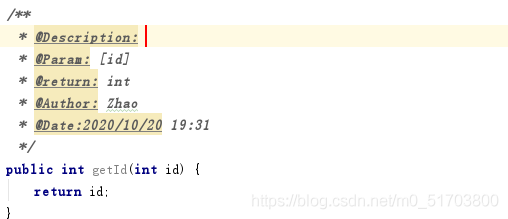
Idea创建方法时,使用注解提示方法参数(param)、返回值(return)、方法作用(Description)

Start with the strategy of small market value factor, and take you into quantitative investment (with the strategy of 77.83% annualized return)

It's 2022. Don't you hurry to learn typescript?

In 2022, the postgraduate entrance examination ran aground | how to counter attack famous IT enterprises and become a programmer in three months

随机推荐
2022 welder (primary) new version test questions and welder (primary) free test questions
Remote Dictionary Server(Redis)——基于 KV 结构的作为 Cache 使用的 NoSQL 数据库管理系统
Software architecture and pattern: structure, component and relationship
Pull all data of a branch of the code cloud to cover the local code
[chrome] Google tips Google browser comes with scrolling screenshot (full screen shot)
How to remove parentheses in PHP regular
Topic selection system of college graduation design based on SSM
Build JSP development environment in vs Code
Reconstructing thinking series 2-functions and variables
Gateway uses global filter for token verification
力扣33【搜索旋转排序数组】
This is a picture
7. Gateway global filter
使用选择法对十个整数进行排序
Accelerate the promotion of industrial Internet, and map out a new blueprint for development
Monorepo silk slide methodology: reference module hot update
ActiveMQ knowledge summary of Message Oriented Middleware
VirtualBox 6.1.34 release
Kubernetes——裸机搭建集群环境
花式优化器整理