当前位置:网站首页>Hyperledger Fabric 2. X custom smart contract
Hyperledger Fabric 2. X custom smart contract
2022-06-27 14:37:00 【zlt2000】

One 、 explain
In order to continuously update the information , And manage the ledger ( Write transaction , Make inquiries, etc ), The blockchain network introduces smart contracts to access and control the ledger ; The smart contract is in Fabric Referred to as Chain code , It is the business logic of blockchain application .
This article shares how to use Java Language development smart contract , And the installation and use of the contract .
Two 、 Environmental preparation
1、 Deploy well Fabric The test network , According to the previous article 《Hyperledger Fabric 2.x Environment building 》 The contents of the are subject to section 1 to 5 Step
- Start two peer Node and a orderer node - Create good mychannel passageway 
2、 Configure the execution command in the environment variable (bin)、 To configure (config) And MSP Path to folder : perform vim /etc/profile Add the following :
export FABRIC_PATH=/opt/gopath/src/github.com/hyperledger/fabric-samplesexport FABRIC_CFG_PATH=${FABRIC_PATH}/config/export MSP_PATH=${FABRIC_PATH}/test-network/organizationsexport CORE_PEER_TLS_ENABLED=trueexport PATH=${FABRIC_PATH}/bin:$PATHFABRIC_PATH The path is modified according to the actual situation .

3、 ... and 、 Download contract code
gitee:https://gitee.com/zlt2000_admin/my-fabric-chaincode-java
github:https://github.com/zlt2000/my-fabric-chaincode-java
Four 、 Code parsing
stay Fabric 2.x The contract writing method after the version is slightly different from the old version , Need to achieve ContractInterface Interface , Here is an official explanation :
All chaincode implementations must extend the abstract class ChaincodeBase. It is possible to implement chaincode by extending ChaincodeBase directly however new projects should implement org.hyperledger.fabric.contract.ContractInterface and use the contract programming model instead.
4.1. pom.xml file
Configure remote warehouse
<repositories> <repository> <id>central</id> <url>http://maven.aliyun.com/nexus/content/groups/public/</url> <releases> <enabled>true</enabled> </releases> <snapshots> <enabled>false</enabled> </snapshots> </repository> <repository> <id>jitpack.io</id> <url>https://www.jitpack.io</url> </repository> <repository> <id>artifactory</id> <url>https://hyperledger.jfrog.io/hyperledger/fabric-maven</url> </repository></repositories>
Dependent contract sdk
<dependency> <groupId>org.hyperledger.fabric-chaincode-java</groupId> <artifactId>fabric-chaincode-shim</artifactId> <version>${fabric-chaincode-java.version}</version></dependency>
Through plug-ins maven-shade-plugin Appoint mainClass by org.hyperledger.fabric.contract.ContractRouter
The new version of all contracts
mainClassAll fororg.hyperledger.fabric.contract.ContractRouter
<build> <sourceDirectory>src/main/java</sourceDirectory> <plugins> <plugin> <artifactId>maven-compiler-plugin</artifactId> <version>3.1</version> <configuration> <source>${java.version}</source> <target>${java.version}</target> </configuration> </plugin> <plugin> <groupId>org.apache.maven.plugins</groupId> <artifactId>maven-shade-plugin</artifactId> <version>3.1.0</version> <executions> <execution> <phase>package</phase> <goals> <goal>shade</goal> </goals> <configuration> <finalName>chaincode</finalName> <transformers> <transformer implementation="org.apache.maven.plugins.shade.resource.ManifestResourceTransformer"> <mainClass>org.hyperledger.fabric.contract.ContractRouter</mainClass> </transformer> </transformers> <filters> <filter> <!-- filter out signature files from signed dependencies, else repackaging fails with security ex --> <artifact>*:*</artifact> <excludes> <exclude>META-INF/*.SF</exclude> <exclude>META-INF/*.DSA</exclude> <exclude>META-INF/*.RSA</exclude> </excludes> </filter> </filters> </configuration> </execution> </executions> </plugin> </plugins></build>
4.2. model
Create the data object of the contract User Use @DataType Annotation marks , Define three fields userId、name、money Use @Property Annotation marks :
@DataTypepublic class User { @Property private final String userId; @Property private final String name; @Property private final double money; public User(final String userId, final String name, final double money) { this.userId = userId; this.name = name; this.money = money; } @Override public boolean equals(final Object obj) { if (this == obj) { return true; } if ((obj == null) || (getClass() != obj.getClass())) { return false; } User other = (User) obj; return Objects.deepEquals( new String[] {getUserId(), getName()}, new String[] {other.getUserId(), other.getName()}) && Objects.deepEquals( new double[] {getMoney()}, new double[] {other.getMoney()}); } @Override public int hashCode() { return Objects.hash(getUserId(), getName(), getMoney()); } @Override public String toString() { return JSON.toJSONString(this); } public String getUserId() { return userId; } public String getName() { return name; } public double getMoney() { return money; }}
4.3. Contract logic
- Contract use
@ContractAnd@DefaultAnnotation marks , And implementContractInterfaceInterface - Use of contract method
@TransactionAnnotation marksTransaction.TYPE.SUBMIT by Write transaction Transaction.TYPE.EVALUATE by Inquire about
- contain 3 There are two trading methods :
init、addUser、transfer - contain 2 A query method :
getUser、queryAll
@Contract(name = "mycc")@Defaultpublic class MyAssetChaincode implements ContractInterface { public MyAssetChaincode() {} /** * initialization 3 Bar record */ @Transaction(intent = Transaction.TYPE.SUBMIT) public void init(final Context ctx) { addUser(ctx, "1", "zlt",100D); addUser(ctx, "2", "admin",200D); addUser(ctx, "3", "guest",300D); } /** * New users */ @Transaction(intent = Transaction.TYPE.SUBMIT) public User addUser(final Context ctx, final String userId, final String name, final double money) { ChaincodeStub stub = ctx.getStub(); User user = new User(userId, name, money); String userJson = JSON.toJSONString(user); stub.putStringState(userId, userJson); return user; } /** * Querying a user */ @Transaction(intent = Transaction.TYPE.EVALUATE) public User getUser(final Context ctx, final String userId) { ChaincodeStub stub = ctx.getStub(); String userJSON = stub.getStringState(userId); if (userJSON == null || userJSON.isEmpty()) { String errorMessage = String.format("User %s does not exist", userId); throw new ChaincodeException(errorMessage); } User user = JSON.parseObject(userJSON, User.class); return user; } /** * Query all users */ @Transaction(intent = Transaction.TYPE.EVALUATE) public String queryAll(final Context ctx) { ChaincodeStub stub = ctx.getStub(); List<User> userList = new ArrayList<>(); QueryResultsIterator<KeyValue> results = stub.getStateByRange("", ""); for (KeyValue result: results) { User user = JSON.parseObject(result.getStringValue(), User.class); System.out.println(user); userList.add(user); } return JSON.toJSONString(userList); } /** * Transfer accounts * @param sourceId Source user id * @param targetId Target users id * @param money amount of money */ @Transaction(intent = Transaction.TYPE.SUBMIT) public void transfer(final Context ctx, final String sourceId, final String targetId, final double money) { ChaincodeStub stub = ctx.getStub(); User sourceUser = getUser(ctx, sourceId); User targetUser = getUser(ctx, targetId); if (sourceUser.getMoney() < money) { String errorMessage = String.format("The balance of user %s is insufficient", sourceId); throw new ChaincodeException(errorMessage); } User newSourceUser = new User(sourceUser.getUserId(), sourceUser.getName(), sourceUser.getMoney() - money); User newTargetUser = new User(targetUser.getUserId(), targetUser.getName(), targetUser.getMoney() + money); stub.putStringState(sourceId, JSON.toJSONString(newSourceUser)); stub.putStringState(targetId, JSON.toJSONString(newTargetUser)); }}
5、 ... and 、 Package contract code
Package the contract source code into a compressed file , For subsequent installation :
peer lifecycle chaincode package mycc.tar.gz --path /opt/app/my-fabric-chaincode-java --lang java --label mycc
6、 ... and 、 Installation contract
In the specified peer Install chain code on node , The following are the installation of two mechanisms .
6.1. For the agency peer0.org1 Installation contract
Execute the following command , Set up peer0.org1 Environmental Science :
export CORE_PEER_LOCALMSPID="Org1MSP"export CORE_PEER_TLS_ROOTCERT_FILE=${MSP_PATH}/peerOrganizations/org1.example.com/peers/peer0.org1.example.com/tls/ca.crtexport CORE_PEER_MSPCONFIGPATH=${MSP_PATH}/peerOrganizations/org1.example.com/users/[email protected]/mspexport CORE_PEER_ADDRESS=localhost:7051Perform the following installation :
peer lifecycle chaincode install mycc.tar.gzReturn to... After success :
2022-02-09 22:09:13.498 EST 0001 INFO [cli.lifecycle.chaincode] submitInstallProposal -> Installed remotely: response:<status:200 payload:"\nEmycc:4c8dce2c7f746d26293ca8f27a3ccdec8d6438090f873f40f8ac9508c01973ae\022\004mycc" > 2022-02-09 22:09:13.498 EST 0002 INFO [cli.lifecycle.chaincode] submitInstallProposal -> Chaincode code package identifier: mycc:4c8dce2c7f746d26293ca8f27a3ccdec8d6438090f873f40f8ac9508c01973ae
6.2. For the agency peer0.org2 Installation contract
Execute the following command , Set up peer0.org2 Environmental Science :
export CORE_PEER_LOCALMSPID="Org2MSP"export CORE_PEER_TLS_ROOTCERT_FILE=${MSP_PATH}/peerOrganizations/org2.example.com/peers/peer0.org2.example.com/tls/ca.crtexport CORE_PEER_MSPCONFIGPATH=${MSP_PATH}/peerOrganizations/org2.example.com/users/[email protected]/mspexport CORE_PEER_ADDRESS=localhost:9051Perform the following installation :
peer lifecycle chaincode install mycc.tar.gzReturn to... After success :
2022-02-09 22:14:14.862 EST 0001 INFO [cli.lifecycle.chaincode] submitInstallProposal -> Installed remotely: response:<status:200 payload:"\nEmycc:4c8dce2c7f746d26293ca8f27a3ccdec8d6438090f873f40f8ac9508c01973ae\022\004mycc" > 2022-02-09 22:14:14.862 EST 0002 INFO [cli.lifecycle.chaincode] submitInstallProposal -> Chaincode code package identifier: mycc:4c8dce2c7f746d26293ca8f27a3ccdec8d6438090f873f40f8ac9508c01973aeCheck the list of installed contracts :
peer lifecycle chaincode queryinstalled Return the of the contract Package ID And Label:
Installed chaincodes on peer:Package ID: mycc:4c8dce2c7f746d26293ca8f27a3ccdec8d6438090f873f40f8ac9508c01973ae, Label: mycc
7、 ... and 、 Approve the contract
When the contract is installed , It is only allowed to use after the approval and agreement of the organization .
7.1. For the agency peer0.org1 Approve contract definitions
Execute the following command , Set up peer0.org1 Environmental Science :
export CORE_PEER_LOCALMSPID="Org1MSP"export CORE_PEER_TLS_ROOTCERT_FILE=${MSP_PATH}/peerOrganizations/org1.example.com/peers/peer0.org1.example.com/tls/ca.crtexport CORE_PEER_MSPCONFIGPATH=${MSP_PATH}/peerOrganizations/org1.example.com/users/[email protected]/mspexport CORE_PEER_ADDRESS=localhost:7051Execute the following command to approve the contract :
peer lifecycle chaincode approveformyorg \ -o localhost:7050 \ --ordererTLSHostnameOverride orderer.example.com \ --tls --cafile ${MSP_PATH}/ordererOrganizations/example.com/orderers/orderer.example.com/msp/tlscacerts/tlsca.example.com-cert.pem \ --channelID mychannel \ --name mycc \ --version 1.0 \ --package-id mycc:4c8dce2c7f746d26293ca8f27a3ccdec8d6438090f873f40f8ac9508c01973ae \ --sequence 1package-id The value of is modified according to the actual situation .
Return to... After success :
2022-02-09 22:22:38.403 EST 0001 INFO [chaincodeCmd] ClientWait -> txid [2531db2811945a641947000cb15cfd19e0b72da594dfba994f5f79b6bc51bce2] committed with status (VALID) at localhost:7051
7.2. For the agency peer0.org2 Approve contract definitions
Execute the following command , Set up peer0.org2 Environmental Science :
export CORE_PEER_LOCALMSPID="Org2MSP"export CORE_PEER_TLS_ROOTCERT_FILE=${MSP_PATH}/peerOrganizations/org2.example.com/peers/peer0.org2.example.com/tls/ca.crtexport CORE_PEER_MSPCONFIGPATH=${MSP_PATH}/peerOrganizations/org2.example.com/users/[email protected]/mspexport CORE_PEER_ADDRESS=localhost:9051Execute the following command to approve the contract :
peer lifecycle chaincode approveformyorg \ -o localhost:7050 \ --ordererTLSHostnameOverride orderer.example.com \ --tls \ --cafile ${MSP_PATH}/ordererOrganizations/example.com/orderers/orderer.example.com/msp/tlscacerts/tlsca.example.com-cert.pem \ --channelID mychannel \ --name mycc \ --version 1.0 \ --package-id mycc:4c8dce2c7f746d26293ca8f27a3ccdec8d6438090f873f40f8ac9508c01973ae \ --sequence 1package-id The value of is modified according to the actual situation .
Return to... After success :
2022-02-09 22:22:47.711 EST 0001 INFO [chaincodeCmd] ClientWait -> txid [796a1e0a735e69425bcd5911bdf4b2a8003bbac977c5e60c769f84da6b86ef86] committed with status (VALID) at localhost:9051
7.3. Contract submission for inspection
Check the approval of the contract , Can I submit to the channel :
peer lifecycle chaincode checkcommitreadiness --channelID mychannel --name mycc --version 1.0 --sequence 1 --output jsonreturn :
{ "approvals": { "Org1MSP": true, "Org2MSP": true }}representative Org1 and Org2 All approved
8、 ... and 、 Submit contract
Execute the following command , Submit the contract to the channel :
peer lifecycle chaincode commit \ -o localhost:7050 \ --ordererTLSHostnameOverride orderer.example.com \ --tls \ --cafile ${MSP_PATH}/ordererOrganizations/example.com/orderers/orderer.example.com/msp/tlscacerts/tlsca.example.com-cert.pem \ --channelID mychannel \ --name mycc \ --peerAddresses localhost:7051 \ --tlsRootCertFiles ${MSP_PATH}/peerOrganizations/org1.example.com/peers/peer0.org1.example.com/tls/ca.crt \ --peerAddresses localhost:9051 \ --tlsRootCertFiles ${MSP_PATH}/peerOrganizations/org2.example.com/peers/peer0.org2.example.com/tls/ca.crt \ --version 1.0 \ --sequence 1Return to... After success :
2022-02-09 22:22:57.445 EST 0001 INFO [chaincodeCmd] ClientWait -> txid [97ded758675113b9339dc9b378a13c0790ea3780855bb8f651758bfb007fc1ec] committed with status (VALID) at localhost:70512022-02-09 22:22:57.456 EST 0002 INFO [chaincodeCmd] ClientWait -> txid [97ded758675113b9339dc9b378a13c0790ea3780855bb8f651758bfb007fc1ec] committed with status (VALID) at localhost:9051View the submitted contracts on the channel :
peer lifecycle chaincode querycommitted --channelID mychannel --name mycc --output jsonreturn :
{ "sequence": 1, "version": "1.0", "endorsement_plugin": "escc", "validation_plugin": "vscc", "validation_parameter": "EiAvQ2hhbm5lbC9BcHBsaWNhdGlvbi9FbmRvcnNlbWVudA==", "collections": {}, "approvals": { "Org1MSP": true, "Org2MSP": true }}
Nine 、 Test smart contracts
- Transaction data usage
peer chaincode invoke [flags]command , The order will attempt to submit an endorsed transaction to the network . - Query data using
peer chaincode query [flags], This command does not generate a transaction .
because invoke More parameters required by the command , So let's create a script command first . perform vim invoke.sh Add the following :
peer chaincode invoke -o localhost:7050 \ --ordererTLSHostnameOverride orderer.example.com \ --tls \ --cafile ${MSP_PATH}/ordererOrganizations/example.com/orderers/orderer.example.com/msp/tlscacerts/tlsca.example.com-cert.pem \ -C mychannel \ -n mycc \ --peerAddresses localhost:7051 \ --tlsRootCertFiles ${MSP_PATH}/peerOrganizations/org1.example.com/peers/peer0.org1.example.com/tls/ca.crt \ --peerAddresses localhost:9051 \ --tlsRootCertFiles ${MSP_PATH}/peerOrganizations/org2.example.com/peers/peer0.org2.example.com/tls/ca.crt \ -c ${1}9.1. Initialize the ledger
Execute the following command , Call the contract init Method initialization 3 A ledger record :
sh invoke.sh '{"function":"init","Args":[]}'
9.2. Query data
You need to connect one of them peer Node to query data
Execute the following command , Set up peer0.org1 Environmental Science :
export CORE_PEER_LOCALMSPID="Org1MSP"export CORE_PEER_TLS_ROOTCERT_FILE=${MSP_PATH}/peerOrganizations/org1.example.com/peers/peer0.org1.example.com/tls/ca.crtexport CORE_PEER_MSPCONFIGPATH=${MSP_PATH}/peerOrganizations/org1.example.com/users/[email protected]/mspexport CORE_PEER_ADDRESS=localhost:7051 Execute the following command , call queryAll Method , Query all the data :
peer chaincode query -C mychannel -n mycc -c '{"Args":["queryAll"]}'Go back to 3 An array of data :
[{"money":100.0,"name":"zlt","userId":"1"},{"money":200.0,"name":"admin","userId":"2"},{"money":300.0,"name":"guest","userId":"3"}]
Execute the following command , call getUser Methods the incoming 1 Parameters , Query individual data :
peer chaincode query -C mychannel -n mycc -c '{"Args":["getUser", "1"]}'Go back to id by 1 The data of :
{"money":100,"name":"zlt","userId":"1"}
9.3. The new data
Execute the following command , call addUser Method , Add a new one id by 4 The record of :
sh invoke.sh '{"function":"addUser","Args":["4","test","400"]}'
9.4. Transfer accounts
Execute the following command , call transfer Method , Transfer operations :
sh invoke.sh '{"function":"transfer","Args":["4","1","400"]}'After the transfer is successful , Use the query command to view :
peer chaincode query -C mychannel -n mycc -c '{"Args":["queryAll"]}'

Code scanning, attention, surprise !

边栏推荐
- 直播app运营模式有哪几种,我们该选择什么样的模式?
- Maximum profit of stock (offer 63)
- American chips are hit hard again, and another chip enterprise after Intel will be overtaken by Chinese chips
- Naacl 2022 | TAMT: search the transportable Bert subnet through downstream task independent mask training
- Longest substring without repeated characters (Sword finger offer 48)
- Redis master-slave replication, sentinel mode, cluster cluster
- Use GCC to generate an abstract syntax tree "ast" and dump it to Dot file and visualization
- SFINAE
- E-week finance Q1 mobile banking has 650million active users; Layout of financial subsidiaries in emerging fields
- Semaphore of thread synchronization
猜你喜欢
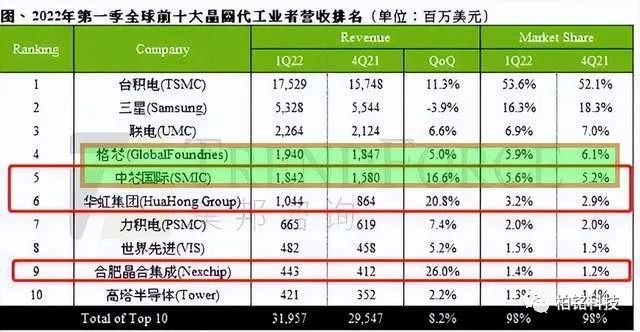
American chips are hit hard again, and another chip enterprise after Intel will be overtaken by Chinese chips

线程同步之信号量

Professor huangxutao, a great master in CV field, was born at the age of 86. UIUC specially set up a doctoral scholarship to encourage cutting-edge students

LVI: feature extraction and sorting of lidar subsystem

QT 如何在背景图中将部分区域设置为透明

【业务安全03】密码找回业务安全以及接口参数账号修改实例(基于metinfov4.0平台)

Synchronized与锁升级

SQL parsing practice of Pisa proxy
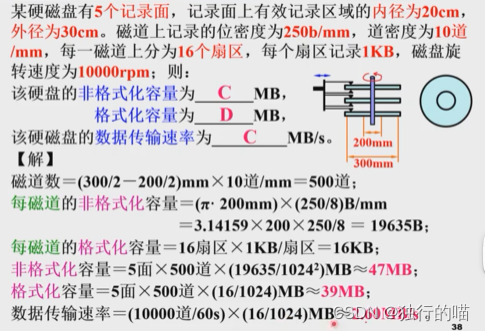
外部存储器

Interpretation of new version features of PostgreSQL 15 (including live Q & A and PPT data summary)
随机推荐
The global chip market may stagnate, and China's chip expansion accelerates to improve its self-sufficiency rate against the trend
my. INI file configuration
NLP - monocleaner
解析Activity启动-生命周期角度
【OS命令注入】常见OS命令执行函数以及OS命令注入利用实例以及靶场实验—基于DVWA靶场
基于WEB平台的阅读APP设计与实现
Calcul de la confidentialité Fate - Prévisions hors ligne
How QT sets some areas to be transparent in the background image
Interview question: rendering 100000 data solutions
海量数据!秒级分析!Flink+Doris构建实时数仓方案
招标公告:暨南大学附属第一医院Oracle数据库维保服务采购
Web chat room system based on SSM
基于SSM的Web网页聊天室系统
Redis CacheClient
Interpretation of new version features of PostgreSQL 15 (including live Q & A and PPT data summary)
SFINAE
每日3题(1):找到最近的有相同 X 或 Y 坐标的点
ERROR L104: MULTIPLE PUBLIC DEFINITIONS
Tsinghua & Shangtang & Shanghai AI & CUHK proposed Siamese image modeling, which has both linear probing and intensive prediction performance
LVI: feature extraction and sorting of lidar subsystem