当前位置:网站首页>How web pages interact with applets
How web pages interact with applets
2022-07-04 09:35:00 【Dandelion_ drq】
summary
The interaction and communication between web pages and applets need to be used in applets web-view Component open web page , And the visited web pages need to introduce wechat js-sdk, adopt js-sdk Provide an interface to send information to the applet .
For details, please refer to the official documentation of the applet :https://developers.weixin.qq.com/miniprogram/dev/component/web-view.html
Applet background configuration business domain name
This is the limitation of applet development , stay web-view The domain name of the web page to be opened in the wechat public platform applet background Development --> Development and setup --> Business domain name Add an item to , otherwise web-view Unable to open this page .
PS: If you don't want to configure this, you can also do it in WeChat developer tools Open inside Do not verify legal domain name .
Web page introduction WeChat js-sdk
WeChat JS-SDK It is a web page development kit based on wechat provided by wechat . Students who have done wechat official account web page development should know ~~( That's notoriously hard to use ……)~~.
Official document link :https://developers.weixin.qq.com/doc/offiaccount/OA_Web_Apps/JS-SDK.html
I won't write about how to introduce , Just follow the instructions in the above document .
Want to use npm You can also find a third party if you quote in this way , I use this weixin-js-sdk.
Web pages send messages to applets
I made a very simple demo page , Demonstrates the function of navigating to the applet page and sending messages to the applet .
The page is as follows :
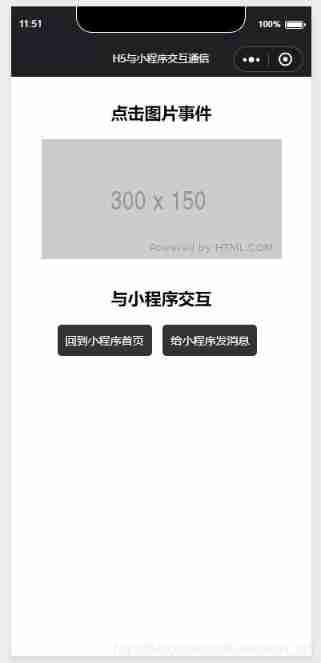
Page is vue Written , It's simple , Go straight to the code :
<template>
    <section>
        <section>
            <h2> Click picture event </h2>
            <div @click="onClick">
                <img src="https://via.placeholder.com/300x150" alt="">
            </div>
        </section>

        <section>
            <h2> Interact with applets </h2>
            <button @click="switchTab"> Go back to the homepage of the applet </button>
            <button @click="postMessage"> Send messages to applets </button>
        </section>

    </section>
</template>

<script> const wx = require('weixin-js-sdk'); export default {
      data () {
      return {
      isMiniprogram: false, //  Is it an applet environment  }; }, mounted () {
      this.wx = wx; this.wx.miniProgram.getEnv((res) => {
      console.log('getEnv', res, res.miniprogram); this.isMiniprogram = true; }); }, methods: {
      onClick () {
      console.log(' Click on the image ', this.wx); }, switchTab () {
      if (this.isMiniprogram) {
      this.wx.miniProgram.switchTab({
      url: '/pages/index/index', success: function (res) {
      console.log('success', res); }, fail: function (err) {
      console.log('fail', err); }, complete: function (res) {
      console.log('complete', res); }, }); } }, postMessage () {
      if (this.isMiniprogram) {
      this.wx.miniProgram.postMessage({
      data: {
      foo: 'bar' }, }); } }, }, }; </script>

<style lang="scss" scoped> button {
      padding: 10px; background: #333; color: #fff; border: none; margin-right: 10px; border-radius: 5px; } h2 {
      padding: 30px 0 20px 0; } section {
      text-align: center; } </style>
Here are a few points to pay attention to :
When navigating to the applet page, the routing method is the same as that of applet development , That is, if you want to navigate to
tabbarpage , Out-of-servicenavigateToMethod , UseswitchTab, Otherwise, no jump will occur during applet debugging , And there was no error message .( This is where I got stuck ……)wx.miniProgram.postMessageThe parameter format of method is object , And there must bedataattribute , namely{data:...}such , Otherwise, you won't receive it in the applet .WeChat
js-sdkOfficial documents say that you need to configure permissions before using all interfaces , However !!miniProgramThis series of methods can be dispensed withconfigOf …… Someone asked about this community : Applet jump page yes bug Do you . Because I don't want to get wechat user information on this page , So this is still more important for me .
The applet receives messages
Applet web-view Of bindmessage It will not be received immediately after the web page sends the message , Instead, it will retreat in the applet 、 Component destruction 、 Trigger and receive a message when sharing . And if the web page sends multiple messages , When the applet receives data Merge .
Page to applet postMessage when , At a certain time ( Applet back 、 Component destruction 、 Share ) Trigger and receive a message .e.detail = { data },data Many times postMessage An array of parameters of
Look directly at the code and output
Code :
<!-- wxml -->

<view class='web-view'>
  <web-view src="{
     {url}}" bindmessage="getMsgFromWeb" bindload="onWebLoad" binderror="onWebError"></web-view>
</view>
// js

  getMsgFromWeb(e) {

    console.log('getMsgFromWeb', e.detail.data)
  },

  onWebLoad(e) {

    console.log('onWebLoad', e)
  },

  onWebError(e) {

    console.error('onWebError', e)
  }
Output :
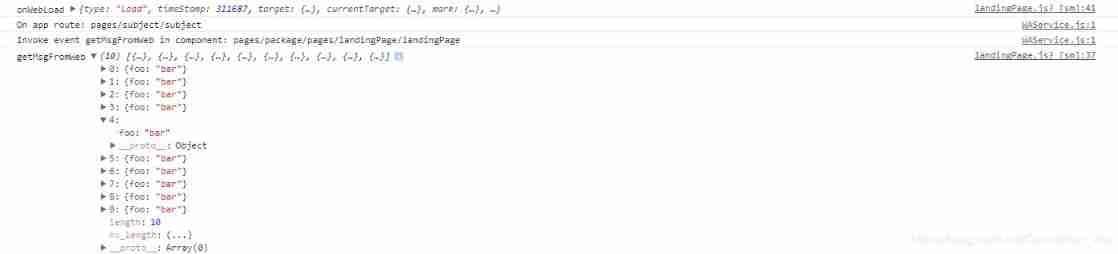
The screenshot above is that I clicked 10 Send Message button again , then getMsgFromWeb The output of is output after I click the button to return to the home page of the applet .
End
This is the basic way to realize the interactive communication between web pages and applets , Because I was cheated when I developed it , Make a record here , I hope it is useful for students who are still climbing the pit ~~
边栏推荐
- Launpad | 基础知识
- [C Advanced] file operation (2)
- 2022-2028 global industry research and trend analysis report on anterior segment and fundus OTC detectors
- At the age of 30, I changed to Hongmeng with a high salary because I did these three things
- Review of last week's hot spots (6.27-7.3)
- Solution to null JSON after serialization in golang
- Research and investment strategy report of China's electronic hydrogen peroxide industry (2022 Edition)
- PHP is used to add, modify and delete movie information, which is divided into foreground management and background management. Foreground users can browse information and post messages, and backgroun
- Mac platform forgets the root password of MySQL
- 2022-2028 global tensile strain sensor industry research and trend analysis report
猜你喜欢

Opencv environment construction (I)
After unplugging the network cable, does the original TCP connection still exist?
H5 audio tag custom style modification and adding playback control events

How to batch change file extensions in win10
Log cannot be recorded after log4net is deployed to the server

2022-2028 global special starch industry research and trend analysis report
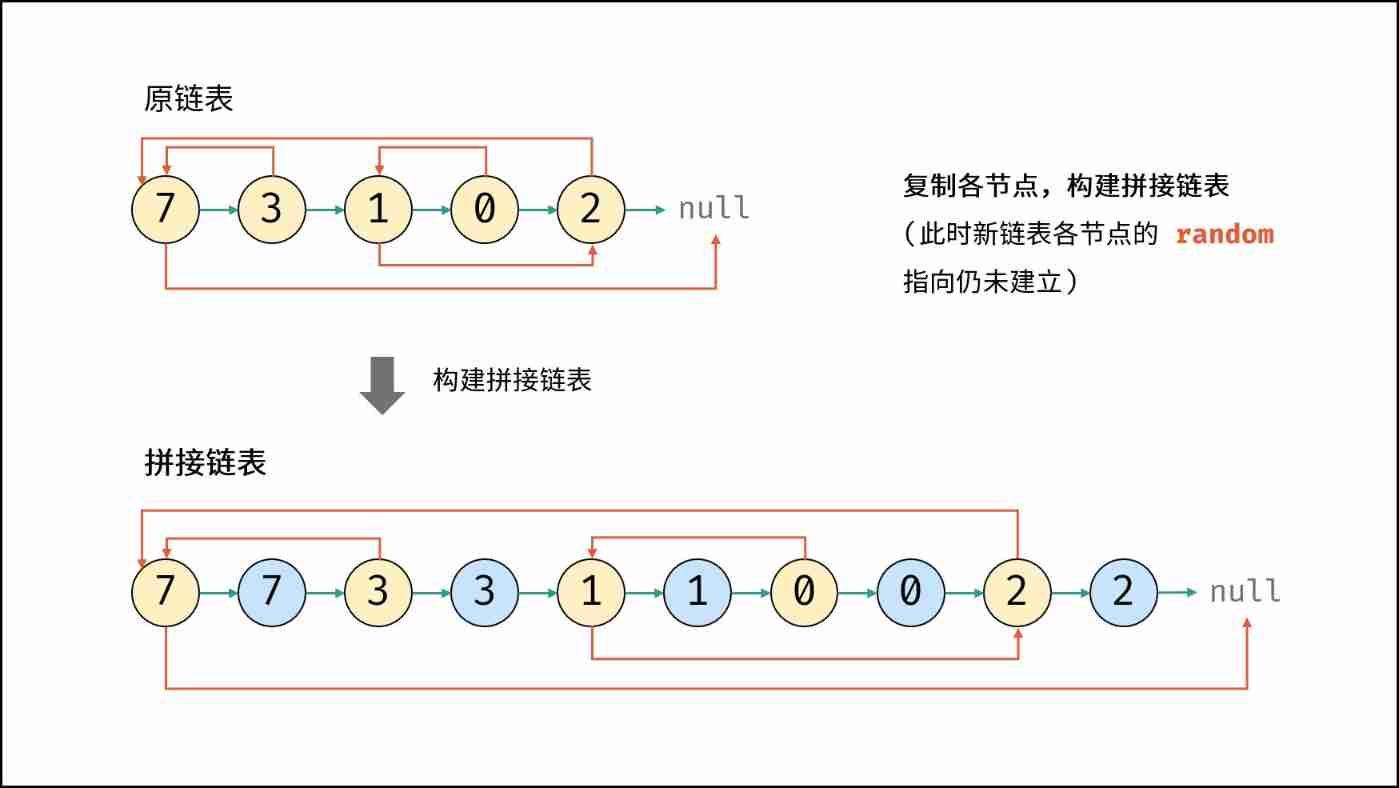
Leetcode (Sword finger offer) - 35 Replication of complex linked list
How should PMP learning ideas be realized?
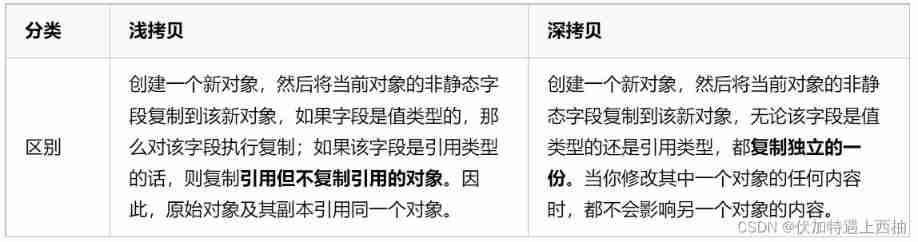
Four common methods of copying object attributes (summarize the highest efficiency)
Some points needing attention in PMP learning
随机推荐
Reload CUDA and cudnn (for tensorflow and pytorch) [personal sorting summary]
Get the source code in the mask with the help of shims
Global and Chinese market of bipolar generators 2022-2028: Research Report on technology, participants, trends, market size and share
Global and Chinese market of wheel hubs 2022-2028: Research Report on technology, participants, trends, market size and share
IIS configure FTP website
《网络是怎么样连接的》读书笔记 - 集线器、路由器和路由器(三)
Write a jison parser from scratch (6/10): parse, not define syntax
什么是权限?什么是角色?什么是用户?
How do microservices aggregate API documents? This wave of show~
Global and Chinese PCB function test scale analysis and development prospect planning report Ⓑ 2022 ~ 2027
Flutter 小技巧之 ListView 和 PageView 的各種花式嵌套
QTreeView+自定义Model实现示例
HMS core helps baby bus show high-quality children's digital content to global developers
Global and Chinese trisodium bicarbonate operation mode and future development forecast report Ⓢ 2022 ~ 2027
About the for range traversal operation in channel in golang
Launpad | 基礎知識
pcl::fromROSMsg报警告Failed to find match for field ‘intensity‘.
什么是uid?什么是Auth?什么是验证器?
Global and Chinese market of sampler 2022-2028: Research Report on technology, participants, trends, market size and share
C language - Introduction - Foundation - syntax - [identifier, keyword, semicolon, space, comment, input and output] (III)