当前位置:网站首页>Encapsulates a console file selector based on inquirer
Encapsulates a console file selector based on inquirer
2022-07-30 19:13:00 【JYeontu】
说在前面
When we initialize the project with scaffolding,There is often some command interaction,用过vue或者reactThose who use scaffolding to create new projects should have interacted with commands,vueIt will give you the choice when you create itvue2还是vue3,You can also choose what configuration you want,也有输入y或者n选择是否用history路由等,These simple interactions are usefulinquireThis package does it all,But recently when I was making a small tool,Want to make file and folder selections,这时我发现inquireThere is no such interactive function in it,So try it yourselfinquireThis library implements two types of interactions, file selection and folder selection.
插件效果
通过该插件,We can use the arrow keys to select files and folders in the console,具体效果如下:
插件实现
Inquirer.js
Inquirer.js试图为NodeJsMake an embeddable beautiful command line interface.如下图:
inquirer原有参数
- type
表示提问的类型,包括:input、confirm、 list、rawlist、expand、checkbox、password、editor.
- name
存储当前输入的值.
- message
问题的描述.
- default
默认值.
- choices
列表选项,在某些type下可用,并且包含一个分隔符(separator);
- validate
对用户的回答进行校验.
- filter
对用户的回答进行过滤处理,返回处理后的值.
- when
根据前面问题的回答,判断当前问题是否需要被回答.
- pageSize
修改某些type类型下的渲染行数.
- prefix
修改message默认前缀.
- suffix
修改message默认后缀.
二次封装
基于inquirerOriginal functions and parameters,Add some extended functions and parameters
新增参数
- notNull
是否不能为空,默认为false,设置为trueAfter this parameter can not enter empty,And there will be a prompt that cannot be empty,You must enter characters before you can press Enter to confirm and proceed to the next step,如下图:
{

    type:"input",
    message:"请输入你的姓名:",
    name:"name",
    notNull:true
}

- type
Two new types have been added to the original types:file、folder,File selector and directory selector, respectively,效果如下图:
{

    type:"file",
    message:"请选择文件:",
    name:"fileName",
    default:"",
},
{

    type:"folder",
    message:"请选择文件夹:",
    name:"folderName",
    default:"",
    pathType:'absolute'
},

- pathType
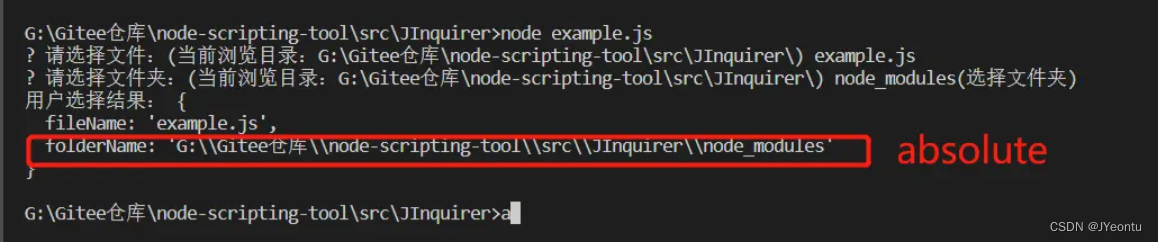
This item is a new configuration,Sets the format for the output of the directory and file selector selected paths,默认为相对路径,可以设置为absolute,The absolute path is output,效果如下图:
{

    type:"file",
    message:"请选择文件:",
    name:"fileName",
    default:"",
},
{

    type:"folder",
    message:"请选择文件夹:",
    name:"folderName",
    default:"",
    pathType:'absolute'
},
代码实现
获取指定路径下的文件列表
使用fs中的readdirSyncmethod to get a list of files in the specified directory,具体代码如下:
getFileList = (dirPath)=>{

    const list = fs.readdirSync(dirPath);
    return ['../(返回上一级)',...list];
}
Get a list of directories under the specified path
使用fs中的readdirSyncmethod to get a list of files in the specified directory,通过isDirectoryThe method can determine whether the file is a directory file,具体代码如下:
getFolderList = (dirPath)=>{

    const list = fs.readdirSync(dirPath);
    let resList = [];
    list.map(item=>{

        const fullPath = path.join(dirPath,item);
        if(fs.statSync(fullPath).isDirectory()){

            resList.push(item + '(进入文件夹)');
            resList.push(item + '(选择文件夹)');
        }
    });
    return ['../(返回上一级)',...resList];
}
Interactive type response control
新增的file和folderTypes use their own repackaging methods,Others are still usedInquirer中的响应方法,具体代码如下:
run(option){

    if(option.type === 'file'){

        return this.chooseFile(option);
    }else if(option.type === 'folder'){

        return this.chooseFolder(option);
    }else{

        if(option.notNull){

            const flag = option.message.slice(-1);
            if([":",":"].includes(flag)){

                option.message = option.message.slice(0,-1) + '(不能为空)' + flag;
            }
        }
        return this.defaultType(option);
    }
}
选择文件
- 选择的为
返回上一级,The current directory will be rolled back one level:
this.clear(2);
return this.chooseFile(option,path.join(dirPath,'/../'));
- Select the directory to enter the selected directory:
return path.join(dirPath, answer[option.name]);
- If a file is selected, it returns the selected file path and ends the operation:
this.clear(2);
return this.chooseFile(option,fullPath);
- 完整代码如下
chooseFile(option,dirPath = './'){

    option.type = 'list';
    option.suffix = "(Currently browsing directory:" + path.join(__dirname,dirPath) + ')';
    option.pageSize = fs.readdirSync('./').length + 1;
    option.choices = [...this.getFileList(dirPath)];
    const answer = await inquirer.prompt([
        option
    ]);
    if(answer[option.name] == '../(返回上一级)'){

        this.clear(2);
        return this.chooseFile(option,path.join(dirPath,'/../'));
    }else{

        const fullPath = path.join(dirPath, answer[option.name]);
        if(!fs.statSync(fullPath).isFile()){

            this.clear(2);
            return this.chooseFile(option,fullPath);
        }else{

            return path.join(dirPath, answer[option.name]);
        }
    }
}
选择目录

- 选择的为
返回上一级,The current directory will be rolled back one level:
this.clear(2);
return this.chooseFile(option,path.join(dirPath,'/../'));
- The choice is to enter the folder,enter this directory,Here, the suffix added for differentiation needs to be removed and returned:
return path.join(dirPath, answer[option.name].slice(0,-7));
- If you choose to select a folder, it will return to the selected folder path and end the operation:
this.clear(2);
return this.chooseFile(option,fullPath);
- 完整代码如下
chooseFile(option,dirPath = './'){

    option.type = 'list';
    option.suffix = "(Currently browsing directory:" + path.join(__dirname,dirPath) + ')';
    option.pageSize = fs.readdirSync('./').length + 1;
    option.choices = [...this.getFileList(dirPath)];
    const answer = await inquirer.prompt([
        option
    ]);
    if(answer[option.name] == '../(返回上一级)'){

        this.clear(2);
        return this.chooseFile(option,path.join(dirPath,'/../'));
    }else{

        const fullPath = path.join(dirPath, answer[option.name]);
        if(!fs.statSync(fullPath).isFile()){

            this.clear(2);
            return this.chooseFile(option,fullPath);
        }else{

            return path.join(dirPath, answer[option.name]);
        }
    }
}
基本类型调用Inquirer处理
这里增加了notNull(是否不能为空)的参数,代码如下:
defaultType(option){

    const answer = await inquirer.prompt([
        option
    ]);
    if(option.notNull && answer[option.name] === ''){

        this.clear(2);
        return this.defaultType(option);
    }
    return answer[option.name];
}
插件使用
1、安装依赖
npm install @jyeontu/j-inquirer
2、在代码中引用
const JInquirer = require('@jyeontu/j-inquirer');
3、示例代码
const JInquirer = require('@jyeontu/j-inquirer');
let options = [
    {

        type:"input",
        message:"请输入你的姓名:",
        name:"name",
        notNull:true
    },{

        type:"input",
        message:"请输入你的年龄:",
        name:"age",
        default:18,
        validate:(val)=>{

            if(val < 0 || val > 150){

                return "请输入0~150之间的数字";
            }
            return true;
        }
    },{

        type:"file",
        message:"请选择文件:",
        name:"fileName",
        default:"",
    },{

        type:"folder",
        message:"请选择文件夹:",
        name:"folderName",
        default:"",
        pathType:'absolute'
    },{

        type:"list",
        message:"请选择你喜欢的水果:",
        name:"fruit",
        default:"Apple",
        choices:[
            "Apple",
            "pear",
            "Banana"
        ],
    },{

        type:"expand",
        message:"请选择一个颜色:",
        name:"color",
        default:"red",
        choices:[
            {

                key : 'R',
                value : "red"
            },
            {

                key : 'B',
                value : "blue"
            },
            {

                key : 'G',
                value : "green"
            }
        ]
    },{

        type:"checkbox",
        message:"Choose one or more colors:",
        name:"color2",
        choices:[
            "red",
            "blue",
            "green",
            "pink",
            "orange"
        ]
    },{

        type:"password",
        message:"请输入你的密码:",
        name:"pwd"
    },{

        type:"editor",
        message:"Write down what you want to write:",
        name:"editor"
    }
];
let j = new JInquirer(options);
let res = j.prompt().then(res=>{

    console.log(res);
});
源码地址
https://gitee.com/zheng_yongtao/node-scripting-tool/tree/master/src/JInquirer
觉得有帮助的同学可以帮忙给我点个star,感激不尽~~~
有什么想法或者改良可以给我提个pr,十分欢迎~~~
有什么问题都可以在评论告诉我~~~
往期精彩
nodeEncapsulates a console progress bar plugin
vueImplement a mouse sliding preview video cover component
说在后面
这里是JYeontu,喜欢算法,GDCPC打过卡;热爱羽毛球,大运会打过酱油.毕业一年,两年前端开发经验,目前担任H5前端开发,算法业余爱好者,有空会刷刷算法题,平时喜欢打打羽毛球 ,也喜欢写些东西,既为自己记录,也希望可以对大家有那么一丢丢的帮助,写的不好望多多谅解,写错的地方望指出,定会认真改进,在此谢谢大家的支持,我们下文再见.
边栏推荐
- Mysql execution principle analysis
- Chapter 4 Controlling the Execution Flow
- 牛客刷题系列之进阶版(搜索旋转排序数组,链表内指定区间反转)
- 什么是 RESTful API?
- Scrapy框架介绍
- How do radio waves transmit information?
- 阿里云武林头条活动分享
- 延时队列优化 (2)
- 【Pointing to Offer】Pointing to Offer 22. The kth node from the bottom in the linked list
- Tensorflow2.0 混淆矩阵与打印准确率不符
猜你喜欢
![[Prometheus] An optimization record of the Prometheus federation [continued]](/img/5d/56e171b7a02584337a0cfe5c731fb2.png)
[Prometheus] An optimization record of the Prometheus federation [continued]

MindSpore:【MindSpore1.1】Mindspore安装后验证出现cudaSetDevice failed错误

【网站放大镜效果】两种方式实现

SwiftUI iOS 精品开源项目之 完整烘焙食品菜谱App基于SQLite(教程含源码)

Recommendation | People who are kind to you, don't repay them by inviting them to eat

Alibaba Cloud Martial Arts Headline Event Sharing

NXP IMX8QXP更换DDR型号操作流程

C# wpf 无边框窗口添加阴影效果

中集世联达飞瞳全球工业人工智能AI领军者,全球顶尖AI核心技术高泛化性高鲁棒性稀疏样本持续学习,工业级高性能成熟AI产品规模应用
VS Code connects to SQL Server
随机推荐
MindSpore:Cifar10Dataset‘s num_workers=8, this value is not within the required range of [1, cpu_thr
Scrapy framework is introduced
Common linked list problems and their Go implementation
LeetCode每日一题(1717. Maximum Score From Removing Substrings)
【MindSpore1.2.0-rc1产品】num_workers问题
VS Code 连接SQL Server
第十七届“振兴杯”全国青年 职业技能大赛——计算机程序设计员(云计算平台与运维)参赛回顾与总结
ResNet18-实现图像分类
requet.getHeader(“token“) 为null
牛客刷题系列之进阶版(组队竞赛,排序子序列,倒置字符串, 删除公共字符,修理牧场)
【hbuilder】运行不了部分项目 , 打开终端 无法输入指令
VBA batch import Excel data into Access database
Read the "Language Model" in one article
MindSpore:数据处理问题
What is a RESTful API?
vxe-table实现复选框鼠标拖动选中
跨域问题的解决方法
第4章 控制执行流程
Critical Reviews | A review of the global distribution of antibiotics and resistance genes in farmland soil by Nannong Zou Jianwen's group
实体中增加操作方法