当前位置:网站首页>4.1 配置Mysql与注册登录模块
4.1 配置Mysql与注册登录模块
2022-07-26 11:17:00 【mfg_】
配置Mysql
查看安装成功与否,进入mysql安装的bin目,执行命令 mysql --version;
当配置完环境变量时,则在电脑的任何位置都可以使用sql命令
最后不要使用git bash连接mysql
net stop mysql80//服务停止net start mysql80// 服务启动mysql -uroot -p// 连接账户
mysql的常用操作
连接用户名为root,密码为123456的数据库服务:mysql -uroot -p123456
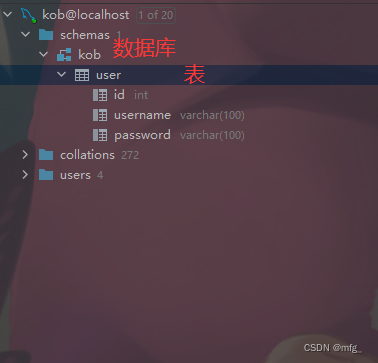
show databases;:列出所有数据库create database kob;:创建数据库drop database kob;:删除数据库

use kob;:使用数据库kob,进入数据库show tables;:列出当前数据库的所有表create table user(id int, username varchar(100),password varchar(100)):创建名称为user的表,表中包含id和username两个属性。drop table user;:删除表

每个表对应java的一个class,每个表都会有多种属性。
insert into user values(1, 'yxc');:在表中插入数据select * from user;:查询表中所有数据delete from user where id = 2;:删除某行数据

select * from user where id =2;
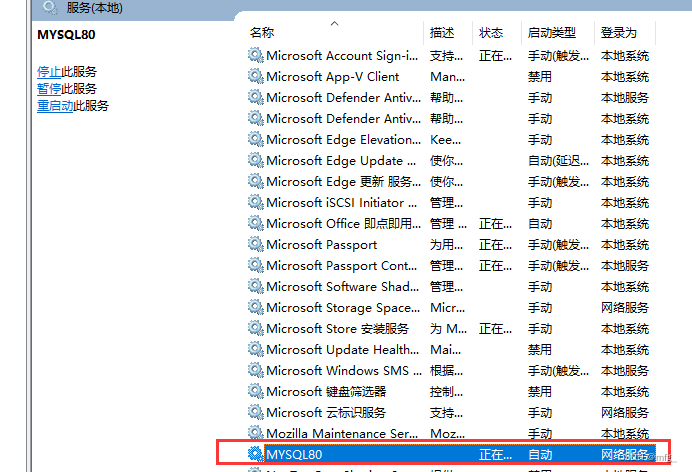
服务列表也可以手动启动
配置SpringBoot
idea是可以 图形界面 操作mysql数据库的。
Mysql连接成功;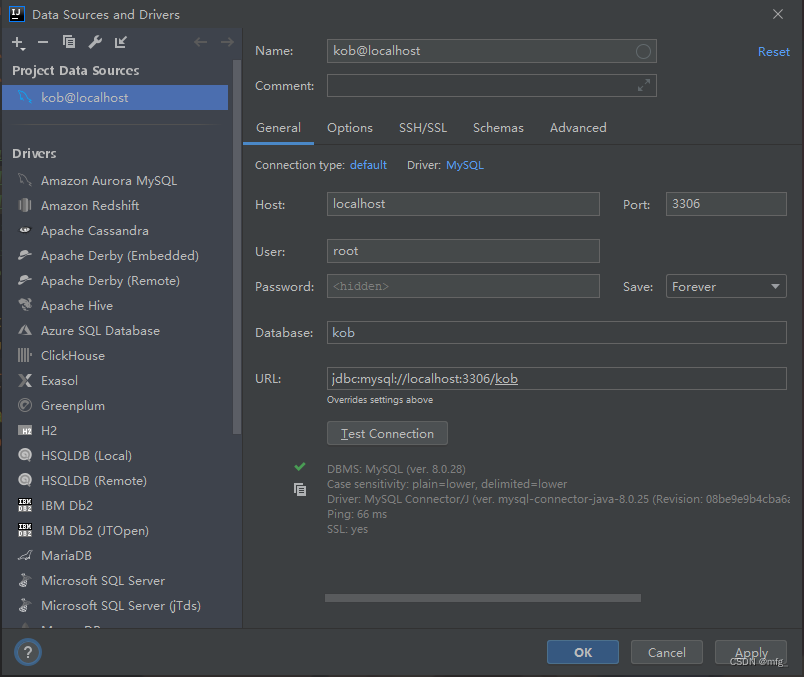
Idea操作数据库需要去添加依赖,放到pom文件
在pom.xml文件中添加依赖:
1. Spring Boot Starter JDBC
2. Project Lombok
3. MySQL Connector/J
4. mybatis-plus-boot-starter
5. mybatis-plus-generator
 <!-- https://mvnrepository.com/artifact/org.springframework.boot/spring-boot-starter-jdbc -->
       <dependency>
           <groupId>org.springframework.boot</groupId>
           <artifactId>spring-boot-starter-jdbc</artifactId>
           <version>2.7.1</version>
       </dependency>
       <!-- https://mvnrepository.com/artifact/org.projectlombok/lombok -->
       <dependency>
           <groupId>org.projectlombok</groupId>
           <artifactId>lombok</artifactId>
           <version>1.18.24</version>
           <scope>provided</scope>
       </dependency>
       <!-- https://mvnrepository.com/artifact/mysql/mysql-connector-java -->
       <dependency>
           <groupId>mysql</groupId>
           <artifactId>mysql-connector-java</artifactId>
           <version>8.0.29</version>
       </dependency>
       <!-- https://mvnrepository.com/artifact/com.baomidou/mybatis-plus-boot-starter -->
       <dependency>
           <groupId>com.baomidou</groupId>
           <artifactId>mybatis-plus-boot-starter</artifactId>
           <version>3.5.2</version>
       </dependency>
       <!-- https://mvnrepository.com/artifact/com.baomidou/mybatis-plus-generator -->
       <dependency>
           <groupId>com.baomidou</groupId>
           <artifactId>mybatis-plus-generator</artifactId>
           <version>3.5.3</version>
       </dependency>

下面这两个先不用装,容易跳步
- spring-boot-starter-security
- jjwt-api
maven仓库官网地址:https://mvnrepository.com/
在application.properties中添加数据库配置:
spring.datasource.username=root
spring.datasource.password=123456
spring.datasource.url=jdbc:mysql://localhost:3306/kob?serverTimezone=Asia/Shanghai&useUnicode=true&characterEncoding=utf-8
spring.datasource.driver-class-name=com.mysql.cj.jdbc.Driver
到这里,springboot正常启动后,可以正常访问主页
用户相关操作
SpringBoot中的常用模块
pojo层:将数据库中的表对应成Java中的Classmapper层(也叫Dao层):将pojo层的class中的操作,映射成sql语句service层:写具体的业务逻辑,组合使用mapper中的操作controller层:负责请求转发,接受页面过来的参数,传给Service处理,接到返回值,再传给页面
sql注入的问题,框架一般都给屏蔽了;
target是编译完成之后的结果
使用lombok生成get,set,constructos方法,自动生成。
@Data
@NoArgsConstructor
@AllArgsConstructor
public class User {

    // 在mabatis-plus中 最好不要使用int ,而去使用对象Integer
    private Integer id;
    private String username;
    private String passwor;


}
mybatis-plus官方文档 ;
https://baomidou.com/
一个数据库表对应一个pojo,也对应一个Mapper
@RestController
public class UserController {

    @Autowired
    private UserMapper userMapper;  // 这个接口是mybatis-plus实现的,爆红不影响运行
    // RequestMapping会将所有类型引入过来 包括GetMapping, RequestMapping
    @GetMapping("/user/all/")
    public List<User> getAll(){

        return userMapper.selectList(null);  //这个函数是返回对象集合列表
    }
浏览器:http://localhost:3000/user/all/
[{"id":1,"username":"mfg","password":"pmfg"},{"id":2,"username":"a","password":"pa"},{"id":3,"username":"b","password":"pb"}]
controller包中写的几个API
@RestController
public class UserController {

    @Autowired
    private UserMapper userMapper;  // 这个接口是mybatis-plus实现的,爆红不影响运行


    // 未来查询这些操作写在service里面,不要写在controller里面
    // RequestMapping会将所有类型引入过来 包括GetMapping, RequestMapping
    @GetMapping("/user/all/")
    public List<User> getAll() {

        return userMapper.selectList(null);  //这个函数是返回对象集合列表
    }

    // 根据url输入的ID来查
    @GetMapping("/user/{userId}")
    public List<User> getuser(@PathVariable int userId) {

        // return userMapper.selectById(userId);

        // 封装的方式查询
        QueryWrapper<User> queryWrapper = new QueryWrapper<>();
        queryWrapper.ge("id", 2).le("id", 3); // 查询id在2~3的范围
        return userMapper.selectList(queryWrapper);
    }

    // 插入数据的时候一般是用Post,不是使用明文传输的,包的长度可扩展;
    // 这里为了方便,使用Get
    @GetMapping("/user/add/{userId}/{username}/{password}")
    public String addUser(@PathVariable int userId,
                          @PathVariable String username,
                          @PathVariable String password) {

        User user = new User(userId, username, password);
        userMapper.insert(user);
        return "Add User Successfully ";

    }

    // 删除操作一般也是用Post, 这里只是为了使用方便
    @GetMapping("/user/delete/{userId}")
    public String deleteUser(@PathVariable int userId) {

        userMapper.deleteById(userId);
        return "delete User Successly";
    }
}
用户认证操作
安全相关的操作~登陆成功之后,有授权才可以操作;授权和验证
以前是用session来判断;如果跨域的话就不容易来判断认证;
现在一般使用JWT的方式来验证,采用的是token的方式存储到localstory里面,下节课讲。
spring-boot-starter-security 引入pom文件
引入之后,再次访问资源,会出现验证机制
http://localhost:3000/logout
spring security 和shrio 差不多用户名: user
密码:自动生成

session验证原理:
用户将用户名和密码发送个后端Springboot,后端会把信息与存储在数据库额信息进行对比。把对比验证一致的信息返回给client; 这个信息可以是随机字符串、标识或sessionID 存储在session。
SessionID不仅会返回给前端,也会在返回之前存储在后端数据库,或者redis;
客户端拿到sessionD之后,会把这个存储到浏览器的cookie中;cookie可以认为是浏览器的一段内容存储空间。浏览器关闭之后一段时间仍然会存在。
以后客户端再向后端访问资源时,会从浏览器的cookie中取出sessionID,然后通过session会话携带这个sessionID向后端访问资源。
后端也会从数据库中取出sessionID的相关信息,判断这个SessionID有没有过期,没有过期就说明可以认证成功。如果过期了,表示这个用户登录过期了,在此重新登录。
用户还可以通过essionID判断对应的用户
类似于临时通行证。
这里我们自己输入密码,然后从数据库里面查找是否有对应的。
实现service.impl.UserDetailsServiceImpl类,继承自UserDetailsService接口,用来接入数据库信息
@Service
public class UserDetailsServiceImpl implements UserDetailsService {

    @Autowired
    private UserMapper userMapper;

    @Override
    public UserDetails loadUserByUsername(String username) throws UsernameNotFoundException {

        QueryWrapper<User> queryWrapper = new QueryWrapper<>();
        queryWrapper.eq("username", username);
        User user = userMapper.selectOne(queryWrapper);
        if (user == null) {

            throw new RuntimeException("用户不存在");
        }

        return new UserDetailsImpl(user);
    }

}
实现config.SecurityConfig类,用来实现用户密码的加密存储
@Configuration
@EnableWebSecurity
public class SecurityConfig {


    @Bean
    public PasswordEncoder passwordEncoder() {

        return new BCryptPasswordEncoder();
    }
}
三次结果都不一样,加密之后;但是可以使用matches()来做匹配
   System.out.println(passwordEncoder.encode("pyxc"));
        System.out.println(passwordEncoder.encode("pyxc"));
        System.out.println(passwordEncoder.encode("pyxc"));
显示true,匹配成功
System.out.println(passwordEncoder.matches("pyxc","$2a$10$OoJclDKEThQY82fuA7Y3vu374Mn0FXSD34HHJAudvcH1e5YuDqNMG"));
数据库表修改为密文 添加密码时,转换为密文直接
// 插入数据的时候一般是用Post,不是使用明文传输的,包的长度可扩展;
    // 这里为了方便,使用Get
    @GetMapping("/user/add/{userId}/{username}/{password}")
    public String addUser(@PathVariable int userId,
                          @PathVariable String username,
                          @PathVariable String password) {

        if(password.length()<6){

            return "密码太短,不足6位";
        }
        BCryptPasswordEncoder passwordEncoder = new BCryptPasswordEncoder();
        String encodePassword = passwordEncoder.encode(password);
        User user = new User(userId, username, encodePassword);
        userMapper.insert(user);
        return "Add User Successfully ";

    }
边栏推荐
- Att request of ble
- [开发工具] IEDA报红
- 哈希表
- easyui03
- Pyqt5 rapid development and practice Chapter 1 understanding pyqt5
- easyui05
- Can you believe it? It took me only two days to develop a management system
- "Mongodb" mongodb high availability deployment architecture - replica set
- The company cannot access station B
- MongoDB-使用$type查询某个字段的类型是否为xxx
猜你喜欢

大咖观点+500强案例,软件团队应该这样提升研发效能!
![[error reported]exception: found duplicate column (s) in the data schema: `value`;](/img/df/ca676633ca6d5e8c0a870be0732707.png)
[error reported]exception: found duplicate column (s) in the data schema: `value`;

easyui05

Caused by: scala.MatchError: None (of class scala.None$)
外包干了四年,废了...

PostgreSQL在Linux和Windows安装和入门基础教程

Cmake常用命令总结

Basic concepts of JVM and memory management model
Summary of common cmake commands
MySQL transaction details
随机推荐
js使用WebUploader做大文件的分块和断点续传
二分模板总结
[reprint] the multivariate normal distribution
Mysql database advanced
easyui05
MLX90640 红外热成像仪测温传感器模块开发笔记(六)
Rigorous proof of Behrman's expectation equation
Pyqt5 rapid development and practice 3.1 QT designer quick start
正点原子stm32中hal库iic模拟`#define SDA_IN() {GPIOB->MODER&=~(3<<(9*2));GPIOB->MODER|=0<<9*2;}` //PB9 输入模式
浅谈VIO之IMU预积分(还是刚入门时的想法)
线程之间的几种通信方式
SQL statement of SQL server creates database
Can SAIC mingjue get out of the haze if its products are unable to sell and decline
[idea] how to create a new project
Build neural network from simple to deep
Reproduce PHP one sentence Trojan horse
PostgreSQL in Linux and windows installation and introductory basic tutorial
ESP8266-Arduino编程实例-开发环境搭建(基于PlatformIO)
36.【const函数放在函数前后的区别】
测试用例千万不能随便,记录由一个测试用例异常引起的思考