当前位置:网站首页>Error EPERM operation not permitted, mkdir 'Dsoftwarenodejsnode_cache_cacach Two solutions
Error EPERM operation not permitted, mkdir 'Dsoftwarenodejsnode_cache_cacach Two solutions
2022-07-30 17:11:00 【Programmer over time】
Table of Contents
Error: operation not permitted, mkdir 'D:software odejs ode_cache_cacach
The first: select administrator to run the command line
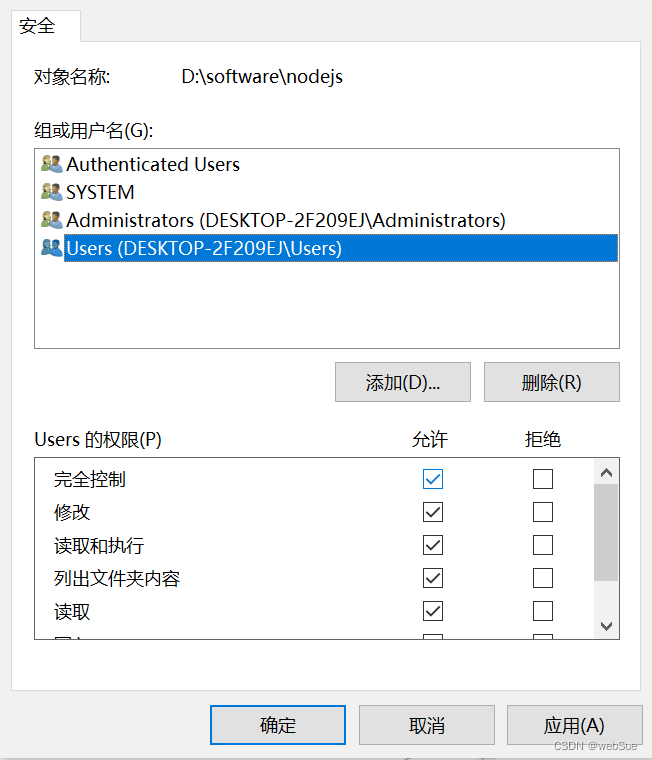
Second: Set users full control permission in the node installation directory
Error: operation not permitted, mkdir ‘D:software odejs ode_cache_cacach
After installing node on window, node-v and npm-v can be displayed normally, but an error is reported when running npminstall
For example, if you are running the following command
npm install -g @vue/cliI get this error when I install the Vue.cli package:
npm ERR! code EPERM
npm ERR! syscall mkdir
npm ERR! path D:software odejs ode_cache_cacache
npm ERR! errno -4048
npm ERR! Error: EPERM: operation not permitted, mkdir 'D:software odejs ode_cache_cacache'
npm ERR! [OperationalError: EPERM: operation not permitted, mkdir 'D:software odejs ode_cache_cacache'] {
npm ERR! cause: [Error: EPERM: operation not permitted, mkdir 'D:software odejs ode_cache_cacache'] {
npm ERR! errno: -4048,
npm ERR! code: 'EPERM',
npm ERR! syscall: 'mkdir',
npm ERR! path:'D:software odejs ode_cache_cacache'
npm ERR! },
npm ERR! isOperational: true,
npm ERR! errno: -4048,
npm ERR! code: 'EPERM',
npm ERR! syscall: 'mkdir',
npm ERR! path: 'D:software odejs ode_cache_cacache'
npm ERR! }
npm ERR!
npm ERR! The operation was rejected by youroperating system.
npm ERR! It's possible that the file was already in use (by a text editor or antivirus),
npm ERR! or that you lack permissions to access it.
npm ERR!
npm ERR! If you believe this might be a permissions issue, please double-check the
npm ERR! permissions of the file and its containing directories, or try running
npm ERR! the command again as root/Administrator.
Solution:
The first: select administrator to run the command line
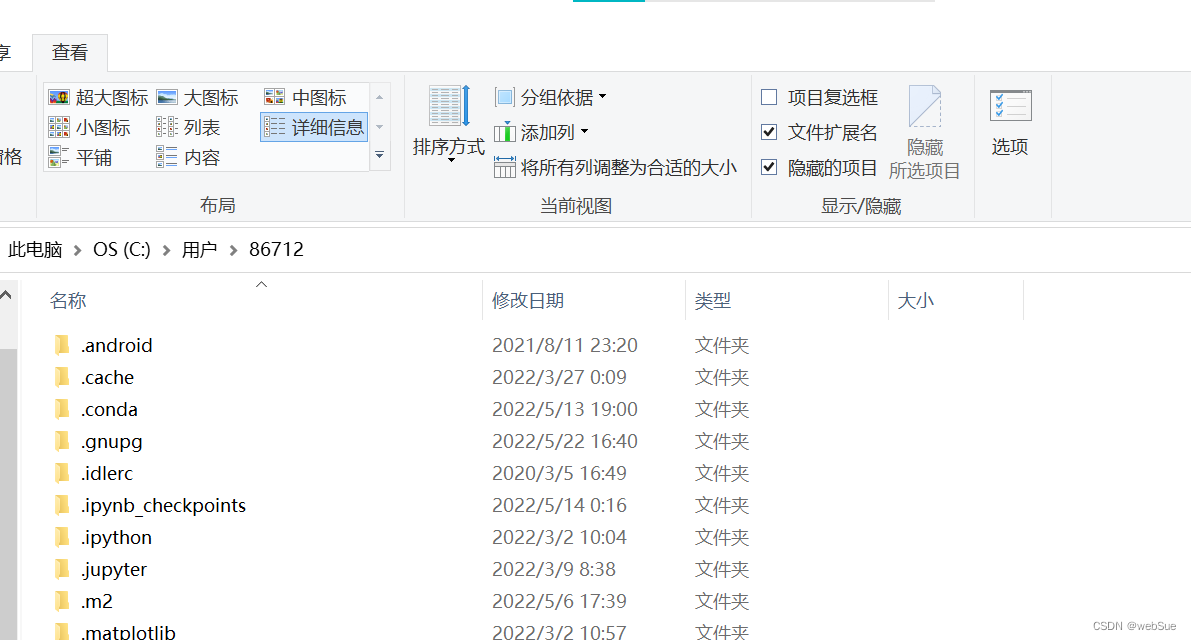
1. Delete the .npmrc file in the C:Users{your user folder}/ directory, which is generally hidden. Remember to find the "hidden item" check mark in the view bar.
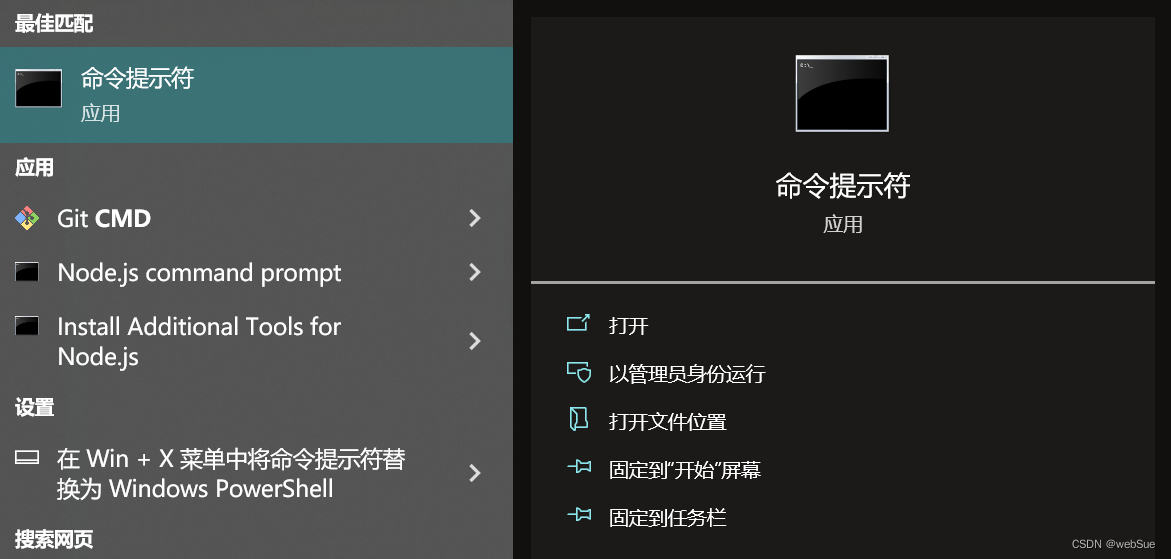
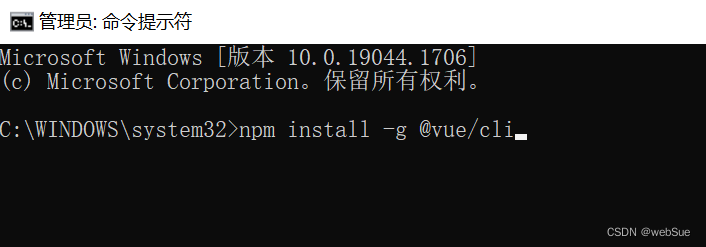
2. Find the command prompt application on the computer, select "Run as administrator" to open cmd, and re-enter the npm install -g @vue/cli command to install successfully
The second type: Set users user full control permission in the node installation directory
1. Find the node.js installation folder on the computer, right-click and select Properties, click Security, select Users, and click Edit
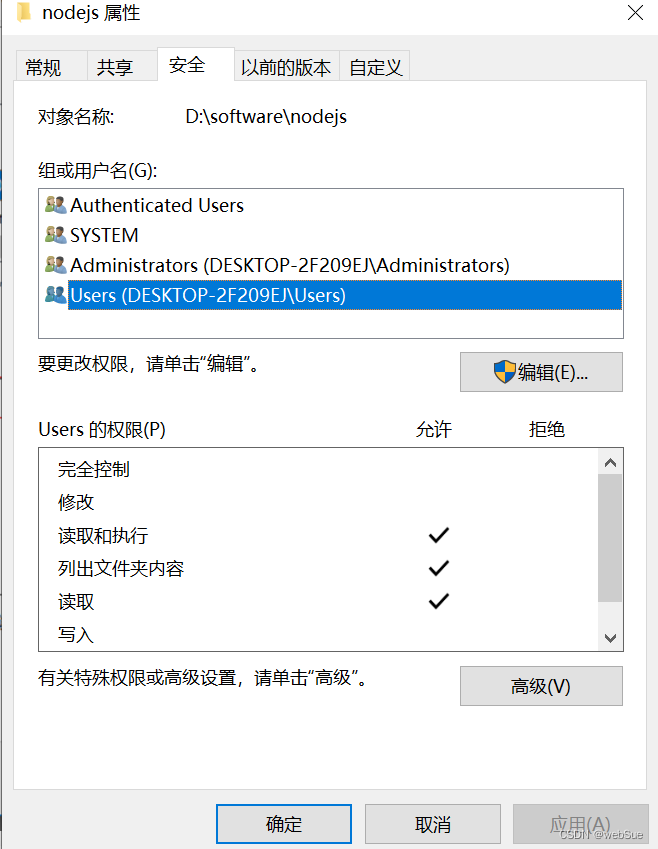
2. Check the "Full Control" permission check box under the User permission, click OK to exit.
Let me introduce myself first. The editor graduated from Shanghai Jiaotong University in 2013. I worked in a small company and went to big factories such as Huawei and OPPO. I joined Ali in 2018, until now.I know that most junior and intermediate java engineers want to upgrade their skills, they often need to explore their own growth or sign up to study, but for training institutions, the tuition fee is nearly 10,000 yuan, which is really stressful.Self-learning that is not systematic is very inefficient and lengthy, and it is easy to hit the ceiling and the technology stops.Therefore, I collected a "full set of learning materials for java development" for everyone. The original intention is also very simple. I hope to help friends who want to learn by themselves but don't know where to start, and at the same time reduce everyone's burden.Add the business card below to get a full set of learning materials
边栏推荐
猜你喜欢




随机推荐
leetcode:1488. 避免洪水泛滥【二分 + 贪心】
JVM学习----垃圾回收
获得抖音商品详情 API
将 APACHE 日志解析到 SQL 数据库中
[极客大挑战 2020]Roamphp1-Welcome
KDD 2020 | 深入浅出优势特征蒸馏在淘宝推荐中的应用
lotus 爆块失败
Dive deep on Netflix‘s recommender system(Netflix推荐系统是如何实现的?)
DTSE Tech Talk丨Phase 2: 1 hour in-depth interpretation of SaaS application system design
[MRCTF2020]Ezaudit
The first time I used debug query and found that this was empty, does it mean that the database has not been obtained yet?please help.
Tensorflow模型量化(Quantization)原理及其实现方法
数据预处理:离散特征编码方法
从零开始的Multi-armed Bandit
测试管理与规范
对话框 QDialog ( 详解 )
云厂商做生态需要“真连接、真赋能”,用“技术+真金实银”发展伙伴
Google Cloud Spanner的实践经验
华为无线设备Mesh配置命令
torch.optim.Adam() 函数用法