当前位置:网站首页>Tkinter GUI address book management system
Tkinter GUI address book management system
2022-07-25 18:07:00 【Heart see heart】
tkinter GUI Version address book management system
The experimental requirements
To design a GUI Address book of version , Connect data.db database ( The database is QQ Group file ), Read out the address book records in the database , Place a table on the window to display the address book information , Use Treeview Component implementation , Then display the name, etc. in the form 6 A field , And add ( You can't add someone's information repeatedly ) And delete records . Improving the function requires error handling and information prompt when adding records . The interface is as follows :
Tips : The following is the main body of this article , The following cases can be used for reference
Complete code
import sqlite3
import tkinter
import tkinter.ttk
import tkinter.messagebox

def doSql(sql):
    ''' Used to perform SQL sentence , In especial INSERT and DELETE sentence '''
    with sqlite3.connect('data.db') as conn:
        cur = conn.cursor()
        cur.execute(sql)
        conn.commit()

#  establish tkinter Application window
root = tkinter.Tk()
#  Set window size and position
root.geometry('500x500+400+300')
#  It is not allowed to change the window size
root.resizable(False, False)
#  Set the window title
root.title(' Address book management system ')

#  Place a label component and a text box component for entering names on the window
lbName = tkinter.Label(root, text=' full name :')
lbName.place(x=10, y=10, width=40, height=20)
entryName = tkinter.Entry(root)
entryName.place(x=60, y=10, width=150, height=20)

#  Place the label component and combo box component for selecting gender on the window
lbSex = tkinter.Label(root, text=' Gender :')
lbSex.place(x=220, y=10, width=40, height=20)
comboSex = tkinter.ttk.Combobox(root,
                                values=(' male ', ' Woman '))
comboSex.place(x=270, y=10, width=150, height=20)

#  Place a label component and a text box component for entering age on the window
lbAge = tkinter.Label(root, text=' Age :')
lbAge.place(x=10, y=50, width=40, height=20)
entryAge = tkinter.Entry(root)
entryAge.place(x=60, y=50, width=150, height=20)

#  Place a label component and a text box component for entering departments on the window
lbDepartment = tkinter.Label(root, text=' department :')
lbDepartment.place(x=220, y=50, width=40, height=20)
entryDepartment = tkinter.Entry(root)
entryDepartment.place(x=270, y=50, width=150, height=20)


#  Place a label component and a text box component for entering a phone number on the window
lbTelephone = tkinter.Label(root, text=' Telephone :')
lbTelephone.place(x=10, y=90, width=40, height=20)
entryTelephone = tkinter.Entry(root)
entryTelephone.place(x=60, y=90, width=150, height=20)

#  Place the label component on the window and use it for input QQ Text box component of number
lbQQ = tkinter.Label(root, text='QQ:')
lbQQ.place(x=220, y=90, width=40, height=20)
entryQQ = tkinter.Entry(root)
entryQQ.place(x=270, y=90, width=150, height=20)

#  Place a table on the window to display the address book information , Use Treeview Component implementation
frame = tkinter.Frame(root)
frame.place(x=0, y=180, width=480, height=280)
#  Scroll bar
scrollBar = tkinter.Scrollbar(frame)
scrollBar.pack(side=tkinter.RIGHT, fill=tkinter.Y)
#Treeview Components
treeAddressList = tkinter.ttk.Treeview(frame,
                                       columns=('c1', 'c2', 'c3','c4', 'c5', 'c6'),
                                       show="headings",
                                       yscrollcommand = scrollBar.set)
treeAddressList.column('c1', width=70, anchor='center')
treeAddressList.column('c2', width=50, anchor='center')
treeAddressList.column('c3', width=50, anchor='center')
treeAddressList.column('c4', width=110, anchor='center')
treeAddressList.column('c5', width=100, anchor='center')
treeAddressList.column('c6', width=100, anchor='center')
treeAddressList.heading('c1', text=' full name ')
treeAddressList.heading('c2', text=' Gender ')
treeAddressList.heading('c3', text=' Age ')
treeAddressList.heading('c4', text=' department ')
treeAddressList.heading('c5', text=' Telephone ')
treeAddressList.heading('c6', text='QQ')
treeAddressList.pack(side=tkinter.LEFT, fill=tkinter.Y)
# Treeview Component combined with vertical scroll bar
scrollBar.config(command=treeAddressList.yview)

#  Definition Treeview Left click event of component , And bind to Treeview Components
#  Click the left mouse button , Set a variable nameToDelete Value , And then you can use “ Delete ” Button to delete
nameToDelete = tkinter.StringVar('')
def treeviewClick(event):
    if not treeAddressList.selection():
        return
    item = treeAddressList.selection()[0]
    nameToDelete.set(treeAddressList.item(item, 'values')[0])
treeAddressList.bind('<Button-1>', treeviewClick)

def bindData():
    ''' Read out the address book records in the database , Then display in the table '''
    #  Delete all the original rows in the table
    for row in treeAddressList.get_children():
        treeAddressList.delete(row)

    #  Read all data in the database
    with sqlite3.connect('data.db') as conn:
        cur = conn.cursor()
        cur.execute('select * from addressList order by id')
        temp = cur.fetchall()

    #  Insert the data into the table
    for i, item in enumerate(temp):
        treeAddressList.insert('', i, values=item[1:])

#  Call function , Display the records in the database in the table
bindData()

#  Place a button on the window to add the address book , And set the button click event function
def buttonAddClick():
    #  Check name
    name = entryName.get().strip()
    if name == '':
        tkinter.messagebox.showerror(title=' I'm sorry ', message=' Name cannot be empty !')
        return

    #  The name cannot be repeated
    with sqlite3.connect('data.db') as conn:
        cur = conn.cursor()
        cur.execute('select COUNT(id) FROM addressList WHERE name="{}"'.format(name))
        c = cur.fetchone()[0]

    if c!=0:
        tkinter.messagebox.showerror(title=' I'm sorry ', message=' The name cannot be repeated !')
        return

    #  Get the selected gender
    sex = comboSex.get()
    if sex not in (' male ', ' Woman '):
        tkinter.messagebox.showerror(title=' I'm sorry ', message=' Gender cannot be empty !')
        return

    #  Age of examination
    age = entryAge.get().strip()
    if age == '':
        tkinter.messagebox.showerror(title=' I'm sorry ', message=' Age cannot be empty !')
        return

    #  Inspection department
    department = entryDepartment.get().strip()
    if department == '':
        tkinter.messagebox.showerror(title=' I'm sorry ', message=' Department cannot be empty !')
        return

    #  Check the phone number
    telephone = entryTelephone.get().strip()
    if telephone=='' or (not telephone.isdigit()):
        tkinter.messagebox.showerror(title=' I'm sorry ', message=' The phone number is empty or wrong !')
        return

    #  Check QQ number
    qq = entryQQ.get().strip()
    if qq=='' or (not qq.isdigit()):
        tkinter.messagebox.showerror(title=' I'm sorry ', message='QQ The number is empty or wrong !')
        return

    #  All inputs passed the check , Insert database
    sql = 'INSERT INTO addressList(name,sex,age,department,telephone,qq) VALUES("'\
              + name + '","' + sex + '",' + str(age) + ',"' + department + '","'\
              + telephone + '","' + qq + '")'
    doSql(sql)

    #  After adding records , Update the data in the table
    bindData()
buttonAdd = tkinter.Button(root, text=' add to ', command=buttonAddClick)
buttonAdd.place(x=100, y=140, width=80, height=20)

#  Place a button on the window to delete the address book , And set the button click event function
def buttonDeleteClick():
    name = nameToDelete.get()
    if name == '':
        tkinter.messagebox.showerror(title=' I'm sorry ', message=' No record selected !')
        return

    #  If you have selected an address book , perform SQL Statement to delete
    sql = 'DELETE FROM addressList WHERE name="{}"'.format(name)
    doSql(sql)
    tkinter.messagebox.showinfo(' Congratulations ', ' Delete successful ')

    #  Reset the variable to an empty string
    nameToDelete.set('')

    #  Update the data in the table
    bindData()
buttonDelete = tkinter.Button(root, text=' Delete ', command=buttonDeleteClick)
buttonDelete.place(x=240, y=140, width=80, height=20)

root.mainloop()
Running results
Set parameters : full name : Wang Wu , Gender : male , Age :20, department : Finance Department , Telephone :666,QQ:888
experimental result : 
Set parameters : full name : Zhang San , Gender : male , Age :35, department : The personnel department , Telephone :1234567,QQ:101010
experimental result : 
Select a record , Delete them
experimental result : 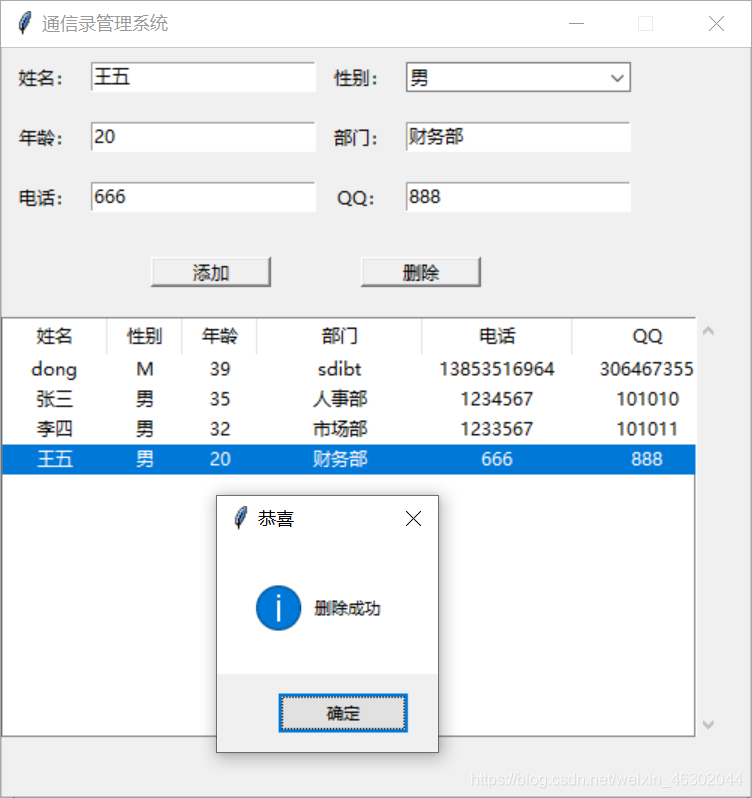
边栏推荐
- "Digital security" alert NFT's seven Scams
- 关于云XR介绍,以及5G时代云化XR的发展机遇
- PageHelper还能结合Lambda表达式实现简洁的分页封装
- IDEA集成SVN代码管理常用功能
- “Deprecated Gradle features were used in this build, making it incompatible with Gradle 6.0”问题解决
- Recognized by international authorities! Oceanbase was selected into the Forrester translational data platform report
- New and malloc
- UFT(QTP)-总结点与自动化测试框架
- Update 3dcat real time cloud rendering V2.1.2 release
- Kendryte K210 在freertos上的lcd屏幕的使用
猜你喜欢

SLA 、SLO & SLI
Redistemplate solves the problem of oversold inventory in the seckill system with high speed - redis transaction + optimistic lock mechanism

How to choose digital twin visualization platform

喜讯!瑞云科技被授予“海上扬帆”5G融合应用专委会成员单位
TME2022校园招聘后台开发/运营开发/业务运维/应用开发笔试(I)编程题的一点自我分析

CVE-2022-33891 Apache spark shell 命令注入漏洞复现

LeetCode 101. 对称二叉树 && 100. 相同的树 && 572. 另一棵树的子树
Cloud XR面临的问题以及Cloud XR主要应用场景

Introduction to cloud XR and development opportunities of cloud XR in 5g Era

How to judge the performance of static code quality analysis tools? These five factors must be considered
随机推荐
Ch582 ble 5.0 uses Le coded broadcast and connection
Connect to MySQL using sqldeveloper
Imx6 rtl8189ftv migration
Which real-time gold trading platform is reliable and safe?
testng执行顺序的3中控制方法
C语言 整数与字符串的相互转换
PageHelper can also be combined with lambda expressions to achieve concise paging encapsulation
Mock service Moco series (II) - JSON format, file file, header, cookie, solving Chinese garbled code
2022/7/23
软件测试基础知识(思维导图)
Basic knowledge of software testing (mind mapping)
C语言 libcurl交叉编译
Take you to a preliminary understanding of multiparty secure computing (MPC)
How many points did NPDP pass? How to pass with high scores?
Three control methods of TestNG execution sequence
Could not stop Cortex-M device! Please check the JTAG cable solution
Why the future of digitalization depends on 3D real-time rendering
NPDP多少分通过?如何高分通过?
Basic operation of bidirectional linked list
Landmark buildings around the world